






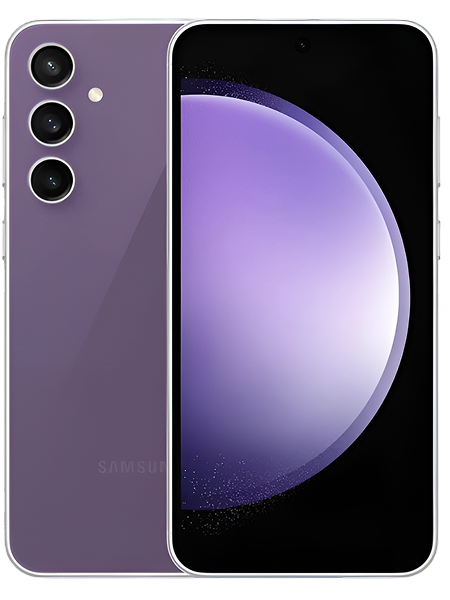
Samsung Galaxy S23 FE Repair Services
Get fast, reliable, and professional Samsung Galaxy S23 FE repair services at The Fix — your trusted destination for expert device care.
Common Repairs We Handle Daily


Get Your Samsung Galaxy S23 FE Working Again: Complete Samsung Galaxy S23 FE Repair Guide
Picture this: you're in the middle of taking a photo when your S23 FE freezes. Or you pull it out to check messages and realize you're already at 30% battery by lunchtime. Maybe the charging port just stopped working reliably, and you're doing that annoying cable-wiggle dance every time you need to charge. Sound familiar?
Your Galaxy S23 FE is Samsung's "Fan Edition" device—basically flagship performance at a more accessible price point. When something goes wrong with it, the good news is that professional Samsung Galaxy S23 FE repair can usually fix whatever's happening faster and cheaper than you'd expect. Whether you're dealing with battery drain, charging issues, performance slowdowns, or screen problems, there are clear solutions that get your phone back to working like it should. This guide will walk you through the most common S23 FE problems and exactly how Samsung Galaxy S23 FE repair addresses each one.
Why People Love (and Hate) the S23 FE
Samsung released the Galaxy S23 FE in late 2023, positioning it as the "flagship experience for everyone." That 6.4-inch Dynamic AMOLED display with 120Hz refresh is genuinely impressive, the Exynos 2200 (in most markets) handles most tasks well, and the camera system punches above its price point. The design feels premium, the build quality is solid, and you're getting Samsung's flagship software experience without paying Ultra prices.
But here's what frustrates people—the Exynos 2200 has thermal issues that can cause stuttering and throttling during intensive tasks. Battery life is inconsistent depending on your usage pattern. The phone doesn't feel quite as refined as the mainline S23, with occasional software quirks that Samsung's still ironing out. These aren't dealbreakers, they're just the tradeoffs of a device that delivers 85% of flagship performance at 65% of flagship price. And honestly? Most of these issues are addressable through software optimization or targeted repairs.
What Happens to Devices Over Time
Think about a garden hose you've used for several summers. When it's new, water flows perfectly. After a few years of sun exposure, being coiled and uncoiled, temperature swings, and general use, it develops slight leaks, the connections get loose, and water pressure drops. Your S23 FE experiences similar gradual wear, just in electronic form.
Your battery has been through hundreds of charge cycles since you got the device. Each cycle—going from empty to full—causes tiny chemical changes inside those lithium-ion cells. The battery physically can't store as much energy as it used to. It's not a defect, it's just how battery chemistry works. After a year of daily charging, you're typically down to 90-95% of original capacity. After 18 months, maybe 85-90%.
The charging port experiences wear every single time you plug in a cable. Those internal pins make and break contact hundreds of times, creating microscopic wear. More importantly, every insertion pushes lint and debris deeper into the port. After months of this, there's often a compressed layer of pocket lint preventing proper electrical contact.
Your display's OLED pixels are organic compounds that emit light through electrical current. Like anything organic, they degrade slowly over time. You won't notice day-to-day, but after thousands of hours of use, maximum brightness drops slightly and colors shift imperceptibly. If you've had static elements like navigation buttons on screen constantly, you might see faint burn-in.
The Exynos 2200 processor works hard every time you open an app, take a photo, or play a game. Over time, thermal paste inside the phone degrades, becoming less effective at transferring heat away from the processor. This leads to higher operating temperatures, which cause throttling that feels like performance degradation.
Software complexity accumulates too. Your S23 FE has received multiple updates since you got it, you've installed dozens of apps, and system files have accumulated cached data. Background processes multiply as you add apps. It's like your phone's trying to remember everything it's ever done all at once, which gradually slows performance.
None of this means your S23 FE is dying—it means it's a working electronic device showing normal wear. Professional maintenance addresses these issues and keeps your phone running optimally.
1. Battery Drain Frustration
What you're experiencing: Your S23 FE barely makes it to evening anymore. You start the day at 100% and you're scrambling for a charger by mid-afternoon. Certain apps seem to kill your battery in minutes. Standby drain is excessive—you lose 15-20% overnight doing nothing.
Why this happens: The S23 FE's 4,500mAh battery seems substantial, but that 120Hz AMOLED display, Exynos processor, and 5G connectivity consume significant power. If you're in an area with weak cellular signal, your phone constantly searches for better connection, draining battery fast. Background app refresh, location services, and always-on display all chip away at battery life.
The Exynos 2200's thermal characteristics mean the processor sometimes works harder than necessary, generating heat and consuming extra battery. Poor optimization between Samsung's software and third-party apps can cause unexpected battery drain. And if your battery's degraded to 85% capacity or less, that compounds everything else.
What you can try:
- Check battery usage in Device Care settings—identify the biggest drainers and restrict them.
- Disable 5G temporarily if signal is weak (Settings > Connections > Mobile networks).
- Reduce screen refresh rate to 60Hz to see if battery life improves.
- Turn off always-on display and reduce screen timeout.
- Clear cache partition from recovery mode—corrupted files can cause drain.
Warning Signs Checklist:
- [ ] Battery drains 10%+ per hour during light use
- [ ] Phone gets hot while draining quickly
- [ ] Battery percentage jumps around erratically
- [ ] Phone shuts down at 20-30% remaining
- [ ] Battery health shows below 80% capacity
If you checked 3+ boxes, battery replacement probably makes sense. At The Fix, we see this pattern constantly—battery replacement on the S23 FE restores that all-day battery life and eliminates the anxiety of constantly watching your battery percentage.
2. Overheating During Use
What's happening: Your S23 FE gets uncomfortably hot during normal use—not just gaming, but browsing, camera use, or even sitting idle. The phone slows down dramatically when hot. Apps close unexpectedly with thermal warnings. The area around the camera gets especially warm.
Why this happens: The Exynos 2200 in most S23 FE units has known thermal challenges. Under sustained load, it heats up quickly, and Samsung's thermal management aggressively throttles performance to prevent damage. This creates the stuttering and slowdowns you're experiencing. If you're charging while using your phone, you're generating heat from both processes simultaneously.
Poor ventilation from thick cases traps heat. Degraded thermal paste inside the phone reduces heat transfer efficiency. Background processes keeping the processor constantly busy generate continuous heat even when you think the phone's idle. Direct sunlight or hot environments compound the problem.
What you can try:
- Update to latest software—Samsung releases thermal optimizations in patches.
- Remove your case temporarily to allow better heat dissipation.
- Close all apps and restart—sometimes background processes go rogue.
- Avoid using phone while charging, especially fast charging.
- Check which apps are constantly running and restrict background activity.
3. Charging Port Acting Up
What you're dealing with: Your charging cable doesn't fit snugly anymore. It wiggles around, falls out easily, or only charges at specific angles. Sometimes the phone doesn't detect it's plugged in. You might see "moisture detected" warnings even though the phone's dry.
Why this happens: After months of daily charging, your USB-C port accumulates compressed lint and debris that prevents proper contact. The port's retention clips weaken from repeated insertions. Cheap cables or aggressive plugging/unplugging accelerates wear on the internal pins.
What you can try:
- Inspect port with flashlight—look for packed debris.
- Carefully clean with wooden toothpick—gently scrape bottom and sides.
- Use compressed air from distance to blow out material.
- Try multiple cables and chargers to rule out accessory problems.
- Test wireless charging to confirm battery can charge (isolates port issue).
From working on these every day: Charging port issues are incredibly common on mid-range phones that people charge frequently. The good news? Port replacement is straightforward. We swap the entire USB-C flex cable assembly, and your S23 FE charges like new. The difference is immediate—that satisfying click when you plug in, the cable staying firmly in place. Most people don't realize how degraded their port was until they experience a fresh one.
4. Camera Problems
What you're noticing: Your camera takes forever to focus or hunts back and forth without getting sharp. Photos come out blurry despite steady hands. Low-light performance is worse than you remember. The camera app occasionally crashes or freezes when you try to take photos.
Why this happens: The S23 FE's camera system relies on autofocus motors, sensor calibration, and software processing working in harmony. Dirty camera lenses confuse the autofocus system. Corrupted camera app cache causes glitches. Physical camera shake or movement interferes with stabilization. After months of updates, camera processing sometimes isn't optimized for the S23 FE's specific hardware.
What you can try:
- Clean camera lenses thoroughly with microfiber cloth—even slight smudges affect focus.
- Clear camera app cache: Settings > Apps > Camera > Storage > Clear Cache.
- Update system software—camera improvements come in patches.
- Test in safe mode to rule out third-party app interference.
- Factory reset if nothing else works (backup first).
5. Performance Lag and Stuttering
What's going on: Apps take longer to open than they should. There's noticeable lag when switching apps or typing. Occasional freezes where the phone doesn't respond for seconds. Gaming performance is inconsistent with frame rate drops. The phone generally feels sluggish.
Why this happens: The Exynos 2200's performance is inconsistent—it thermal throttles aggressively, causing stuttering. System files accumulate over months of updates. Cached data from dozens of apps bloats storage. Background processes multiply. Animations can stutter if the phone's trying to maintain 120Hz refresh while the processor throttles.
What you can try:
- Clear system cache from recovery mode.
- Uninstall apps you don't use—each one consumes resources.
- Disable or uninstall bloatware and carrier apps.
- Reduce screen refresh to 60Hz—less demanding on processor.
- Factory reset as last resort (backup everything first).
6. Screen Issues
What you're seeing: Slight green tint on gray backgrounds. Auto-brightness acting erratically. Touch response feeling laggy in certain areas. Occasional flickering at low brightness. Colors looking off compared to other phones.
Why this happens: OLED displays require precise calibration, and there's variation between units. Samsung's display profiles (Vivid vs Natural) don't look right to everyone. The ambient light sensor gets confused by cases or screen protectors. PWM dimming at low brightness causes perceptible flicker for some people.
What you can try:
- Adjust color manually in Settings > Display > Screen mode.
- Toggle between Vivid and Natural modes.
- Disable adaptive brightness temporarily.
- Remove screen protector to test if touch improves.
- Update software—display calibrations come in patches.
Here's Exactly How We Fix Your S23 FE (No Surprises)
Repair shops can feel like black boxes where your phone disappears and hopefully comes back fixed. Let's walk through our actual process at The Fix so you know exactly what happens.
Detailed Initial Assessment
Hand us your S23 FE, and we start with comprehensive diagnostics. We test battery health with specialized equipment that measures actual capacity, not just what your phone reports. We inspect the charging port under magnification looking for damage or debris. We run thermal stress tests while monitoring temperatures. We check display quality with calibrated test patterns. We test camera autofocus speed and accuracy.
For the S23 FE specifically, we pay attention to Exynos thermal behavior and common software quirks this model experiences. We test 120Hz refresh performance and verify the phone isn't thermal throttling during normal tasks. This diagnostic takes 20-30 minutes and gives us complete understanding of your device's condition.
Honest Problem Explanation
After diagnostics, we explain what we found in plain language. If it's something you can fix yourself through settings or software updates, we tell you how—no charge. If it needs professional repair, we explain what's wrong, why it happened, and what fixing it involves. We don't create problems that don't exist, and we don't upsell services you don't need.
We discuss options. Sometimes there's a quick fix and a comprehensive fix. We explain pros and cons of each approach. If repair doesn't make economic sense, we'll tell you that too. Our goal is informed decisions, not pushing services.
The Actual Repair Process
If you proceed, we use quality parts and proper techniques for the S23 FE. Battery replacements get high-quality cells with proper adhesive placement. Charging ports get replaced as complete flex cable assemblies including microphone and antenna connections. We don't cut corners or use shortcuts.
Most S23 FE repairs are same-day. Battery replacement typically takes 2-3 hours. Port repairs are similar timeframe. Screen work might take longer if we need to order parts, but we give realistic timelines upfront. We keep you informed throughout and respect your data privacy.
Comprehensive Pre-Delivery Testing
Before returning your S23 FE, we test everything thoroughly. We verify the original issue is resolved. We run general diagnostics ensuring repair didn't affect other functions. We test charging behavior, battery performance, thermal characteristics, display quality, camera function, and connectivity.
For the S23 FE, we specifically verify thermal performance is acceptable and 120Hz refresh is working properly. We don't hand back your phone until we're confident it works exactly as it should.
Your S23 FE Can Run Like New Again
Professional repair brings your device back to life at a fraction of replacement cost. Whether you're dealing with battery drain, overheating, charging problems, camera issues, or performance lag, Samsung Galaxy S23 FE repair addresses these problems effectively.
Small problems today prevent big problems tomorrow. Bring your S23 FE to The Fix for a free diagnostic. We'll run comprehensive tests, identify exactly what's happening, and give you honest recommendations. No pressure, no upselling—just straightforward guidance from technicians who work on these devices every day. Your S23 FE deserves expert care from people who understand Samsung's Fan Edition lineup inside and out, and that's exactly what The Fix delivers.


Trusted repair solution for mobile phones, tablets, gaming consoles, and computer systems. We provide fast, reliable, and affordable repair services to get your devices back in perfect working condition.
The Fix is an independent repair service provider and is not affiliated with, sponsored by, or endorsed by Apple Inc., Samsung Electronics, Google LLC, or any other device manufacturer. We use high-quality compatible replacement parts unless explicitly stated. All trademarks are property of their respective owners.


© Copyright The Fix Solutions All rights reserved 2026.
Design by Deepcoder