






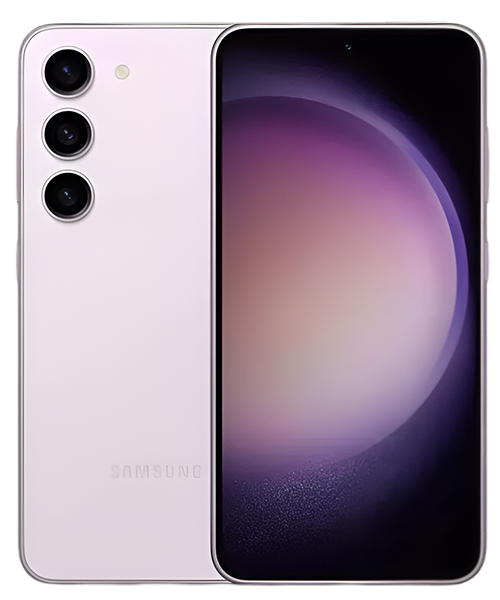
Samsung Galaxy S23 5G Repair Services
Get fast, reliable, and professional Samsung Galaxy S23 5G repair services at The Fix — your trusted destination for expert device care.
Common Repairs We Handle Daily


Solve Your Samsung Galaxy S24+ Problems: Samsung Galaxy S24+ Repair Solutions
You know what's interesting? From our repair bench, we're seeing a clear pattern with new flagship devices like the Galaxy S24+. They're not coming in because Samsung built a bad phone, but because this flagship gets used hard. When you’re paying premium prices for cutting-edge tech, you’re using every feature: that gorgeous 6.7-inch display is constantly on, the camera system’s working overtime, and those AI features? They’re running in the background more than you’d think. Here’s what happens: heavy use accelerates wear on components that’d normally last years with lighter usage.
The S24+ hit the market as Samsung’s sweet-spot flagship—big enough for serious productivity, powerful enough for everything you throw at it, but not quite as expensive as the Ultra. That balance makes it popular, which means we’re seeing tons of these devices coming through our shop. And you know what? Most Samsung Galaxy S24+ repair needs are totally predictable and fixable. Whether you’re dealing with battery drain that’s driving you nuts or a screen that met concrete a little too hard, professional Samsung Galaxy S24+ repair can get your device back to feeling brand new.
In this guide, we’ll walk you through exactly what’s going wrong, why it’s happening, and what you can actually do about it. No fluff, no fake testimonials—just straight talk from technicians who work on these phones every single day.
What Makes the Galaxy S24+ Different
The S24+ launched in early 2024, and Samsung packed it with some genuinely impressive tech. That 6.7-inch Dynamic AMOLED 2X display runs at 120Hz, which looks incredible but demands serious power. The Snapdragon 8 Gen 3 processor (in most regions) handles everything you throw at it, and that 4,900mAh battery should theoretically get you through a full day.
Here’s the thing about flagship phones, though—they’re built for performance, not necessarily longevity. When you’ve got a display this bright, a processor this powerful, and AI features constantly analyzing your photos and texts, every component’s working harder than it would in a mid-range device. That’s not a design flaw—it’s just physics. More power consumption means more heat, more charge cycles, and more opportunities for something to eventually wear out.
Why All Smartphones Eventually Show Their Age
Look, every smartphone on the planet deals with certain problems as it gets older. It’s not about Samsung cutting corners or your S24+ being a lemon—it’s about the fundamental nature of the technology inside these devices.
Think about your phone’s battery like a high-performance sports car engine. Sure, it’s built to handle serious demands, but run it hard every single day and you’ll need maintenance sooner than if you were just cruising. Lithium-ion batteries go through chemical reactions every time you charge and discharge them. After 500-800 cycles (which happens faster than you’d think with daily charging), they naturally hold less juice. That’s not failure—that’s chemistry.
Your screen’s another story. Modern AMOLED displays are basically millions of tiny organic LEDs sandwiched between layers of glass and touch sensors. They’re engineered tough, but drop your phone from waist height onto concrete and those layers can crack, separate, or stop responding properly. The digitizer (that’s the touch-sensing layer) can fail even when the glass looks fine, which is why sometimes your screen looks perfect but won’t register taps.
Then there’s the charging port. Every time you plug in that USB-C cable, you’re creating physical contact between metal pins. Do that once or twice a day for a year? That’s 700+ insertion cycles. Pocket lint gets compressed into the port, contacts oxidize slightly, and eventually you’re doing the “wiggle the cable just right” dance to get it to charge.
Software complexity adds another layer. Your S24+ is running Samsung’s One UI on top of Android, with AI features, Knox security, and dozens of background processes. When updates don’t install cleanly, or when an app goes rogue, you get crashes, slowdowns, and battery drain that feels like hardware failure but isn’t.
Let’s Tackle the Urgent Stuff First
Battery Dies Before You’re Even Home From Work
What you’re experiencing: You charge to 100% before leaving in the morning, and by 3 PM you’re already down to 15%. Maybe the battery percentage drops in weird chunks—like it goes from 40% to 20% in ten minutes. Or the phone just dies at 30% because it thinks it’s empty when it’s really not.
Why this happens: Your S24+‘s 4,900mAh battery is going through charge cycles faster than you realize. If you’re using that bright 120Hz display, processing photos with AI, streaming video, and running navigation all day, you might be doing a full discharge cycle daily. After 500 cycles (so, about 18 months of heavy use), you’ve lost maybe 20% of original capacity. The battery management system tries to compensate, but eventually the math just doesn’t work anymore.
Here’s what gets tricky with the S24+: Samsung’s AI features are constantly running. Photo optimization, text suggestions, app predictions—these are all happening in the background, and they add up. Combine that with 5G constantly searching for signals in areas with weak coverage, and you’ve got a recipe for accelerated battery aging.
What you can try:
- Check your battery health in Settings → Battery → Battery Health. If it’s showing below 80%, you’re definitely feeling the effects.
- Switch to “Light” performance mode temporarily and see if that helps. If it makes a noticeable difference, your battery’s struggling to deliver peak power.
- Disable AI features you’re not actively using—go to Settings → Advanced Intelligence and turn off suggestions you don’t need.
- Still draining fast? Here’s what’s really happening…
From our repair experience: The S24+ uses Samsung’s standard adhesive-sealed design, which makes battery replacement trickier than older models but still totally doable. We see these batteries failing around the 18-24 month mark with heavy users, earlier if the phone’s been exposed to heat regularly (like if you leave it in a hot car or use it for GPS navigation in summer). Professional Samsung Galaxy S24+ repair for battery issues typically takes about an hour, and you’ll immediately notice the difference—we’re talking full-day battery life restored. The key is using quality replacement batteries that meet Samsung’s specs and properly calibrating the battery management system afterward, which prevents those weird percentage jumps you might’ve been seeing.
Your Gorgeous Screen Met Concrete (And Lost)
What you’re experiencing: Maybe you’ve got spiderweb cracks radiating from an impact point. Or perhaps the screen looks fine but won’t respond to touches in certain areas. Worst case? Black spots spreading across the display or the whole thing’s just dead.
Why this happens: The S24+‘s 6.7-inch display is a marvel of engineering—and a fragile one. You’ve got the outer Gorilla Glass Victus 2 layer for scratch resistance, then the AMOLED panel itself, then the digitizer layer that senses your touches. When you drop the phone, the impact can crack the glass, damage the OLED pixels underneath, or disconnect the digitizer’s ribbon cable from the logic board. Sometimes all three happen at once.
What you can try:
- If touch isn’t working but the display looks fine, try a forced restart: hold Volume Down + Power for 10 seconds.
- Check if only part of the screen’s unresponsive—that suggests digitizer damage rather than full display failure.
- If you see black spots spreading, turn the phone off immediately. Continued use can make OLED bleeding worse.
EXPERT INSIGHT PANEL
What we’ve seen in our repair shop: The S24+ screen assembly is a complex component—you’re replacing the glass, AMOLED panel, and digitizer as one sealed unit. We see a lot of customers who cracked their screens weeks ago and kept using them, which is risky. Small cracks let moisture in, and that can corrode the display connectors. If you crack your screen, getting it fixed sooner rather than later saves you from potential logic board damage down the line. The good news? Screen replacement is one of the most common repairs we do, and we’ve got it down to a science. The new display comes pre-calibrated, so your colors and brightness will be spot-on after Samsung Galaxy S24+ repair.
The Phone Turns Into a Hand Warmer
What you’re experiencing: Your S24+ gets uncomfortably hot during normal use—not just when gaming or charging, but even when you’re scrolling social media or texting. Maybe it’s hot near the camera bump, or maybe the whole back of the phone feels like a heating pad.
Why this happens: The Snapdragon 8 Gen 3 is a powerful processor, and power generates heat. Under normal circumstances, your phone’s thermal management system (basically a vapor chamber and graphite heat spreaders) moves that heat away from the CPU and disperses it across the phone’s body. But when something goes wrong—a runaway app, a failing thermal paste application, or software that’s not managing processor speed properly—heat builds up faster than it can dissipate.
What you can try:
- Check which apps are using the most battery in Settings → Battery → Battery Usage. If something weird’s at the top of the list, that’s your culprit.
- Boot into Safe Mode (Power + Volume Down, then tap Safe Mode) and see if overheating continues. If it stops, a third-party app’s causing the issue.
- Make sure you’re on the latest software update—Samsung’s released thermal management improvements in several patches.
- Remove any thick cases during charging, which traps heat.
What really happens in most cases: If overheating persists after trying these steps, you might have a hardware issue. We’ve seen S24+ devices with failing batteries that overheat during charging, or occasionally thermal paste that wasn’t applied correctly during manufacturing. Both require professional diagnosis. Heat’s the enemy of electronics—if your phone consistently runs hot, it’s accelerating wear on every component inside.
Things Are Getting Serious (But Still Fixable)
Charging’s Become a Frustrating Game
What you’re experiencing: You’ve got to position the cable just right to get charging to start. Or maybe wireless charging works but wired doesn’t (or vice versa). Perhaps the phone says it’s charging but the battery percentage isn’t actually going up.
Why this happens: That USB-C port’s taking a beating. Every time you plug in the cable, there’s potential for lint, dust, or debris to get compressed into the port. The metal contacts inside can also oxidize slightly over time, especially if you’ve ever gotten the port wet. We’ve also seen cables that look fine externally but have broken wires internally, which causes intermittent charging.
What you can try:
- Shine a flashlight into the charging port and look for compacted lint. Use a wooden toothpick (NOT metal!) to gently scrape along the bottom.
- Try a different cable and charging brick—seriously, cables fail more often than ports.
- Test wireless charging if you have a Qi charger available. If that works fine, your port’s likely the problem.
- Check if your phone charges normally when turned off. If it does, software’s involved somehow.
Here’s what we’ve learned from the repair bench: Charging port replacement on the S24+ is moderately involved because the port’s soldered to a small flex cable assembly rather than directly to the logic board. That’s actually good news—it means we’re replacing an entire flex assembly rather than doing micro-soldering work. The repair takes about 45 minutes, and once it’s done, you’ll have a fresh port with clean contacts and proper tension on the cable connection. If you’re still under a year of ownership and the port’s failed, it’s worth checking with Samsung, but most charging issues we see are from physical wear or debris, which isn’t covered.
Camera Producing Disappointing Results
What you’re experiencing: Photos that should be sharp are coming out blurry, especially in low light. Or maybe the camera app’s crashing when you switch to a specific lens. Perhaps you’re seeing a weird haze or spots in your pictures that won’t wipe away.
Why this happens: The S24+ camera system is sophisticated—you’ve got a 50MP main sensor with optical image stabilization (OIS), a 10MP telephoto, and a 12MP ultrawide. That OIS system uses a tiny motor (the Voice Coil Motor, or VCM) to stabilize the lens by counteracting hand shake. If that motor fails, your photos get blurry because the lens can’t compensate. If you drop the phone, that VCM can get knocked out of alignment or damaged.
Internal lens haze usually comes from one of two sources: moisture that’s gotten inside (even through a tiny screen crack), or rarely, a manufacturing defect where the lens coating’s degrading.
What you can try:
- Close the camera app completely and restart your phone. Software glitches can cause camera weirdness.
- Clear the camera app’s cache: Settings → Apps → Camera → Storage → Clear Cache.
- Test each lens individually—if only one’s producing bad results, that narrows down the problem.
- Gently tap the back of the phone near the camera. If the image briefly clears, your OIS system’s stuck, which is a mechanical issue.
Based on the devices we see: Camera module replacement on the S24+ is necessary when you’ve got hardware failure—software fixes won’t help a failed OIS motor or water-damaged sensor. The good news is each camera module is separate, so if only your main sensor’s having issues, we’re not replacing the whole array. Testing after replacement confirms autofocus speed and image quality match factory specs. Camera repairs typically require Samsung Galaxy S24+ repair expertise because you’re dealing with delicate ribbon cables and calibration requirements.
Apps Crashing, Phone Freezing, General Chaos
What you’re experiencing: Apps suddenly closing without warning. Home screen lag when you should have power to spare. Random reboots that happen at the worst possible times. Maybe certain system apps won’t even open anymore.
Why this happens: Software corruption’s usually the villain here. Android updates that didn’t install cleanly, apps that conflict with each other, or system cache that’s gotten corrupted can all cause stability issues. Occasionally—rarely, but it happens—you’ve got failing storage memory (the UFS chip that holds your data), which causes all sorts of unpredictable behavior.
What you can try:
- Boot into Safe Mode and see if problems continue. If everything’s smooth in Safe Mode, a third-party app’s causing the chaos.
- Wipe the system cache partition: turn off the phone, then hold Volume Up + Power until you see the Samsung logo, release both, then navigate with volume buttons to “Wipe Cache Partition.”
- Check your available storage—if you’re over 90% full, performance tanks. Delete some stuff.
- Factory reset’s the nuclear option, but it works for software issues. Back everything up first.
What we tell customers who come in: Most stability issues are software-related and fixable without hardware intervention. But if you’ve tried a factory reset and problems persist, or if the phone randomly reboots even in Safe Mode, you might have failing hardware—either storage memory or occasionally RAM issues. Professional diagnostics can pinpoint exactly what’s failing, which saves you from buying a new phone when maybe just one component needs replacement.
Rare But Scary Problems
Complete Power Failure (Won’t Turn On At All)
What you’re experiencing: Press the power button and… nothing. No Samsung logo, no vibration, no screen flicker. It’s just a very expensive paperweight.
Why this happens: Several possible causes: completely dead battery that won’t even show the charging indicator, a failed power management IC on the logic board, liquid damage that’s shorted something critical, or occasionally a disconnected battery connector (if the phone was previously opened for repair).
What you can try:
- Connect to a charger and leave it for 30 minutes. Sometimes deeply discharged batteries need time before they’ll even show they’re charging.
- Try a forced restart: Volume Down + Power for 20 seconds, then release.
- Look for any signs of liquid damage—check the SIM tray area for corrosion or discoloration.
- If you’ve got a wireless charger, try that—if the phone gets warm, something’s happening internally even though the screen’s not lighting up.
A pattern we’ve noticed over the years: True “won’t power on at all” situations usually need professional diagnostics. We’ve got specialized equipment that can measure whether power’s getting to critical components, whether the logic board’s shorted, and whether the battery’s actually dead or just disconnected. Sometimes it’s a simple fix (reconnected battery connector, new battery), sometimes it’s more complex (logic board component repair), but you won’t know without proper testing. The worst thing you can do is repeatedly try to force-restart it or leave it charging for days, which can make certain types of failures worse.
What to Expect When You Bring Your S24+ In
Bringing your device in doesn’t have to be nerve-wracking. Here’s exactly what happens when you visit The Fix with your Galaxy S24+.
First, we run a completely free diagnostic. That means one of our technicians sits down with your phone and tests everything—charging port functionality, screen response, camera operation, battery health, and any specific issues you’ve mentioned. We’re not just guessing; we’ve got diagnostic tools that show us exactly what’s working and what isn’t. This takes about 15-20 minutes, and you’ll get straight answers.
Then we explain what’s wrong in plain English (not tech jargon) and what it’ll take to fix it. We’ll tell you honestly whether Samsung Galaxy S24+ repair makes financial sense or if you’re better off considering other options. If you decide to proceed, most repairs happen same-day. Battery replacement? About an hour. Screen replacement? Usually 90 minutes to two hours. Charging port? 45 minutes to an hour.
We test everything before handing your phone back. That means verifying the repair fixed what was broken, but also making sure we didn’t accidentally introduce new problems. Screen replacement gets tested for touch response across the entire panel, color accuracy, and brightness. Battery replacement includes calibration so your percentage indicator’s accurate.
Smart Care for Your S24+
Look, spending a few minutes on basic maintenance can save you from needing repairs in the first place. Here’s what’s actually worth doing:
Must-Do Tasks:
Get a decent protective case—something with raised edges around the screen and camera bump. The S24+‘s glass back and front are durable, but “durable” doesn’t mean indestructible. A case can prevent a costly screen replacement. Consider a tempered glass screen protector too. Yeah, the S24+ comes with Gorilla Glass Victus 2, but an extra layer of protection takes a beating so your actual screen doesn’t have to.
Keep your charging port clean. Once a month, turn off your phone, then use a wooden toothpick or compressed air to gently remove lint from the USB-C port. This prevents charging issues and extends port life.
Should-Do Tasks:
Restart your phone once a week. Seriously, just power it off and back on. This clears temporary files, refreshes system processes, and often fixes minor glitches before they become major annoyances.
Keep your software updated, but maybe wait a day or two after major updates drop. Let other people beta test Samsung’s patches, then install once you’re sure the update’s stable. Check Settings → Software Update weekly.
Nice-to-Do Tasks:
Use battery protection features. The S24+ has a “Protect Battery” option that stops charging at 85% to reduce long-term wear. If you’re home most days with access to charging, enable this—it genuinely extends battery lifespan.
Clear cache monthly. Not a full factory reset—just clearing the system cache partition and individual app caches keeps things running smoothly without losing your data or settings.
Most Issues Are Totally Fixable
Here’s the reality: the Galaxy S24+ is a powerful, well-built flagship phone, and most problems you’ll encounter have straightforward solutions. Battery wearing out? That’s normal after heavy use, and it’s replaceable. Cracked screen? Unfortunate, but it’s one of the most common repairs we do. Charging port acting up? Quick fix that’ll have you back to normal charging.
The key is addressing problems when they’re still manageable. That slightly-cracked screen you’ve been living with? It’s letting moisture in that could damage other components. That battery that barely makes it to dinner? It’s stressing the power management system, which can cause other issues. The charging port that needs the cable wiggled just right? Those contacts are wearing down every time you struggle with them.
Professional Samsung Galaxy S24+ repair isn’t about squeezing a few more months out of a dying phone—it’s about restoring functionality so your device lasts years, not months. We’ve got customers still using Galaxy S20 devices because they’ve maintained them properly and addressed issues promptly.
Stop by The Fix for a free diagnostic, and let’s figure out exactly what’s going on with your S24+. No pressure, no sales pitch—just honest assessment and clear options. Your phone’s fixable, and we’ll prove it.


Trusted repair solution for mobile phones, tablets, gaming consoles, and computer systems. We provide fast, reliable, and affordable repair services to get your devices back in perfect working condition.
The Fix is an independent repair service provider and is not affiliated with, sponsored by, or endorsed by Apple Inc., Samsung Electronics, Google LLC, or any other device manufacturer. We use high-quality compatible replacement parts unless explicitly stated. All trademarks are property of their respective owners.


© Copyright The Fix Solutions All rights reserved 2026.
Design by Deepcoder