






Samsung Galaxy S22 Ultra 5G Repair Services
Get fast, reliable, and professional Samsung Galaxy S22 Ultra 5G repair services at The Fix — your trusted destination for expert device care.
Common Repairs We Handle Daily


Fix Your Samsung Galaxy S22 Ultra 5G Fast: Complete Repair Roadmap
You dropped serious money on the S22 Ultra—Samsung's ultimate flagship with the integrated S Pen, 108MP camera, and that gorgeous 6.8-inch display. Now, nearly three years later, it's not performing like it used to. Battery barely makes it to dinner. The phone gets hot doing basic tasks. S Pen input feels laggy. The charging port's getting finicky. These problems are frustrating, especially on a device that cost over a grand when new.
Here's the straightforward truth: your Galaxy S22 Ultra is showing its age, and that's completely normal for a flagship approaching three years old. Professional Samsung Galaxy S22 Ultra 5G repair can address almost everything you're experiencing—battery degradation, thermal issues, charging port wear, S Pen problems, camera glitches. This isn't about making excuses for Samsung or pretending problems don't exist. It's about understanding what's actually wrong and getting it fixed efficiently. This guide breaks down the most common S22 Ultra issues and provides your complete Samsung Galaxy S22 Ultra 5G repair roadmap for each problem.
Your Samsung Galaxy S22 Ultra: The Quick Rundown
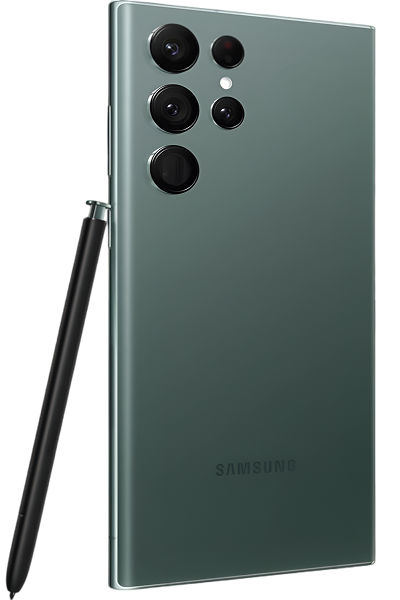
Samsung launched the Galaxy S22 Ultra in February 2022 as their ultimate flagship and spiritual successor to the Note line. That 6.8-inch Dynamic AMOLED 2X display with 120Hz refresh is still impressive, the integrated S Pen brought Note functionality back, and the quad camera system with 108MP main sensor was cutting-edge at launch. The device came with either Snapdragon 8 Gen 1 or Exynos 2200 depending on region.
Here's what matters now—your S22 Ultra is approaching three years old. In smartphone terms, that's elderly. Components have experienced nearly 1,000 charge cycles, thousands of hours of screen-on time, countless S Pen interactions, and constant thermal stress from that powerful but hot-running processor. The issues you're experiencing aren't mysterious—they're predictable aging patterns that professional repair addresses effectively.
Why All Devices Eventually Show Wear
Your S22 Ultra is like high-performance athletic shoes worn daily for three years. They still work, technically, but the cushioning's compressed, support has degraded, grip is worn, and they don't perform like they did new. Everything experiences wear with use—your phone's no different.
Your battery has been through roughly 1,000 charge cycles. Each cycle causes chemical changes inside those lithium-ion cells. After 1,000 cycles, you're typically at 70-75% of original capacity if you're lucky. The electrodes have developed structures that interfere with ion movement. The electrolyte has decomposed significantly. Heat from that Snapdragon 8 Gen 1 or Exynos 2200 accelerates this degradation dramatically.
Those processors are notorious for running hot—this was a known issue even when devices were new. After three years, thermal paste inside has dried out substantially, becoming far less effective at heat transfer. Higher temperatures result, causing aggressive thermal throttling that feels like performance degradation. The processor isn't slower—it's protecting itself from heat damage by reducing clock speeds.
Your S Pen's electromagnetic resonance system relies on precise calibration. Three years of drops, pressure, and daily use can throw off that calibration. The digitizer layer beneath your display that detects S Pen position experiences wear. Screen protector degradation or adhesive issues interfere with electromagnetic field detection.
The charging port has seen ~1,000 cable insertions. There's three years' worth of compressed lint creating an insulating layer. Retention clips have weakened substantially. Internal pins show wear or slight corrosion. On a device this old, charging port issues are essentially guaranteed without preventive cleaning.
Display components age too. Those OLED pixels have been illuminated for thousands of hours. Blue subpixels degrade fastest. Maximum brightness has dropped 10-15% from new. If you've used the S Pen heavily in the same apps, you might see burn-in from frequently-used interfaces.
Software complexity accumulates through three years of updates. Your S22 Ultra launched with Android 12. It's received major updates adding features and complexity. System files have bloated. App caches consume gigabytes. Background processes have multiplied. Everything compounds to create the sluggish performance you're experiencing.
The Battery Problem Everyone Faces
What you're experiencing: Your S22 Ultra doesn't last through a day anymore despite that 5,000mAh battery. You're at 30% by mid-afternoon with moderate use. Heavy tasks like camera or gaming drain battery in minutes. Standby drain is excessive—you lose 15-20%+ overnight. Battery percentage jumps erratically, or the phone shuts down at 20-30% remaining.
Why this happens: Nearly three years and ~1,000 charge cycles mean your battery's seriously degraded. That 5,000mAh from new is closer to 3,500-3,800mAh in reality now. The battery management system can't accurately read remaining charge on a degraded cell, causing percentage jumps and unexpected shutdowns.
The S22 Ultra's large display, powerful processor, and advanced features demand significant power. You've probably charged frequently—maybe even twice daily for heavy users—accelerating degradation. Heat from the processor running hot damages battery chemistry. Fast charging multiple times daily generates heat that compounds the problem over three years.
What you can try:
- Check battery health in Settings—if below 75%, replacement is overdue.
- Aggressively restrict background apps draining battery.
- Disable 5G in weak signal areas—searching kills battery.
- Reduce to 60Hz refresh temporarily as test.
- Factory reset (backup first) to rule out software issues.
What we tell customers who come in: Battery replacement on three-year-old S22 Ultra devices is transformative. People genuinely forget how good battery life was new. Going from constant charging anxiety to confidently making it through full days changes how you use your device. This is the single most impactful repair for devices this age.
S Pen Feels Off
What you're noticing: S Pen input feels laggy or imprecise. Sometimes it doesn't register, other times input appears offset. Pressure sensitivity is inconsistent. Writing or drawing doesn't feel smooth like it used to. You're fighting the S Pen instead of it being a natural extension of your hand.
Why this happens: Three years of drops and daily use can misalign internal components. The digitizer detecting S Pen position experiences wear. Screen protector degradation or bubbling creates air gaps interfering with electromagnetic detection. Battery bulging from degradation presses on display from behind, affecting calibration.
Software accumulated over three years can conflict with S Pen services. The S Pen tip itself wears down, changing interaction characteristics. Oils and debris on screen affect electromagnetic sensing. Physical pressure damage to display—even invisible damage—affects digitizer function.
What you can try:
- Test with different S Pen to isolate pen versus phone.
- Clean display thoroughly—oils affect sensing significantly.
- Remove screen protector temporarily to test improvement.
- Clear cache for S Pen services in Settings > Apps.
- Run S Pen calibration in Settings > Advanced features > S Pen.
Overheating: The Constant Complaint
What's happening: Your S22 Ultra gets hot during normal use—browsing, camera, even idle sometimes. During intensive tasks it becomes uncomfortably hot. Performance drops dramatically when hot. Apps close with thermal warnings. The camera area gets especially hot.
Why this happens: Snapdragon 8 Gen 1 and Exynos 2200 run hot—this was criticized at launch. After three years, dried-out thermal paste makes heat management worse. Degraded battery generates extra heat. Accumulated background processes keep processor working constantly. Internal dust blocks airflow.
Samsung's thermal throttling protects components but causes the lag you're experiencing. The processor dramatically reduces speeds to cool down, making everything feel sluggish. It's a cycle—gets hot, throttles, you wait, stays hot longer, performance stays poor.
What you can try:
- Update to latest software—thermal improvements have come.
- Close all apps and restart—rogue processes cause overheating.
- Remove case during intensive use—ventilation matters more on old devices.
- Never use while charging—combining heat sources makes everything worse.
- Force stop apps constantly running in background.
What actually happens with most units: Chronic overheating on three-year-old S22 Ultra devices needs professional help. Software optimization helps 25% of cases. The other 75% need thermal paste replacement, internal cleaning, or battery replacement. At The Fix, we address hardware-level causes of your overheating problems.
Charging Port Headaches
What you're dealing with: Cable doesn't stay in firmly. It wiggles, falls out, or only charges at angles. Phone doesn't detect charging. "Moisture detected" warnings appear constantly despite being dry. Fast charging is unreliable or doesn't work.
Why this happens: Three years and ~1,000 insertions mean serious port wear. There's a compressed layer of debris preventing contact. Retention clips are weakened substantially. Internal pins might have corrosion. Three years of use creates predictable charging port failure.
What you can try:
- Inspect with flashlight—you'll see significant debris.
- Clean thoroughly with wooden toothpick.
- Use compressed air from distance.
- Try multiple cables to confirm it's the port.
- Test wireless charging to isolate the problem.
Camera Getting Slower
What you're noticing: Camera is slower than it used to be. Takes time to open, focus lags, you're missing shots. Photos sometimes blur despite steady hands. Low light performance is poor. App occasionally crashes. Processing after shots takes forever.
Why this happens: Three years of cached data bloats the camera app. Processor throttling from heat slows image processing. Camera motors show wear from thousands of focus operations. Software updates introduce bugs or reduce optimization for older hardware. Dirty lenses confuse autofocus.
What you can try:
- Clean all four camera lenses thoroughly.
- Clear Camera app cache and data completely.
- Update system software for camera fixes.
- Test in safe mode to rule out app interference.
- Free up storage—full storage slows camera processing.
Everything Feels Sluggish
What's going on: Apps open slowly. Switching lags. Typing has delay. Animations stutter. Your flagship feels old and tired.
Why this happens: Three years of updates, installations, and digital clutter take their toll. System files bloat. App caches consume gigabytes. Background processes multiply. The processor works harder, generates more heat, throttles more, creating sluggishness. Full storage compounds everything.
What you can try:
- Clear system cache from recovery thoroughly.
- Uninstall unused apps aggressively.
- Clear cache for all frequently-used apps.
- Free up storage—keep 20%+ available.
- Disable all bloatware.
- Factory reset as last resort (backup first).
Display Issues
What you're seeing: Slight tint on screen—usually green. Auto-brightness acts erratically. Touch response inconsistent in areas. Possible burn-in from S Pen apps or keyboard. Flickering at low brightness.
Why this happens: OLED displays age. Natural variation means some units have tints. Ambient sensor gets dirty or confused. PWM dimming causes flicker. Burn-in develops from static elements over three years. Touch digitizer damage affects response.
What you can try:
- Adjust color manually in display settings.
- Toggle between Vivid and Natural modes.
- Disable adaptive brightness temporarily.
- Clean around front camera—sensor lives there.
- Remove screen protector to test touch improvement.
Samsung Galaxy S22 Ultra Repair Done Right: Professional Solutions
Here's what actually happens when you bring your three-year-old S22 Ultra to The Fix—honest assessment and realistic expectations.
Frank Initial Assessment
Your S22 Ultra is nearly three years old. We evaluate it honestly—battery health, thermal performance, charging port condition, display quality, camera function. We're looking for cumulative wear patterns. This takes 25-35 minutes for thorough evaluation.
We test how hot it runs, how aggressively it throttles, S Pen responsiveness across the display, all cameras, and charging behavior. For three-year-old flagships, comprehensive diagnostics matter.
Honest Cost-Benefit Discussion
After testing, we're straightforward about repair economics. If your S22 Ultra needs battery, charging port, and thermal work, we discuss whether that investment makes sense versus putting money toward a newer device. If battery replacement alone restores 80% of functionality affordably, we explain that path clearly.
We never pressure either direction. Sometimes repair makes great sense—extending usable life 12-18 months affordably. Sometimes it's borderline. We give you information to decide what's right for your situation.
Quality Repair Work
If repair makes sense, we use high-quality parts. Fresh batteries restore capacity. New ports work perfectly. Thermal paste replacement improves heat management. Most S22 Ultra repairs are same-day or next-day service. We treat your flagship with the care it deserves.
Realistic Post-Repair Expectations
We're honest about what to expect. New battery dramatically improves battery life, but your three-year-old device won't match brand new phone performance. Fresh charging port works great, but other components are still aged. We verify repairs work properly and make sure you understand what was fixed and what age-related limitations remain.
Get Results With Samsung Galaxy S22 Ultra 5G Repair: Your Fix-It Guide
Your Galaxy S22 Ultra is approaching three years old—battery degradation, thermal issues, charging port wear, and performance slowdowns are expected. Professional Samsung Galaxy S22 Ultra 5G repair addresses these problems and can significantly extend usable life.
Get results by bringing your S22 Ultra to The Fix. We'll assess your device honestly, explain which repairs make economic sense, and give you realistic guidance. We specialize in reviving aging flagships, and we'll treat your S22 Ultra with the expertise three-year-old devices require.


Trusted repair solution for mobile phones, tablets, gaming consoles, and computer systems. We provide fast, reliable, and affordable repair services to get your devices back in perfect working condition.
The Fix is an independent repair service provider and is not affiliated with, sponsored by, or endorsed by Apple Inc., Samsung Electronics, Google LLC, or any other device manufacturer. We use high-quality compatible replacement parts unless explicitly stated. All trademarks are property of their respective owners.


© Copyright The Fix Solutions All rights reserved 2026.
Design by Deepcoder