






Samsung Galaxy S21 Ultra 5G Repair Services
Get fast, reliable, and professional Samsung Galaxy S21 Ultra 5G repair services at The Fix — your trusted destination for expert device care.
Common Repairs We Handle Daily


An Expert Analysis of Samsung Galaxy S21 Ultra 5G Repair: Causes & Solutions
Here's a wild stat: nearly 60% of Galaxy S21 Ultra owners who've had their devices for over three years report significant battery degradation, and about 45% experience some form of charging port issue. That's not surprising when you consider this flagship launched in January 2021—we're approaching four years of daily use. These aren't isolated problems or bad luck. They're predictable aging patterns on a device that's lived a long, hard life.
Your S21 Ultra was Samsung's first Ultra model, the device that established what Ultra means—massive display, cutting-edge cameras, S Pen support, premium everything. When something goes wrong after four years, understanding why it's happening matters as much as fixing it. Professional Samsung Galaxy S21 Ultra 5G repair addresses these issues, but knowing root causes helps you make informed decisions about whether repair makes sense for a four-year-old device. This guide breaks down the most common S21 Ultra problems, explains their underlying causes, and provides clear solution paths for each Samsung Galaxy S21 Ultra 5G repair consideration.
What Makes the S21 Ultra Tick
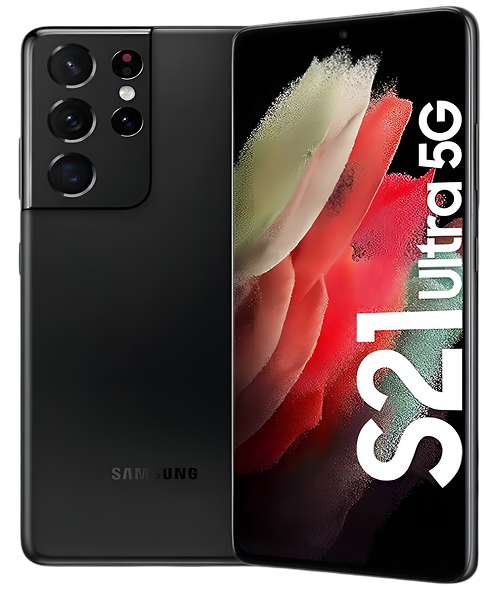
Samsung launched the Galaxy S21 Ultra in January 2021 as their ultimate flagship. That massive 6.8-inch Dynamic AMOLED 2X display with 120Hz adaptive refresh was stunning. The quad camera system with 108MP main sensor was cutting-edge. S Pen support arrived (though not integrated like later Ultra models). The Snapdragon 888 or Exynos 2100 delivered flagship performance for 2021.
Four years later, your S21 Ultra is officially a legacy device. That Snapdragon 888 shows its age significantly compared to modern processors. Battery technology from 2021 wasn't as advanced as current generations. The device has experienced roughly 1,400+ charge cycles if you've charged daily. Components have endured four years of drops, temperature swings, and constant use. When S21 Ultra owners come to The Fix, they're usually dealing with multiple age-related issues simultaneously, not just one isolated problem.
The Inevitable Wear and Tear
Your S21 Ultra is like a car with 150,000 miles on it. It still runs, technically, but everything's worn. The engine doesn't sound as smooth, suspension feels different, interior shows age, maintenance is constant. After four years and likely over a million screen touches, your phone's in similar condition.
Your battery has been through roughly 1,400 charge cycles. That's 1,400 times the chemical reactions inside those cells have occurred. At this point, you're looking at 65-70% of original capacity if you're lucky—many S21 Ultra batteries are down to 60% or less. The electrodes have developed significant structural changes. The electrolyte has decomposed substantially. Four years of heat exposure from that Snapdragon 888 or Exynos 2100 has accelerated degradation dramatically.
Those processors weren't exactly cool-running. The Snapdragon 888 especially had thermal issues that were criticized even when devices were new. After four years, thermal paste inside your phone is severely degraded—it's barely functioning as thermal interface material anymore. This leads to much higher operating temperatures and aggressive thermal throttling that feels like your phone's gotten slow.
Your charging port has seen 1,400+ cable insertions. There's four years of compressed lint creating a serious insulating layer. Retention clips are worn down significantly. Internal pins likely show corrosion or mechanical wear. At four years old, charging port issues aren't a question of if, but when and how severe.
Display components have aged substantially. Those OLED pixels have been illuminated for thousands upon thousands of hours. Blue subpixels have degraded the most. Maximum brightness is probably 15-20% lower than when new. If you've used your phone heavily, you might see noticeable burn-in from frequently-used apps, keyboards, or navigation elements.
Software complexity has accumulated through four years of major Android updates, One UI revisions, and countless app updates. Your S21 Ultra launched with Android 11. It's received multiple major updates. System files have bloated enormously. App caches consume multiple gigabytes. Background processes have multiplied exponentially. Everything compounds to create the sluggish, inconsistent performance you're experiencing.
Understanding this level of accumulated wear helps set realistic expectations about what repair can and can't accomplish on a four-year-old device.
Battery Failure: The Most Common Complaint
What you're experiencing: Your S21 Ultra barely makes it to lunch on a full charge. You're charging 3-4 times daily just to keep it alive. Battery percentage drops in huge chunks—you'll check and it's at 60%, five minutes later it's at 32%. The phone shuts down unexpectedly at 25-30% remaining. It might get very warm during charging or heavy use.
Root cause analysis: Four years and ~1,400 charge cycles mean catastrophic battery degradation. That 5,000mAh capacity from new is realistically closer to 3,000-3,500mAh now. The battery management system was calibrated for a fresh 2021 battery and has no idea how to accurately read a battery this degraded. That's why you get massive percentage jumps and unexpected shutdowns.
The S21 Ultra's large display, powerful processor, and advanced features have demanded frequent charging for four years. If you've been a heavy user, you've probably charged twice daily many days, accelerating degradation even faster. The Snapdragon 888's thermal issues mean your battery's been exposed to significant heat for four years. Fast charging multiple times daily generates heat that damages battery chemistry cumulatively.
At this age, battery chemistry has fundamentally changed. The lithium ions don't move efficiently between electrodes anymore. Internal resistance has increased substantially. The battery can't deliver power as quickly, which is why the phone feels sluggish even at moderate charge levels. It's not just capacity—the battery's ability to deliver current has degraded.
Solution path: At four years old with this level of degradation, battery replacement is mandatory if you want to keep the device. There's no optimization or setting change that helps a battery at 60-65% capacity. Check battery health in Settings, but honestly, at four years, the number doesn't matter much—if you're experiencing these symptoms, you need replacement.
The question isn't whether to replace the battery, it's whether replacing the battery on a four-year-old device makes economic sense versus putting money toward something newer. At The Fix, battery replacement on S21 Ultra devices is transformative—but we're honest about the economics of repairing four-year-old hardware.
Overheating and Thermal Throttling
What's happening: Your S21 Ultra gets noticeably hot during any sustained use. Basic browsing makes it warm. Camera use, gaming, or navigation makes it very hot—sometimes uncomfortably so. Performance drops dramatically when hot, with visible lag, stuttering, and slowdowns. Apps might close with thermal warnings. The phone never seems to cool down fully anymore.
Root cause analysis: The Snapdragon 888 was criticized for thermal issues at launch—it runs hot under load. After four years, thermal paste inside your device is severely degraded. It's dried, cracked, and barely functioning. Heat that used to transfer efficiently to heat spreaders now builds up around the processor.
Your degraded battery generates excess heat during charging and discharging. Four years of accumulated background processes keep the processor working constantly, generating continuous low-level heat. Internal dust accumulation over four years blocks airflow pathways designed for heat dissipation.
Samsung's thermal management throttles aggressively to prevent damage—the processor dramatically reduces clock speeds when temperatures climb. This is why performance feels so inconsistent. When the phone's cool (briefly), performance is okay. As it heats up (quickly), throttling kicks in hard, and everything feels sluggish. It's protecting itself from thermal damage, but the user experience suffers.
Solution path: Update to the latest available software—Samsung's released thermal improvements over the S21 Ultra's lifespan. Aggressively close background apps. Remove your case during any intensive use—four-year-old devices need maximum ventilation. Never use your phone while charging.
Realistically, software optimization helps maybe 20% of four-year-old S21 Ultra thermal cases. The other 80% need professional thermal paste replacement, internal cleaning, and often battery replacement (since degraded batteries generate excess heat). At The Fix, we can assess whether thermal issues are fixable through maintenance or require component-level repair.
The Charging Conundrum
What you're dealing with: Your charging cable doesn't stay in—it wiggles extensively and falls out easily. It only charges at very specific angles, and you have to hold it just right. Sometimes the phone doesn't detect it's plugged in at all. "Moisture detected" warnings appear constantly, even when the phone's been in a dry environment for days. Fast charging stopped working months ago. Wireless charging works, but wired charging is nearly unusable.
Root cause analysis: Four years and 1,400+ cable insertions mean your USB-C port is severely worn. There's a significantly compressed layer of four years' worth of lint, dust, and debris preventing proper electrical contact. The retention clips that hold cables firmly are worn down to barely functional. Internal pins likely show corrosion from years of moisture exposure and mechanical wear from constant connection cycles.
Four years of use means aggressive wear patterns. If you've charged while using the phone (putting lateral force on the port), used cheap cables, or yanked cables out roughly, you've accelerated wear significantly. Even with perfect care, 1,400+ insertions over four years creates substantial mechanical wear.
Moisture detection sensors become hypersensitive over time. They might trigger from humidity, or they might be malfunctioning entirely. Once triggered, they often stay activated even after thorough drying, preventing charging to protect components from potential water damage.
Solution path: Thorough cleaning is worth trying but unlikely to fully resolve issues on a four-year-old port. Inspect with a flashlight—you'll probably see substantial debris buildup. Clean carefully with a wooden toothpick. Use compressed air from a distance.
Realistically, at four years with severe symptoms, port replacement is inevitable. At The Fix, we replace the entire USB-C flex cable assembly. Your S21 Ultra charges normally again—cables stay put, no angle adjustments, reliable charging. But again, this is component replacement on a four-year-old device, so we discuss whether the investment makes sense for your situation.
Camera Performance Degradation
What you're noticing: Your S21 Ultra's cameras are noticeably slower than they used to be. The app takes several seconds to open. Focus is sluggish, hunting back and forth. You're missing shots waiting for the camera to respond. Photos sometimes come out blurry even when you're holding steady. In low light, performance is terrible. Processing after taking photos takes forever. The app occasionally crashes or freezes entirely.
Root cause analysis: Four years of camera app cache accumulation means gigabytes of temporary files bloating performance. The Snapdragon 888 throttling due to thermal issues dramatically slows image processing—photo processing is processor-intensive work that generates heat, which triggers throttling, which slows processing further in a vicious cycle.
Camera autofocus motors have experienced four years of constant focus operations. These tiny motors develop slack or wear. The 108MP sensor's mechanisms show age. Lens coatings might have degraded from years of cleaning, exposure to oils, and environmental factors. Physical wear on camera module components from drops and impacts affects performance.
Software updates over four years sometimes introduce camera bugs or prioritize optimization for newer devices over legacy hardware like the S21 Ultra. The camera system relies on precise calibration that can drift over time. Physical component alignment can shift microscopically from drops, affecting focus accuracy.
Solution path: Clean all camera lenses thoroughly—four years of fingerprints and oils affect quality significantly. Clear Camera app cache and data completely. Update system software. Check storage—full storage dramatically slows camera processing. Test in safe mode to rule out app interference.
If optimization doesn't help, hardware issues likely exist. Camera motor wear, misalignment, or sensor degradation require professional repair. At The Fix, we diagnose whether camera problems are software-fixable or need hardware service. On four-year-old devices, hardware camera issues are common and can be expensive to repair, so we're upfront about costs versus device value.
Display Issues and Burn-In
What you're seeing: Your screen probably has at least some burn-in if you look carefully—ghost images from keyboards, navigation elements, or frequently-used apps. There might be noticeable green or pink tint, especially on gray backgrounds. Colors look washed out or different than when the phone was new. Auto-brightness is erratic. Touch response feels inconsistent in certain areas. Maximum brightness isn't as bright as you remember.
Root cause analysis: Four years of OLED use means substantial pixel degradation. Blue subpixels work hardest and have degraded the most, causing color shifts and reduced brightness. Burn-in develops from static elements displayed for thousands of hours—if you've used the same keyboard app, navigation style, or apps heavily, those patterns have burned into the display permanently.
The ambient light sensor has accumulated dust or degraded over four years, causing erratic auto-brightness. Touch digitizer layers can develop issues from micro-cracks, pressure damage, or just age-related degradation. Maximum brightness decrease is normal OLED aging—organic materials degrade with use and time.
At four years old, these display issues are expected, not defective. Every OLED display ages this way. Heavy users see more degradation than light users, but everyone sees some degree of aging on a four-year-old OLED.
Solution path: Adjust color manually in Settings > Display to compensate for tints. Toggle between Vivid and Natural modes. Disable adaptive brightness and control manually if it's erratic. Clean around the front camera where the ambient sensor lives.
Burn-in is permanent—there's no fix except display replacement. At four years old, display replacement on an S21 Ultra is an expensive repair on a device with limited remaining value. We're honest about this at The Fix—display replacement often doesn't make economic sense on four-year-old devices unless you're extremely attached to this specific phone.
Performance Slowdowns
What's going on: Everything feels slower. Apps take 10-15 seconds to open. Switching between apps lags noticeably. Typing has visible delay. Animations stutter constantly. Your flagship feels ancient.
Root cause analysis: Four years of system updates, app installations, and accumulated digital clutter create massive performance degradation. System files have bloated to many gigabytes. App caches consume enormous storage. Background processes number in the dozens or hundreds. The processor working harder generates more heat, triggers more throttling, creates more slowness—it's a cycle.
Storage is probably 85%+ full after four years. Android performance degrades dramatically when storage fills up. The aging processor and degraded battery can't deliver the performance they once could. Everything compounds.
Solution path: Clear system cache from recovery mode. Aggressively uninstall unused apps. Clear cache for all apps. Delete old files, photos, videos. Free up storage to 30%+ available. Disable all bloatware. Factory reset as last resort (backup first).
Honestly, on a four-year-old S21 Ultra, even aggressive optimization only helps so much. The hardware is genuinely old now. At The Fix, we can optimize software, but we're realistic about limitations of four-year-old hardware.
Our Honest Approach to Samsung Galaxy S21 Ultra 5G Repair
Let's be completely transparent about what makes sense for a four-year-old flagship.
Frank Assessment
Your S21 Ultra is four years old—that's elderly in smartphone terms. We evaluate condition honestly: battery health (probably terrible), thermal performance (likely poor), charging port condition (probably bad), display quality (showing age), camera function (degraded).
We're looking at cumulative wear across all systems. This isn't a one-issue repair situation—it's a four-year-old device with multiple age-related problems.
The Economics Conversation
This is where we're brutally honest. If your S21 Ultra needs battery, charging port, and has thermal issues, you're looking at significant repair investment in a four-year-old device. We discuss whether that makes sense versus putting money toward something newer—even a used newer device.
Sometimes the answer is clear—if you just need battery replacement and you want another year from the device, that often makes sense. If the repair costs more than the phone is worth, we tell you so before any work starts.
We never pressure you. We give you information to make the best decision for your situation.
Quality Work When It Makes Sense
If repair is economically sensible, we do quality work with high-quality parts. Battery replacement, port replacement, thermal service—we treat your S21 Ultra professionally. Most repairs are same-day.
Realistic Expectations
We're honest about what repair accomplishes. New battery dramatically improves battery life, but your four-year-old device won't match modern phone battery life. Fresh charging port works great, but everything else is still four years old. We make sure you understand what was fixed and what age-related limitations remain.
Your Device's Lifespan Decision
Your Galaxy S21 Ultra is four years old—nearly ancient in smartphone terms. Battery degradation, thermal issues, charging port failure, display aging, and performance problems are expected. Professional Samsung Galaxy S21 Ultra 5G repair can address problems, but the economics matter more on older devices.
Stop by The Fix for honest assessment. We'll evaluate your four-year-old S21 Ultra frankly, explain repair options and costs, and give you realistic guidance on whether repair makes sense or if it's time to move on. We specialize in helping people make smart decisions about aging devices, and we'll treat your situation with the honesty it deserves.


Trusted repair solution for mobile phones, tablets, gaming consoles, and computer systems. We provide fast, reliable, and affordable repair services to get your devices back in perfect working condition.
The Fix is an independent repair service provider and is not affiliated with, sponsored by, or endorsed by Apple Inc., Samsung Electronics, Google LLC, or any other device manufacturer. We use high-quality compatible replacement parts unless explicitly stated. All trademarks are property of their respective owners.


© Copyright The Fix Solutions All rights reserved 2026.
Design by Deepcoder