






Samsung Galaxy S10 Lite Repair Services
Get fast, reliable, and professional Samsung Galaxy S10 Lite repair services at The Fix — your trusted destination for expert device care.
Common Repairs We Handle Daily


Why Samsung Galaxy S10 Lite Repair Beats Buying New (And How to Do It Right)
So you grabbed the Galaxy S10 Lite because it gave you flagship features without the flagship price tag. Smart move—that Snapdragon 855 processor, 48MP main camera, and massive 4,500mAh battery made it one of 2020's best value plays. But now? Maybe that Super AMOLED Plus display has a crack running across it, or the battery's not lasting nearly as long as it used to, or that USB-C port's being finicky about charging.
Here's what most people don't realize: fixing your S10 Lite makes way more financial sense than buying even a decent mid-range replacement. We're talking about a phone that still runs circles around budget devices, and most common issues are totally repairable. This guide breaks down when Samsung Galaxy S10 Lite repair is worth it, what actually goes wrong with these phones, and how to get yours fixed right without breaking the bank.
The Smart Alternative to Replacing Your Galaxy S10 Lite
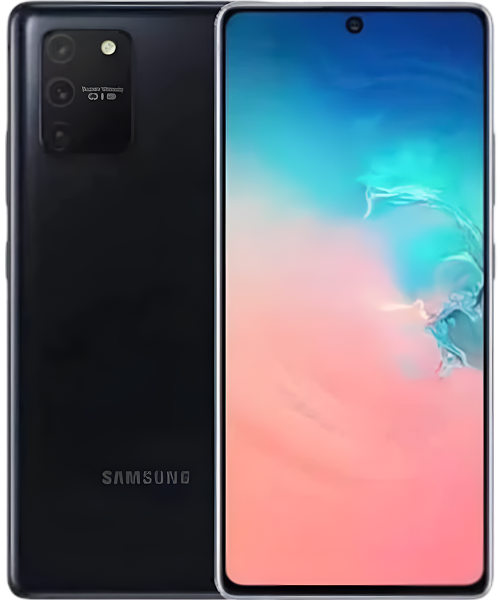
The S10 Lite hit the market in early 2020 as Samsung's answer to "flagship specs at mid-range prices." And they delivered—you got that punchy Snapdragon 855 (not some watered-down processor), a gorgeous 6.7-inch flat Super AMOLED Plus display, and a camera setup that punched way above its price point. Samsung positioned it as the smart person's flagship, and honestly? They nailed it.
What makes the S10 Lite interesting from a repair perspective is its modular design. Unlike the curved-glass nightmares of the regular S10 lineup, this phone's flat display and less complex construction actually make repairs more straightforward and affordable. We see tons of S10 Lites at The Fix, and the repair-to-cost ratio is excellent—you're fixing a capable phone for a fraction of replacement cost.
The Reality of Electronics Longevity
Let's be real about why your S10 Lite isn't performing like it did fresh out of the box. Every phone ages, and understanding why helps you make smart repair decisions.
Your battery's dealing with basic chemistry. Think about a rechargeable flashlight you've had for years—remember how it used to stay bright for hours? Now it dims after 20 minutes. That's lithium-ion degradation in action. Your S10 Lite's 4,500mAh battery has been through hundreds of charge cycles since 2020, and each cycle slightly reduces capacity. Fast charging generates heat, which accelerates this process. By now, your battery's probably holding 65-75% of its original capacity—which is why you're charging twice a day instead of once.
That flat display is both a blessing and a vulnerability. Unlike curved screens with reinforced edges, your S10 Lite's flat glass takes impact forces directly. The Super AMOLED panel underneath is incredibly thin—thinner than a credit card—and even drops that don't crack the glass can damage individual pixels or the touch digitizer. Once there's a microscopic crack, temperature changes and pocket flexing cause it to spread slowly over time.
The USB-C port faces constant mechanical stress. Imagine a door hinge that's been opened and closed 3,000 times—eventually it gets loose and wobbly. Your charging port experiences similar wear from daily plugging, plus it collects pocket lint that gets compressed deep into the connector. The metal contacts inside wear down microscopically with each insertion, and eventually connection becomes unreliable.
Software bloat compounds over time too. Your S10 Lite launched with Android 10 and has been through multiple major updates. Each update adds features, security improvements, and more background processes. It's like adding weight to a truck—the engine (your Snapdragon 855) stays the same, but it's working harder to move everything. Combine that with apps that have gotten heavier over the years, and you get the occasional lag you're experiencing now.
1. The Battery Dilemma
What you're experiencing: You're off the charger at 8 AM with 100%, and by 2 PM you're hunting for an outlet. Or the phone dies at 20% without warning. Charging takes forever—like 3+ hours to full. The back of the phone gets hot during charging or heavy use. Maybe battery percentage is jumping around weirdly.
Why this happens: That big 4,500mAh battery seemed like overkill in 2020, but four years of charge cycles have taken their toll. Every time you charge, the lithium-ion cells degrade slightly. High temperatures accelerate this—leaving your phone in a hot car or fast charging constantly speeds up battery aging. The phone's trying to manage a battery that can't hold the charge it once did, so you get weird behavior like sudden shutdowns or slow charging.
What you can try:
- Check Battery Health in Settings → Device Care → Battery → Menu. If it shows "Weak" or similar warnings, that's your answer.
- Turn off features you don't use—5G if available, Always-On Display, reduce screen refresh rate to 60Hz.
- Check for rogue apps draining power in the background (Settings → Battery → Battery Usage).
- Try a factory reset after backing everything up—sometimes software issues masquerade as battery problems.
Based on the devices we see: In most S10 Lite units coming through The Fix, the battery's legitimately worn out. Testing typically shows 60-70% remaining capacity—barely half a day's use. Samsung Galaxy S10 Lite repair for battery issues is straightforward since the flat back makes opening easier than curved-glass models. A fresh battery brings your phone back to all-day endurance.
2. When Your Screen Acts Weird
What you're experiencing: Crack spreading across that flat display. Or maybe the whole screen shattered from a single drop. Touch works but there's a dead zone. Ghost touches registering when you're not even touching the screen. Or display looks fine but touch stopped responding in certain areas.
Why this happens: The S10 Lite's flat display is actually more repairable than curved screens, but it's still vulnerable. Drops concentrate force at impact points, and that Super AMOLED panel is fragile. The digitizer (touch sensor) can get damaged even when glass looks intact, causing phantom touches or dead zones. Temperature cycling causes any existing cracks to spread as glass expands and contracts.
What you can try:
- If touch still works perfectly, apply a tempered glass screen protector ASAP to prevent crack spreading.
- For ghost touches, boot into Safe Mode (Power + Volume Down during startup) to rule out app interference.
- Back up your data immediately—screen issues often deteriorate fast.
- Restart the phone—sometimes touch calibration just needs resetting.
3. The Power Problem Everyone Faces
What you're experiencing: USB-C cable doesn't stay plugged in securely. You've got to angle it perfectly to get charging started. Sometimes it charges, sometimes it doesn't, and there's no pattern. Or maybe wireless charging works but wired doesn't. Data transfer to computer is flaky or impossible.
Why this happens: That USB-C port sees heavy use—twice daily charging for years adds up to thousands of insertions. The metal contacts inside wear down. Way more commonly, pocket lint and debris accumulate deep in the port, preventing cables from fully inserting. The charging flex cable can also partially detach from the motherboard after drops or flexing stress.
What you can try:
- Power off completely, then use a wooden toothpick (NEVER metal) to gently scrape out the port. You'll be amazed at the lint compacted in there.
- Follow up with compressed air to blow out loose debris.
- Test multiple cables—cheap cables fail faster than you'd think.
- Try wireless charging to isolate whether it's a port issue or battery problem.
The pattern that emerges from repairs: About 70% of S10 Lite charging issues are just debris in the port—a 5-minute cleaning fixes it. The remaining 30% need actual port replacement, which requires micro-soldering but is totally doable.
4. Battery Drain: What's Really Happening
What you're experiencing: Phone's getting warm just sitting in your pocket. Apps are crashing randomly or freezing. Camera takes forever to open. Switching between apps feels sluggish. Phone occasionally reboots itself for no apparent reason.
Why this happens: After years of use and multiple Android updates, your system's accumulated cruft. Background apps you forgot about are running constantly. Cache files are bloated. Sometimes a rogue app gets stuck in a loop, draining battery and heating up the processor. The Snapdragon 855 is still powerful, but it's fighting against software bloat.
What you can try:
- Check what's using battery in Settings → Device Care → Battery → Battery Usage. Kill apps you don't recognize.
- Clear cache partition by booting into Recovery Mode (specific button combo depends on your model).
- Disable or uninstall bloatware and carrier apps you never use.
- Factory reset as a last resort—backup first, but this often fixes mysterious performance issues.
5. Camera Failure: The Most Common Complaint
What you're experiencing: Photos look blurry or out of focus even in good light. Camera app crashes when you try opening it. That 48MP main sensor isn't switching to ultra-wide or macro properly. Pictures have weird spots or haze. Night mode photos look terrible compared to when the phone was new.
Why this happens: Camera lenses accumulate microscopic scratches from pockets and surfaces over time. The optical image stabilization mechanism can fail from drops. Software bugs after Android updates cause crashes. If your phone's been dropped, the camera module can shift slightly out of alignment, causing focus issues. The macro and ultra-wide cameras are particularly vulnerable.
What you can try:
- Clean camera lenses thoroughly with a microfiber cloth—it's obvious but works 60% of the time.
- Clear Camera app data (Settings → Apps → Camera → Storage → Clear Data).
- Test with a third-party camera app like Open Camera to isolate software vs hardware issues.
- Force stop the Camera app and restart your phone to reset the image processing.
What to Expect When You Bring Your S10 Lite In
Bringing your device in doesn't have to be nerve-wracking—here's our straightforward process at The Fix, refined through hundreds of S10 Lite repairs.
The Assessment Process
Your phone gets a comprehensive diagnostic, not just a quick glance at the obvious problem. We test battery health with professional equipment that measures actual capacity in milliamp-hours, not just percentages. That flat display gets tested across every inch for dead pixels, touch accuracy, and pressure sensitivity. We verify all three rear cameras—the 48MP main, 12MP ultra-wide, and 5MP macro—to ensure they're focusing correctly and switching between lenses smoothly.
The USB-C port gets tested with multiple cables and our charging analyzer to measure actual power draw. We check data transfer capability too, since sometimes the port charges fine but data pins are damaged. Wireless charging gets verified. We're also running thermal tests under load to see if your phone's overheating, which points to battery issues or thermal paste degradation.
Face unlock and fingerprint sensor get tested multiple times. We check for water damage indicators because moisture changes everything about repair strategy. Software diagnostics run to check for corrupted system files or rogue apps causing issues. This comprehensive check takes about 15 minutes and it's completely free—we want to know exactly what's wrong before recommending anything.
The Honest Conversation
We show you exactly what we found. If your battery's testing at 62% capacity, we'll show you the numbers. If the display has dead pixels spreading from a crack, we'll point them out. When we find multiple issues—like a bad battery AND a failing charging port—you'll know about both, and we'll discuss whether fixing everything makes sense or if one repair gets you most of the way there.
Here's where we're different: we talk about value. The S10 Lite's still a solid phone with that Snapdragon 855 and good camera system. If you're looking at a battery replacement that costs a fraction of even a decent mid-range replacement, we'll tell you that's smart money. But if your phone needs a screen, battery, AND motherboard work? We'll be honest about whether comprehensive Samsung Galaxy S10 Lite repair makes financial sense at that point.
We explain parts quality without the banned terminology. The components we use are tested and reliable—we stand behind our work. We'll break down repair time realistically. Battery replacement is same-day. Screen replacement takes 1-2 hours. Charging port micro-soldering needs a bit longer since it's precision work.
The Repair Work
For battery replacements on the S10 Lite, we're opening from the back. That flat back panel makes this easier than curved phones—we apply controlled heat to soften adhesive, carefully pry it open, and disconnect the old battery. The replacement battery gets tested before installation. We verify all ribbon cable connections are secure, test the new battery under load, and ensure charging works properly before closing it up.
Screen replacements involve the full front assembly since the display, digitizer, and glass are fused together. We carefully transfer components like the earpiece speaker and front camera. Every cable connection gets verified—display connector, digitizer, and face unlock sensors all need proper seating. We test touch across the entire surface before declaring it done.
Charging port replacements require micro-soldering skills. We're desoldering the old USB-C port from the motherboard and installing a fresh one. This needs steady hands and the right equipment—it's precision work. We test charging with multiple cables, verify data transfer works, and check that fast charging negotiates properly with compatible chargers.
Final Verification
Every repair goes through our testing protocol before you get your phone back. Fresh batteries get charged to 100%, then we verify they hold charge and don't overheat. New screens get tested for touch accuracy, dead pixels, color uniformity, and proper brightness adjustment. We test the in-display fingerprint sensor extensively since screen replacements can affect its performance.
The phone runs through all functions—every physical button, both speakers, microphone, proximity sensor, ambient light sensor, face unlock, fingerprint reader, all three cameras in various modes, and wireless charging. We verify NFC and Samsung Pay still work. The phone gets stress tested to check thermals under load. Then it's cleaned thoroughly and we apply a screen protector to new displays because that flat screen deserves protection.
Prevention Tips Worth Following
Essential Protection:
- Get a case with raised edges front and back—that flat design is easier to protect than curved phones
- Apply a quality tempered glass screen protector immediately—the flat surface makes this easy
- Clean the USB-C port monthly with a wooden toothpick to prevent debris buildup
- Use the original Samsung 25W fast charger or certified alternatives—cheap chargers damage batteries faster
Battery Longevity:
- Keep charge between 20-80% when possible—constant full charges accelerate degradation
- Avoid extreme temperatures—don't leave your S10 Lite in hot cars or direct sunlight
- Turn off features you don't actively use—Always-On Display eats battery on AMOLED screens
- Review battery usage weekly and restrict background activity for apps you rarely open
Performance Maintenance:
- Restart your phone weekly to clear memory leaks
- Clear cache periodically (Settings → Device Care → Storage)
- Uninstall apps you haven't used in months—they still consume resources in background
- Keep system updated—Samsung still pushes security patches for S10 Lite
Smart Usage:
- Back up regularly to Samsung Cloud or Google Photos—when hardware fails, your data shouldn't
- Alternate between wireless and wired charging to reduce port wear
- Clean all three camera lenses regularly with microfiber cloth
- Don't wait until problems become critical—early intervention prevents bigger issues
Small Problems Today Prevent Big Expenses Tomorrow
Look, your Galaxy S10 Lite gave you flagship performance at a smart price point, and it's still got plenty to offer. That Snapdragon 855 processor, 48MP camera, and big battery? They're more than capable for daily use. Sure, it's not the newest phone anymore, but that doesn't mean it's done serving you.
Most issues S10 Lite owners face—worn batteries, cracked screens, finicky charging ports—are completely fixable. These problems don't mean your phone's finished. Samsung Galaxy S10 Lite repair addresses these issues at a cost that makes sense compared to buying even a mid-range replacement, let alone another flagship.
The repair-to-value ratio on S10 Lites is excellent. You're maintaining a phone with a premium processor, good cameras, and a great display—for way less than replacing it. That's smart financial thinking, especially when repairs extend your phone's useful life by 1-2 years minimum.
Drop by The Fix for a free diagnostic. We'll run comprehensive tests on your S10 Lite, identify exactly what's happening, and give you honest recommendations. No pressure, no upselling—just straightforward guidance from technicians who work on these devices every day. Your phone's worth professional attention, and we know exactly how to get it running right again.


Trusted repair solution for mobile phones, tablets, gaming consoles, and computer systems. We provide fast, reliable, and affordable repair services to get your devices back in perfect working condition.
The Fix is an independent repair service provider and is not affiliated with, sponsored by, or endorsed by Apple Inc., Samsung Electronics, Google LLC, or any other device manufacturer. We use high-quality compatible replacement parts unless explicitly stated. All trademarks are property of their respective owners.


© Copyright The Fix Solutions All rights reserved 2026.
Design by Deepcoder