






Samsung Galaxy S10 5G Repair Services
Get fast, reliable, and professional Samsung Galaxy S10 5G repair services at The Fix — your trusted destination for expert device care.
Common Repairs We Handle Daily


Samsung Galaxy S10 5G Repair Analysis & Solutions
Your Galaxy S10 5G was Samsung's first 5G flagship—the phone that was supposed to future-proof you. And honestly? That massive 6.7-inch display and quad-camera setup still hold up pretty well. But here's what nobody tells you about being an early 5G adopter: these phones work harder, run hotter, and age differently than their 4G siblings.
If your S10 5G's battery is draining like there's a hole in it, or that gorgeous curved screen is cracked, or the phone's heating up during video calls—you're not alone. We see these exact issues at The Fix constantly, and there's usually a clear reason why. This guide breaks down what's actually happening with your S10 5G and what Samsung Galaxy S10 5G repair options make sense for a phone this capable.
A Tech Expert's Guide to Samsung Galaxy S10 5G Repair
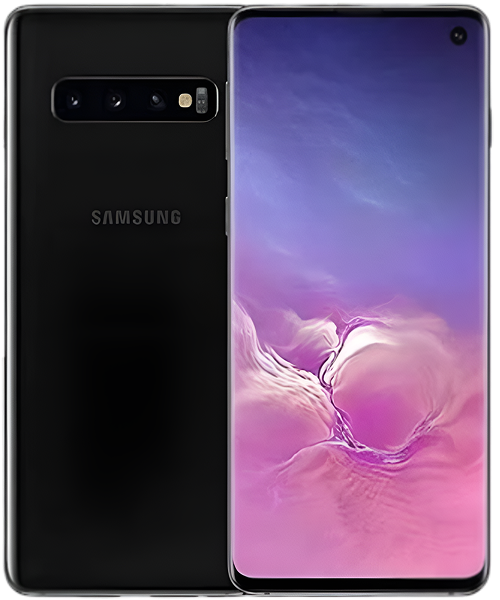
The S10 5G launched in spring 2019 as Samsung's boldest bet yet. This wasn't just another Galaxy—it was their 5G statement piece with a 6.7-inch curved Dynamic AMOLED display, four rear cameras (wide, telephoto, ultra-wide, plus a depth sensor), and that hungry Snapdragon 855 processor managing 5G connectivity. Samsung positioned it as the ultimate early adopter phone, and they charged accordingly.
Here's what makes the S10 5G interesting from a repair perspective—that 5G modem generates significantly more heat than standard 4G chips. More heat means faster battery degradation and more thermal stress on internal components. We've opened hundreds of these phones at The Fix, and the wear patterns tell a consistent story: 5G connectivity ages these devices faster than their 4G counterparts.
Why No Phone Lasts Forever
Your S10 5G's dealing with something every electronic device faces—the slow march of physics and chemistry working against it. Let's talk about what's really happening inside that premium chassis.
Think about an electric toothbrush you've owned for years. Brand new, it runs strong for days between charges. But after a couple years of daily charging cycles, it barely lasts through two brushing sessions. Your S10 5G's 4,500mAh battery follows the exact same pattern—lithium-ion cells degrade with every charge cycle, and that 5G modem accelerates the process by generating extra heat during use.
Your charging port's going through its own wear process. Picture a power cord that you've coiled and uncoiled hundreds of times—eventually the wires inside fray and connection becomes unreliable. The S10 5G's USB-C port experiences similar stress from daily plugging, plus it collects pocket debris that gets compressed into the connector. After years of twice-daily charging, those metal contacts aren't making the solid connection they once did.
That curved display is particularly vulnerable. The glass curves at the edges, which makes it harder to protect with screen protectors and cases. When you drop the phone, impact force concentrates at the curve points. The AMOLED panel underneath is thinner than a credit card, and once it's damaged, dead pixels and touch issues spread. Temperature cycling from pocket to outdoor air constantly flexes that curved glass, and any existing microcracks expand slowly over time.
Then there's the 5G factor nobody talks about. Your phone's modem switches between 5G, 4G LTE, and WiFi constantly, searching for the best connection. This background radio activity drains battery faster than older 4G-only phones and generates heat that slowly cooks internal components. It's like running your laptop on high performance mode 24/7—technically it works, but long-term wear happens faster.
Let's Tackle the Urgent Stuff First
The Battery Situation Is Probably Worse Than You Think
What you're experiencing: You're lucky to make it to 4 PM on a single charge, even with light use. The phone dies at 25% without warning. Charging takes hours, and the back of the phone gets uncomfortably warm while plugged in. Maybe you've noticed the battery percentage jumping around—68% one second, 43% the next.
Why this happens: That 4,500mAh battery seemed massive in 2019, but 5G connectivity is incredibly power-hungry. The modem constantly searches for 5G signal, falling back to LTE when unavailable, and that radio switching murders battery life. Add in years of charge cycles plus heat from 5G use, and you've got a battery running at maybe 60% of original capacity. The phone's battery management system tries compensating, but eventually physics wins.
What you can try:
- Check Settings → Device Care → Battery to see what's actually draining power. 5G connectivity might be the culprit.
- Force your phone to LTE-only (Settings → Connections → Mobile Networks → Network Mode → LTE/3G/2G). You'll be shocked at the battery improvement.
- Disable Always-On Display and drop screen resolution from WQHD+ to FHD+—that huge AMOLED is a power monster.
- Factory reset after backing up—sometimes software bloat from years of updates kills battery life.
After years of fixing these devices: The battery's genuinely worn out in most S10 5G units we see. Testing typically shows 55-65% remaining capacity—basically half the endurance you had new. Samsung Galaxy S10 5G repair for battery replacement is straightforward, but that curved back glass requires careful heating to avoid cracking. Fresh battery plus forcing LTE-only makes these phones feel brand new again.
When That Gorgeous Curved Screen Breaks
What you're experiencing: Crack running down the edge where the glass curves. Or maybe the whole display spider-webbed from a single drop. Touch works but there's a dead zone near the crack. Possibly the screen looks perfect but phantom touches are driving you insane, or certain areas stopped responding entirely.
Why this happens: Those curved edges that look so premium? They're structural weak points. Drops concentrate force at the curves where glass is thinnest. Screen protectors can't adhere properly to curved edges, leaving them exposed. The AMOLED panel underneath is fragile—even drops that don't crack the glass can damage the display layer, causing dead pixels or touch issues.
What you can try:
- If touch still works perfectly, apply a UV-cured glass screen protector to prevent crack spreading.
- For phantom touches, boot into Safe Mode (Power + Volume Down) to rule out app issues.
- Back up immediately—screen damage often gets worse quickly.
- Avoid temperature extremes—heat and cold cause glass expansion that worsens cracks.
Then We'll Get to the Annoying-But-Not-Critical Issues
5G Connectivity Driving You Crazy
What you're experiencing: Your phone constantly shows 5G but data seems slow. Or it keeps switching between 5G and LTE. Maybe certain apps timeout or fail to load despite showing signal. Possibly the phone gets hot just sitting in your pocket because the modem's working overtime.
Why this happens: Early 5G implementation was rough, and the S10 5G's modem reflects that. It aggressively searches for 5G signal even in areas with weak coverage, draining battery and generating heat. Network congestion on 5G bands causes slow data despite strong signal. The modem firmware has bugs Samsung never fully resolved.
What you can try:
- Switch to LTE-only in areas with weak 5G—you'll get faster speeds and better battery life.
- Reset network settings (Settings → General Management → Reset → Reset Network Settings).
- Remove and reinsert your SIM card to refresh the connection.
- Contact your carrier about 5G coverage in your area—if it's weak, forcing LTE makes more sense.
USB-C Port Not Charging Reliably
What you're experiencing: Cable doesn't click in firmly anymore. You've got to position it perfectly to charge. Sometimes charging starts then stops randomly. Maybe it only charges wirelessly now, or you're using the same cable that works fine with other devices.
Why this happens: Daily plugging wears down those internal metal contacts. More commonly, lint and debris get packed deep into the port, preventing the cable from fully inserting. The S10 5G's port is durable, but five years of constant use takes its toll. Sometimes the charging flex cable inside partially detaches from the motherboard.
What you can try:
- Power off the phone, then use a wooden toothpick to carefully scrape the port. You'll probably pull out a shocking amount of compressed lint.
- Blast with compressed air to clear remaining debris.
- Test multiple cables—sometimes the cable's worn out, not the port.
- Try wireless charging to confirm whether it's a port issue or battery problem.
Cameras Acting Weird
What you're experiencing: Photos look soft or blurry even in good light. Camera app crashes or freezes, especially when switching between lenses. The telephoto or ultra-wide camera refuses to activate. Pictures have a weird haze or spots you didn't notice before.
Why this happens: Four cameras mean four opportunities for problems. Lenses accumulate microscopic scratches from pockets and surfaces. Optical image stabilization can fail from drops. Drops also misalign camera modules. Software bugs after Android updates cause crashes. And that depth sensor? It's finicky and often the first thing to act up.
What you can try:
- Clean all four camera lenses thoroughly with microfiber cloth—works surprisingly often.
- Clear Camera app cache and data (Settings → Apps → Camera → Storage).
- Test each camera individually in Pro mode to isolate which lens is problematic.
- Try a third-party camera app—if it works fine, it's a software issue.
Our Honest Approach to Samsung Galaxy S10 5G Repair
Here's exactly what happens when you bring your S10 5G to The Fix—no surprises, no hidden steps, just honest service from techs who've worked on hundreds of these phones.
What Our Tech Does First
Your S10 5G gets a complete diagnostic, not just the problem you mentioned. We start with battery health testing using professional equipment that measures actual capacity in mAh, not just Samsung's vague percentage. The display gets tested for dead pixels, touch accuracy across the entire curved surface, and we check for the pink/green tinting issue some S10 5G units develop.
All four cameras get tested individually—wide, telephoto, ultra-wide, and depth sensor. We verify autofocus speed, image stabilization, and lens switching. The fingerprint sensor gets tested multiple times because ultrasonic sensors can be finicky. We plug into our charging test equipment to measure actual power draw and verify the USB-C port's making proper contact at the board level.
We're also checking thermals—running a stress test to see how hot your S10 5G gets under load. Excessive heat points to battery issues, thermal paste degradation, or failing 5G modem. Water damage indicators get checked too, because moisture completely changes repair strategy.
Key Decision Points During Repair
If you came in for battery replacement but we discover the back glass is already cracked, we'll discuss options—because opening the phone risks worsening that crack. For screen repairs, we determine whether you need just glass replacement (rare and risky on curved screens) or full display assembly replacement (recommended approach).
With 5G connectivity issues, we test whether it's antenna damage, modem firmware problems, or just weak carrier coverage in your area. Sometimes the fix is forcing LTE-only, not an expensive board repair. We're checking for multiple issues because five-year-old flagships often have compounding problems, and you deserve to know if comprehensive repair makes financial sense versus upgrading.
The S10 5G's curved display assembly is expensive—we're talking flagship replacement parts. If your phone has multiple issues (bad battery, cracked screen, failing port), we'll honestly assess whether repair cost justifies keeping a 2019 flagship running.
Quality Checks Throughout
After battery installation, we don't just turn it on and call it done. The phone goes through a full charge cycle test—we verify it charges to 100%, holds charge properly, and doesn't get excessively hot. Display replacements get tested across every millimeter of that curved surface for touch accuracy, color uniformity, and dead pixels.
We test that ultrasonic fingerprint sensor extensively because display replacements sometimes affect its performance. All four cameras get verified in multiple modes. Wireless charging gets tested because the charging coil can be damaged during back glass removal. Every button, both speakers, microphone, and all sensors get validated.
The phone runs through our thermal test again to confirm cooling is adequate. We install a UV-cured screen protector on new displays because curved glass is too expensive to leave unprotected. Then everything gets cleaned—returning your phone with our fingerprints all over that gorgeous display would be unprofessional.
Maintain Your S10 5G: Samsung Galaxy S10 5G Repair Best Practices
Daily Habits That Matter:
- Use a case with substantial edge protection—those curves are expensive to replace
- Apply a UV-cured tempered glass protector properly fitted to curved edges
- Clean the USB-C port monthly with a wooden toothpick to prevent debris buildup
- Force LTE-only in areas with weak 5G to reduce heat and save battery
Weekly Maintenance:
- Review battery usage stats and restrict background 5G apps you don't actively use
- Wipe down all four camera lenses with microfiber cloth
- Check for system updates—Samsung's still pushing security patches
- Restart your phone to clear memory leaks that accumulate
Smart Charging Strategy:
- Keep battery between 20-80% when possible—full cycles accelerate degradation
- Alternate between wired and wireless charging to reduce port wear
- Avoid charging overnight if you can—the constant trickle charge at 100% creates heat
- Never leave your S10 5G in a hot car while charging—heat is the battery killer
Long-term Protection:
- Back up monthly to Samsung Cloud or Google Photos
- Disable 5G when you don't need it—Settings → Connections → Mobile Networks
- Consider replacing the battery proactively at the 3-year mark before it fails completely
- Get the charging port cleaned professionally if you notice any connection issues
Most Issues Are More Fixable Than You Think
Your Galaxy S10 5G was expensive when you bought it, and it's still a capable flagship. That massive display, versatile camera system, and yes, even that 5G capability—they're all worth preserving. Sure, it's not the latest anymore, but with strategic repairs and proper maintenance, there's no reason this phone can't keep performing well.
The most common problems we see—degraded batteries from 5G use, cracked curved displays, unreliable charging ports—are all repairable. These aren't death sentences for your phone. Professional Samsung Galaxy S10 5G repair addresses these issues properly, and the cost is reasonable compared to replacing even a mid-range phone today.
Here's what we tell customers who come in: The Fix specializes in Samsung flagship repairs, and we've worked on hundreds of S10 5G units. We understand the unique challenges of early 5G phones—the heat issues, the battery drain, the curved display vulnerabilities. Our techs use professional diagnostic equipment and proper techniques, not the "heat it and hope" approach some shops use.
We'll diagnose your S10 5G for free, show you exactly what's wrong, and explain your options honestly. Whether it's a battery that can't keep up with 5G anymore, a curved screen that finally cracked, or charging issues that are driving you crazy, we've fixed these problems hundreds of times. Your phone deserves expert attention, and that's exactly what The Fix delivers.


Trusted repair solution for mobile phones, tablets, gaming consoles, and computer systems. We provide fast, reliable, and affordable repair services to get your devices back in perfect working condition.
The Fix is an independent repair service provider and is not affiliated with, sponsored by, or endorsed by Apple Inc., Samsung Electronics, Google LLC, or any other device manufacturer. We use high-quality compatible replacement parts unless explicitly stated. All trademarks are property of their respective owners.


© Copyright The Fix Solutions All rights reserved 2026.
Design by Deepcoder