






Samsung Galaxy Note 10 Plus Repair Services
Get fast, reliable, and professional Samsung Galaxy Note 10 Plus repair services at The Fix — your trusted destination for expert device care.
Common Repairs We Handle Daily


Understanding Samsung Galaxy Note 10 Plus Repair: A Professional Breakdown
Your Galaxy Note 10 Plus was Samsung's 2019 ultimate productivity flagship—S Pen with Air Actions, quad cameras, massive 6.8-inch curved display, and a huge 4,300mAh battery. You bought it because size matters for productivity, and this Note delivered. But now, maybe that battery's not lasting like it should, the S Pen's acting up, or that gorgeous curved screen has damage you've been living with.
Here's what we see daily: Note 10 Plus owners dealing with issues that seem complicated but are actually straightforward when you know what you're doing. This guide breaks down what really fails on these big Notes and when Samsung Galaxy Note 10 Plus repair makes sense. Let's solve your productivity phone's problems.
The Note 10 Plus Legacy
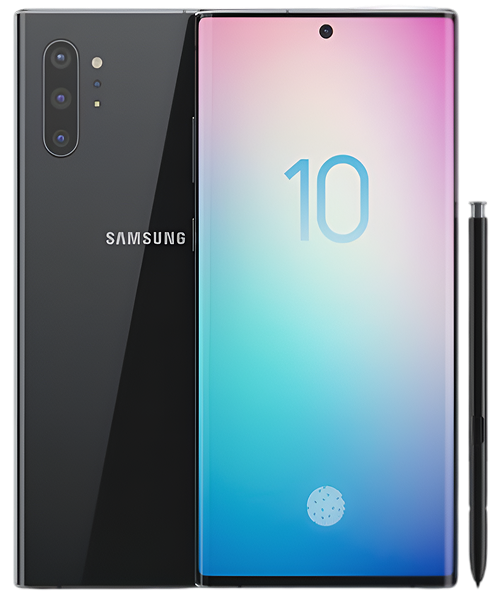
Samsung launched the Note 10 Plus in August 2019 as their everything phone. You got a 6.8-inch curved Dynamic AMOLED display, Snapdragon 855 or Exynos 9825 (region-dependent), S Pen with Air Actions, quad cameras (16MP ultra-wide, 12MP wide, 12MP telephoto, plus depth sensor), and a 4,300mAh battery. That centered hole-punch camera and nearly bezel-less design was stunning.
At The Fix, we work on Note 10 Plus devices constantly. That curved display makes screen repairs complex and expensive. The S Pen digitizer layer adds another dimension. But here's the reality—most issues are battery degradation, S Pen problems, or charging port wear. All fixable when you know what you're doing.
What Causes Tech to Break Down
Your Note 10 Plus faces aging from physics, chemistry, and mechanical stress. Let's break down what's actually happening inside that premium device.
Think about an electric lawn mower battery you've owned for years. Brand new, it mowed the entire yard. After years of seasons, it barely finishes half. Your phone's 4,300mAh battery works identically—lithium-ion cells lose capacity with every charge cycle. That large display and S Pen features drain power consistently. Fast charging generates heat accelerating degradation. After several years of daily charging, you're probably down to 2,600-2,900mAh effective capacity.
Your S Pen system faces unique aging. There's an electromagnetic digitizer layer under that entire 6.8-inch display detecting pen position. Years of note-taking, sketching, and signing creates microscopic wear on this layer. Drops can damage the digitizer without cracking glass—suddenly the pen registers incorrectly in certain zones. The S Pen itself has a tiny rechargeable battery for Air Actions that degrades from thousands of charges in its slot.
That massive curved display is both beautiful and vulnerable. Those curves are the thinnest points where glass is most susceptible to cracks. Drops concentrate impact forces at the curves. The AMOLED panel underneath is incredibly thin and delicate. Even drops that don't visibly crack glass can damage internal display layers, causing dead pixels or touch issues that spread over time near the edges.
The USB-C port battles constant wear. Daily charging plus DeX connections for desktop productivity mean thousands of cable insertions over years. Pocket lint gets compressed deep into the connector. Those internal contacts wear microscopically until connection quality suffers. The charging flex cable can work loose from the motherboard after drops—this phone's heavy, so drops are more impactful.
Software accumulation happens gradually. Your Note 10 Plus launched with Android 9 and has been updated to Android 12. Each update adds features, security patches, more background processes. One UI has grown heavier. S Pen features have expanded. All this software runs on the same Snapdragon 855 or Exynos 9825 hardware, so performance naturally degrades without maintenance.
Issue #1: S Pen Malfunction
What you're experiencing: S Pen not registering touches accurately. Cursor drifting when hovering near the screen. Lines appearing jagged or offset from actual pen position. Pressure sensitivity feels off. Air Actions (remote shutter, presentation controls) stopped working completely. Or the pen charges slowly or not at all in its slot.
Why this happens: The electromagnetic digitizer layer can develop dead zones or calibration drift from drops or pressure damage accumulated over years. The S Pen's internal battery degrades from hundreds of charge cycles. The charging contacts in the pen slot accumulate debris preventing proper contact. Software updates sometimes mess with pen calibration and Air Actions functionality.
What you can try:
- Recalibrate the S Pen in Settings → Advanced Features → S Pen → More S Pen Settings → S Pen Calibration. Do this on a flat, stable surface for best accuracy.
- Clean the S Pen tip thoroughly and the pen slot with a dry microfiber cloth—debris affects both charging and detection accuracy.
- Reset S Pen connection completely by removing pen, going to Settings → Advanced Features → S Pen → More Options → Disconnect S Pen, then reinserting it firmly.
- Test the pen systematically across the entire display to map where problems occur—this helps determine if it's calibration or hardware failure.
- Replace the S Pen tip if it's worn down—worn tips cause inaccurate input and can scratch the sensitive digitizer layer.
What really happens in most cases: About 30% of S Pen issues are calibration or software fixable with the steps above. Another 20% are just worn tips needing cheap replacement. The remaining 50% involve actual digitizer layer damage or failing pen battery. Digitizer damage requires screen replacement since it's integrated into the display assembly. Pen battery failure means replacing the S Pen itself—relatively affordable compared to screen replacement.
Issue #2: Battery Life Tanking
What you're experiencing: Full charge at morning, hunting for outlets by 3 PM with normal use. Sudden shutdowns at 30%+ battery remaining. Charging taking forever—3-4 hours to reach 100%. Phone getting hot during charging or even moderate use. Battery percentage jumping around erratically—shows 65% then suddenly drops to 48%.
Why this happens: That 4,300mAh battery seemed massive in 2019, but years of charge cycles have degraded it significantly. The 6.8-inch display drains power consistently. S Pen features keep the screen active more than typical phones. Fast charging generates substantial heat accelerating chemical degradation. After several years, you're down to maybe 2,700mAh effective capacity—barely better than a smaller phone new.
What you can try:
- Check Settings → Battery and Device Care → Battery for detailed usage breakdown. Restrict background activity for power-hungry apps you rarely actually use.
- Reduce screen brightness and timeout—Note users tend to keep displays on longer for productivity work.
- Disable Always-On Display—it's beautiful on AMOLED but power-hungry over a full day.
- Close apps after productivity sessions—multitasking leaves things running in background consuming resources.
- Factory reset after complete backup—sometimes accumulated software causes phantom battery drain that cleaning up fixes.
The consistent trend we observe: Almost every Note 10 Plus we test shows battery capacity around 60-70%. Years of fast charging that large battery creates significant heat exposure. Samsung Galaxy Note 10 Plus repair for battery replacement is straightforward, and a fresh battery typically brings full-day endurance back easily.
Issue #3: Curved Screen Damage
What you're experiencing: Crack running along the curved edge. Entire massive display shattered from a drop. Touch works but there's dead zones you work around. S Pen registers incorrectly near screen edges where curves are. Green tint appearing at low brightness—annoying AMOLED issue. Or specific areas stopped responding to both touch and S Pen input completely.
Why this happens: That 6.8-inch curved display is one of the largest smartphone screens made. The curves concentrate impact forces when dropped. Screen protectors struggle to adhere to such aggressive curves, leaving edges vulnerable. The AMOLED underneath is fragile—drops that don't crack glass can still damage display layers internally. The digitizer for S Pen is particularly vulnerable to impact damage.
What you can try:
- If touch and S Pen work properly everywhere, apply UV-cured screen protector immediately to stabilize the crack and prevent spreading.
- Try S Pen recalibration if pen-specific issues—sometimes that temporarily resets minor digitizer problems.
- For green tint issue, try different screen modes (Settings → Display → Screen Mode). Won't fix it but might reduce visibility somewhat.
- Back up all data right now—screen damage on Note devices often progressively affects the S Pen digitizer layer over time.
Issue #4: Charging Port Failure
What you're experiencing: USB-C cable feels loose in the port, doesn't click in firmly. Need to angle cable perfectly to start charging. Intermittent charging that starts and stops randomly. Wireless charging works but wired doesn't. DeX mode not connecting to external displays. Computer doesn't recognize phone for data transfer.
Why this happens: Years of charging that large battery plus DeX connections mean 3,500+ cable insertions wearing internal contacts microscopically. Pocket lint gets packed incredibly deep into USB-C port preventing proper insertion and contact. The charging flex cable can partially detach from motherboard after drops. DeX functionality is especially sensitive to port damage and poor connections.
What you can try:
- Power off completely, then carefully use wooden toothpick (never metal—you'll short the contacts) to scrape out the charging port. You'll extract surprising amounts of compressed lint.
- Follow up with compressed air to blow out remaining loose debris thoroughly.
- Test with multiple known-good cables—sometimes the cable's worn out rather than the port itself.
- Try different USB-C devices (flash drives, external storage) to isolate whether it's charging-specific or full port failure.
Our repair data reveals something interesting: About 65% of Note 10 Plus charging complaints are just debris in the port. Quick thorough cleaning fixes it completely. The remaining 35% need actual port replacement via micro-soldering—doable and relatively affordable.
Issue #5: Performance and Camera Problems
What you're experiencing: Apps taking longer to open than they used to. Camera freezing when you launch it. S Pen gestures feeling laggy and unresponsive. Phone getting hot during basic productivity tasks. Random reboots happening weekly. Or camera producing soft blurry photos, crashing when switching lenses, telephoto refusing to activate properly.
Why this happens: Software bloat from multiple major Android updates. Background apps consuming RAM constantly. The Snapdragon 855 or Exynos 9825 throttling from heat buildup. Cache accumulation over years. Four camera modules mean four potential problems—lens scratches from pockets, misalignment from drops, stabilization motor failures. S Pen processing adds computational overhead to everything.
What you can try:
- Check Device Care → Memory to see what's consuming RAM. Force stop apps you're not actively using right now.
- Clear system cache partition through Recovery Mode (Power + Volume Up during startup sequence).
- For cameras, clean all four rear lenses thoroughly with proper microfiber cloth—even tiny smudges affect photo quality noticeably.
- Clear Camera app cache and data completely (Settings → Apps → Camera → Storage → Clear Cache, then Clear Data).
- Factory reset after complete backup—often resolves both performance and mysterious camera issues simultaneously.
We Show You Exactly What's Happening Before Anything Gets Fixed
Let's walk through how we handle Note 10 Plus repairs at The Fix—specialized expertise for premium Note devices.
Comprehensive Note-Specific Diagnostics
Your phone gets testing accounting for S Pen and that massive display. Professional battery diagnostics measure actual remaining capacity in milliamp-hours—real numbers showing exactly what's left of that 4,300mAh. That huge curved display gets tested across every inch for dead pixels, touch accuracy, AND S Pen digitizer functionality. We test hover detection, pressure sensitivity across full range, Air Actions gestures.
All four cameras tested individually—ultra-wide, main, telephoto, depth sensor. We verify autofocus speed, optical stabilization on main and telephoto, lens switching smoothness, zoom functionality. USB-C port connects to our charging analyzer measuring actual power draw, fast charging negotiation capability, data transfer speeds, DeX mode compatibility. We test S Pen charging in its slot with precise current measurement.
Thermal tests under load check heat management during typical Note productivity workflows—multitasking, S Pen intensive use, DeX desktop mode. Water damage indicators checked carefully. We look for the back glass separation issue some Note 10 Plus units developed over time.
Clear Professional Assessment
We show exactly what diagnostics revealed with actual data. Battery at 68% capacity meaning only 2,924mAh remaining? You'll see the measurement. S Pen digitizer failing in specific zones? We'll demonstrate exactly where the dead areas are located. When multiple issues exist—degraded battery AND damaged digitizer screen—we discuss honestly whether fixing both makes financial sense or if one repair gets most benefit.
Straight talk: The Note 10 Plus was $1,099 new. It's now 5+ years old, but that S Pen functionality is what keeps Note users loyal to these devices. Individual repairs like battery or charging port? Worth considering if you rely on S Pen for work and productivity. Screen replacement including new digitizer? More expensive due to size and curves, but might make sense if S Pen is essential to your daily workflow.
We use high-quality parts and stand behind our work. Repair timeframes are realistic: battery replacement is same-day service, screen replacement on large curved Note displays takes 3-4 hours due to size and digitizer calibration requirements, charging port micro-soldering needs additional precision time.
Professional Note Plus Repair Process
Battery replacements open from the back. That glass back requires extremely careful heating to soften adhesive on a phone this large without damaging components. The 4,300mAh battery's firmly adhered—removal requires proper technique, the right tools, and patience. New batteries get load-tested before installation to verify performance. We verify all ribbon cable connections are secure, apply fresh adhesive precisely, test all charging functionality including 15W fast wireless.
Screen replacements on Note 10 Plus are among our most complex repairs. That 6.8-inch curved display assembly includes glass, AMOLED panel, touch digitizer, AND S Pen digitizer layer—all fused together as one expensive unit. After replacement, we must meticulously recalibrate the S Pen digitizer. Even tiny variations in screen thickness affect pen accuracy and pressure detection across that massive surface. We test S Pen extensively across the entire display.
Charging port replacements require advanced micro-soldering expertise. We desolder the old USB-C port from the motherboard and install fresh hardware with precision. This needs steady hands, proper equipment, experience with large flagship phones. We test charging with multiple cables, verify 25W fast charging negotiates properly, check data transfer works at full speed, validate DeX mode connectivity.
Thorough Quality Validation
Every repair goes through extensive testing protocol. Fresh batteries charge to 100%, we verify overnight charge retention and monitor heat levels during heavy use and charging. New screens tested systematically for dead pixels, touch accuracy across the curved surface, color uniformity, brightness response across full range.
S Pen gets rigorous testing—hover detection at various heights, pressure sensitivity across full range, Air Actions gestures all validated individually, charging in slot verified with current measurement. We test handwriting recognition accuracy, Screen Off Memo functionality, Samsung Notes, all S Pen features Note users depend on. All five cameras tested extensively in various modes and lighting conditions. Every physical button, both speakers, microphone, all sensors validated.
The phone runs stress tests under typical Note Plus workloads—heavy multitasking, S Pen intensive use, productivity apps, DeX desktop mode. We clean the device meticulously and offer UV-cured screen protector application compatible with S Pen input.
Professional Repair Costs Less Than You'd Expect
Essential Note 10 Plus Protection:
- Heavy-duty case with substantial edge protection—curved screen is extremely expensive
- UV-cured screen protector designed specifically for S Pen use
- Monthly USB-C port cleaning with wooden toothpick prevents most charging issues
- Replace S Pen tips every 6-12 months—worn tips damage the digitizer
Battery Longevity Practices:
- Charge 20-80% when possible to significantly extend that large battery's lifespan
- Close apps after productivity sessions—multitasking leaves things running
- Reduce screen timeout—Note users keep displays on longer than average
- Fast charging generates heat—use standard charging overnight when possible
S Pen Care:
- Keep multiple replacement tips available—worn tips are the enemy
- Clean pen slot monthly to maintain proper charging contacts
- Recalibrate S Pen quarterly even if working fine—maintains accuracy
- Test pressure sensitivity periodically in Samsung Notes app
Performance Maintenance:
- Weekly restarts clear memory leaks from heavy multitasking
- Monthly cache clearing through Device Care
- Uninstall apps not used in months—they consume resources in background
- Keep One UI updated for S Pen improvements and security patches
Expert Care Extends Your Device's Lifespan
Your Galaxy Note 10 Plus represented the peak of Note design in 2019. That S Pen functionality, quad cameras, massive curved display—it was built for professionals who needed real productivity tools. The fact you're considering repair shows you understand what makes Note Plus devices irreplaceable for certain workflows.
Most Note 10 Plus problems—degraded batteries, S Pen digitizer issues, curved display damage, worn charging ports—are repairable when approached with proper expertise. These issues don't signal the end. Samsung Galaxy Note 10 Plus repair addresses these problems at costs that make sense when you're maintaining professional productivity tools you rely on daily.
Think about the value proposition: battery replacement extends productive life 1-2 years. S Pen functionality can be restored with proper screen and digitizer replacement. Charging port replacement keeps DeX mode working for presentations and desktop productivity. These repairs make financial sense when the alternative is losing the S Pen capabilities you depend on.
Understanding Samsung Galaxy Note 10 Plus Repair: A Professional Breakdown at The Fix. We specialize in Note devices and understand what makes the Note 10 Plus special—that massive S Pen digitizer, the curved display calibration challenges, the quad-camera system, the productivity-focused thermal profile, the common failure points after 5+ years of professional use.
Stop by for a free diagnostic. We'll test battery health realistically, S Pen digitizer functionality across that massive display, camera system performance, charging and DeX capabilities. No pressure—just expert evaluation from techs who've worked on hundreds of Note 10 Plus devices and understand why professionals can't give up that S Pen. Your Note 10 Plus deserves care from people who understand it's a productivity tool, not just a phone.


Trusted repair solution for mobile phones, tablets, gaming consoles, and computer systems. We provide fast, reliable, and affordable repair services to get your devices back in perfect working condition.
The Fix is an independent repair service provider and is not affiliated with, sponsored by, or endorsed by Apple Inc., Samsung Electronics, Google LLC, or any other device manufacturer. We use high-quality compatible replacement parts unless explicitly stated. All trademarks are property of their respective owners.


© Copyright The Fix Solutions All rights reserved 2026.
Design by Deepcoder