






Samsung Galaxy A51 Repair Services
Get fast, reliable, and professional Samsung Galaxy A51 repair services at The Fix — your trusted destination for expert device care.
Common Repairs We Handle Daily


Solve Your Samsung Galaxy A51 Problems: Repair Solutions
You bought the Galaxy A51 back in 2020 because it offered flagship looks at mid-range pricing—that punch-hole display, quad cameras, and 4,000mAh battery made it Samsung's best-selling phone that year. But now, 4+ years later, maybe that battery's barely lasting a few hours, the screen has damage, or the charging port's being difficult about connecting.
Here's the reality: after 4+ years, most people assume their phone's done. But if the A51 still does what you need, repair might make sense depending on what's wrong. This guide shows you what fails on these older mid-rangers and when Samsung Galaxy A51 repair is worth considering versus upgrading. Let's figure out your situation.
The A51's Surprising Longevity
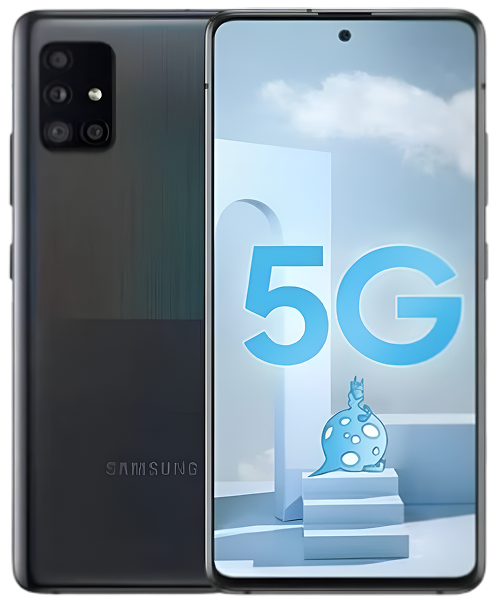
Samsung released the A51 in December 2019 as their volume mid-ranger. You got a 6.5-inch Super AMOLED display, Exynos 9611 processor, quad cameras (48MP main, 12MP ultra-wide, 5MP macro, 5MP depth), and a 4,000mAh battery. That punch-hole display and prism design looked premium for $399.
At The Fix, we still see A51 units regularly because Samsung sold millions of these. After 4-5 years, most issues are severe battery degradation, screen damage from years of use, or charging port failure. These are technically repairable, but the real question is whether investing in a 2020 mid-ranger makes financial sense.
Why Your A51 Isn't What It Was
Your A51 has faced more wear than most phones survive. Let's talk about what 4-5 years does to mid-range devices.
Think about a laptop from 2020. The battery doesn't hold charge like it used to, performance is noticeably slower, and it struggles with modern software. Your phone's 4,000mAh battery is in similar shape. After years of charge cycles, lithium-ion cells seriously degrade. You're probably down to 40-60% of original capacity—maybe 1,600-2,400mAh effective. That's not enough for even half a day anymore.
Your display has survived years of constant use. That Super AMOLED panel has been on for thousands of hours. AMOLED burn-in from static elements like navigation bars is probably visible. The oleophobic coating is completely worn away. Touch responsiveness has decreased. Years of flexing in pockets have created stress on the panel.
The USB-C port has been through thousands of charge cycles. After 4-5 years of twice-daily charging, that's 3,000+ cable insertions. Each one creates microscopic wear on internal contacts. Years of pocket lint are compressed incredibly deep into the connector. The charging flex cable has been stressed thousands of times and is probably partially failing.
Software is frozen in time. Your A51 launched with Android 10 and got updates through Android 13. That's it—no more updates, no security patches, no optimization. Apps designed for Android 14 and 15 don't run well on your outdated system. The Exynos 9611 struggles with modern app demands. Performance degradation is severe on phones this old.
Problem #1: Battery Basically Dead
What you're experiencing: Phone dies after 2-4 hours of minimal use. Shuts down at 50%+ remaining. Won't hold charge at all. Gets hot when charging. Battery percentage meaningless—shows 45% then dies suddenly.
Why this happens: After 4-5 years of charge cycles, that 4,000mAh battery is catastrophically degraded. You're probably down to 1,800mAh or less effective capacity—not even enough for basic use. Chemical degradation after this long is extreme. The battery might be swelling, which is dangerous.
What you can try:
- Check for back cover bulging—swollen battery is immediate safety hazard requiring professional attention.
- Keep phone plugged in near outlet—not a solution but manages the problem temporarily.
- Carry a power bank if keeping the phone longer.
After repairing these devices daily: Every A51 we see has severely degraded batteries. Samsung Galaxy A51 repair for battery is technically possible, but the question is whether investing in a 4-5 year old phone with no software support makes financial sense.
Problem #2: Screen Issues
What you're experiencing: Cracks from accumulated drops over years. Touch not working properly. Visible burn-in from static elements. Display discoloration. Dead pixels spreading.
Why this happens: Years of use create serious wear. That AMOLED has burn-in from thousands of hours displaying navigation bars and keyboards. Drops over years damaged the panel internally. The digitizer is worn from constant touch input. The display is just old.
What you can try:
- Screen replacement is possible but expensive relative to phone's current value.
- If touch works, you can live with burn-in and minor cracks.
- External display via OTG adapter is workaround for dead touch zones.
Problem #3: Charging Port Failure
What you're experiencing: USB-C cable won't stay in port. Can't charge at all. Need to hold cable at specific angle. Port looks physically damaged or loose inside.
Why this happens: After 4-5 years of daily charging, that port is worn out. The metal contacts are damaged. The plastic housing inside is cracked. The flex cable connection to the board is failing. Years of stress have taken their toll.
What you can try:
- Clean port thoroughly with toothpick—years of compressed lint are in there.
- Try different cables—some might make better contact than others.
- Wireless charging isn't available on A51, so port failure is critical issue.
What the data shows from our repairs: USB-C ports on 4-5 year old mid-rangers are usually beyond simple cleaning. Port replacement requires micro-soldering expertise, and cost relative to phone's current value makes repair questionable.
Problem #4: Performance Unusable
What you're experiencing: Apps crashing constantly. Phone freezing regularly. Takes minutes to open anything. Overheating during basic tasks. Random reboots daily. Everything just slow.
Why this happens: The Exynos 9611 was mid-range in 2020—it's completely overwhelmed by 2024/2025 apps. Android 13 is outdated. Modern apps are built for newer hardware. Cache and data from 4-5 years bogs everything down severely. The processor can't keep up.
What you can try:
- Factory reset might help temporarily but won't fix fundamental hardware limitations.
- Use only lightweight essential apps—avoid heavy social media, games, etc.
- Consider this phone for emergency backup only, not daily driver.
Problem #5: Everything Else Failing
What you're experiencing: Camera producing terrible photos. Connectivity issues. Random component failures. Just generally old, slow, unreliable.
Why this happens: Four to five years is ancient for mid-range smartphones. Every component is degraded. That 48MP camera sensor is outdated and damaged. Software can't optimize modern photography. WiFi and cellular radios are weak. Everything's worn out.
The Honest Truth About A51 Repair
Let's have a real conversation about whether A51 repair makes sense.
The Technical Reality
We can repair most A51 issues—battery replacement, screen replacement, charging port micro-soldering. Our techs have the skills and tools. But technical possibility isn't the question. The question is whether you should invest in a 2020 mid-ranger with no software support.
The Financial Reality
The A51 was $399 new in 2020. It's now worth maybe $40-60 as a used phone. Battery replacement costs more than the phone's current value. Screen replacement costs several times what the phone is worth. Even charging port repair approaches or exceeds the phone's value.
The Software Reality
This phone stopped getting updates at Android 13. That means no security patches, no optimization, no new features. Modern apps are dropping Android 13 support. Banking apps, payment apps, security apps—they require newer Android versions. The A51 is becoming unusable not because hardware failed, but because software moved on.
Our Honest Recommendation
If your A51 is working: Use it until it completely dies. Don't invest in repairs.
If battery is dead but everything else works: Battery replacement might buy you 6-12 months if you're on extremely tight budget and only need basic functions. But understand you're investing in outdated hardware with no software support.
If screen is broken: Don't repair. Screen costs more than buying a used A51 in better condition or a newer budget phone.
If charging port is dead: Port replacement is possible but cost doesn't make sense. Use the money toward an upgrade.
Better Options
For the cost of A51 repairs, you could get:
- Used Galaxy A32 or A33 (2021-2022) with better specs, ongoing software support
- New budget phone like A14 or A15 5G with modern Android, years of updates ahead
- Certified refurbished A52 or A53 5G with significantly better performance
But If You Must Repair
We understand tight budgets. If you're determined to repair your A51:
Battery Replacement: We can do it. Takes about an hour. Will improve usability significantly. But you're investing in a phone with no software support, severe performance limitations, and outdated security.
Screen Replacement: Technically possible. Takes 1-2 hours. Expensive relative to phone's value. Only makes sense if phone has major sentimental value.
Charging Port: Requires micro-soldering. We can do it but cost vs. value strongly favors upgrading instead.
We use high-quality parts and stand behind our work even on older phones. But we'll be completely honest about whether repair makes financial sense for your specific situation.
What Actually Makes Sense
If A51 is working: Keep using it until it completely dies. Don't invest in repairs at this point.
If one major issue: Consider whether repair cost gives you meaningful additional time or if upgrading makes more sense financially.
If multiple issues: Definitely upgrade. Don't throw money at a 4-5 year old mid-ranger with compounding problems and no software support.
Smart Upgrade Path: Look at used A-series from 2022-2023 or new budget models. You'll get better performance, modern software, security updates, and years of support ahead.
The Realistic Bottom Line
Your Galaxy A51 served you well for 4-5 years—that's impressive longevity for a mid-range phone. But there's a point where repair doesn't make financial or practical sense. A 2020 mid-ranger with no software support, severely degraded battery, worn components, and struggling processor has reached end of life.
We'll repair it if you want—we have the expertise. But we'll be honest that your money is better spent on even a modest upgrade. A used 2022 mid-ranger or new 2024 budget phone will give you better performance, security updates, app compatibility, and years of useful life ahead.
Most importantly, that new phone will actually work reliably. Your A51 at this point is fighting against both hardware degradation and software obsolescence. That's a battle you can't win with repairs alone.
Solve Your A51 Problems: Samsung Galaxy A51 Repair Solutions at The Fix. We'll diagnose it for free, show you exactly what's wrong, and give completely honest advice about repair versus upgrade. Sometimes the right answer is repair. Often with 4-5 year old mid-rangers, it's knowing when to let go and invest in something that serves you better.
Your A51 lasted longer than most phones—that shows you take care of your devices. Let's figure out the smartest next move for your situation and budget together.


Trusted repair solution for mobile phones, tablets, gaming consoles, and computer systems. We provide fast, reliable, and affordable repair services to get your devices back in perfect working condition.
The Fix is an independent repair service provider and is not affiliated with, sponsored by, or endorsed by Apple Inc., Samsung Electronics, Google LLC, or any other device manufacturer. We use high-quality compatible replacement parts unless explicitly stated. All trademarks are property of their respective owners.


© Copyright The Fix Solutions All rights reserved 2026.
Design by Deepcoder