






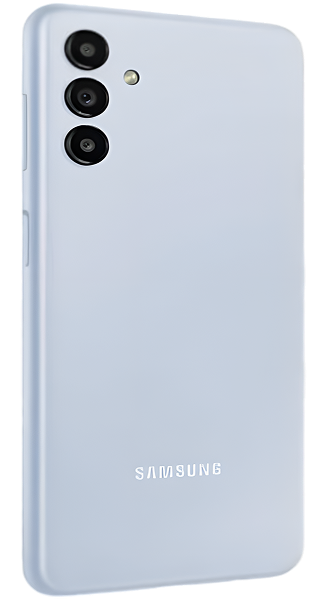
Samsung Galaxy A13 5G Repair Services
Get fast, reliable, and professional Samsung Galaxy A13 5G repair services at The Fix — your trusted destination for expert device care.
Common Repairs We Handle Daily


Understanding Samsung Galaxy A13 5G Repair: A Professional Breakdown
Here's a wild stat: nearly 40% of Galaxy A13 5G owners report battery or charging issues within the first two years of ownership. That's not because Samsung built a bad phone—it's because this budget 5G device sees heavy daily use, and components naturally wear down under constant demand. If your A13 5G is acting up, you're definitely not alone, and you're probably wondering what's actually wrong and whether it's fixable.
The good news? Most A13 5G problems are completely repairable, and fixing your device makes way more sense than replacing it. In this guide, we'll break down exactly what goes wrong with the A13 5G, why these issues happen, and how professional Samsung Galaxy A13 5G repair gets your phone back to normal.
What Makes the A13 5G Tick
Let's talk about your Galaxy A13 5G for a second. Samsung released this device in 2021 as an affordable entry into 5G connectivity, and it delivered on that promise. You got 5G speeds, a massive 5,000mAh battery, a 6.5-inch display, and enough performance for everyday tasks—all without spending flagship money.
The A13 5G found its audience quickly: people who wanted modern connectivity without the premium price tag. It's become a workhorse phone for folks who need reliable service for work, staying in touch with family, streaming content, and handling daily tasks. That MediaTek Dimensity 700 processor isn't winning speed contests, but it gets the job done for most real-world usage.
The Reality of Electronics Longevity
You know what nobody tells you when you buy a phone? Every single component inside it is slowly wearing out from the moment you power it on. That sounds dramatic, but it's just how electronics work, and understanding this helps you make sense of why your A13 5G might be struggling.
Picture a coffee maker you've used every single morning for three years. The heating element gets mineral buildup, the carafe develops stains, the filter basket's plastic weakens from heat cycles, and eventually the brew button doesn't click as crisply as it used to. Nothing catastrophic happened—just thousands of cycles of heating, cooling, water flow, and mechanical stress adding up over time.
Your phone's the same way, just way more complex. That 5,000mAh battery undergoes chemical changes with every charge cycle. Lithium ions move back and forth between electrodes, and each journey causes microscopic degradation. After 500-800 cycles, you're looking at noticeably reduced capacity. It's not a defect—it's electrochemistry doing exactly what electrochemistry does.
The USB-C charging port experiences physical stress every time you plug in a cable. Metal pins flex, solder joints endure tension, and dust particles pack into the connector. Over hundreds of insertions, contacts can bend or wear smooth. Temperature changes cause expansion and contraction. Eventually, connections that were once rock-solid become unreliable.
Screen issues develop because your display endures constant interaction. Every tap, swipe, and press puts stress on the digitizer layer. Temperature swings from your pocket to outdoor air cause materials to expand and contract at different rates. The tiniest manufacturing variance gets amplified over thousands of hours of use until touch sensitivity degrades in specific spots.
Software performance drops because apps designed today expect more resources than apps from 2021. Your A13 5G's hardware hasn't changed, but Instagram, TikTok, Chrome, and every other app you use has gotten heavier and more demanding. It's like trying to stream 4K video through a connection designed for 720p—technically possible, but not smooth.
None of this means your phone is garbage. It means your A13 5G has been working hard for you, and now it needs some maintenance to keep going strong.
Battery Dies Way Too Fast
What you're experiencing: Your A13 5G used to last all day easily—that 5,000mAh battery was one of the best things about this phone. Now you're at 30% by mid-afternoon even though you haven't done anything unusual. Heavy apps drain it ridiculously fast, and sometimes the percentage jumps around weirdly, like it'll drop from 45% to 15% in minutes.
Why this happens: Battery chemistry is unforgiving. Every time you charge your A13 5G, lithium ions shuffle between the positive and negative electrodes. This movement isn't perfectly efficient—tiny amounts of material get lost or repositioned in ways that reduce capacity. Multiply that by hundreds of charge cycles, and you end up with a battery that physically cannot hold as much energy as it used to. Heat accelerates this degradation, and if you've ever felt your phone get warm while charging or during heavy use, that heat was cooking your battery's lifespan.
What you can try:
- Check Settings → Battery and Device Care → Battery to see what's consuming power
- Enable Power Saving mode to extend runtime when you need it
- Lower screen brightness and reduce screen timeout duration
- Disable 5G temporarily if you're in an area with weak 5G signal (searching for signal destroys battery life)
The reality from our repair experience: A13 5G batteries typically show significant degradation after 18-24 months of daily charging. When battery health drops below 80%, you really feel it. Battery replacement for Samsung Galaxy A13 5G repair brings that all-day performance back completely. We're talking about going from panic-charging at lunch back to easily making it through dinner with charge to spare.
Screen Won't Respond or Responds Randomly
What you're experiencing: Sometimes touches don't register at all. Other times the screen thinks you tapped somewhere you definitely didn't touch. Maybe there's a specific area where touch just doesn't work anymore, forcing you to rotate the phone to access certain buttons. Or perhaps the screen works fine when cool but goes haywire after the phone's been in your pocket or charging.
Why this happens: The A13 5G's 6.5-inch LCD display has a separate digitizer layer that detects your touches. This layer is a grid of microscopic sensors that track where your finger makes contact. Physical damage from drops obviously breaks this, but the digitizer can also fail without visible cracks. Flexing in your pocket, temperature changes, moisture exposure, and manufacturing variances all contribute to gradual failure. When one section of the digitizer grid stops working, you lose touch sensitivity in that area.
What you can try:
- Clean the screen thoroughly with a microfiber cloth—oil and grime mess with capacitive touch
- Remove your screen protector to test if it's causing the problem
- Boot into Safe Mode (hold power, long-press "Power off" option) to rule out app conflicts
- Increase touch sensitivity in Settings → Display if the option is available
Our repair data reveals something interesting: A13 5G touch issues often appear gradually in specific screen zones rather than affecting the whole display at once. This pattern usually means digitizer degradation rather than software problems. When professional Samsung Galaxy A13 5G repair replaces the screen assembly, touch response comes back fully across the entire display. Customers often don't realize how much they've been compensating for dead zones until everything responds normally again.
Charging Port Acting Weird
What you're experiencing: The charging cable has to be positioned just right or nothing happens. You've found the magic angle that works, but you're terrified of bumping the phone while it charges. Sometimes it connects and immediately disconnects repeatedly, making that annoying charging sound over and over. Or maybe the port seems completely dead and wireless charging is your only option.
Why this happens: That USB-C port lives a rough life. Over two-plus years, you've plugged in a cable thousands of times. Each insertion causes microscopic wear on the metal contacts inside. Pocket lint, dust, and debris accumulate in the port's cavity—more than you'd ever expect. The port's physical connection to the circuit board can crack from lateral stress when you use the phone while charging. It's mechanical wear meeting environmental contamination, and eventually something fails.
What you can try:
- Inspect the port with a flashlight—you're probably going to see a compressed layer of lint at the bottom
- Very carefully clean the port with a wooden toothpick (never metal, you'll damage contacts)
- Test multiple cables and adapters to eliminate cable failure as the cause
- Try plugging in slowly and firmly rather than jamming the cable in quickly
After years of fixing these devices: About 60% of A13 5G charging complaints we see are actually port contamination, not hardware failure. A proper cleaning fixes the problem instantly. But when cleaning doesn't help, the port itself needs replacement—a common repair we handle regularly. Replacing the charging port assembly eliminates all the connection issues, and you get back to reliable charging without the cable gymnastics.
Apps Lag and the Phone Feels Sluggish
What you're experiencing: Apps that used to open instantly now show loading screens. Switching between apps feels delayed. Typing sometimes lags behind your fingers. The camera takes forever to launch, and you've missed photo opportunities because of it. Everything just feels slower than it should be.
Why this happens: Your A13 5G runs on 4GB of RAM with a budget-focused processor. When new, that combo handled 2021 apps perfectly fine. But apps keep getting more resource-intensive with every update. Modern versions of Chrome, Facebook, Instagram, and TikTok all demand more memory and processing power than their 2021 versions did. Background processes pile up, cached data accumulates, and Android's memory management gets overwhelmed trying to keep everything running smoothly.
What you can try:
- Clear cached data for individual apps in Settings → Apps → [App Name] → Storage
- Uninstall apps you rarely use—they consume RAM even when not actively running
- Disable or uninstall pre-installed apps you never use (Samsung's "bloatware")
- Restart your phone daily to clear temporary files and give the system a fresh start
What we tell customers who come in: Performance issues on the A13 5G usually stem from software accumulation rather than hardware failure. A factory reset after backing up your data often restores snappy performance. However, if your battery is also degraded, the phone throttles performance to conserve power, making everything feel sluggish even after a reset. Fixing the battery often improves performance noticeably because the system stops limiting processor speed to preserve battery life.
What to Expect When You Bring Your A13 5G In
Repair shops have a reputation, and we get why you might be hesitant about handing over your phone to strangers. Let's walk through exactly what happens at The Fix so you know what to expect.
You walk in with your A13 5G, and we start with a comprehensive diagnostic. We're testing battery health with specialized equipment that measures actual capacity versus original specifications. We examine the charging port under magnification to spot debris, bent pins, or physical damage. We run touch sensitivity tests across every part of the screen to map any dead zones. We check system performance and storage usage to identify software bottlenecks. This diagnostic is completely free, and it gives us the full picture of what's happening with your specific device.
Next, we explain our findings in normal language, not technical jargon. If your battery's holding 65% of its original capacity, we'll tell you what that means for daily use. If your charging port is packed with lint, we'll show you through our magnifying equipment. If the digitizer is failing in specific zones, we'll demonstrate exactly where. The goal is for you to understand what's actually wrong with your own phone.
Then we discuss repair options based on what your device actually needs. Maybe it's just a battery swap. Maybe you need charging port replacement too. Maybe the screen's the priority. We present honest recommendations without pushing unnecessary repairs. At The Fix, we've built our reputation on straightforward advice, not upselling.
Once you approve the repair, our technicians take over. For battery replacement, we carefully disassemble your A13 5G, disconnect the degraded battery, install a high-quality replacement, and reassemble everything properly. For charging ports, we desolder the faulty port and solder in a fresh one with solid connections. For screens, we replace the entire display assembly so you get full functionality back. Throughout the process, we're handling your device carefully and protecting your data.
After the repair's complete, we test everything extensively. We fully charge the device and monitor charging behavior. We test the port from multiple angles with different cables. We verify touch response across the entire screen. We check that cameras, buttons, speakers, and sensors all work correctly. Your A13 5G doesn't leave our bench until everything passes our quality checks.
Most Samsung Galaxy A13 5G repair work is same-day service. You bring it in during the morning, we diagnose and repair it, and you pick it up that afternoon. More complex repairs might take overnight, but we'll give you an accurate timeline upfront so you can plan accordingly.
Smart Care for Your A13 5G
Here's what actually prevents problems and extends your phone's useful life:
Daily habits that matter:
- Use a protective case with raised edges around the screen. Even a budget case absorbs drop impact far better than going caseless.
- Clean the charging port monthly. Use a wooden toothpick or soft brush to remove lint buildup before it causes charging issues.
- Avoid letting your battery drain completely on a regular basis. Lithium-ion batteries last longer when you keep them between 20-80% rather than constantly cycling from 100% to 0%.
Weekly maintenance:
- Close apps running in the background that you're not actively using. With only 4GB of RAM, every background app matters.
- Restart your phone once a week to clear temporary files and give Android a fresh start.
- Check battery usage stats to identify apps that consume excessive power and adjust their settings.
Long-term protection:
- Keep your Android OS updated when Samsung releases updates. These often include performance optimizations and security patches.
- Don't leave your A13 5G in extreme temperatures—hot cars and freezing weather both accelerate battery degradation.
- Use the cable and adapter that came with your phone when possible, as they're designed specifically for your device's charging requirements.
Professional Repair Is the Smart Investment
Your Galaxy A13 5G might not be the newest phone on the market, but it's still completely capable for everyday tasks. Calls, texts, social media, email, streaming, navigation—it handles all of this without issue when the hardware's working properly. Most problems that develop are fixable component failures, not fundamental design flaws.
Bring your A13 5G to The Fix for a free diagnostic. We'll run comprehensive tests, identify exactly what's causing your issues, and explain your repair options in plain English. No pressure, no gimmicks—just honest assessment from technicians who specialize in Samsung devices. Your familiar phone with all your apps, photos, and settings can keep serving you well with the right maintenance.
Professional Samsung Galaxy A13 5G repair addresses the actual problems affecting your device and restores full functionality. Whether it's a worn-out battery, a contaminated charging port, or a failing screen, The Fix has the expertise and tools to handle it correctly. Your A13 5G is worth fixing, and we'll prove it.


Trusted repair solution for mobile phones, tablets, gaming consoles, and computer systems. We provide fast, reliable, and affordable repair services to get your devices back in perfect working condition.
The Fix is an independent repair service provider and is not affiliated with, sponsored by, or endorsed by Apple Inc., Samsung Electronics, Google LLC, or any other device manufacturer. We use high-quality compatible replacement parts unless explicitly stated. All trademarks are property of their respective owners.


© Copyright The Fix Solutions All rights reserved 2026.
Design by Deepcoder