






Samsung Galaxy A12 Repair Services
Get fast, reliable, and professional Samsung Galaxy A12 repair services at The Fix — your trusted destination for expert device care.
Common Repairs We Handle Daily


Save Money With Samsung Galaxy A12 Repair: A Complete Value Guide
Why does your Galaxy A12 keep acting up after years of solid service? Let's be honest—you've probably thought about replacing it, but then you see the price tags on new phones and wonder if repair makes more sense. Here's what matters: most A12 issues are totally fixable, and professional repair costs way less than buying a replacement device. Whether it's battery drain, screen damage, or charging problems, fixing what's broken often beats starting over.
In this guide, we'll show you exactly what goes wrong with the A12, why these problems develop, and how Samsung Galaxy A12 repair can save you money while keeping your familiar device running smoothly. You're about to see why repair is the smarter financial choice.
Your Galaxy A12: The Quick Rundown
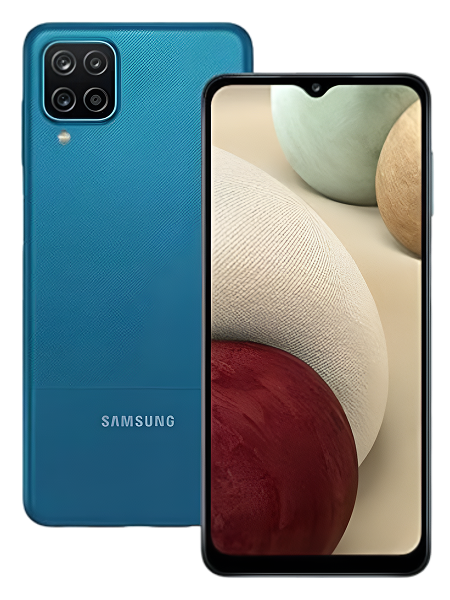
Samsung released the Galaxy A12 in late 2020, positioning it as an affordable option that still delivered on the basics. You got a big 6.5-inch display, quad cameras, a massive 5,000mAh battery, and enough performance for everyday tasks. It wasn't trying to compete with flagships—it was designed to be a practical, budget-friendly phone that just works.
Here's what makes the A12 interesting: it became one of Samsung's best-selling budget phones because it nailed the value proposition. Decent screen, long battery life, multiple cameras, and a price point that didn't require financing. People bought these for their kids, as backup phones, or simply as affordable daily drivers. That MediaTek Helio P35 processor won't blow anyone away, but for texts, calls, social media, and streaming? It handles the job fine.
How Time Affects Your Tech
Something interesting happens with electronics that nobody really talks about—they're all on a countdown from day one. Not because they're poorly made, but because physics and chemistry don't care how expensive your device was or how carefully you treat it.
Think about a cordless drill you've owned for years. When it was new, that battery held a charge forever and the drill had tons of torque. Fast forward three years: the battery dies halfway through projects, the trigger feels looser, and the chuck doesn't grip bits quite as firmly. You didn't abuse it—you just used it for what it was designed to do. All those charge cycles, mechanical movements, and work sessions added up to gradual wear.
Your A12 experiences the same reality, just with more sophisticated components. That 5,000mAh battery goes through chemical changes with every single charge. Lithium ions migrate between electrodes, leaving behind microscopic deposits that reduce capacity. Heat from charging and heavy use accelerates this degradation. After 500-800 cycles over a few years, you're looking at a battery that legitimately holds less energy than it used to—it's not your imagination.
The charging port takes physical punishment constantly. Every cable insertion flexes those metal contacts slightly. Dust and lint from your pocket pack into the connector cavity like it's their job. Temperature changes cause expansion and contraction of different materials at different rates, creating stress on solder joints. Eventually, a connection that was once solid becomes intermittent or fails completely.
Your display endures constant interaction—thousands of taps, swipes, and presses every day. The LCD panel and digitizer layer both deal with mechanical stress from every touch. Flexing in your pocket or bag puts tension on the display assembly. One drop can create internal damage that doesn't show externally but affects touch sensitivity. Over time, these accumulated stresses manifest as dead zones or erratic touch response.
Software slows down because apps keep getting bigger and more demanding. Your A12's 3GB of RAM was adequate for 2020 apps, but Instagram, TikTok, Chrome, and every other app you use has added features and functionality that consume more resources. Android updates bring new capabilities that require more system memory. Your hardware hasn't changed, but the demands placed on it absolutely have.
None of this is a design flaw. It's just what happens when you use a device daily for years. The good news? Most of it's fixable with straightforward Samsung Galaxy A12 repair.
The Power Problem Everyone Faces
What you're experiencing: Can't make it through work without charging twice. Battery dies before dinner even though you charged fully. Phone's dead by noon every single day. You charge to 100% in the morning and you're at 20% by lunch. The percentage sometimes drops weirdly fast, like it'll go from 50% to 15% in what feels like minutes.
Why this happens: Battery degradation is pure chemistry, and chemistry doesn't negotiate. Inside that 5,000mAh battery, lithium ions shuttle back and forth between the anode and cathode during charging and discharging. This process isn't perfectly reversible—tiny amounts of lithium get trapped or form unwanted compounds with each cycle. The electrolyte breaks down gradually. Electrodes develop surface layers that impede ion flow. Multiply this by hundreds or thousands of cycles, and capacity drops significantly. Your A12's battery isn't broken—it's just chemically exhausted.
What you can try:
- Check Settings → Battery and Device Care to identify apps draining excessive power
- Reduce screen brightness and enable adaptive brightness so it adjusts automatically
- Turn off 5G if your A12 model supports it and you're in an area with weak signal
- Enable Power Saving mode during the day to squeeze out extra runtime
- Close background apps manually since you've only got 3GB of RAM to work with
What actually happens with most units: A12 batteries start showing noticeable degradation around the 18-month mark with daily charging. When capacity drops to 70-75% of original, that's when users really feel the difference. Battery replacement brings back that reliable all-day performance you remember when the phone was new. We're talking about eliminating the anxiety of constantly searching for outlets and actually trusting your phone to last through the day again.
When Your Screen Acts Weird
What you're experiencing: Touches don't register where you tap them. The screen seems to have a mind of its own, opening apps you didn't touch. Maybe there's visible damage—cracks, black spots, discoloration—from that unfortunate drop. Or perhaps the screen looks fine but specific areas just won't respond to touch no matter what you do.
Why this happens: A12 screens face a tough existence. That 6.5-inch LCD display might be big and functional, but it's also vulnerable. The glass can shatter from drops, obviously. But even without visible damage, the digitizer layer underneath that detects your touches can fail over time. Repeated flexing in your pocket stresses the display assembly. Temperature swings cause materials with different expansion rates to pull against each other. Manufacturing tolerances mean some displays are more fragile than others from day one.
What you can try:
- Clean the screen thoroughly with a microfiber cloth—sometimes it's just accumulated grime
- Remove your screen protector temporarily to see if it's causing touch issues
- Restart your phone to clear any temporary software glitches
- Test touch sensitivity by opening a drawing app and scribbling across the entire screen to identify dead zones
The consistent trend we observe: A12 screen damage typically falls into two categories—obvious physical cracks from drops, and mysterious touch problems that develop without visible damage. Both are fixable with screen replacement. When we replace an A12 display assembly, customers often don't realize how much they'd been compensating for poor touch response until everything works normally again. That frustration of having to tap things three times? Gone.
Charging Has Become Your Full-Time Job
What you're experiencing: Cable needs to be held at exactly the right angle or charging stops entirely. Sometimes it charges, sometimes it doesn't, and the pattern makes no sense. You've memorized every outlet location in your building. Fast charging doesn't work anymore even though you're using the same adapter. Or maybe it's gotten so bad that the port seems completely dead and wireless charging is your only option—except the A12 doesn't have wireless charging.
Why this happens: Your USB-C port has been plugged and unplugged literally thousands of times over three-plus years. Each insertion causes microscopic wear on the metal contacts inside the port. Pocket lint, dust particles, and debris pack into the connector cavity and compress into a dense mat at the bottom. The port housing can crack or detach from the circuit board if you've used the phone while charging and put lateral stress on the cable. Corrosion from moisture exposure degrades electrical contacts. It's the perfect storm of mechanical wear and environmental contamination.
What you can try:
- Inspect the port with a bright light—you'll probably see way more lint than you expected
- Very gently clean the port with a wooden toothpick, scraping debris from the bottom (never use metal)
- Try multiple cables and adapters to rule out cable failure rather than port failure
- Plug in slowly and firmly rather than jamming the cable in quickly, which bends the contacts
Real-world repair results show: Roughly 65% of A12 charging complaints we encounter are actually port contamination rather than hardware failure. A thorough professional cleaning solves the issue completely. When cleaning doesn't work, the charging port assembly needs replacement—a straightforward repair that restores reliable charging. After Samsung Galaxy A12 repair of the charging port, you get back to normal charging without the cable angle gymnastics or connection anxiety.
Everything Feels Ridiculously Slow
What you're experiencing: Apps take forever to open. Switching between apps shows loading screens every time. The keyboard lags behind your typing. Photos take several seconds to save after you tap the shutter button. Everything just feels sluggish and frustrating compared to how responsive the phone used to be.
Why this happens: Your A12 runs on 3GB of RAM with a budget-tier MediaTek processor. In 2020, that combo handled daily tasks fine. But modern apps have grown significantly more resource-intensive. Every app update adds features, and features require memory and processing power. Social media apps now load high-resolution videos automatically. Messaging apps add stories and video calls. Even simple apps like settings menus have gotten more complex. Your A12's hardware hasn't changed, but the software environment it operates in has become far more demanding.
What you can try:
- Clear app cache regularly for apps you use most: Settings → Apps → [App Name] → Storage → Clear Cache
- Uninstall apps you haven't opened in months—they still consume RAM even when not running
- Disable pre-installed Samsung and carrier apps you never use
- Factory reset after backing everything up (this often dramatically improves performance)
- Avoid installing heavy launcher replacements or live wallpapers that consume resources
Working with these daily teaches you: Performance degradation on the A12 usually stems from software accumulation rather than hardware failure. A clean factory reset restores surprisingly snappy performance in most cases. However, if the battery is also degraded, the system throttles CPU performance to conserve power, making everything feel slow. Addressing the battery issue often improves perceived performance because the processor stops being artificially limited.
Here's Exactly How We Fix Your Galaxy A12 (No Surprises)
We know repair shops can feel intimidating, especially when you're handing over a device that contains your entire digital life. Let's walk through what actually happens at The Fix so you know exactly what to expect.
You come in with your A12, and we immediately start with a free diagnostic assessment. We're using specialized equipment to measure battery health—actual remaining capacity versus original specifications. We inspect the charging port under magnification to identify debris, bent pins, or corrosion. We run systematic touch tests across the entire screen to map any areas with reduced sensitivity. We check system performance, storage usage, and app behavior to identify software bottlenecks. This diagnostic gives us the complete picture of your device's condition.
Then we sit down with you and explain what we found using plain language instead of technical jargon. If your battery's at 68% health, we'll explain what that means for your daily usage patterns. If your charging port is packed with compressed lint, we'll show you through our magnification equipment. If specific screen zones aren't responding to touch, we'll demonstrate exactly where and why. You deserve to understand what's happening with your own device.
Next we discuss repair options based on what your A12 actually needs. Maybe it's just battery replacement. Maybe you need the charging port replaced too. Maybe the screen is the priority issue. We give you honest recommendations based on our diagnostic findings without pushing services you don't need. The Fix has built a reputation on straightforward advice rather than upselling.
Once you approve the repair work, our experienced technicians handle your device. For battery replacement, we carefully open your A12's back panel, disconnect the degraded battery, install a high-quality replacement, and reassemble everything with proper sealing. For charging port replacement, we desolder the failed port and install a new assembly with solid electrical connections. For screen replacement, we swap the entire display assembly to restore full touch sensitivity and visual quality. Throughout every repair, we're protecting your data and handling your device with care.
After completing the repair, we run extensive testing before calling you for pickup. We fully charge the device and monitor charging behavior to verify proper function. We test the charging port from multiple angles with different cables. We verify touch response across every inch of the screen. We check that all buttons, cameras, speakers, and sensors work correctly. Your A12 doesn't leave our shop until everything passes our quality standards.
Most Samsung Galaxy A12 repair jobs are completed the same day. You drop it off in the morning, we diagnose and repair it, and you pick it up that afternoon with full functionality restored. Some repairs might require overnight service if we need to order specific parts, but we'll communicate the timeline clearly so you can plan accordingly.
Extend Your A12's Life With These Tips
Avoid These Common Mistakes:
Don't let your battery fully drain regularly. Lithium-ion batteries experience more wear from deep discharge cycles than partial cycles. Try to keep your charge between 20% and 80% when possible.
Don't ignore charging port debris. Monthly cleaning with a wooden toothpick or soft brush prevents the lint buildup that causes charging issues down the road. By the time you notice charging problems, the port is usually severely contaminated.
Don't skip Android updates when Samsung releases them. These updates often include performance optimizations and security patches that help your device run more efficiently.
Don't leave your A12 in extreme temperatures. Hot cars and freezing weather both accelerate battery degradation and can damage other components. Keep your phone at moderate temperatures when possible.
Don't use your phone heavily while charging. This generates excessive heat that degrades your battery faster. If you need to use it while charging, at least remove any case to improve heat dissipation.
Smart habits that actually work:
Get a protective case with raised edges around the screen. Even an inexpensive case absorbs impact dramatically better than going caseless, and the A12's screen isn't particularly tough.
Close background apps you're not actively using. With only 3GB of RAM, every app consuming memory affects overall performance. Don't let apps pile up in the background.
Restart your phone weekly to clear temporary files and cached data. This simple habit keeps Android running smoothly and prevents the gradual performance degradation that comes from accumulated junk files.
Adjust your screen timeout to 30 seconds or 1 minute instead of longer durations. The screen is the biggest battery consumer, so reducing how long it stays on when idle helps battery life noticeably.
Samsung Galaxy A12 Repair vs Replace: Why Fixing Makes Financial Sense
Look, your Galaxy A12 might not be the newest phone out there, but it's still perfectly capable for everyday use. Making calls, sending texts, checking email, scrolling social media, watching videos—it handles all of this without issue when the hardware's working properly. Most problems that develop are straightforward component failures with clear solutions.
Drop by The Fix for a free diagnostic. We'll thoroughly test your A12, identify exactly what's causing problems, and explain your repair options without any pressure or sales tactics. Just honest assessment from technicians who work on Samsung devices every day. Your familiar phone with all your apps, contacts, photos, and settings can keep serving you well with the right maintenance.
Professional Samsung Galaxy A12 repair addresses the actual issues affecting your device and costs significantly less than replacement. Whether it's a degraded battery, a contaminated charging port, or a damaged screen, The Fix has the experience and tools to fix it correctly. Your A12 is worth fixing—let us show you why.


Trusted repair solution for mobile phones, tablets, gaming consoles, and computer systems. We provide fast, reliable, and affordable repair services to get your devices back in perfect working condition.
The Fix is an independent repair service provider and is not affiliated with, sponsored by, or endorsed by Apple Inc., Samsung Electronics, Google LLC, or any other device manufacturer. We use high-quality compatible replacement parts unless explicitly stated. All trademarks are property of their respective owners.


© Copyright The Fix Solutions All rights reserved 2026.
Design by Deepcoder