






Samsung Galaxy A10e Repair Services
Get fast, reliable, and professional Samsung Galaxy A10e repair services at The Fix — your trusted destination for expert device care.
Common Repairs We Handle Daily


Avoid Samsung Galaxy A10e Repair: A Maintenance Guide for Galaxy A10e
Remember when your Galaxy A10e was snappy and reliable? Before the battery started dying early, before charging became a guessing game, before the screen stopped responding properly? Here's the truth—most A10e problems develop gradually and predictably, which means you can actually prevent them with the right maintenance habits. Understanding how to care for your device now saves you from costly repairs later.
In this guide, we'll show you exactly how to keep your Galaxy A10e running smoothly, what warning signs to watch for, and when professional Samsung Galaxy A10e repair makes sense versus when simple maintenance can solve the problem. Let's keep your device healthy.
Why People Love (and Hate) the Galaxy A10e
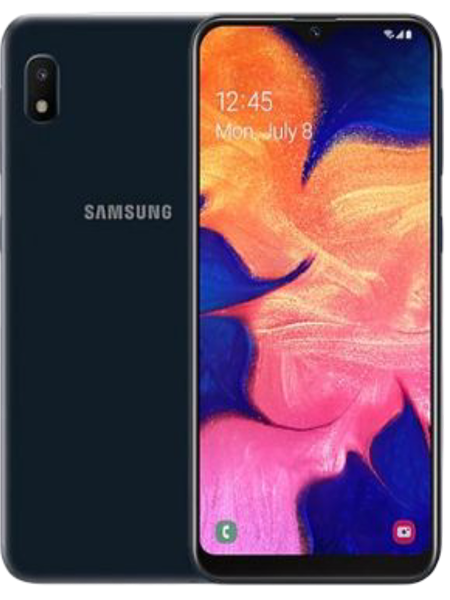
Samsung launched the Galaxy A10e back in 2019 as a compact, budget-friendly option for people who just needed a solid phone without frills. You got a 5.83-inch display, decent single camera, 3,000mAh battery, and enough performance for everyday tasks—all in a pocketable size that didn't cost a fortune. It wasn't trying to be a flagship killer. It was designed to be an affordable, practical device that handles calls, texts, and basic apps.
The A10e found its audience quickly among folks who wanted simplicity. No massive screen, no complicated camera arrays, just straightforward smartphone functionality. That Exynos 7884 processor won't impress anyone, but it handles messaging, social media browsing, and email just fine. The compact size actually became a selling point—in an era of giant phones, the A10e fit comfortably in one hand and slipped easily into pockets.
Prevention Tips Worth Following
Look, the best repair is the one you never need. Your A10e faces predictable threats that you can actively prevent with smart habits. Let's break down what actually works versus what's just common advice that doesn't matter.
Keep Your Battery Healthy
Why this matters: Battery degradation is the number one complaint we see with older A10e devices. That 3,000mAh battery loses capacity with every charge cycle, but how you charge makes a huge difference in how quickly it degrades.
What to actually do:
- Don't charge to 100% every single night if you can avoid it. Stopping around 80-90% reduces stress on the battery cells.
- Don't let it drain completely on a regular basis. Try to plug in when you hit 20-30% rather than running it to zero.
- Remove your case while charging if the phone gets warm. Heat is battery enemy number one, and cases trap heat during charging.
- Avoid using your phone heavily while it's charging. Gaming or video streaming while plugged in generates excessive heat that accelerates battery aging.
- If you're going to store the phone unused for a while, charge it to about 50% first. Storing at full charge or empty both damage the battery.
Warning signs you're too late:
- Battery dies before dinner even with minimal use
- Percentage jumps around erratically (65% to 30% suddenly)
- Phone feels warm even during light usage
- Takes longer to charge than it used to
Protect That Charging Port
Why this matters: Charging port failure is incredibly common on the A10e because that USB-C port takes constant abuse. Once lint and debris pack into the port, charging becomes unreliable fast.
What to actually do:
- Clean your charging port monthly with a wooden toothpick. Gently scrape along the bottom of the port to remove packed lint.
- Never use metal objects to clean the port—you'll bend or scratch the contacts.
- Plug cables in slowly and firmly rather than jamming them in quickly. Aggressive plugging bends the internal pins.
- Don't use your phone with the cable plugged in at weird angles. Lateral stress on the cable cracks the port's solder connections.
- Keep your phone out of your pocket when you're working in dusty or dirty environments. Construction dust, sawdust, and similar debris destroy charging ports.
Warning signs you're too late:
- Cable needs to be held at a specific angle to charge
- Charging starts and stops randomly
- Fast charging stopped working
- You see visible debris packed in the port even after cleaning
Maintain Your Screen
Why this matters: The A10e's screen isn't particularly durable compared to modern phones. That glass digitizer layer cracks easily, and the LCD underneath can develop issues from pressure or flexing.
What to actually do:
- Get a case with raised edges around the screen. When you drop the phone face-down, the case edges hit first instead of the screen.
- Apply a tempered glass screen protector. It won't prevent serious damage, but it handles minor impacts that would otherwise crack the actual screen.
- Don't keep your phone in the same pocket as keys, coins, or other hard objects that can scratch the screen.
- Avoid putting heavy pressure on the screen. Don't sit on your phone, don't pile things on top of it, don't press hard when cleaning it.
- Keep the screen clean with a microfiber cloth. Built-up oils and grime reduce touch sensitivity over time.
Warning signs you're too late:
- Touch stops responding in specific areas
- Screen registers touches you didn't make
- Visible cracks or black spots on the display
- Screen looks fine but touch sensitivity feels off
Manage Your Software
Why this matters: The A10e runs on just 2GB of RAM with a budget processor. Software bloat absolutely murders performance on this device, making it feel slow and frustrating even when the hardware's fine.
What to actually do:
- Uninstall apps you don't use anymore. Every installed app consumes some resources even when closed.
- Disable pre-installed apps (bloatware) that you never open. Samsung and carriers load these phones with apps nobody wants.
- Clear app cache weekly for apps you use most: Settings → Apps → [App Name] → Storage → Clear Cache.
- Restart your phone at least once a week to clear temporary files and give the system a fresh start.
- Don't install task killers or RAM cleaners—they actually make performance worse on modern Android.
- Limit widgets on your home screen. Each widget consumes RAM that could be used for apps you're actually using.
Warning signs you're too late:
- Apps take forever to open
- Phone freezes or crashes randomly
- Keyboard lags behind your typing
- Switching apps shows constant loading screens
What Causes Tech to Break Down
You know what's interesting about electronics? They're all dying slowly from the moment you start using them. Not because they're poorly made, but because using them literally causes wear at the molecular level.
Think about an electrical outlet becoming loose after years of plugging things in. The metal contacts inside wear smooth from friction. The springs lose tension. Tiny arcs of electricity erode the contact surfaces. Eventually, plugs don't grip firmly anymore and connections become intermittent. Your A10e's charging port experiences the same gradual mechanical failure.
Your battery goes through chemical changes with every single charge. Lithium ions migrate between electrodes, but this process isn't perfectly reversible. Some ions get trapped. Unwanted compounds form on electrode surfaces. The electrolyte degrades. Heat accelerates all of this dramatically. After 500-800 charge cycles over a couple years, capacity drops noticeably. It's not a manufacturing defect—it's just electrochemistry.
The screen's digitizer layer detects your touches through capacitance changes when your finger gets close. But every touch creates microscopic stress on that layer. Flexing in your pocket adds more stress. Temperature changes cause materials with different expansion rates to pull against each other. Manufacturing tolerances mean some screens are more fragile from day one. Eventually, that digitizer develops dead zones or erratic behavior.
Software performance degrades because apps keep getting bigger and more demanding. Your A10e's 2GB of RAM was adequate for 2019 apps, but modern versions of Instagram, TikTok, Facebook, and Chrome all demand more memory. Android system updates add features that require more resources. Your hardware hasn't changed, but everything running on it has gotten heavier.
Understanding these natural degradation patterns helps you prevent problems before they become serious. Regular maintenance, smart usage habits, and catching warning signs early can extend your A10e's functional life significantly.
When Maintenance Isn't Enough: Common Problems That Need Repair
Even with perfect maintenance, some problems eventually require professional attention. Here's when DIY prevention stops being enough and Samsung Galaxy A10e repair becomes necessary.
Battery Death Spiral
What happens: You're doing everything right—avoiding full charges, not draining completely, keeping it cool—but the battery still dies ridiculously fast. You charge fully in the morning and you're at 15% by lunch despite minimal use.
Why maintenance doesn't fix it: Once a lithium-ion battery has gone through enough charge cycles, the chemical degradation is permanent. No amount of smart charging habits can restore lost capacity. The battery cells have fundamentally changed at the molecular level.
What actually fixes it: Battery replacement is the only solution. Professional technicians at The Fix can swap your degraded battery for a high-quality replacement, bringing back that reliable all-day battery life you had when the phone was new.
Charging Port Hardware Failure
What happens: You've cleaned the port thoroughly with a wooden toothpick, removed all visible debris, but charging is still completely unreliable or doesn't work at all. The cable still needs to be held at weird angles, or maybe the port is just dead.
Why maintenance doesn't fix it: Cleaning solves contamination problems, but it can't fix bent pins, cracked solder joints, or corroded contacts. Once the port's internal hardware has failed mechanically, cleaning won't help.
What actually fixes it: Charging port replacement involves desoldering the failed port assembly and installing a new one. This requires specialized tools and soldering skills that aren't DIY-friendly. Professional Samsung Galaxy A10e repair handles this properly.
Screen Digitizer Failure
What happens: You've cleaned the screen, removed the screen protector, restarted the phone, but specific areas still don't respond to touch or the phone registers phantom touches constantly. The screen might look physically fine with no cracks.
Why maintenance doesn't fix it: Once the digitizer layer fails internally, no amount of cleaning or software troubleshooting will restore function. The capacitive touch sensors have physically degraded or failed.
What actually fixes it: Screen replacement with a new display assembly restores full touch sensitivity across the entire screen. This isn't a repair most people can do themselves—it requires proper tools, skill, and testing equipment.
Performance Beyond Software Fixes
What happens: You've done factory resets, uninstalled apps, cleared cache, disabled bloatware, but the phone still feels painfully slow and unresponsive for basic tasks.
Why maintenance doesn't fix it: If the performance issues stem from hardware failure—like a degraded battery causing CPU throttling, or actual processor degradation—software cleanup won't solve it.
What actually fixes it: Sometimes fixing the battery restores performance because the system stops throttling the CPU to conserve power. Other times, you're hitting the fundamental limitations of 2GB RAM and a budget processor trying to run 2024 software. At that point, you've maintained the phone perfectly, but the hardware's just reached its functional limits.
Our Honest Approach to Samsung Galaxy A10e Repair
Here's exactly what happens when you come to The Fix with your A10e—whether you just need advice on maintenance or you're dealing with problems that need professional repair.
You walk in, and we start with a free diagnostic. We're not trying to sell you services you don't need, so we test everything thoroughly first. Battery health gets measured with specialized equipment that shows actual remaining capacity. The charging port gets inspected under magnification for debris, damage, or corrosion. We run touch sensitivity tests across the entire screen to identify any problem areas. We check system performance and storage to spot software issues.
Then we talk honestly about what we found. If your battery's still at 85% health and your problems are actually software-related, we'll tell you that and show you how to fix it yourself for free. If your charging port just needs cleaning and we can do it in two minutes while you wait, we'll do that at no charge. We're not interested in unnecessary repairs.
If you genuinely need repair—battery replacement, port replacement, screen replacement—we explain exactly what's involved and give you the information to make an informed decision. We never pressure anyone into repairs they don't need or can't afford.
For repairs you approve, our technicians handle your A10e carefully. Battery replacement involves opening the phone, disconnecting the old battery safely, installing a high-quality replacement, and reassembling everything properly. Port replacement requires precise desoldering and soldering work. Screen replacement means swapping the entire display assembly and testing touch response thoroughly.
After any repair, we run extensive testing before handing your phone back. We verify that everything works correctly—not just the repaired component, but cameras, buttons, speakers, and sensors too. Most Samsung Galaxy A10e repair jobs are same-day service, so you're not without your phone for long.
Keep Your Galaxy A10e Running: Smart Samsung Galaxy A10e Repair Prevention
Your Galaxy A10e might be a few years old and wasn't expensive when new, but it's still perfectly capable for everyday use when properly maintained. With the right habits, you can prevent most common problems and extend your phone's functional life significantly.
The habits that actually matter:
- Clean your charging port monthly to prevent contamination buildup
- Charge smart—avoid extremes of 0% and 100% when possible
- Protect your screen with a case and tempered glass protector
- Manage your software by uninstalling unused apps and clearing cache regularly
- Restart weekly to keep Android running smoothly
When prevention isn't enough and you need professional help, The Fix is here. We'll diagnose your A10e for free, give you honest advice about whether you need repair or just better maintenance, and handle any necessary repairs with expertise and care. No pressure, no upselling—just straightforward service from technicians who work on these devices daily.
Professional Samsung Galaxy A10e repair solves problems that maintenance can't fix—worn batteries, failed charging ports, damaged screens. Your A10e is worth maintaining, and when repair becomes necessary, it's worth doing correctly. Stop by The Fix and we'll help you keep your device running well.


Trusted repair solution for mobile phones, tablets, gaming consoles, and computer systems. We provide fast, reliable, and affordable repair services to get your devices back in perfect working condition.
The Fix is an independent repair service provider and is not affiliated with, sponsored by, or endorsed by Apple Inc., Samsung Electronics, Google LLC, or any other device manufacturer. We use high-quality compatible replacement parts unless explicitly stated. All trademarks are property of their respective owners.


© Copyright The Fix Solutions All rights reserved 2026.
Design by Deepcoder