






Samsung Galaxy A03 Repair Services
Get fast, reliable, and professional Samsung Galaxy A03 repair services at The Fix — your trusted destination for expert device care.
Common Repairs We Handle Daily


An Expert Analysis of Samsung Galaxy A03 Repair: Causes & Solutions
Something interesting happened with the Galaxy A03—Samsung released it in 2021 as their most affordable smartphone, and it immediately became one of the most commonly repaired budget devices we see. Not because it's poorly built, but because it sees heavy daily use and components naturally wear down. If your A03 is acting up, you're dealing with predictable issues that we diagnose and fix constantly.
In this guide, we'll break down exactly what goes wrong with the Galaxy A03, why these specific problems develop, and how professional Samsung Galaxy A03 repair addresses each issue. You're about to get expert insights from technicians who work on these devices every single day.
What Makes the Galaxy A03 Tick
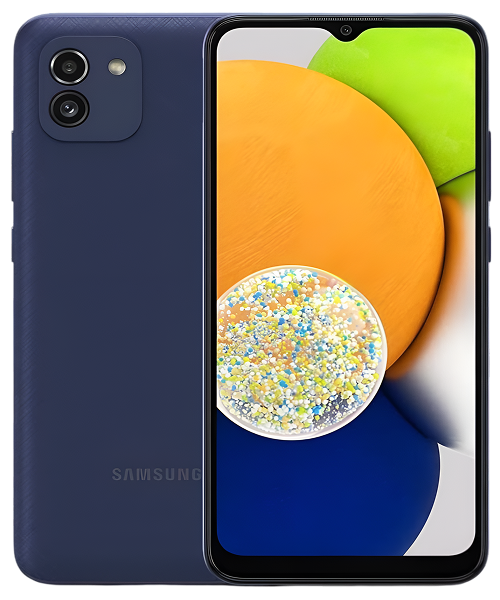
Let's talk about your Galaxy A03 for a second. Samsung launched this device in late 2021 as an ultra-affordable entry point into their smartphone ecosystem. You got a 6.5-inch display, dual cameras, 5,000mAh battery, and enough performance for basic tasks—all at a price that made smartphones accessible to virtually everyone. It wasn't designed to compete with mid-range or flagship devices. It was built to be the absolute cheapest way to get a functional Samsung smartphone.
The A03 found massive sales volume quickly because it delivered core smartphone functionality at bargain pricing. People bought these for their kids' first phones, as backup devices, for elderly relatives who just needed calls and texts, or simply as no-frills personal devices. That Unisoc SC9863A processor with 2-4GB of RAM won't win any performance awards, but it handles messaging apps, light social media, phone calls, and basic web browsing without major issues when everything's working correctly.
The Science Behind Device Aging
You know what nobody explains when you buy a phone? Every component inside it is degrading from the moment you power it on. This isn't planned obsolescence or poor quality—it's fundamental physics and chemistry that affects every electronic device ever made.
Think about a power drill you've owned for years. When new, the battery held a full charge and the drill had plenty of torque. After hundreds of use cycles, that battery doesn't last nearly as long, the chuck doesn't grip bits as tightly, the trigger feels looser, and the motor sounds different under load. You haven't abused it—it's just experienced thousands of mechanical movements, electrical cycles, and thermal stresses that accumulated into measurable wear.
Your A03 experiences identical degradation patterns, just with more sophisticated components. That massive 5,000mAh battery undergoes electrochemical changes with every single charge cycle. Lithium ions migrate between electrodes during charging and discharging, but this process isn't perfectly reversible. Microscopic deposits form on electrode surfaces, the electrolyte slowly breaks down, and capacity diminishes gradually. Heat from charging or heavy use dramatically accelerates all these processes. After 500-800 charge cycles over 2-3 years, you're looking at a battery with significantly reduced capacity—it's not defective, it's just chemistry.
The USB-C charging port endures constant mechanical stress. Those eight tiny metal pins inside the connector flex microscopically with every cable insertion. Dust particles and pocket lint accumulate in the port cavity and compress into a dense mat. Temperature changes cause different materials to expand and contract at different rates, stressing solder joints. Lateral force from using the phone while charging can crack the port's connection to the circuit board. Eventually, connections that were once rock-solid become intermittent or fail completely.
Your screen takes relentless punishment—thousands of taps, swipes, and presses every single day put stress on the digitizer layer that detects touches. The LCD panel underneath can develop issues from flexing in your pocket or bag. Physical drops obviously damage the glass and internal components, but even without visible cracks, the digitizer can fail internally. Manufacturing tolerances mean some screens are more robust than others from day one.
Software performance degrades because apps keep growing more demanding. Your A03's processor and RAM were adequate for 2021 apps, but Instagram, TikTok, Facebook, and Chrome have all added features that consume more resources. Android system updates bring new capabilities that require more memory. Background processes pile up. Your hardware hasn't changed, but the software environment it operates in has gotten significantly heavier.
Understanding these natural aging patterns helps make sense of why your A03 develops specific problems at predictable intervals. It's not a design flaw—it's just what happens when you use any electronic device for its intended purpose over several years.
Battery Degradation: The Primary Issue
What customers experience: Battery life has gotten terrible over the past year. You used to easily make it through the day, but now you're at 30% by early afternoon even with light usage. Sometimes the percentage drops dramatically and unexpectedly—like going from 50% to 15% in minutes. The phone might shut off even when the battery indicator shows charge remaining.
Technical analysis: The A03's 5,000mAh lithium-ion battery undergoes irreversible chemical changes with each charge cycle. During charging, lithium ions move from the positive electrode (cathode) to the negative electrode (anode) through the electrolyte. During discharge, they move back. This migration causes microscopic structural changes—lithium gets trapped in unwanted locations, solid electrolyte interface layers form on electrodes, the electrolyte decomposes gradually, and electrode materials slowly degrade.
Heat accelerates all degradation pathways exponentially. If you've charged your A03 while using demanding apps, left it in hot cars, or used it in direct sunlight, you've significantly accelerated battery aging. Each 10°C increase in temperature roughly doubles the degradation rate of battery chemistry.
After 18-24 months of daily charging, most A03 batteries we test show capacity retention of only 70-80% of original specifications. This manifests as dramatically reduced runtime, erratic percentage readings (the battery management system can't accurately track degraded cells), and unexpected shutdowns when power draw exceeds what the degraded battery can deliver.
Professional solution: Battery replacement is the only effective fix. We remove your A03's back panel carefully, disconnect the degraded battery from the logic board, install a high-quality replacement with full 5,000mAh capacity, and reassemble everything properly. Post-replacement testing verifies proper charging behavior, accurate percentage tracking, and expected runtime under various usage scenarios. Customers consistently report that Samsung Galaxy A03 repair of the battery brings back the reliable all-day performance they remember from when the device was new.
Charging Port Failure Patterns
What customers experience: Charging has become increasingly unreliable. The cable needs to be positioned at a very specific angle, or charging stops immediately. Sometimes it charges, sometimes it doesn't, with no obvious pattern. Fast charging stopped working even though you're using the same cable and adapter. Worst case scenario—the port seems completely dead and won't respond to any cable.
Technical analysis: The USB-C port represents a mechanical weak point on the A03. That connector endures thousands of insertion cycles—easily 1,000+ over two years of daily charging. Each insertion causes microscopic wear on the eight spring-loaded pins inside the port. These pins are designed to flex and make contact with the cable's corresponding pins, but repeated flexing causes metal fatigue.
Contamination compounds the mechanical wear significantly. Pocket lint, dust particles, fabric fibers, and environmental debris all enter the charging port and accumulate at the bottom of the connector cavity. This debris compresses into a dense mat that prevents the cable from fully inserting, which means the pins don't make proper electrical contact.
Lateral stress is another major failure mode. When people use their A03 while it's charging, they often put sideways force on the cable. This lateral stress gets transmitted directly to the port's solder connections on the logic board. Repeated stress in this manner can crack solder joints or even detach the port housing from the circuit board entirely.
Moisture and corrosion also contribute to port failure, especially in humid environments or if the phone's been exposed to sweat, light rain, or bathroom humidity. Corrosion forms on the metal contacts, increasing electrical resistance and causing intermittent connections.
Professional solution: For contamination-related issues (about 60% of charging complaints we see), thorough professional cleaning with proper tools solves the problem immediately. We use specialized picks and compressed air to remove compacted debris without damaging the delicate internal pins.
For mechanical failure of the port itself, we desolder the failed charging assembly from the logic board and solder in a fresh replacement. This requires precise soldering work with proper temperature control to avoid damaging surrounding components. After replacement, we test charging from multiple angles, verify fast charging functionality, and confirm solid electrical connections. Samsung Galaxy A03 repair of the charging port restores completely reliable charging without the cable positioning gymnastics.
Screen and Digitizer Failures
What customers experience: Touch sensitivity has degraded in specific areas of the screen—certain zones don't respond when you tap them, forcing you to tap multiple times or avoid those areas entirely. Alternatively, the phone registers phantom touches you didn't make, opening apps randomly or making selections without your input. Or there's obvious physical damage—cracks across the glass, black spots on the display, or discoloration in certain areas.
Technical analysis: The A03's 6.5-inch PLS LCD display consists of multiple layers—the backlight, LCD panel, digitizer layer, and protective glass—all working together. Failure can occur in any of these layers independently.
Physical impact damage obviously breaks the glass and often damages the LCD panel underneath, causing black spots (dead pixels or cracked liquid crystal cells) or complete display failure in sections. But digitizer failure is more subtle and often develops without obvious physical damage.
The digitizer is a capacitive touch sensor grid that detects changes in electrical charge when your finger approaches. This grid is an extremely thin film with microscopic conductive traces. Repeated flexing in your pocket stresses these traces. Temperature cycling causes materials with different thermal expansion coefficients to pull against each other. Manufacturing variance means some digitizers have weaker traces from day one.
When traces break or degrade, you lose touch sensitivity in those specific zones. When the digitizer's controller chip malfunctions or electrical connections become intermittent, you get phantom touch behavior where the system registers inputs that don't exist.
Professional solution: Screen issues require full display assembly replacement. We remove the damaged or malfunctioning screen assembly, install a new display with fresh digitizer and LCD components, and test touch response systematically across the entire screen surface. We verify proper display brightness, color accuracy, and touch sensitivity in all zones. After Samsung Galaxy A03 repair of the screen, customers often realize they'd been unconsciously compensating for dead zones or erratic touch response—full functionality across the entire screen comes back.
Performance Throttling and Software Issues
What customers experience: Apps take significantly longer to open than they used to. Switching between apps shows constant loading screens. The keyboard lags behind your typing, making you look illiterate. The camera app takes so long to launch that you miss photo opportunities. Everything feels frustratingly sluggish even for basic tasks.
Technical analysis: The A03 runs on modest hardware—2GB to 4GB of RAM (depending on the model) with a budget-tier processor designed for basic tasks, not performance. This hardware specification was adequate for the 2021 software environment, but apps have grown substantially more demanding since then.
Modern versions of Instagram, TikTok, Facebook, Chrome, and other popular apps all consume significantly more RAM than their 2021 versions. They load higher-resolution media, support more features, and run more background processes. Android system updates add capabilities that require additional resources. With only 2-4GB of total RAM, the A03 struggles to keep multiple apps in memory simultaneously.
However, software bloat isn't the only cause of performance issues. A degraded battery often causes performance throttling that users don't recognize. When battery health drops below certain thresholds, the system's power management aggressively throttles CPU and GPU frequencies to prevent voltage drops that could cause shutdowns. This throttling makes everything feel slow, but users attribute it to aging hardware rather than battery degradation.
Professional solution: For pure software performance issues, we perform thorough system optimization—removing bloatware, clearing accumulated cache and temporary files, and in some cases performing clean Android reinstallation. This often restores surprisingly responsive performance.
For battery-related throttling, replacing the degraded battery eliminates the power delivery issues that were causing the system to limit performance. Customers frequently report that their A03 feels noticeably faster after battery replacement, even though we didn't touch the processor or RAM—we simply removed the constraint that was forcing performance throttling.
What to Expect When You Bring Your A03 In
Transparency matters, especially with something as personal as your phone, so let's walk through exactly what happens at The Fix when you bring in your Galaxy A03 for repair.
Initial diagnostic is completely free and comprehensive. We start by measuring battery health with specialized equipment that shows actual remaining capacity as a percentage of original specifications. We test charging port functionality under magnification to identify debris, mechanical damage, or corrosion. We run systematic touch sensitivity tests across the entire screen to map any dead zones or areas with reduced response. We check system performance, available RAM, storage usage, and background processes to distinguish software issues from hardware failures.
Then we explain our findings in plain language without technical jargon. If your battery is at 62% health, we'll explain exactly what that means for your daily usage patterns and how it compares to normal degradation curves for devices of this age. If your charging port has compacted lint preventing proper cable insertion, we'll show you under magnification. If specific screen zones aren't responding to touch, we'll demonstrate the exact areas and explain why this indicates digitizer failure rather than software issues.
Next we discuss your actual repair options based on diagnostic findings. Maybe just battery replacement solves all your problems. Maybe you need charging port service too. Maybe the screen is the critical issue. We provide honest recommendations without pushing unnecessary services—our reputation depends on straightforward advice, not upselling repairs you don't need.
For approved repairs, our experienced technicians handle your device. Battery replacement involves careful disassembly to access the battery compartment, safe disconnection of the old battery from the logic board, installation of a high-quality replacement, and proper reassembly with attention to all connector seating and adhesive sealing. Charging port replacement requires precise desoldering of the failed component and soldering of the new port assembly with proper temperature control and solder joint quality. Screen replacement means swapping the entire display assembly and verifying full functionality across all screen zones.
After completing any repair, we run extensive testing protocols. We fully charge the device and monitor charging behavior to verify proper function. We test the charging port from multiple angles with different cables to confirm solid connections. We systematically test touch response across every inch of the screen. We verify that cameras, buttons, speakers, microphones, and all sensors function correctly—we don't just fix the reported problem and ignore everything else.
Most Samsung Galaxy A03 repair jobs are same-day service. You bring your device in during morning hours, we diagnose and repair it, and you pick it up that afternoon with everything working properly. Complex repairs or parts availability issues might occasionally require overnight service, but we communicate timelines clearly upfront so you can plan accordingly.
Smart Care for Your Galaxy A03
Daily habits that extend device life:
- Use a protective case with raised edges that protect the screen when placed face-down
- Avoid charging to 100% every night—stopping around 80-85% significantly extends battery lifespan
- Don't let the battery fully drain regularly—plug in around 20-30% to minimize stress on battery cells
- Remove your case while charging if the phone gets noticeably warm—heat is battery enemy number one
Weekly maintenance routines:
- Clean your charging port with a wooden toothpick to remove accumulating lint before it compacts
- Close background apps manually since you're working with limited RAM—every running app matters
- Restart your phone to clear temporary files and give Android a fresh start
- Check battery usage statistics to identify apps consuming excessive power
Long-term protection:
- Keep your A03 out of extreme temperatures—hot cars and freezing weather both accelerate battery degradation
- Don't use your phone heavily while it's charging—this generates excessive heat that damages the battery
- Update Android when Samsung releases updates for the A03—updates often include performance optimizations
- Avoid installing task killers or RAM cleaners—they actually worsen performance on modern Android
Your Complete Galaxy A03 Repair Analysis: What Really Works
Your Galaxy A03 might be Samsung's budget option, but it's still perfectly capable for everyday smartphone tasks when the hardware's functioning properly. Calls, texts, messaging apps, social media browsing, email, and light web usage—it handles all the basics just fine. Most problems that develop are straightforward component failures with clear solutions.
Bring your A03 to The Fix for free diagnostic testing. We'll identify exactly what's causing your issues, explain your options without any pressure, and handle any necessary repairs with expertise and care. Just honest assessment from technicians who specialize in Samsung devices and understand these phones thoroughly. Your familiar device with all your apps, contacts, photos, and settings can keep serving you well with appropriate maintenance or repair.
Professional Samsung Galaxy A03 repair addresses whatever's actually affecting your device—degraded batteries, failed charging ports, damaged screens, or performance issues. Whether you need battery replacement, port service, screen repair, or just expert advice, we've got the tools and experience to help. Your A03 is worth fixing—let us prove it.


Trusted repair solution for mobile phones, tablets, gaming consoles, and computer systems. We provide fast, reliable, and affordable repair services to get your devices back in perfect working condition.
The Fix is an independent repair service provider and is not affiliated with, sponsored by, or endorsed by Apple Inc., Samsung Electronics, Google LLC, or any other device manufacturer. We use high-quality compatible replacement parts unless explicitly stated. All trademarks are property of their respective owners.


© Copyright The Fix Solutions All rights reserved 2026.
Design by Deepcoder