



Galaxy Z Fold8 Ultra Repair Services
At The Fix, we help with common phone repair needs, including screen repair, battery replacement, camera repair and back glass replacement. Contact your nearest location to discuss your Galaxy Z Fold8 Ultra and get a quote based on the fault.
Common Repairs We Handle Daily


Galaxy Z Fold8 Ultra Repair at The Fix
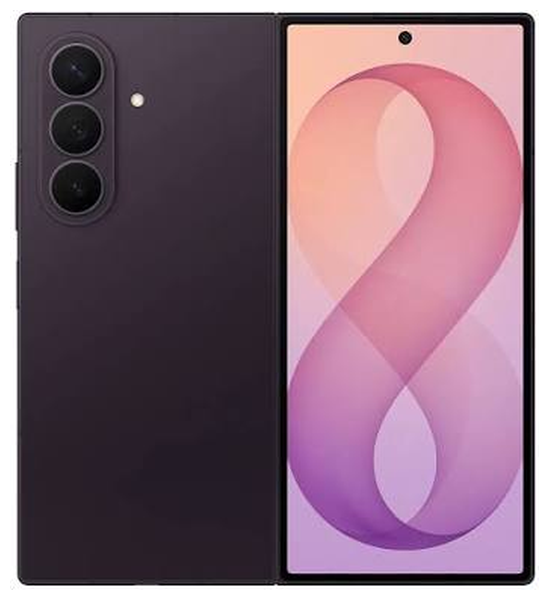
The Samsung Galaxy Z Fold8 Ultra combines an 8-inch folding main display with a 6.5-inch cover display. Its slim folding design, 5,000 mAh battery and multi-camera system support a wide range of everyday tasks. Damage to either screen, battery wear, camera faults or a cracked rear panel can make the phone harder to use.
At The Fix, we help customers with common phone repair needs, including screen repair, battery replacement, camera repair and back glass replacement. If your Galaxy Z Fold8 Ultra has been damaged or is not working as expected, read about the symptoms below. Then contact your nearest The Fix location to discuss the repair and get a quote.
What should you do if your Galaxy Z Fold8 Ultra screen is damaged?
The Galaxy Z Fold8 Ultra has two displays, so it is important to identify which screen is affected. The large inner display folds with the phone, while the cover display is used when the device is closed. A crack, dark patch, flickering image, colored line or unresponsive touch area can interfere with normal use.
Visible glass damage is not the only sign of a screen problem. You might also notice that part of the image disappears, touch input becomes unreliable or the display behaves differently when the phone is opened. These symptoms can have more than one cause, so the appearance of the screen alone does not confirm which component has failed.
Avoid pressing hard on a damaged folding display or trying to flatten, bend or open the phone beyond its normal movement. If glass is loose or sharp, handle the device carefully and avoid touching the damaged area. Screen repair can address display damage, but the repair needed and the quote depend on the condition of the device.
When is a Galaxy Z Fold8 Ultra battery replacement worth considering?
The 5,000 mAh battery is designed to power the phone throughout daily use, but battery performance can change over time. Frequent charging, a noticeable drop in battery life, unexpected shutdowns or a device that struggles to hold charge may indicate a battery-related issue. Background apps, software behavior and charging accessories can also affect battery life.
Look at the pattern rather than relying on one short period of heavy use. If the phone consistently loses charge much faster than before, or shuts down while showing remaining battery power, battery replacement may be appropriate. The cause should be identified first.
Do not continue charging or using the phone if the battery appears swollen, the device becomes unusually hot, or the back or screen starts lifting. Do not press the case back into place or attempt to remove the battery yourself. Move the phone away from flammable materials when it is safe to do so and seek professional help.
Why might your Galaxy Z Fold8 Ultra not charge properly?
A phone that charges slowly, connects intermittently or does not charge at all can have several possible causes. The cable, power adapter, outlet, charging port, battery or internal circuitry may be involved. A charging symptom does not by itself prove that the port needs repair.
If the device and cable are dry and undamaged, try a compatible cable and adapter. Use a power outlet that you know works. Do not insert metal objects into the USB-C port, scrape the connector or apply liquid to it. If the phone or connector is wet, disconnect power and do not attempt to charge it until it has been checked.
The Fix handles common phone charging problems as part of its repair services. A quote for your Galaxy Z Fold8 Ultra depends on the fault and the repair required. If charging remains unreliable after you rule out a damaged accessory or outlet, contact a nearby location to discuss the next step.
What can you do about camera or back glass damage?
The Galaxy Z Fold8 Ultra has a 200 MP wide camera and a 50 MP ultra-wide camera. It also has a 10 MP telephoto camera with 3x optical zoom. Photos may appear blurry or focus may keep shifting. The camera app might also fail to open, or one camera view may stop working. Possible causes include the camera, its cover glass, software or another phone component.
Try checking whether the issue appears in more than one camera mode and whether the camera lens cover has visible cracks. Avoid pressing on a damaged lens cover or using tools to remove glass. If the camera remains unreliable, camera repair can be considered after the fault is identified.
A cracked rear panel can leave sharp edges and make the phone more vulnerable to further damage. Back glass replacement is a common phone repair service. However, the correct repair depends on the extent and location of the damage. Keep the device dry and avoid relying on its water resistance after physical damage.
How can The Fix help with your Galaxy Z Fold8 Ultra repair?
The Fix provides phone repair services for common problems such as damaged screens, worn batteries, camera issues and cracked back glass. The right repair depends on the symptoms and the condition of your specific device. A phone that will not charge, for example, may need a different solution from one with a worn battery.
The Galaxy Z Fold8 Ultra uses a folding display and hinge system. Do not open the phone or attempt internal repairs at home. Do not assume that a repair method used on a non-folding phone is suitable for this model. Unverified opening steps can damage flexible components or create additional problems.
Before bringing the phone in, back up important data if it is safe to use. Remove sensitive accessories and note the symptoms you have observed. A final quote should reflect the fault and the repair required. Many common phone repairs can be completed quickly, but timing varies by repair and device condition.
Visit your nearest The Fix location to discuss your Galaxy Z Fold8 Ultra repair and get a quote for the service your phone needs.
Frequently Asked Questions About Galaxy Z Fold8 Ultra Repair
Can a damaged inner screen be repaired for a Galaxy Z Fold8 Ultra?
Inner display repair depends on the type of damage and on part availability for the foldable panel. The Fix can inspect the phone, identify which display is affected and give you a quote after that.
When should I consider a battery replacement?
Consider a battery replacement when poor battery life or unexpected shutdowns persist and the cause points to battery wear. If the phone is swollen or unusually hot, stop charging it and seek professional help.
Why does my Galaxy Z Fold8 Ultra refuse to charge?
Charging failure can result from an accessory, outlet, port, battery or internal fault. Avoid charging a wet or visibly damaged device, and do not insert objects into the port.
Should I back up my data before a repair?
Back up important files before repair when the phone is safe to use and the data is accessible. No hardware repair can promise that all data will remain intact, so keep a separate backup when possible.


Trusted repair solution for mobile phones, tablets, gaming consoles, and computer systems. We provide fast, reliable, and affordable repair services to get your devices back in perfect working condition.
The Fix is an independent repair service provider and is not affiliated with, sponsored by, or endorsed by Apple Inc., Samsung Electronics, Google LLC, or any other device manufacturer. We use high-quality compatible replacement parts unless explicitly stated. All trademarks are property of their respective owners.


© Copyright The Fix Solutions All rights reserved 2026.