





Galaxy S25+ Repair Services
At The Fix, we help with Samsung Galaxy S25+ screen, battery, charging, camera, and back glass problems. Visit a nearby location to discuss your device and get a quote for the repair it needs.
Common Repairs We Handle Daily


Samsung Galaxy S25+ Repair at The Fix
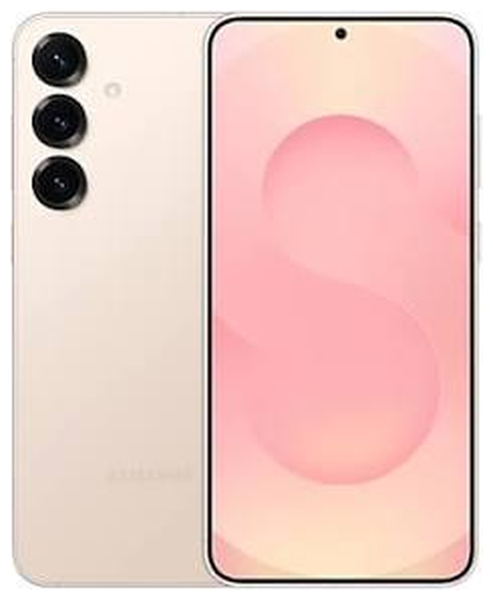
The Samsung Galaxy S25+ has a 6.7-inch QHD+ Dynamic AMOLED 2X display with a refresh rate of up to 120Hz, a 4,900 mAh typical-capacity battery, and a three-camera rear system. Damage to the display, changes in battery life, charging trouble, or camera faults can affect how you use the phone every day.
At The Fix, we help with common phone repairs, including screen repair, battery replacement, charging port repair, camera repair, and back glass replacement. The right solution depends on the symptoms and the condition of your Galaxy S25+. Read about common repair needs below, then visit your nearest The Fix location to get a quote.
What Should You Do If Your Galaxy S25+ Screen Is Damaged?
A cracked screen, colored lines, flickering, dark patches, or touch response that stops working in part of the display can make a Galaxy S25+ difficult to use. The phone's high-resolution AMOLED panel can have internal damage even when the outer glass has only a small crack. A visible crack does not reveal the full extent of the problem.
Screen repair is a relevant option when the display is damaged or touch input no longer works reliably. Avoid pressing on broken glass or trying to remove fragments yourself. If glass is loose, cover the phone only in a way that does not press on the display, and arrange repair. Visit The Fix for a quote for your Galaxy S25+ screen repair.
When Is It Time to Replace Your Galaxy S25+ Battery?
If your Galaxy S25+ loses charge much faster than it used to, shuts down unexpectedly, or struggles to last through your usual day, the battery may need attention. Heavy app use, signal conditions, screen brightness, software activity, and temperature can also affect battery life, so fast drain alone does not confirm a battery fault.
The Galaxy S25+ has a typical battery capacity of 4,900 mAh. If battery performance has changed noticeably, a battery replacement may be appropriate after the cause is identified. If the back cover or screen begins lifting, or the phone appears swollen, stop using and charging it. Do not press the phone closed or attempt to open it. Visit your nearest The Fix location to discuss the symptoms and get a quote.
Why Is Your Galaxy S25+ Not Charging Properly?
Charging that starts and stops, a cable that connects inconsistently, or a phone that does not charge can have several causes. The USB-C cable or power adapter, the charging port, battery condition, software, or exposure to moisture may be involved. These symptoms do not automatically mean the port is damaged.
If the port is wet or the phone displays a moisture warning, disconnect the cable and let the device dry in a safe, ventilated place. Do not insert objects into the port or apply heat. Do not continue charging a phone that is unusually hot, swollen, or physically damaged. If the issue persists after trying a known-working compatible cable and adapter, The Fix offers charging port repair for charging problems that require service.
What Can Cause Galaxy S25+ Camera or Back Glass Damage?
The Galaxy S25+ has a 50 MP main rear camera, a 10 MP telephoto camera, and a 12 MP ultra-wide camera, along with a 12 MP front camera. Blurry images, focus problems, a camera that will not open, or a cracked camera cover can have different causes. A software issue or obstruction may look different from physical damage, so the symptom alone does not confirm which component needs repair.
A drop can also crack the rear glass while leaving the front display intact. Broken back glass can expose sharp edges, so handle the phone carefully and avoid loose fragments. The Fix offers camera repair and back glass replacement. The repair needed and final quote depend on the damage found.
How Can The Fix Help With Your Galaxy S25+ Repair?
The Fix provides phone repair services for problems such as damaged screens, worn batteries, charging faults, camera issues, and cracked back glass. The purpose of a repair visit is to identify the issue affecting your device and determine the appropriate service. A symptom such as rapid battery drain or failed charging can have more than one cause, so the repair and quote depend on the specific fault.
Many common repairs can take about 30 minutes or less, but timing varies with the type of repair and the condition of the device. A more precise estimate can be provided after the issue has been identified. Back up important data before a repair when possible, but do not continue using a phone that appears swollen, overheats unusually, or has other signs of a battery safety problem.
Frequently Asked Questions About Galaxy S25+ Repair
Can a Galaxy S25+ screen be repaired if the glass is not cracked?
Yes, a screen may need repair even when the outer glass is intact. Lines, flickering, dark areas, or unresponsive touch can indicate a display problem, though the cause should be identified before choosing the repair.
How do I know if my Galaxy S25+ needs a battery replacement?
Rapid battery drain, unexpected shutdowns, or a major change in runtime can indicate a battery issue. Apps, signal strength, temperature, and software can also affect battery life, so these symptoms do not confirm the battery is the cause.
What should I do if my Galaxy S25+ gets wet?
Disconnect any cable and do not charge the phone while it is wet or showing a moisture warning. Avoid heat and do not insert anything into the USB-C port. Let the device dry safely and seek repair advice if warnings or problems continue.
Will repairing my Galaxy S25+ preserve my data?
Data preservation cannot be promised for every repair. Back up important files before service if the phone is safe to use and you can access your data. If the device is swollen, unusually hot, or physically unsafe, stop using it rather than trying to back it up.
Need help with your Samsung Galaxy S25+? Visit your nearest The Fix location to get a quote for the repair your phone needs.


Trusted repair solution for mobile phones, tablets, gaming consoles, and computer systems. We provide fast, reliable, and affordable repair services to get your devices back in perfect working condition.
The Fix is an independent repair service provider and is not affiliated with, sponsored by, or endorsed by Apple Inc., Samsung Electronics, Google LLC, or any other device manufacturer. We use high-quality compatible replacement parts unless explicitly stated. All trademarks are property of their respective owners.


© Copyright The Fix Solutions All rights reserved 2026.