




Galaxy A57 Repair Services
At The Fix, we help Galaxy A57 5G owners with screen damage, battery problems, charging issues, camera faults, and cracked back glass. Visit a nearby location to discuss the problem and get a quote for the repair your phone needs.
Common Repairs We Handle Daily


Galaxy A57 5G Repair at The Fix
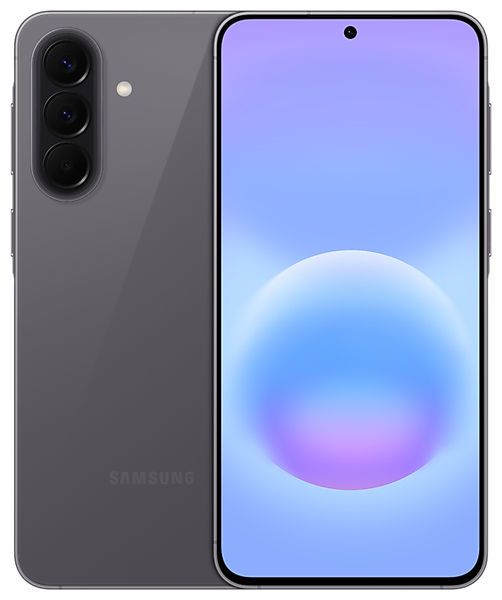
The Samsung Galaxy A57 5G pairs a 6.7-inch Super AMOLED Plus display with a 120 Hz refresh rate. Its slim 6.9 mm body houses a 5,000 mAh battery and three rear cameras. These features make the phone useful for streaming, photography, and daily communication. A cracked screen, worn battery, or charging fault can interrupt those activities. The right repair starts with understanding the symptoms, not guessing at the cause.
At The Fix, we help with common phone repair needs, including screen repair, battery replacement, charging port repair, camera repair, and back glass replacement. Each problem can have more than one cause. We can help you identify the repair your Galaxy A57 5G needs and provide a quote. This guide explains common symptoms and what to consider before arranging service.
What Should You Do If Your Galaxy A57 Screen Is Damaged?
Cracks need prompt attention. Touch matters, too. A damaged Galaxy A57 5G screen can affect more than appearance. Cracks may spread, touch response can become unreliable, and display lines or dark areas may appear. Some damage is visible immediately, while other faults show up after a drop. If the glass is broken, avoid pressing on loose or sharp pieces. A screen protector cannot repair a damaged display.
Its 6.7-inch FHD+ Super AMOLED Plus display supports refresh rates up to 120 Hz. Flickering, unusual colors, or failed touch can have different causes. A black screen does not always mean the panel alone has failed. The Fix offers screen repair, with a quote based on the fault.
Handle loose glass carefully and keep it away from children. Do not open the device yourself. If the screen lifts or the phone becomes unusually hot, stop using and charging it. Visit your nearest The Fix location. Get a quote for screen repair.
When Is It Time to Replace Your Galaxy A57 Battery?
Battery changes are gradual. Sudden changes matter. The Galaxy A57 5G has a 5,000 mAh typical-capacity battery that is not user-removable. Capacity alone cannot predict runtime. Brightness, signal strength, apps, and usage affect battery life. Fast drain may also relate to software or charging issues.
Other signs include sudden shutdowns or difficulty keeping a charge. If the back cover or screen begins to lift, the battery may be swollen. Treat that as a safety concern. Stop charging the phone, do not press the raised area, and arrange professional help. Do not puncture, bend, or attempt to remove a swollen battery yourself.
The Fix provides battery replacement services for phone owners experiencing battery problems. The repair and quote reflect the phone's condition. Back up important files beforehand if the phone is safe to use. Do not use a swollen or hot phone to make a backup. Contact your nearest The Fix location.
Why Is Your Galaxy A57 Not Charging Properly?
Charging trouble has several possible causes. Do not guess. The Galaxy A57 5G charges through a USB Type-C port and supports wired charging up to 45 W. A phone that charges slowly or not at all does not automatically have a damaged port. The cable, adapter, outlet, software, or battery may also be involved. Try a compatible cable and adapter that work, and check the power source.
Inspect the connector without inserting tools or liquids. If it looks damaged or charging disconnects repeatedly, do not force the cable. Never scrape the port with metal objects. If the phone was exposed to liquid, disconnect it from power and let a repair professional advise on next steps. Charging a wet device can increase the risk of damage.
The Fix offers charging port repair for charging-related problems. The symptoms should be considered together. If the phone heats up, smells unusual, or shows battery swelling, stop charging it. Visit your nearest The Fix location.
What Can You Do About Camera or Back Glass Damage?
Camera clarity matters. So does safe handling. The Galaxy A57 5G has three rear cameras. The main camera is 50 MP with optical image stabilization. It also has a 12 MP ultra-wide camera and a 5 MP macro camera. The front camera is 12 MP. A damaged lens cover can cause glare, haze, or marks in photos. Focus problems may also involve software or camera hardware.
If photos look blurry, check the outside of the camera cover. Clean it gently with a soft cloth. Do not press broken glass or remove a lens cover at home. If one camera view fails but another works, mention this when arranging service.
A cracked back panel can leave sharp edges and reduce the phone's intended protection. Samsung lists IP68 water and dust protection under test conditions. Do not assume that protection remains after damage or repair. Keep a phone with cracked glass away from water. The Fix offers camera repair and back glass replacement. Visit a nearby location. Get a quote for the camera and back glass damage.
How Can The Fix Help With Your Galaxy A57 Repair?
Start with the symptoms. Get a clear quote. The Fix handles common phone repairs such as screen repair, battery replacement, charging port repair, camera repair, and back glass replacement. The right service depends on the symptoms and phone condition. Charging problems can involve the port, battery, adapter, or another component. Camera issues may involve the cover, hardware, or software. Explain when the problem started.
Before visiting, note drops, liquid exposure, and recent symptoms. Back up data beforehand if the phone is safe to use. Repairs can put stored information at risk. If the device is hot, swollen, or has sharp fragments, prioritize safe handling.
Many common repairs can take about 30 minutes or less. Timing varies by repair and device condition. A more precise estimate follows after diagnosis. Visit your nearest The Fix location. Discuss the problem and get a quote.
Frequently Asked Questions About Galaxy A57 5G Repair
How much does Galaxy A57 5G screen repair cost?
The cost depends on the damage and required repair. Contact your nearest The Fix location for a quote.
How long does Galaxy A57 5G battery replacement take?
Battery replacement time varies by phone condition. Many common repairs can take about 30 minutes or less, with a clearer estimate after diagnosis.
Can a Galaxy A57 that will not charge need more than port repair?
Yes, charging trouble can involve the cable, adapter, battery, port, software, or another internal component. The symptom alone does not confirm a port fault.
Should I use my Galaxy A57 if the battery looks swollen?
No, stop using and charging a phone with a suspected swollen battery. Do not press, puncture, or remove the battery yourself, and arrange professional help.
The Fix can help with screen, battery, charging, camera, and back glass repairs. Visit your nearest location to get a quote.


Trusted repair solution for mobile phones, tablets, gaming consoles, and computer systems. We provide fast, reliable, and affordable repair services to get your devices back in perfect working condition.
The Fix is an independent repair service provider and is not affiliated with, sponsored by, or endorsed by Apple Inc., Samsung Electronics, Google LLC, or any other device manufacturer. We use high-quality compatible replacement parts unless explicitly stated. All trademarks are property of their respective owners.


© Copyright The Fix Solutions All rights reserved 2026.
Design by Deepcoder