






PlayStation 4 Repair Services
Get fast, reliable, and professional PlayStation 4 repair services at The Fix — your trusted destination for expert device care.
Common Repairs We Handle Daily


A Tech Expert's Guide to PlayStation 4 Repair
Since its launch in November 2013, Sony sold over 117 million PlayStation 4 consoles worldwide, making it one of the most successful gaming systems ever released. Millions of these consoles are still in active use today—people keep them for massive game libraries that span a decade, exclusive titles that never came to PS5, and as secondary consoles for kids' rooms or guest bedrooms. But here's what's happening now: you're dealing with the infamous "blue light of death" where the console won't fully boot, or the HDMI port stopped working after someone yanked the cable, or the console sounds like a jet engine and shuts down from overheating, or the disc drive won't accept or eject discs anymore.
Here's what changes everything: professional PlayStation 4 repair addresses these decade-old issues affordably and effectively. Blue light of death? Usually fixable. HDMI port damage? Replaceable. Overheating problems? Solvable. Disc drive failures? Repairable. This guide covers what goes wrong with PS4 consoles after years of service, why these problems happen, and how repair extends the life of a system that still has thousands of great games worth playing.
Why People Love (and Hate) the PS4
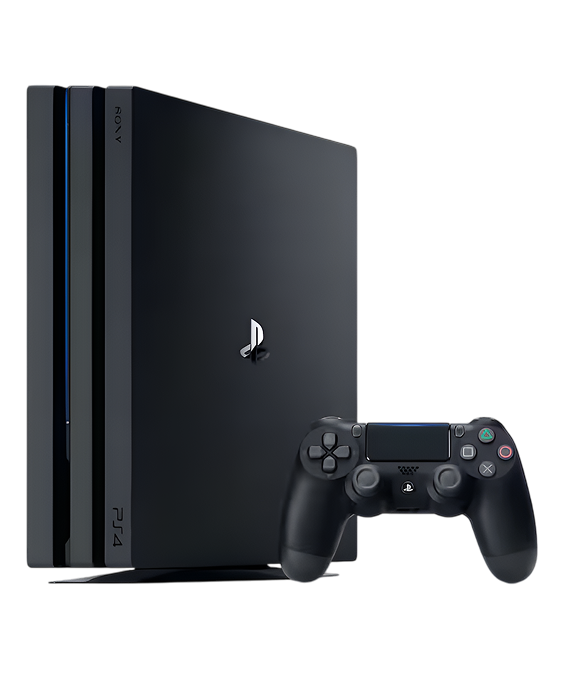
Sony launched the PlayStation 4 in November 2013 as a massive improvement over the PS3. You're getting an AMD "Jaguar" 8-core CPU, AMD Radeon GPU with 1.84 TFLOPS, 8GB GDDR5 RAM, 500GB or 1TB hard drive, and full 1080p gaming. The console came in several variants: the original PS4, the PS4 Slim (2016), and the PS4 Pro (2016) with 4K capabilities. The game library is incredible: The Last of Us, God of War, Spider-Man, Horizon Zero Dawn, Uncharted series, Bloodborne, Ghost of Tsushima, and thousands more titles. Many people still prefer PS4 for its mature library and lower cost compared to PS5.
What's interesting about the PS4 from a repair perspective? Sony used modular construction where major components can be serviced. The HDMI port is replaceable (common failure point on all PlayStations). The power supply is a separate unit. The disc drive is its own module. The hard drive is user-replaceable. The cooling system is accessible for maintenance. The challenge is age—these consoles are 10+ years old, so components that were never designed to last this long are failing from natural wear. Early PS4 models from 2013-2014 have specific issues—thermal paste degradation, failing power supplies, failing HDMI ports—that later revisions addressed. The PS4 Slim and PS4 Pro are more reliable but still face age-related failures.
The Science Behind Device Aging
Every PlayStation 4 eventually needs attention, and that's not Sony's fault—it's just materials meeting 10+ years of intensive gaming use. Here's what's physically happening inside your console over time.
Your cooling system degrades like bike tires wearing down from use. When they were new, the tires gripped great and held air perfectly. After thousands of miles, the rubber wears thin, they develop slow leaks, and performance suffers. Your PS4's cooling system faces similar degradation. The thermal paste between the APU (combined CPU/GPU) and heatsink dries out after years of thermal cycling. Dried paste doesn't transfer heat efficiently, so temperatures rise. Dust accumulates in the heatsink fins and fan blades, restricting airflow dramatically—we've seen PS4s so clogged with dust they could barely breathe. The fan bearings wear out, causing loud operation or complete failure. As cooling efficiency drops, the console runs hotter, the fan spins faster trying to compensate, and eventually thermal protection shuts down the system.
The HDMI port faces stress it wasn't designed for. Think about a pen clip wearing thin after years of being clipped on and off. The metal fatigues and eventually breaks from repeated stress. Your PS4's HDMI port is similar. It's a 19-pin connector soldered to the motherboard, designed for occasional cable changes, not daily stress. When cables get yanked—someone trips, the console gets moved while connected, kids playing nearby pull on cables—the port experiences lateral force. The metal shield bends. Internal pins bend or break. Solder joints crack. One damaged pin means no video or audio.
The disc drive's mechanical components wear from thousands of insertions and ejections. Motors that spin discs weaken. The laser lens gets dirty or the laser itself weakens. Gears strip or crack. The rubber drive belt (in some models) stretches or breaks. The eject mechanism jams or fails. After years of use, disc drives develop reliability issues or fail completely.
Power supply components age even when the console sits unused. Capacitors—electronic components that regulate voltage—degrade over years. After a decade of thermal cycling and electrical stress, capacitors bulge, leak, or fail. When they fail, the console won't power on properly, exhibits random shutdowns, or shows the blue light of death.
Blue Light of Death—Console Won't Fully Boot
You press the power button, the indicator light turns blue, but the console never displays anything and eventually shuts off or stays stuck with a pulsing blue light. Or maybe you hear a beep, see the blue light, but nothing appears on your TV and the console shuts down after 30 seconds. Could be you get blue light and fan spinning but no video output at all. Perhaps the console worked fine yesterday and today it's stuck in this blue light loop. Some PS4 owners experienced this suddenly after a power outage or system update.
Why this happens: The "blue light of death" indicates the console is powering on but failing to complete the boot process. Multiple issues can cause this. HDMI port failure prevents video output, making it seem like the console won't boot (it actually boots fine, you just can't see it). APU (combined CPU/GPU chip) failure from years of heat stress prevents proper initialization. Failed power supply can't deliver stable voltages needed for boot. Corrupted system software prevents boot completion. Hard drive failure stops the boot process. Overheating during boot triggers thermal protection. Failed HDMI encoder chip (separate from the port) prevents video output. Early PS4 models from 2013-2014 are especially prone to blue light issues from power supply and APU problems.
What you can try:
- Test with multiple different HDMI cables and TV inputs to rule out HDMI connectivity issues
- Try a different TV or monitor completely to eliminate display problems
- Boot into safe mode by holding the power button—press once to turn off, then hold for 7 seconds until you hear two beeps; if safe mode displays, it's likely a software issue
- Check if you hear the disc drive spin up or any beeps—sounds indicate partial boot
- Feel if the console gets warm—warmth means it's receiving power and processing
- Try rebuilding the database in safe mode if you can access it
What actually happens with most units: Blue light of death on PlayStation 4 consoles has multiple potential causes requiring systematic diagnosis. Failed HDMI ports account for maybe 30% of blue light cases—the console actually boots fine, you just can't see it. APU overheating or solder joint failures represent another 30%—years of thermal stress crack solder connections under the APU. Power supply issues make up 25%—failing capacitors can't deliver stable power. Hard drive failures account for 10%. The remaining 5% are corrupted software or other component failures. When you bring blue light issues to The Fix, we systematically isolate the cause. We test HDMI output with known-good cables and displays. We open the console and inspect for obvious failures. We test power supply voltages. We check for overheating during boot with thermal monitoring. We test with a known-good hard drive. For HDMI port failures, we replace the port. For APU overheating, we replace thermal paste and clean the cooling system—if that doesn't solve it, we may need to reball the APU (advanced repair involving removing the chip, reflowing solder balls, and reinstalling). For power supply failures, we replace the PSU. For hard drive failures, we replace the drive and reinstall system software. PlayStation 4 repair for blue light issues typically takes 90-120 minutes for straightforward fixes like HDMI or PSU, or 3-4 hours for advanced APU work. Success rates vary—HDMI and PSU fixes are nearly 100% successful, APU reballing is more complex with lower success guarantees.
HDMI Port Damaged—No Video Output
You've got no display on your TV even though the PS4 clearly powers on—you hear the beep, fan spins, but the screen stays black. Maybe you get intermittent video that flickers or cuts out when you move the cable. Could be the picture is distorted with visual artifacts. Perhaps the HDMI cable won't stay in the port—it feels loose or falls out. Some PS4 owners accidentally pulled the HDMI cable and immediately lost all video output.
Why this happens: The HDMI port is a 19-pin connector soldered to the motherboard. It handles both high-bandwidth video signals and audio. When HDMI cables get yanked accidentally—someone trips over the cable, you move the console while connected, or accidental pulls occur during cable management—the port experiences lateral force it wasn't designed for. This bends the metal shield around the port opening, bends or breaks the delicate internal pins, or cracks the solder joints connecting the port to motherboard traces. Even without obvious yanking, cheap HDMI cables that fit poorly stress the port with repeated insertions. Power surges through HDMI can damage the port's circuitry.
What you can try:
- Test with multiple different HDMI cables—cheap cables cause problems more often than people realize
- Try different HDMI inputs on your TV to eliminate TV port problems
- Inspect the HDMI port with a flashlight—look for bent metal shield or visible pin damage
- Try a completely different TV or monitor to isolate console versus display
- Boot into safe mode and check video settings—sometimes resolution settings prevent display
- Don't force or wiggle the cable—additional stress causes more damage
Worried about repair costs on an older console? Here's the honest assessment: HDMI port damage is the single most common hardware repair we perform on PS4 consoles across all models. Physical port damage from yanked cables accounts for 60% of cases. Bent or broken pins make up 30%. Cracked solder joints represent 10%. When you bring HDMI issues to The Fix, we inspect under magnification for bent shields and damaged pins. We test with known-good cables. PlayStation 4 repair for HDMI ports involves careful desoldering of the damaged port using temperature-controlled equipment—19 data pins plus shield connections must be removed cleanly without damaging circuit board traces. We clean all connection pads thoroughly. We position a new port with precision alignment. We solder each connection cleanly. We inspect under magnification for quality. We test extensively at multiple resolutions with different cables. The repair takes 60-90 minutes. It costs significantly less than replacing the console, and most PS4 owners have invested heavily in games making repair the smart financial choice.
Console Overheats and Shuts Down During Gaming
Your PS4 sounds incredibly loud—the fan runs at maximum speed constantly. Or maybe the console shuts down randomly after 30-60 minutes of gameplay, especially during demanding games. Could be you see temperature warning messages before shutdowns. Perhaps the console feels extremely hot to touch. Some PS4 owners notice performance drops—frame rate stuttering, lag—before thermal shutdowns occur.
Why this happens: The PS4 APU generates significant heat during gaming—the processor and GPU can pull 100-150 watts depending on the game. Sony designed a cooling system with aluminum heatsink, heat pipes, and centrifugal fan. But after 10+ years, this system degrades. Thermal paste between the APU and heatsink completely dries out—we regularly see PS4s where the thermal paste has turned to dust or cracked into pieces. Dried paste doesn't transfer heat, so temperatures skyrocket. Dust accumulates massively in the heatsink—the PS4's design pulls air through the console, and over years this accumulates shocking amounts of dust that's invisible from outside. Fan bearings wear out, reducing airflow or causing grinding noises. Blocked vents from poor placement prevent cooling. Sometimes it's environmental—using the console in hot rooms or enclosed spaces accelerates thermal issues.
What you can try:
- Clean external vents thoroughly with compressed air from multiple angles
- Ensure the console has clearance on all sides—don't use it in enclosed TV cabinets
- Make sure vents on the sides and back aren't blocked by walls or furniture
- Listen to the fan—grinding or clicking suggests bearing failure
- Note which games cause shutdowns—thermal issues show up most in demanding titles like God of War, Horizon Zero Dawn, or The Last of Us Part II
- Track timing until shutdown—consistent duration indicates thermal protection at specific temperature
Not sure if thermal paste replacement is worth it? Here's the reality: When you bring overheating PS4s to The Fix, we see the same pattern repeatedly—completely dried thermal paste and dust-packed heatsinks. We disassemble the console completely to access the APU cooling assembly. We remove the heatsink (requires specific screw pattern to prevent warping). We clean off all old thermal paste thoroughly—dried paste has zero thermal conductivity. We use high-quality thermal paste with proper application technique (amount matters—too much insulates instead of conducting, too little doesn't cover the die). We thoroughly clean the heatsink fins with compressed air and brushes—dust between fins blocks airflow dramatically. We clean fan blades and check bearing operation. We replace thermal pads on secondary components like RAM and power delivery. After reassembly, we run demanding games for extended periods while monitoring temperatures. PlayStation 4 repair for thermal issues takes 75-90 minutes. The results are dramatic—we regularly see temperature drops of 20-30°C after proper maintenance, fan noise decreases significantly, and thermal shutdowns stop completely. For 10+ year old consoles, thermal paste replacement should be considered mandatory maintenance.
Disc Drive Won't Accept or Eject Discs
Your PS4's disc drive won't accept discs—you insert a game and it immediately spits it back out. Or maybe it accepts discs but won't eject them no matter what you try. Could be the drive makes terrible grinding or clicking noises. Perhaps it accepts discs but can't read them, giving error messages. Some PS4 owners find the eject button triggers randomly, ejecting discs during gameplay or when the console is off.
Why this happens: The PS4 disc drive is a complex mechanical device with motors, gears, sensors, laser assemblies, and eject mechanisms. Multiple components can fail after years of use. The motor that spins discs weakens. The laser lens gets dirty or the laser diode weakens. Gears strip or crack. The rubber drive belt (in some models) stretches or breaks. The eject sensor malfunctions, triggering random ejects (common issue with original PS4). The disc insertion mechanism jams from debris or worn components. The laser assembly rails need lubrication. Sometimes poorly maintained discs (scratched, dirty, warped) jam the mechanism.
What you can try:
- Try multiple different discs—if only one disc fails, it's the disc not the drive
- Clean discs thoroughly before inserting them
- For random ejects, try tightening the manual eject screw under the glossy panel—it's often too loose
- For stuck discs, use the manual eject screw to manually feed out the disc
- Make sure you're inserting discs correctly (label side up on horizontal console)
- Don't force discs if they won't insert smoothly
Can you just repair the drive versus replacing it? Here's what's involved: PS4 disc drive issues require drive disassembly and component-level diagnosis. We remove the drive from the console. We disassemble it to access internal components. We clean the laser lens and mechanical parts thoroughly. We lubricate moving parts and rails. We test motor operation. We inspect gears for wear. We check drive belt condition (if equipped). For weak lasers, we replace the laser assembly. For mechanical failures, we replace worn gears or belts. For eject sensor issues, we adjust or replace the sensor. For severely damaged drives, we replace the entire mechanism (note: PS4 disc drives are married to motherboards, so drive replacement requires proper pairing procedures or motherboard work—we handle this). PlayStation 4 repair for disc drives takes 75-120 minutes depending on the specific issue. Most drive problems are repairable—complete drive replacement is rarely necessary.
Power Supply Failed—Console Won't Turn On
You press the power button and absolutely nothing happens—no lights, no beeps, no sounds. Maybe you hear a beep but nothing else happens—no fan, no display. Could be the white light comes on briefly then immediately turns off. Perhaps it worked fine, you put it in rest mode, and now it won't wake up. Some PS4 owners experienced sudden power loss and the console hasn't turned on since.
Why this happens: Power supply failures are common on 10+ year old PS4 consoles, especially original models from 2013-2015. The PSU converts AC wall power to multiple DC voltages the console needs. Components on the PSU board fail from age, power surges, or thermal stress. Capacitors bulge or leak. Fuses blow. Voltage regulators fail. The PSU itself is actually quite serviceable—it's a separate module that unplugs from the motherboard. Sometimes it's not the PSU—it's the power button failing (mechanical switch that wears), blown fuses on the motherboard, or actual motherboard component failure.
What you can try:
- Try a different power cable and power outlet
- Unplug everything from the console and let it sit for 10 minutes, then reconnect just power
- Listen carefully when you press power—any sounds indicate partial power
- Check if any lights come on at all
- Try holding the power button for 7+ seconds
- Don't repeatedly try to power on if nothing happens—this can stress components
Making sure you're comfortable with what we found: When you bring a non-powering PS4 to The Fix, we systematically diagnose the issue. We test the power cable and outlet. We open the console and inspect the PSU for obvious failures—bulging capacitors, burn marks, blown components. We use a multimeter to test PSU voltage outputs. We check motherboard fuses. We test the power button. For PSU failures (60-70% of power issues on original PS4 models), we replace the power supply unit—it's modular and relatively inexpensive. For blown fuses, we replace them and identify why they blew. For power button failures, we replace the button. PlayStation 4 repair for power issues takes 60-90 minutes for PSU replacement. Most power problems are completely solvable. Original PS4 models from 2013-2015 had PSU reliability issues that Sony addressed in later revisions—if you've got an early console with PSU failure, replacement with a revised PSU often solves it permanently.
Controller Won't Connect or Has Drift
Your DualShock 4 controller won't sync with the console via Bluetooth. Or maybe it connects but has terrible input lag. Could be the analog sticks have developed drift where characters move without input. Perhaps the light bar doesn't work or the touchpad is unresponsive. Some PS4 owners find the controller only works when connected via USB cable, not wirelessly.
Why this happens: DualShock 4 controllers have multiple potential failure points after years of use. Wireless connection issues stem from Bluetooth radio failures, antenna damage, or corrupted pairing data. Controller drift comes from worn analog stick potentiometers—the graphite contact pads wear away after millions of movements. Light bar failures indicate LED or driver circuit issues. Touchpad problems come from failed digitizer or ribbon cable damage. Battery degradation after years causes connection instability or short runtime. Sometimes it's not the controller—it's the console's Bluetooth module that's failed.
What you can try:
- Reset the controller using the small button on the back
- Connect via USB cable and try re-syncing from Settings > Devices > Bluetooth Devices
- Update controller firmware by connecting via USB
- For drift, try compressed air under the analog stick rubber skirts
- Try the controller on a different PS4 if available to isolate controller versus console issues
- Check battery health—weak batteries cause connection problems
Your options explained honestly: DualShock 4 controller repairs vary by issue. For wireless connection problems, we test with known-good consoles, inspect Bluetooth antennas, and replace wireless modules if necessary. For analog stick drift, we replace the stick modules with high-quality components. For touchpad issues, we replace the touchpad assembly. For battery problems, we replace the battery. For light bar issues, we replace LEDs or repair driver circuits. PlayStation 4 repair for controllers takes 30-60 minutes depending on the specific issue. Many PS4 owners opt to replace controllers rather than repair them since used DualShock 4s are widely available, but for sentimental controllers or limited edition colors, repair makes sense.
Keep Your PS4 Running for Years
Thermal maintenance is critical. If your PS4 is 5+ years old and you've never had thermal paste replaced, schedule maintenance before thermal issues develop. Clean external vents monthly. Keep the console in open spaces with clearance. Don't use it in enclosed cabinets.
HDMI cable care prevents repairs. Never yank cables. Use quality cables with proper strain relief. Route cables to avoid tripping hazards. Don't move the console while connected. Consider an HDMI port saver to reduce direct port stress.
Disc drive care. Clean discs before inserting them. Handle discs by edges only. Store in cases. Don't use damaged discs. Don't move the console while discs spin.
Power protection. Use a surge protector—power surges damage PSUs. Don't repeatedly power cycle during issues. Use rest mode properly.
Hard drive health. Rebuild the database quarterly (safe mode option). Don't fill the drive to 100%. Consider upgrading to SSD for better performance and reliability.
Controller care. Keep hands clean. Don't eat while gaming. Store controllers properly. Clean stick bases monthly with compressed air. Replace batteries when runtime decreases significantly.
Your PS4 Still Has Life Left
The PlayStation 4 might be over a decade old, but it's got an incredible game library and remains a capable gaming system. Most problems—blue light of death, HDMI damage, overheating, disc drives, power supplies—are completely repairable. These consoles were built well, and with professional repair and maintenance, they'll keep delivering entertainment for years.
Drop by The Fix for a free diagnostic. We'll run comprehensive tests on your PlayStation 4, identify exactly what's happening, and give you honest recommendations. No pressure, no upselling—just straightforward guidance from technicians who work on these consoles every day. Your gaming library is worth protecting with expert repair.


Trusted repair solution for mobile phones, tablets, gaming consoles, and computer systems. We provide fast, reliable, and affordable repair services to get your devices back in perfect working condition.
The Fix is an independent repair service provider and is not affiliated with, sponsored by, or endorsed by Apple Inc., Samsung Electronics, Google LLC, or any other device manufacturer. We use high-quality compatible replacement parts unless explicitly stated. All trademarks are property of their respective owners.


© Copyright The Fix Solutions All rights reserved 2026.
Design by Deepcoder