






PlayStation 3 Repair Services
Get fast, reliable, and professional PlayStation 3 repair services at The Fix — your trusted destination for expert device care.
Common Repairs We Handle Daily


Dealing With PlayStation 3 Issues? Your PlayStation 3 Repair Answer
You bought a PlayStation 3 because it was the only console that played Blu-ray movies, had free online multiplayer, and offered incredible exclusives like The Last of Us, Uncharted, and Metal Gear Solid. Fast forward 15+ years: the console that was cutting-edge in 2006 now flashes the dreaded yellow light and won't boot, or it overheats and shuts down after 20 minutes of gameplay, or the disc drive sounds like it's grinding metal gears before refusing to read discs. Maybe the HDMI port stopped working after years of cable changes, or the console won't turn on at all despite working fine last time you played. Could be it turns on but runs so hot and loud you can't enjoy gaming anymore.
Here's what changes the game: professional PlayStation 3 repair addresses these decade-old issues and extends the life of a console that's now considered retro gaming hardware. Yellow light of death? Often fixable with proper reflow or reball. Overheating? Solvable with maintenance. Disc drive failures? Repairable. HDMI damage? Replaceable. This guide covers what goes wrong with PS3 consoles after 15+ years, why these problems happen, and how repair keeps classic gaming accessible.
Living With the PS3
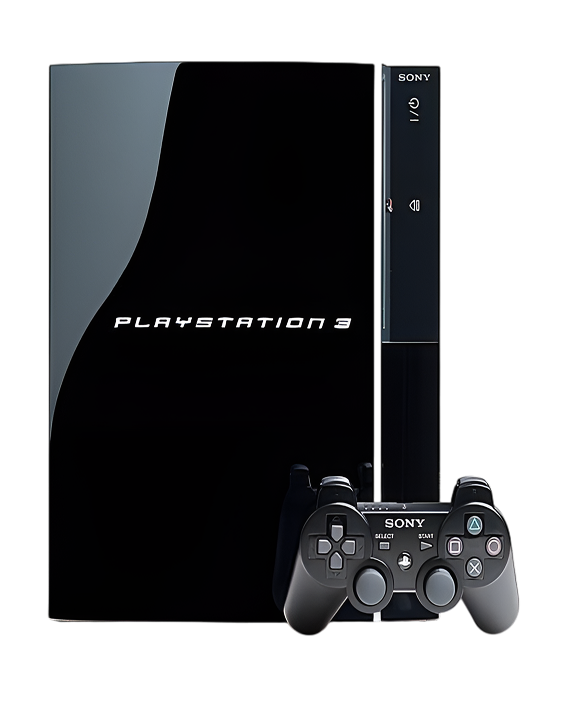
Sony launched the PlayStation 3 in November 2006 with ambitious technology—the Cell processor designed by IBM, Sony, and Toshiba was supposed to revolutionize computing. The console came in several models: the original "fat" PS3 with PS2 backward compatibility (discontinued quickly due to cost), later fat models without PS2 support, and the PS3 Slim (2009) and Super Slim (2012) that addressed many reliability issues. The hardware was impressive: Cell processor with 7 functional SPEs, RSX graphics chip, 256MB XDR RAM plus 256MB GDDR3 VRAM, built-in Blu-ray drive, and WiFi. The game library is incredible: The Last of Us, Uncharted series, God of War III, Metal Gear Solid 4, LittleBigPlanet, and hundreds more exclusives that never came to other platforms.
What makes the PS3 interesting from a repair perspective? The original fat PS3 models are notoriously failure-prone due to thermal design issues—the Cell processor and RSX GPU generate massive heat, and Sony's cooling solution wasn't adequate. The yellow light of death (YLOD) became infamous. The PS3 Slim improved reliability significantly with better cooling and power management. From a repair standpoint, PS3s are challenging—the original fat models require advanced techniques like GPU/CPU reballing for YLOD. But they're also still repairable, which is remarkable for 15+ year old electronics. The disc drives are serviceable. The HDMI ports are replaceable. The power supplies can be fixed or replaced. The main challenge is finding technicians with the skills and equipment to handle advanced PS3 repairs.
What Happens to Devices Over Time
Every PlayStation 3 eventually needs attention, and that's not Sony's fault—it's just physics meeting 15+ years of thermal stress. Here's what's actually happening inside your console over time.
Your cooling system degrades like a garden hose developing leaks over seasons of use. When it was new, water flowed consistently without issues. After years of sun exposure, freezing winters, and constant pressure, the rubber develops cracks and connections leak. Your PS3's cooling system faces similar degradation. The thermal paste between the Cell processor and RSX GPU and their respective heatsinks completely dries out after years of heat cycling. We regularly see PS3s where thermal paste has turned to powder or cracked into pieces. Dried paste doesn't transfer heat at all—it insulates instead. Dust accumulates massively in the heatsink fins over years. The fan bearings wear out. As thermal performance degrades, the processors run hotter and hotter until solder joints underneath them literally crack from thermal expansion and contraction. That's what causes the yellow light of death—failed solder connections.
The power supply components face electrical stress even when the console sits unused. Think about an electrical outlet becoming loose after years of plugging things in and out—the contacts wear, connections weaken, and eventually you get intermittent power or sparks. Your PS3's power supply capacitors age similarly. After 15+ years of electrical stress and thermal cycling, capacitors bulge, leak electrolyte, or fail completely. The power supply in original fat PS3 models was pushed to its limits—it's delivering 380W to power-hungry components, and that much power flow causes component stress. When capacitors fail, the PS3 won't power on, exhibits random shutdowns, or shows yellow light of death.
The disc drive's mechanical components wear from thousands of disc insertions over years. Motors weaken. The laser lens gets dirty or the laser diode weakens. Gears strip. The rubber drive belt stretches. The Blu-ray laser assembly is complex and expensive—it reads both DVD and Blu-ray formats, requiring dual lasers. After years of use, the Blu-ray laser often fails first while DVD reading still works.
HDMI ports face the same lateral stress issues as all PlayStation consoles. Years of cable insertions, accidental yanks, and poor cable management bend pins or crack solder joints. The HDMI port on PS3 is especially vulnerable because it's mounted on the motherboard without substantial mechanical support.
Yellow Light of Death—Console Won't Boot
You press the power button, you hear a beep, the green light briefly appears, then the yellow light flashes and the console shuts down with three beeps. Or maybe you get yellow light immediately without even a boot attempt. Could be the console worked fine for years and suddenly developed YLOD after a particularly long gaming session. Perhaps it started shutting down randomly before finally dying with yellow light. Some PS3 owners get YLOD after the console sat unused for months or years.
Why this happens: The yellow light of death indicates a general hardware failure—Sony's way of saying "something critical failed but we're not telling you what." In reality, YLOD almost always stems from GPU or CPU failure caused by thermal stress. Here's the physics: the Cell processor and RSX GPU are soldered to the motherboard using ball grid array (BGA) connections—literally hundreds of tiny solder balls underneath each chip. These chips run hot—very hot. Over years of thermal cycling (heating up during gaming, cooling down when off), the solder balls develop micro-cracks from thermal expansion and contraction. Different materials expand at different rates, creating stress. Eventually, enough solder connections fail that the chip can't communicate with the motherboard properly. The console detects this during power-on self-test and displays YLOD. Power supply failures can also cause YLOD—failed capacitors can't deliver stable power. Sometimes it's HDMI encoder chip failure or other motherboard component failures, but GPU/CPU is most common.
What you can try:
- Let the console cool completely for several hours, then try again—sometimes early YLOD will temporarily work when cold
- Check if the fan spins when you press power—no fan suggests power supply failure rather than YLOD
- Try different power outlets and power cables
- Don't repeatedly attempt power-on—this stresses components further
- If you're getting YLOD after overheating shutdowns, it's definitely thermal-related
In our experience with hundreds of these: YLOD repair on PlayStation 3 consoles requires advanced techniques and comes with caveats you need to understand. The "fix" that gets promoted online is heating the GPU/CPU with a heat gun to temporarily reflow the solder—this sometimes works for days or weeks but isn't a permanent solution because the underlying thermal stress remains. Professional PlayStation 3 repair for YLOD involves several approaches depending on severity. For early YLOD, we replace thermal paste completely, thoroughly clean the cooling system, replace power supply capacitors if they're failing, and verify proper cooling system operation—sometimes catching it early prevents permanent damage. For established YLOD where the GPU/CPU solder joints have failed, we perform professional reflow using proper temperature-controlled equipment—this is more reliable than heat gun methods but still temporary (6 months to 2 years typical lifespan). For permanent fixes, we perform GPU/CPU reballing—completely removing each chip, removing all old solder balls, applying new solder balls using precision stencils and equipment, and reinstalling the chips. Reballing is expensive, time-consuming (4-6 hours of work), requires specialized equipment, and has risks—but it's the only permanent solution. We're honest with customers: YLOD repairs have varying success rates. Thermal paste and cleaning might prevent YLOD if caught early. Reflow gives temporary fixes. Reballing is the best option but most expensive. Some PS3s are too far gone—multiple component failures make repair impractical. Success rate for proper reballing is 70-80%. We explain all options and costs upfront so you make informed decisions.
Console Overheats and Shuts Down Constantly
Your PS3 sounds like a jet engine taking off—the fan runs at maximum speed constantly. Or maybe the console shuts down after 15-30 minutes of gameplay with no warning. Could be you see temperature warnings before shutdowns. Perhaps the console feels scorching hot to touch, especially near the vents. Some PS3 owners can't play demanding games at all—the console overheats and shuts down within minutes.
Why this happens: Original fat PS3 models have fundamental thermal design issues—the Cell processor and RSX GPU generate massive heat (the system can pull 200+ watts), and Sony's cooling solution barely kept up when the console was new. After 15+ years, thermal paste has completely dried out, dust has accumulated massively in heatsinks, and fan bearings have worn. We've opened PS3s where the thermal paste looked like crushed crackers—zero thermal conductivity. The heatsink fins are densely packed and trap dust that restricts airflow dramatically. The fan itself is powerful but inefficient by modern standards. As thermal performance degrades, the console runs hotter, hits thermal limits faster, and shuts down to prevent hardware damage. This is actually good—the thermal protection prevents YLOD by shutting down before solder joints fail from heat. But it makes the console unusable.
What you can try:
- Clean external vents thoroughly with compressed air
- Ensure the console has massive clearance—these generate serious heat and need space
- Don't use it in enclosed TV cabinets
- Note how quickly shutdowns occur—faster shutdowns indicate worse thermal performance
- Listen to the fan—grinding suggests bearing failure
- If you're comfortable with basic disassembly, you can vacuum dust from internal areas, but full thermal paste replacement requires advanced disassembly
First 30 minutes when you bring it in—assessment: When you bring overheating PS3s to The Fix, we see the same pattern on almost every original fat model—completely dried thermal paste and dust-caked heatsinks. Thermal paste replacement on PS3 is complex—you're disassembling the entire console, removing the motherboard, carefully removing the heatsinks (they're held with springs that must be removed in specific patterns to prevent warping), cleaning off ancient dried thermal paste with isopropyl alcohol and patience (it's often baked onto the chips), applying fresh high-quality thermal paste with proper amount and spread technique, and reassembling everything. We also thoroughly clean all heatsink fins—the dust between fins is shocking. We clean fan blades and inspect bearings. We replace thermal pads on secondary components. PlayStation 3 repair for thermal issues takes 90-120 minutes for proper complete service. The results are dramatic—we regularly see temperature drops of 25-35°C, fan speeds decrease significantly (the console's quieter), and thermal shutdowns stop. For 15+ year old PS3s, thermal paste replacement should be mandatory maintenance if you want to keep using them. Some PS3s have such bad thermal paste that they're on the verge of YLOD—catching them early prevents permanent damage.
Disc Drive Won't Read Discs or Makes Terrible Noises
Your PS3 won't read Blu-ray game discs, giving error messages about unreadable discs. Or maybe it reads DVDs fine but refuses to read Blu-ray discs. Could be the drive makes grinding, clicking, or buzzing noises. Perhaps it won't accept discs at all—they get pushed back out immediately. Some PS3 owners find the drive randomly ejects discs during gameplay or when the console is off.
Why this happens: The PS3 Blu-ray drive is complex—it's got dual lasers for reading DVDs and Blu-ray discs, motors, gears, sensors, and eject mechanisms. After 15+ years, multiple components fail. The Blu-ray laser is usually first—it's more delicate than the DVD laser and weakens over time. The laser lens gets dusty. The laser assembly rails need lubrication. Motors weaken. Gears strip. The rubber drive belt (in some models) stretches or breaks. The eject sensor malfunctions, causing random ejects. The disc detection sensor fails. Sometimes poorly maintained discs (scratched, dirty) jam the mechanism. The Blu-ray drive controller board can fail from age.
What you can try:
- Try multiple different discs—Blu-ray games, DVD movies, audio CDs—to identify what formats fail
- Clean discs thoroughly before testing
- For random ejects, try adjusting the eject sensor (advanced, requires partial disassembly)
- Listen to what sounds the drive makes—grinding suggests mechanical issues, clicking suggests laser problems
- Check if the drive spins up at all when you insert a disc
- Try the disc database rebuild in PS3 settings
Next 45-60 minutes—the actual work: PS3 disc drive repair requires drive removal and disassembly. We remove the drive from the console (fairly straightforward on most models). We disassemble the drive to access internal components. We clean the laser lens carefully with proper cleaning solution and lens tissue. We clean and lubricate the laser assembly rails. We inspect mechanical components—motors, gears, belts. We test laser power output. For weak Blu-ray lasers (most common issue on old PS3s), we replace the laser assembly—Blu-ray lasers are expensive but readily available since millions of PS3s were sold. For mechanical failures, we replace worn gears or belts. For eject sensor issues, we adjust or replace the sensor. For drive controller board failures, we replace the board. Note: PS3 disc drives are married to motherboards with encrypted keys, so drive replacement requires proper procedures—we handle the technical aspects. PlayStation 3 repair for disc drives takes 90-120 minutes depending on the issue. Most drive problems are repairable, though Blu-ray laser replacement is often the most cost-effective solution for reading issues.
HDMI Port Damaged—No Video Output
You've got no display on your TV even though the PS3 powers on normally—you hear the beep, the green light stays on, but the screen is black. Maybe you get intermittent video that cuts out randomly. Could be the picture is heavily distorted or flickering. Perhaps the HDMI cable won't stay in the port—it feels loose. Some PS3 owners accidentally yanked the HDMI cable and immediately lost video.
Why this happens: The PS3's HDMI port is a 19-pin connector soldered to the motherboard. It's mounted without substantial mechanical reinforcement, making it vulnerable to stress. When HDMI cables get yanked accidentally, the port experiences lateral force that bends the metal shield, bends or breaks internal pins, or cracks solder joints. After years of cable insertions, wear accumulates. Original fat PS3 models are especially prone to HDMI port failure because the port location and mounting make it vulnerable to stress from cable weight.
What you can try:
- Test with multiple HDMI cables and different TV inputs
- Try a different TV to isolate console versus display issues
- Use component video cables (red/green/blue) to see if video output works through those—if it does, the problem is definitely the HDMI port
- Inspect the HDMI port for bent metal or visible damage
- Check PS3 video settings—boot into safe mode and reset video output
- Don't wiggle or force the HDMI cable—additional stress causes more damage
Final hour—testing everything: HDMI port replacement on PlayStation 3 consoles is straightforward but requires precision. We desolder the damaged port using temperature-controlled equipment—19 pins plus shield connections. We clean connection pads thoroughly. We position a new port with precise alignment. We solder all connections cleanly. We inspect under magnification. We test at multiple resolutions with different cables. PlayStation 3 repair for HDMI ports takes 60-90 minutes. It's one of the more common PS3 repairs we perform, and success rate is nearly 100% when done properly. The PS3 can output video through component cables, so HDMI port failure doesn't completely kill the console—but modern TVs often lack component inputs, making HDMI repair necessary.
Power Supply Failed—Console Won't Turn On
You press the power button and nothing happens—no lights, no sounds, no response. Maybe you hear a click from inside but no other activity. Could be the red standby light is on but pressing power does nothing. Perhaps the console worked fine and suddenly died during gameplay or in standby mode. Some PS3 owners experienced power failure after a power outage or surge.
Why this happens: PS3 power supplies, especially in original fat models, are pushed hard—they're delivering up to 380W to power-hungry components. After 15+ years, capacitors fail from electrical stress and heat. The power supply has multiple voltage rails, and failure of any rail prevents boot. Fuses can blow from power surges. The power supply fan can fail, causing the PSU itself to overheat. Sometimes it's not the PSU—it's the power button that's failed (mechanical switch), blown fuses on the motherboard, or catastrophic motherboard failure.
What you can try:
- Try different power cables and outlets
- Check if the red standby light comes on—if it does, the PSU has some functionality
- Listen for any sounds when you press power—clicking indicates partial PSU operation
- Let the console sit unplugged for 30 minutes, then try again
- Don't repeatedly attempt power-on if nothing happens
Your PS3 ready for pickup: When you bring non-powering PS3s to The Fix, we systematically diagnose the issue. We inspect the PSU for bulging capacitors, burn marks, or obvious failures. We test PSU voltage outputs with a multimeter. We check motherboard fuses. We test the power button. For PSU failures (60-70% of power issues on fat PS3s), we replace or repair the power supply—replacement PSUs are available, or we can repair original PSUs by replacing failed capacitors and components. For blown fuses, we replace them and identify root causes. For power button failures, we replace the button. PlayStation 3 repair for power issues takes 60-90 minutes. Original fat PS3 models from 2006-2008 had notorious PSU reliability issues—replacement or refurbishment solves this. PS3 Slim and Super Slim have much more reliable power supplies that rarely fail.
Wireless Network Connectivity Issues
Your PS3 won't connect to WiFi, or it connects but constantly drops connection. Maybe download speeds are terrible compared to other devices. Could be you can only connect via wired Ethernet, not wireless. Perhaps the console sees the network but won't authenticate. Some PS3 owners find wireless worked fine for years and suddenly stopped entirely.
Why this happens: The PS3's wireless card is a separate module that can fail from age or electrical issues. The wireless antenna can come loose from vibration or impacts. WiFi modules from 2006-2012 are outdated by modern standards—they use older wireless protocols that don't work well with modern routers. Driver issues in old PS3 firmware can cause compatibility problems with newer router security standards. Sometimes it's not the console—it's router configuration incompatible with old devices.
What you can try:
- Test with wired Ethernet to verify network functionality
- Try connecting to a mobile hotspot to isolate router issues
- Update PS3 system software to the latest version
- Try different wireless security settings on your router (WPA2 instead of WPA3)
- Move the console closer to the router to test signal strength
- Check if the wireless antenna connector inside is secure (requires opening the console)
We make sure you're completely satisfied: Network issues require troubleshooting. We test WiFi functionality and signal strength. We test with multiple networks. We inspect wireless antenna connections. For failed wireless cards, we replace the module. For antenna issues, we reseat or replace the antenna. PlayStation 3 repair for network issues varies from simple troubleshooting to module replacement (60-75 minutes). Many network "failures" are actually compatibility issues between ancient PS3 wireless protocols and modern routers—sometimes router configuration fixes solve it without hardware repair.
Keep Your PS3 Running Longer
Thermal maintenance is mandatory. If you've got an original fat PS3 and haven't had thermal paste replaced, schedule it before YLOD develops. Clean vents monthly. Keep the console in open spaces with massive clearance. Never use it in enclosed spaces.
HDMI care prevents repairs. Use quality cables. Never yank cables. Route cables to avoid stress. Consider component cables as backup—PS3 can output 1080p through component.
Disc care. Clean discs before use. Handle by edges only. Store in cases. Don't use damaged discs. Blu-ray lasers are expensive to replace.
Power protection. Use a quality surge protector—these old PSUs are vulnerable to surges. Don't use the console during thunderstorms.
Backup saves regularly. PS3 uses internal hard drives that can fail. Back up saves to USB drives or PlayStation Plus cloud storage.
Hard drive maintenance. Don't fill the drive to 100%. Consider upgrading to SSD for better reliability. Rebuild database quarterly.
Expert Care for Classic Consoles
The PlayStation 3 might be 15+ years old, but it's got an incredible exclusive library that makes it worth maintaining. Most problems—YLOD, overheating, disc drives, HDMI ports, power supplies—are repairable with the right expertise and equipment. These consoles are now retro gaming hardware, and professional repair keeps classic games accessible.
Bring your PlayStation 3 to The Fix and let our experienced techs take a look. We've seen every problem these consoles develop, we know exactly how to fix them, and we'll treat your device like it's our own. Free diagnostic, honest pricing, quality work. We understand these are aging systems that people keep for their exclusive libraries, and we're committed to keeping them playable for years to come.


Trusted repair solution for mobile phones, tablets, gaming consoles, and computer systems. We provide fast, reliable, and affordable repair services to get your devices back in perfect working condition.
The Fix is an independent repair service provider and is not affiliated with, sponsored by, or endorsed by Apple Inc., Samsung Electronics, Google LLC, or any other device manufacturer. We use high-quality compatible replacement parts unless explicitly stated. All trademarks are property of their respective owners.


© Copyright The Fix Solutions All rights reserved 2026.
Design by Deepcoder