




razr+ 2025 Repair Services
At The Fix, we help with Motorola Razr+ 2025 screen, battery, charging, camera, speaker, and microphone repair needs. Visit a nearby location to discuss the problem and get a quote.
Common Repairs We Handle Daily


Motorola Razr+ 2025 Repair at The Fix
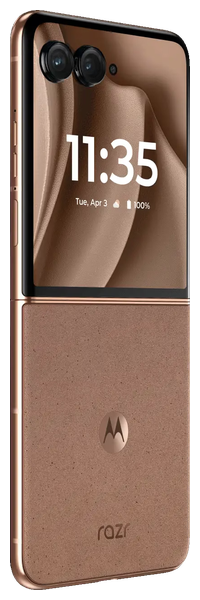
The Motorola Razr+ 2025 combines a 6.9-inch foldable pOLED main display with a 4-inch external pOLED screen. Its flip design makes both displays central to everyday use, so cracks, touch problems, or display faults can interfere with how you use the phone.
At The Fix, we help with phone repair needs such as screen repair, battery replacement, charging port repair, camera repair, and audio issues. This guide explains common symptoms and the repair options to consider for your Motorola Razr+ 2025.
What should you do if your Razr+ 2025 screen is damaged?
A damaged Razr+ 2025 screen may show cracks, lines, flickering, dark areas, or touch response problems. Because this phone has both an inner foldable display and an external screen, note which display is affected and describe what changed before seeking repair.
Avoid pressing on damaged display areas or repeatedly folding the phone if the hinge or screen feels obstructed. If glass or display layers are lifting, keep your fingers away from the damaged area. Visit your nearest The Fix location to get a quote for Motorola Razr+ 2025 screen repair.
When is it time to replace your Razr+ 2025 battery?
Battery replacement may be worth considering if the phone loses charge unusually quickly, shuts down unexpectedly, or has trouble maintaining power during normal use. These symptoms can also have other causes, so they do not confirm a battery fault on their own.
The Razr+ 2025 has a 4,000 mAh non-removable battery. If the phone becomes unusually hot, the battery area appears swollen, or the casing starts to separate, stop using and charging the device and arrange professional assistance. Do not press on or attempt to remove a swollen battery.
Why is your Razr+ 2025 not charging properly?
Charging trouble can result from a cable, power adapter, software issue, battery problem, or damaged USB-C port. The phone supports wired charging up to 45 W and wireless charging up to 15 W, but the charging rate depends on the compatible equipment and conditions.
If the port looks damaged, the connector feels loose, or the phone has been exposed to liquid, do not force a cable into the port or connect power while moisture may remain. Charging symptoms alone do not prove that the port needs replacement. The Fix can help with charging port repair and provide a quote based on the problem.
What can cause camera or audio problems on your Razr+ 2025?
Camera concerns can include blurry images, focusing problems, a camera view that fails to open, or visible damage around a lens. The phone has a main rear camera, a telephoto camera, and a front-facing camera. If only one camera view is affected, mention that detail when arranging repair.
Audio faults may appear as quiet playback, distorted sound, or trouble being heard during calls. The Razr+ 2025 has stereo speakers and multiple microphones. Check whether the issue occurs in more than one app or call type, but do not insert objects into openings or attempt to dismantle the phone. The Fix can help with camera, speaker, and microphone repair needs.
How can The Fix help with your Razr+ 2025 repair?
The right repair depends on the symptoms and the fault affecting the device. Screen damage, battery problems, charging failures, camera faults, and audio issues can have different causes, so the repair and final quote depend on the problem found.
Many common phone repairs can take about 30 minutes or less, although timing varies by repair and a more precise estimate is available after diagnosis. Visit your nearest The Fix location to discuss your Motorola Razr+ 2025 and get a quote for the repair it needs.
Frequently Asked Questions About Motorola Razr+ 2025 Repair
Can the inner and outer screens have different problems?
Yes, the inner foldable display and the external display can show different symptoms because they are separate display areas. Tell the repair team which screen is affected and describe any cracks, touch issues, or image changes.
Should I charge my Razr+ 2025 after liquid exposure?
No, do not connect a charger if the phone may still be wet. Disconnect it from power if safe to do so, avoid inserting objects into the port, and arrange professional help before attempting to charge it again.
Will a repair definitely preserve my data?
No repair can be promised to preserve every file or setting. Back up your data before service if the phone is working safely enough to do so, and avoid using a device that is swollen, unusually hot, or physically unsafe.
How much does Motorola Razr+ 2025 repair cost?
The cost depends on the fault and the repair required. Visit your nearest The Fix location to discuss the symptoms and get a quote before proceeding.
Need help with your Motorola Razr+ 2025? Visit your nearest The Fix location to get a quote for the repair your phone needs.


Trusted repair solution for mobile phones, tablets, gaming consoles, and computer systems. We provide fast, reliable, and affordable repair services to get your devices back in perfect working condition.
The Fix is an independent repair service provider and is not affiliated with, sponsored by, or endorsed by Apple Inc., Samsung Electronics, Google LLC, or any other device manufacturer. We use high-quality compatible replacement parts unless explicitly stated. All trademarks are property of their respective owners.


© Copyright The Fix Solutions All rights reserved 2026.