






Motorola Razr 40 (2023) Repair Services
Get fast, reliable, and professional Motorola Razr 40 (2023) repair services at The Fix — your trusted destination for expert device care.
Common Repairs We Handle Daily


Motorola Razr 40 (2023) Repair: In-Depth Technical Guide
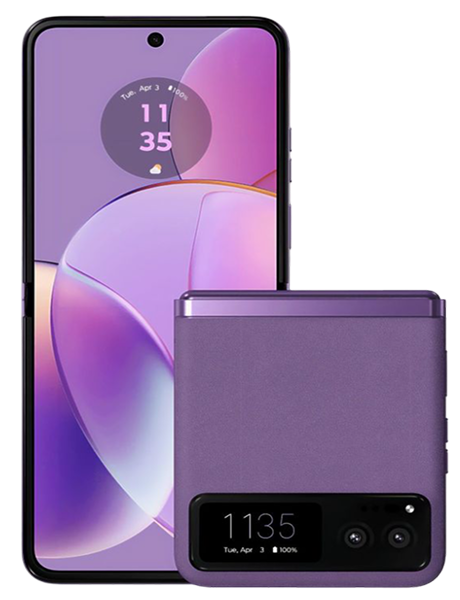
The Motorola Razr 40 represents iterative refinement in foldable smartphone design, incorporating lessons learned from earlier generations to deliver improved durability and reliability. Released in 2023, this device demonstrates how manufacturers address the unique engineering challenges foldable technology presents. Understanding the technical systems within the Razr 40 provides context for maintenance requirements and repair considerations that keep these sophisticated devices functioning optimally.
Engineering Design Principles Behind the Razr 40
Motorola approached the Razr 40 with specific objectives addressing previous generation limitations. The hinge mechanism received particular attention, incorporating stronger materials and refined geometry to withstand increased folding cycles. Engineering simulations tested hinge components through hundreds of thousands of fold cycles before production, identifying potential failure points and strengthening vulnerable areas.
The flexible display assembly utilizes ultra-thin glass layered with polymer films, creating a structure that balances durability with flexibility. This composite construction allows repeated folding without the catastrophic failures rigid glass would experience. However, the materials require specific handling considerations—pressure applied perpendicular to the screen surface can damage internal layers even when the glass surface appears intact.
The device's frame architecture distributes stress strategically during folding cycles. The aluminum frame incorporates reinforcement at high-stress points where hinge mounting creates concentrated loads. This structural approach prevents frame fatigue that would otherwise accumulate over thousands of folding operations.
Internal component layout optimizes space efficiency while maintaining serviceability. The dual battery configuration positions cells strategically to balance weight distribution when folded. Display controllers, wireless charging coils, and camera modules occupy precisely engineered locations that maximize functionality within the compact folded footprint. This thoughtful arrangement facilitates component replacement during repairs by minimizing interdependencies between systems.
Thermal management in foldables presents unique challenges compared to traditional smartphones. The folding design creates confined spaces that limit airflow, while dual displays generate more heat than single-screen devices. The Razr 40 employs graphite thermal spreaders and copper heat pipes that conduct heat from the processor and displays toward frame edges where it dissipates more effectively. Understanding this thermal architecture explains why the device feels warm in specific areas during intensive use.
Analyzing Major Component Systems
Flexible Display Technology
The main foldable display represents the most complex component, integrating multiple technologies into a single assembly. The OLED panel itself consists of organic compounds deposited onto a flexible substrate. These compounds emit light when electrical current passes through them, creating the image you see. Unlike rigid displays where the OLED sits on glass, foldable displays place these organic layers on ultra-thin polymer or glass that can bend.
Above the OLED sits the ultra-thin glass layer providing touch sensitivity and surface protection. This glass, typically 30-50 micrometers thick compared to 500+ micrometers in traditional screens, can flex without fracturing. However, sharp impacts or pressure concentrated on small areas can still crack or damage it despite its flexibility.
The display assembly includes a digitizer layer that senses touch input through capacitive sensing. This layer must maintain electrical connectivity across the fold line while flexing thousands of times. The engineering challenge involves creating circuits that survive repeated bending without developing breaks that would create dead zones in touch responsiveness.
Protective layers above the ultra-thin glass safeguard against scratches and impacts while maintaining touch sensitivity and optical clarity. These layers use specialized polymers designed to flex with the display. Removing or replacing these protectors requires materials engineered specifically for foldable displays—standard screen protectors designed for rigid displays won't flex properly and can damage the screen underneath.
Advanced Hinge Mechanism
The hinge system comprises over a hundred individual components working together to enable smooth folding action. The mechanism includes gears, springs, cam followers, and linkages precisely engineered to control folding radius and maintain appropriate tension. This complexity serves specific purposes—controlling how the flexible display bends prevents stress concentration that would damage it over time.
The hinge incorporates a cam mechanism that maintains consistent tension throughout the folding range. As you open or close the device, you feel smooth, uniform resistance. This resistance isn't merely aesthetic preference—it prevents the display from creasing too sharply and ensures the device doesn't snap open or closed, which would stress components unnecessarily.
Dust and debris management represents a critical hinge design consideration. The mechanism includes brush seals and barriers that minimize particle infiltration while allowing the necessary mechanical movement. Despite these protections, small particles inevitably work into the mechanism over extended use. The engineering challenge involves creating designs where debris doesn't jam critical components or accelerate wear.
Lubrication within the hinge reduces friction and wear during folding cycles. Manufacturers select lubricants that maintain appropriate viscosity across temperature ranges and don't degrade over time. As hinges accumulate folding cycles, lubricants can migrate or thin, potentially increasing friction. Professional hinge service sometimes involves reapplying appropriate lubricants to restore smooth operation.
Dual Battery Configuration
The Razr 40 distributes battery capacity across two cells positioned in the upper and lower halves of the device. This configuration balances weight and allows the device to close flat despite battery thickness. Each cell connects to the power management system through separate circuits that monitor individual cell health, charge levels, and temperature.
The power management integrated circuit coordinates charging between cells to maintain balanced capacity. Unbalanced cells—where one degrades faster than the other—can cause irregular battery behavior. The system reports aggregate capacity rather than individual cell status, so standard battery health indicators may not reveal single-cell degradation until it significantly affects overall performance.
Thermal management during charging becomes more critical in foldables due to confined spaces and dual displays. The charging system monitors battery temperature and adjusts current to prevent overheating. Users sometimes notice slower charging speeds than specifications suggest, which often represents thermal throttling protecting battery health rather than charging system failure.
Cover Display System
The external cover screen operates independently from the main foldable display, with its own controller, digitizer, and power management. This separation means cover screen problems don't necessarily indicate main display issues. The cover screen uses traditional rigid OLED technology since it doesn't fold, making it more durable than the flexible internal display but subject to different failure modes.
The cover display's smaller size concentrates touch interactions into a compact area, potentially increasing wear on specific digitizer zones. Users who extensively use the cover screen may notice touch sensitivity changes sooner than those primarily using the main display.
Understanding Failure Mechanics and Root Causes
Display Degradation Patterns
Flexible displays age through multiple mechanisms. The organic compounds in OLED technology degrade naturally over time, reducing brightness and potentially causing color shifts. This affects all OLED displays but becomes more noticeable in foldables where the crease area may age differently than flat regions due to repeated bending stress.
The crease itself—the visible line where the display folds—becomes more pronounced over thousands of folding cycles. This represents normal wear as the materials experience plastic deformation from repeated flexing. Accelerated crease definition or localized discoloration along the crease suggests abnormal stress, possibly from debris between halves during folding or impact damage affecting internal layers.
Delamination occurs when layers within the display assembly separate. This can manifest as cloudy patches, color irregularities, or bubbles visible beneath the screen surface. Delamination typically stems from impact damage, exposure to extreme temperatures, or moisture infiltration that weakens adhesives bonding layers together.
Hinge Wear Progression
Hinge components experience mechanical wear through friction during folding cycles. While engineered for longevity, materials gradually wear, potentially affecting smoothness. Asymmetric wear—where one side feels different than the other—develops if users consistently hold one side while folding. Balanced handling distributes stress evenly across components.
Debris infiltration represents the most common accelerant of hinge wear. Particles working into the mechanism act as abrasives, accelerating component degradation. Regular external cleaning prevents accumulation, but particles that penetrate internal mechanisms require professional service to remove without causing additional damage.
Environmental factors affect hinge performance. Cold temperatures temporarily increase resistance as materials contract and lubricants thicken. High humidity can cause slight component swelling. These environmental responses don't indicate failure but explain temporary behavior changes.
Battery System Degradation
Lithium-ion cells degrade through chemical processes inevitable with use. The dual-cell configuration means cells may age at slightly different rates depending on thermal exposure and stress from folding cycles. As mentioned earlier, the power management system reports aggregate health, so individual cell issues may not become apparent until they significantly impact total capacity.
Battery swelling occasionally occurs in aged cells and presents serious concerns in foldables. Swollen batteries create pressure against displays and internal components in already-compact devices. Any signs of swelling—gaps between display and frame, device not closing completely, or back panel lifting—require immediate professional attention.
Professional Repair Procedures and Techniques
Flexible Display Replacement
Replacing the main foldable display represents the most complex Razr 40 repair. The procedure requires complete device disassembly beginning with cover screen removal to access internal fasteners. Technicians must disconnect multiple flex cables connecting displays, battery, and other components to the motherboard.
The foldable display adheres to the frame through adhesives that require careful heating to soften without damaging adjacent components. Replacement displays arrive pre-assembled with digitizers and necessary sensors, but technicians must ensure proper alignment with the hinge mechanism. Improper alignment causes uneven stress during folding, potentially damaging the new display.
Post-installation calibration verifies touch responsiveness across the entire surface and tests folding action to confirm the display flexes appropriately. The repair includes installing new adhesives that secure the display while allowing the minimal flex necessary during folding cycles.
Hinge Mechanism Service
Professional hinge service ranges from cleaning and lubrication to component replacement depending on issue severity. Technicians access the hinge by removing the displays and frame components that conceal it. Visual inspection identifies worn parts, debris accumulation, or damage requiring replacement.
Cleaning involves carefully removing old lubricants and debris using appropriate solvents that don't damage plastic components or affect metal finishes. Technicians apply fresh lubricants specified for the temperature ranges and mechanical requirements the hinge experiences. Improper lubricants can attract debris or break down prematurely.
Component replacement within the hinge becomes necessary when gears show wear, springs lose tension, or cam followers develop flat spots. Many hinge components can be individually replaced rather than replacing the entire assembly, reducing repair costs while restoring proper function.
Battery System Replacement
Battery replacement requires navigating around the hinge mechanism to access both cells. Technicians disconnect batteries from the power management system, remove adhesives securing them, and install quality replacement cells. Both batteries typically replace together to ensure matched capacity and aging characteristics.
Post-replacement testing verifies proper charging behavior, accurate capacity reporting, and appropriate thermal management during charging and use. The power management system may require recalibration to recognize the new batteries' characteristics.
Cover Display Repair
Cover screen replacement follows procedures similar to traditional smartphone display replacement. The rigid OLED panel removes from the frame, allowing installation of the replacement assembly. This repair proves more straightforward than flexible display replacement but still requires proper technique to avoid damaging sensors and components integrated into the cover screen assembly.
Long-Term Care and Maintenance Strategies
Implement deliberate handling practices that minimize stress on flexible components. Fold and unfold the device smoothly without forcing or rushing. Check that nothing obstructs the interior before closing—even thin objects can concentrate pressure causing display damage.
Maintain clean hinge areas through gentle regular maintenance. Monthly inspection and cleaning prevent debris accumulation that accelerates wear. Use soft brushes or compressed air applied gently around hinge gaps, avoiding forcing debris deeper into mechanisms.
Monitor battery health through settings or third-party apps that report capacity. Proactive battery replacement before complete failure prevents inconvenience and potential damage from swelling. Watch for capacity dropping below 80% of design specification, which typically indicates replacement timing.
Avoid temperature extremes when possible. Don't leave the device in hot vehicles where temperatures exceed 140°F, and allow cold devices to warm gradually rather than immediately using them intensively after bringing them indoors. Thermal stress accelerates material aging and affects adhesives bonding components together.
Use cases designed for foldable devices that don't interfere with folding action. Cases must allow complete closing without forcing or creating pressure points. Remove cases that show signs of interfering with hinge operation—slight resistance closing indicates the case restricts movement.
Store the device either fully open or fully closed rather than at partial angles. These positions maintain appropriate stress distribution across internal components. Avoid placing heavy objects on the device regardless of position.
Conclusion: Engineering Excellence Meets Practical Maintenance
The Motorola Razr 40 demonstrates refined foldable engineering incorporating lessons from previous generations. Its improved hinge mechanism, carefully designed flexible display, and thoughtful component layout create a device balancing innovation with reliability. Understanding the technical systems within the Razr 40 provides context for maintenance requirements and repair considerations.
Professional repair services address issues these sophisticated devices inevitably experience. Flexible display replacements restore visual quality, hinge service maintains smooth operation, and battery replacements ensure reliable power. Each repair requires specialized knowledge of foldable architecture and appropriate techniques that prevent additional damage.
At The Fix, we provide expert service for advanced devices like the Razr 40. Our technicians understand foldable technology, use proper tools and techniques, and have access to quality replacement components. We approach each repair with the care these engineering achievements deserve.
If your Razr 40 requires service or shows concerning symptoms, contact The Fix for professional assessment. We'll diagnose issues accurately and discuss solutions that restore your foldable device to optimal operation.


Trusted repair solution for mobile phones, tablets, gaming consoles, and computer systems. We provide fast, reliable, and affordable repair services to get your devices back in perfect working condition.
The Fix is an independent repair service provider and is not affiliated with, sponsored by, or endorsed by Apple Inc., Samsung Electronics, Google LLC, or any other device manufacturer. We use high-quality compatible replacement parts unless explicitly stated. All trademarks are property of their respective owners.


© Copyright The Fix Solutions All rights reserved 2026.
Design by Deepcoder