






Motorola Razr+ (2024) Repair Services
Get fast, reliable, and professional Motorola Razr+ (2024) repair services at The Fix — your trusted destination for expert device care.
Common Repairs We Handle Daily


Diagnosing Motorola Razr+ (2024) Problems: Expert Repair Insights
The 2024 Motorola Razr+ represents the cutting edge of foldable smartphone technology, combining the largest cover screen in its class with refined hinge engineering and flagship performance. This premium device transforms how users interact with their phones, offering full smartphone functionality on the exterior display while maintaining the compact form factor that makes foldables appealing. However, the sophisticated mechanics and dual-display architecture introduce unique diagnostic considerations when problems arise. Understanding how to identify issues correctly ensures appropriate solutions rather than unnecessary interventions.
Establishing a Diagnostic Framework for Foldable Devices
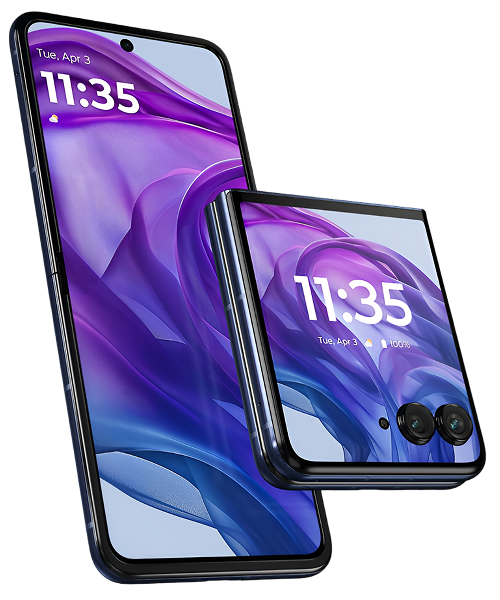
Foldable smartphones require fundamentally different diagnostic approaches than traditional devices. The Razr+ contains two distinct display systems—the large 3.6-inch external pOLED screen and the 6.9-inch internal foldable display. Each operates independently with separate digitizers, controllers, and power management. Problems affecting one display don't necessarily indicate issues with the other, making symptom isolation critical for accurate diagnosis.
The hinge mechanism represents another unique system requiring specialized assessment. Unlike simple pivot joints, the Razr+ employs a sophisticated multi-axis hinge that controls folding radius, maintains tension throughout the motion range, and protects the flexible display during countless open-close cycles. Hinge problems manifest through various symptoms that can mislead users toward incorrect conclusions about underlying causes.
Battery management in foldables differs from traditional smartphones due to space constraints and thermal considerations. The Razr+ distributes battery capacity across multiple cells positioned to maintain device balance when folded. This architecture affects charging behavior, thermal patterns, and capacity reporting in ways that can confuse standard diagnostic approaches.
Software integration between dual displays creates additional diagnostic complexity. The device constantly switches contexts between screens, manages different aspect ratios, and optimizes power consumption based on which display is active. Software glitches can produce symptoms that seem hardware-related, making systematic testing essential before assuming physical component failure.
Categorizing Symptoms by System
Display-Related Symptoms
Cover screen issues present differently than internal display problems. The external pOLED may show touch responsiveness problems, color accuracy shifts, or brightness irregularities. These symptoms typically remain consistent regardless of whether the phone is open or closed, suggesting issues specific to the cover display system.
Internal foldable display symptoms often correlate with fold position. Dead zones along the crease area, color banding that appears when folded at certain angles, or brightness variations between upper and lower display halves all suggest problems related to the flexible screen's mechanical stress points. The crease itself—a visible line where the display folds—is normal and shouldn't be confused with defects unless it shows sharp definition changes or localized discoloration.
Touch responsiveness issues require careful assessment to determine affected display. Some users report phantom touches where the screen registers input without physical contact. This can stem from digitizer problems, software glitches, or even environmental factors like high humidity affecting capacitive sensing. Testing in controlled environments helps isolate actual hardware failures from situational sensitivity.
Hinge-Related Symptoms
Resistance changes during folding represent the most common hinge concern. The device should open and close smoothly with consistent tension throughout the motion range. Increased resistance, grinding sensations, or areas where tension suddenly changes suggest mechanical issues within the hinge assembly. However, temperature affects hinge feel—cold environments naturally increase resistance while heat reduces it. Distinguishing environmental effects from actual problems requires testing at normal temperatures.
Audible clicking or popping during folding cycles doesn't necessarily indicate failure. The hinge contains multiple mechanical elements that can produce sounds during normal operation. Concerning sounds include grinding, scraping, or sudden snapping that suggests component interference. The distinction between normal mechanical sounds and problematic noises requires experience but significantly affects diagnostic accuracy.
Alignment problems where the device doesn't close flush or shows gaps between halves when folded suggest either hinge mechanism issues or frame deformation. The Razr+ should close completely with uniform gaps along all edges. Asymmetric gaps or resistance to complete closure often indicate problems requiring professional assessment.
Power and Charging Symptoms
Battery life variations in foldables can confuse users accustomed to traditional smartphones. The Razr+ consumes power differently depending on which display is active and how intensively the hinge sensors and controllers operate. Rapid drain when using the cover screen extensively may seem abnormal but actually reflects the power required to maintain that display active continuously. Distinguishing normal foldable power consumption patterns from actual battery degradation requires understanding baseline expectations.
Charging irregularities sometimes stem from software rather than hardware. The device's power management system optimizes charging based on usage patterns and thermal conditions. Slower charging speeds when the phone is warm represent protective measures rather than failures. However, complete charging failures, intermittent connection problems, or charging that works only in specific positions suggest actual hardware issues requiring attention.
Overheating during normal use warrants investigation. Foldables generate more heat than traditional devices due to compact internal layouts and the power required to drive dual displays. However, excessive heat during light tasks or sustained high temperatures suggest either software problems causing excessive background activity or hardware issues affecting thermal management.
Performance and Software Symptoms
App crashes, interface lag, or unexpected behavior require systematic diagnosis to distinguish software from hardware causes. The Razr+ runs sophisticated software managing display transitions, aspect ratio changes, and optimized app layouts for different screen configurations. Software glitches can mimic hardware problems, making safe mode testing and cache clearing essential diagnostic steps before assuming component failure.
Connectivity problems with 5G, Wi-Fi, or Bluetooth sometimes relate to antenna placement in foldable designs. The device's orientation affects signal quality more than traditional phones due to how antennas position relative to the user's hand when folded versus open. Testing connectivity across different folding positions helps determine whether problems stem from actual hardware failures or signal interference from normal usage patterns.
Root Cause Analysis for Common Problems
Foldable Display Concerns
The flexible internal display uses ultra-thin glass layered with polymer films to enable repeated folding. This construction makes it more susceptible to pressure damage than traditional rigid displays. Users should never press firmly on the folded screen or place objects between the halves when closing. Even light pressure can create permanent marks or damage the delicate layers.
The display crease naturally becomes more visible over time as the folding cycles accumulate. This represents normal wear rather than defect. However, sharp changes in crease appearance, localized discoloration along the crease, or dead pixels developing near the fold line suggest accelerated wear requiring professional assessment.
Screen protector compatibility represents a unique concern for foldables. The Razr+ ships with a factory-applied screen protector designed specifically for the flexible display. Removing this protector or applying incompatible alternatives can damage the screen. Any bubbling, lifting, or damage to the factory protector requires professional replacement with compatible materials.
Hinge Mechanism Issues
The hinge contains numerous small mechanical components working together to provide smooth folding action and proper display protection. Debris infiltration represents the most common cause of hinge problems. Pocket lint, dust, and small particles can work into hinge mechanisms during normal carry, gradually affecting operation. Regular gentle cleaning around hinge areas prevents accumulation before it causes problems.
Hinge wear occurs naturally over thousands of folding cycles, though proper design ensures reliable operation throughout the device's intended lifespan. Asymmetric wear—where one side feels different than the other—sometimes develops if users consistently fold the device while holding one side. Balanced handling distributes stress evenly across hinge components.
Environmental exposure affects hinge performance. Extreme cold stiffens lubricants and materials, increasing resistance temporarily. High humidity can cause slight swelling in certain components, also affecting feel. Understanding these environmental sensitivities prevents mistaking normal behavior under unusual conditions for actual failures.
Battery and Power Management
The distributed battery architecture in foldables means capacity readings aggregate multiple cells. If one cell ages faster than others, overall capacity drops but the imbalance may not be immediately apparent through standard battery health reporting. Professional diagnostics can assess individual cell health, identifying situations where partial battery replacement might address problems more efficiently than complete battery system replacement.
Charging port problems affect foldables similarly to traditional devices, but the compact internal layout makes port replacement more complex. The USB-C port typically resides on a small flex assembly that requires careful routing around the hinge mechanism during service. Port contamination from pocket debris remains the leading cause of charging problems, making regular gentle cleaning an effective preventive measure.
Professional Solutions for Diagnosed Problems
Display System Repairs
Cover screen replacement follows relatively straightforward procedures similar to traditional smartphone displays. The external screen can be serviced without disturbing the internal foldable display, making it more accessible for repair. Quality replacement covers maintain the touch sensitivity and display characteristics that make the Razr+ cover screen so functional.
Internal foldable display replacement represents the most complex repair for this device. The procedure requires complete disassembly, careful removal of the delicate flexible display without damaging it further, and precise installation of the replacement. The new display must be properly tensioned and aligned with the hinge mechanism to ensure correct folding behavior. This repair demands specialized expertise and appropriate tooling.
Screen protector replacement on the internal display requires manufacturer-approved materials and application techniques. The protector must flex properly with the display without creating bubbles or stress points along the crease. Improper protector installation can actually damage the display underneath, making professional service essential for this seemingly simple task.
Hinge Mechanism Service
Minor hinge issues sometimes resolve through professional cleaning and lubrication. Technicians can disassemble hinge areas, remove accumulated debris, and apply appropriate lubricants that restore smooth operation. This service proves particularly effective when problems stem from contamination rather than component wear.
Hinge component replacement becomes necessary when mechanical parts show actual wear or damage. The Razr+ hinge contains numerous small components that can be individually replaced rather than replacing the entire hinge assembly. This targeted approach reduces repair costs while restoring proper function.
Alignment corrections address situations where the device no longer closes symmetrically or shows gaps when folded. Technicians can adjust hinge tension and realign frame elements to restore proper closure. This service often proves necessary after drops or impacts that don't obviously damage displays but affect structural alignment.
Battery System Repairs
Battery replacement in foldables requires careful navigation around the hinge mechanism and dual display systems. The distributed battery cells must be replaced together to ensure balanced capacity and charging behavior. Professional service ensures new batteries install correctly without creating pressure points that could affect hinge operation or display positioning.
Charging port service follows similar principles as traditional devices but with additional complexity from the compact foldable architecture. Port replacement restores reliable charging and data connectivity while ensuring proper fit within the tight internal layout.
Preventive Care for Foldable Longevity
Handle the device deliberately during folding cycles. Avoid folding while distracted or rushing, as this increases risk of forcing the hinge beyond its intended range or catching debris between halves. Smooth, controlled folding cycles minimize stress on all mechanical components.
Keep the hinge area clean through gentle maintenance. Regularly inspect hinge gaps for debris accumulation and carefully remove any visible particles using appropriate tools. Never force debris out aggressively, as this can push particles deeper into the mechanism.
Avoid exposing the device to extreme temperatures when possible. Cold environments make materials more brittle while heat can affect adhesives and lubricants. Allow the device to acclimate to normal temperatures before extensive folding when it's been in extreme conditions.
Use protective cases designed specifically for the Razr+ that accommodate its folding action without interfering with hinge operation. Cases must allow complete closing without creating pressure points or requiring force. Improper cases can stress hinges and displays, accelerating wear.
Never place objects between the display halves when closing. Even thin items like cards or paper can concentrate pressure on small display areas, causing permanent damage. Always visually verify the interior is clear before closing.
Store the device in positions that don't stress the hinge. Avoid placing heavy objects on folded devices or storing them in tight pockets that apply sustained pressure. When not in use, the device can remain either fully open or fully closed—both positions maintain appropriate internal stress distribution.
Conclusion: Expert Care for Advanced Technology
The Motorola Razr+ (2024) represents sophisticated engineering that enables the foldable smartphone experience. Its dual-display system, advanced hinge mechanism, and compact design create unique diagnostic requirements when problems arise. Understanding how to properly identify issues ensures appropriate solutions rather than unnecessary interventions or overlooked problems.
Professional diagnosis for foldable devices requires specialized knowledge of their unique architecture and common failure patterns. The delicate nature of flexible displays, complex hinge mechanisms, and integrated dual-screen software all demand expertise beyond traditional smartphone repair.
At The Fix, we provide professional diagnostic services and repairs for cutting-edge devices like the Razr+. Our technicians understand foldable technology, use appropriate tools and techniques, and have access to quality components designed for these advanced devices. We stand behind our work because we respect the engineering excellence these devices represent.
If your Razr+ (2024) shows concerning symptoms or requires service, contact The Fix for expert assessment. We'll diagnose problems accurately and discuss solutions that restore your premium foldable to optimal operation.


Trusted repair solution for mobile phones, tablets, gaming consoles, and computer systems. We provide fast, reliable, and affordable repair services to get your devices back in perfect working condition.
The Fix is an independent repair service provider and is not affiliated with, sponsored by, or endorsed by Apple Inc., Samsung Electronics, Google LLC, or any other device manufacturer. We use high-quality compatible replacement parts unless explicitly stated. All trademarks are property of their respective owners.


© Copyright The Fix Solutions All rights reserved 2026.
Design by Deepcoder