






Motorola Razr+ Repair Services
Get fast, reliable, and professional Motorola Razr+ repair services at The Fix — your trusted destination for expert device care.
Common Repairs We Handle Daily


Complete Motorola Razr+ Repair Guide
The Motorola Razr+ redefined expectations for foldable flip phones when it launched in 2023, featuring the largest cover screen in its category at 3.6 inches. This expansive external display transforms how users interact with foldable devices, enabling full app functionality without opening the phone. Combined with flagship specifications and refined hinge engineering, the Razr+ delivers premium foldable experiences. Understanding common issues and repair options helps maintain this sophisticated device's functionality.
The Razr+ Design and Key Features
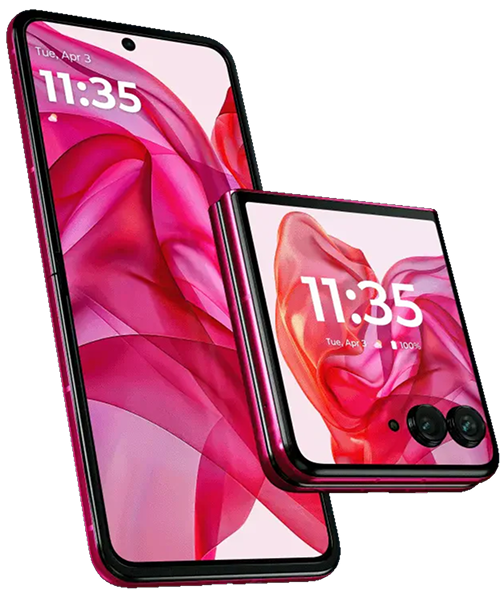
Motorola engineered the Razr+ around its standout cover screen, which occupies nearly the entire front surface. This pOLED display supports full Android apps, providing genuine smartphone functionality in compact form. Users can respond to messages, check social media, take photos, and navigate apps without unfolding the device. This capability distinguishes the Razr+ from competitors with smaller cover screens limited to notifications and quick actions.
The 6.9-inch internal foldable display uses ultra-thin glass construction that enables repeated folding while maintaining durability. The OLED panel delivers vibrant colors and deep blacks characteristic of premium displays. The visible crease running down the center represents normal foldable design rather than defect, though it becomes slightly more pronounced over time.
The hinge mechanism incorporates improvements from previous generations, using stronger materials and refined geometry to support increased folding cycles. The system maintains consistent tension throughout the folding range, providing smooth action that protects the flexible display during operation. This engineering enables the device to hold positions at various angles, supporting hands-free video calls and content viewing.
Flagship specifications include powerful processors, capable cameras, and wireless charging support. The dual battery configuration positions cells strategically to maintain device balance when folded. These premium features create a device that doesn't compromise performance for the foldable form factor.
Common Problems and Their Symptoms
Cover Screen Issues
The large cover screen handles significant daily interaction, potentially developing touch responsiveness problems or display irregularities. Dead zones where touches don't register consistently, phantom touches triggering unwanted actions, or brightness inconsistencies all suggest cover screen problems. These issues affect only the external display—the main foldable screen operates independently.
Cracks or scratches on the cover screen occur through the same mechanisms affecting any rigid display. Drops, impacts, or pocket debris can damage the glass. Since this display doesn't fold, it proves more resistant to certain damage types than the flexible internal screen but remains vulnerable to impact forces.
Foldable Display Concerns
The internal flexible display requires careful handling due to its delicate construction. Pressure applied perpendicular to the screen surface can damage internal layers even when the outer surface appears intact. Users should never press firmly on the folded screen or place objects between halves when closing.
Burn-in where static interface elements ghost onto the screen occurs over time with OLED technology. Navigation buttons, status bars, and frequently displayed app interfaces may leave permanent marks visible against solid backgrounds. This affects visual quality without impacting touch functionality.
Display delamination appears as cloudy patches, color irregularities, or visible bubbles beneath the screen surface. This separation of internal layers typically stems from impact damage, temperature extremes, or moisture infiltration weakening adhesives.
Hinge Performance Changes
The hinge should provide smooth, consistent resistance throughout its range. Increased stiffness, grinding sensations, or loose action suggest issues requiring attention. Temperature affects hinge feel temporarily—cold stiffens materials while heat loosens them—so testing at room temperature provides accurate assessment.
Debris accumulation in hinge mechanisms represents a common cause of performance changes. Pocket lint and dust work into the mechanism during normal carry, potentially affecting smoothness. Visible misalignment where the device doesn't close flush or shows asymmetric gaps indicates either hinge wear or frame issues.
Battery and Charging Problems
Battery life varies based on which display receives heavy use. The large cover screen consumes significant power when active continuously, potentially draining the battery faster than expected. Understanding these usage patterns helps distinguish normal consumption from actual battery degradation.
Charging port contamination causes intermittent charging requiring cable repositioning or complete charging failure. The USB-C port accumulates pocket debris over time, preventing cables from seating fully. This mechanical issue often appears as charging problems users attribute to battery failure.
Camera and Software Issues
Camera problems range from slow launching to autofocus failures or error messages. These symptoms can stem from hardware failures, software glitches, or corrupted app data. Systematic testing distinguishes between causes before assuming component replacement necessity.
Performance degradation, app crashes, or interface lag sometimes result from software issues rather than hardware problems. The sophisticated software managing dual displays and app transitions can develop glitches that mimic hardware failures.
Repair Options and Procedures
Cover Screen Replacement
Cover screen repair follows procedures similar to traditional smartphone displays. The rigid OLED panel removes from the frame through careful heating to soften adhesives. Replacement assemblies include the display, digitizer, and integrated sensors as a pre-assembled unit, simplifying installation compared to separating individual components.
Quality replacement screens maintain the touch sensitivity, color accuracy, and brightness characteristics that make the Razr+ cover screen so functional. Post-repair testing verifies proper operation of all cover screen features before completing service.
Foldable Display Service
Main display replacement represents the most complex Razr+ repair due to the flexible screen's delicate construction and integration with the hinge mechanism. The procedure requires complete disassembly, careful removal of the damaged display, and precise installation ensuring proper alignment with the hinge system.
Replacement displays must be properly tensioned during installation to fold correctly without creating stress points. Improper installation can cause uneven folding that damages the new display over time. This repair demands specialized expertise and appropriate tools to maintain device integrity.
Hinge Mechanism Maintenance
Professional hinge service ranges from cleaning and lubrication to component replacement depending on issue severity. Cleaning removes accumulated debris and old lubricants, while fresh application of appropriate lubricants restores smooth operation. Component replacement becomes necessary when gears, springs, or other mechanical elements show wear affecting function.
The multi-component hinge system allows targeted repairs rather than complete assembly replacement, reducing costs while restoring proper operation. Post-service testing verifies smooth folding action and proper tension throughout the range.
Battery Replacement
Battery service involves replacing both cells that comprise the dual battery system. Technicians navigate around the hinge mechanism to access both units, disconnecting them from the power management system and installing quality replacements. Both batteries typically replace together to ensure matched capacity and aging characteristics.
Post-replacement testing confirms proper charging behavior through both wired and wireless methods, accurate capacity reporting, and appropriate thermal management during use and charging.
Charging Port Repair
USB-C port replacement addresses mechanical wear or contamination damage affecting reliable charging. The port resides on a small daughterboard that includes related circuitry, making assembly replacement more reliable than attempting to replace just the connector. This repair immediately restores secure cable connections and proper charging functionality.
Maintenance for Long-Term Reliability
Handle folding deliberately with smooth, controlled motions. Avoid rapid or forced folding that stresses components unnecessarily. Always verify nothing obstructs the interior before closing—even thin objects concentrate pressure causing display damage.
Clean both displays regularly with appropriate microfiber cloths. The cover screen particularly benefits from regular cleaning since it handles frequent interaction. Never use harsh chemicals or abrasive materials that could damage protective coatings.
Maintain clean hinge areas through gentle monthly maintenance using soft brushes or compressed air. Inspect visually for lint accumulation and remove particles carefully without forcing them deeper into mechanisms.
Monitor battery health through system settings or third-party apps reporting capacity. Proactive replacement before complete failure prevents inconvenience and potential swelling damage. Watch for capacity dropping below 80% of design specification.
Use cases designed specifically for foldable devices that don't interfere with folding action. Cases must allow complete closing without creating pressure points or requiring force. Remove any case showing signs of restricting hinge movement.
Avoid temperature extremes that accelerate component aging. Don't leave the device in hot vehicles, and allow cold devices to warm gradually rather than immediately using them intensively after bringing them indoors.
Making Informed Repair Decisions
The Razr+ represents significant investment in premium foldable technology. Repair decisions should consider the device's current condition, your usage patterns, and the specific problem severity. Battery and charging port repairs typically provide excellent value, immediately restoring functionality at reasonable cost relative to device replacement.
Cover screen replacement makes sense when damage affects usability or aesthetics significantly. Since this display handles substantial daily interaction, maintaining its functionality preserves the Razr+'s signature capability of full smartphone operation while folded.
Foldable display replacement represents more substantial investment due to complexity and component cost. This repair proves worthwhile when the device otherwise functions well and the display damage significantly impacts daily use. Minor burn-in or slight crease definition changes don't typically warrant replacement, while cracks, dead zones, or severe delamination do.
Hinge service provides value when problems affect daily folding operation or when early intervention can prevent accelerated wear. Addressing grinding sensations or stiffness early through cleaning and lubrication often prevents more extensive repairs later.
The Fix Approach to Premium Foldable Service
At The Fix, we recognize the Razr+ represents substantial investment in cutting-edge technology. We provide professional service that respects this device's sophisticated engineering. Our technicians understand foldable architecture, use appropriate tools and techniques, and have access to quality replacement components.
Comprehensive diagnostics identify all existing and potential problems before beginning repairs. We explain findings clearly, discuss available options honestly, and complete work efficiently. Whether you need display service, battery replacement, hinge maintenance, or charging system repair, we apply expertise developed through servicing numerous foldable devices.
We stand behind our repairs because we believe premium devices deserve professional care. Our goal involves restoring your Razr+ to optimal operation, maintaining the functionality that makes this foldable technology so compelling.
Conclusion: Maintaining Premium Foldable Innovation
The Motorola Razr+ delivers exceptional foldable experiences through its expansive cover screen, refined hinge mechanism, and flagship specifications. When issues arise, professional diagnosis identifies specific problems and enables targeted solutions. Battery replacements restore reliable runtime, display repairs maintain visual quality and touch functionality, and hinge service ensures smooth folding operation.
Understanding the unique requirements of foldable devices helps distinguish normal behavior from actual problems requiring repair. The sophisticated engineering enabling the Razr+'s compact form factor and dual-display functionality demands appropriate care and professional service when problems develop.
If your Razr+ requires service or shows concerning symptoms, contact The Fix for expert assessment. We'll diagnose issues accurately and provide solutions that restore your premium foldable device to reliable operation.


Trusted repair solution for mobile phones, tablets, gaming consoles, and computer systems. We provide fast, reliable, and affordable repair services to get your devices back in perfect working condition.
The Fix is an independent repair service provider and is not affiliated with, sponsored by, or endorsed by Apple Inc., Samsung Electronics, Google LLC, or any other device manufacturer. We use high-quality compatible replacement parts unless explicitly stated. All trademarks are property of their respective owners.


© Copyright The Fix Solutions All rights reserved 2026.
Design by Deepcoder