






Motorola One 5G Repair Services
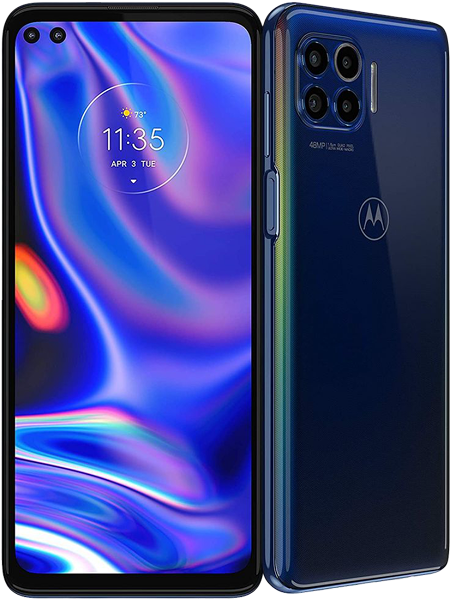
Get fast, reliable, and professional Motorola One 5G repair services at The Fix — your trusted destination for expert device care.
Common Repairs We Handle Daily


Problem Detection: Motorola One 5G Diagnosis
Ever wonder why your Motorola One 5G suddenly can't make it through lunch on a single charge? Or why that 5G connection you paid for seems to drop constantly? You're not alone—and you're definitely not imagining these problems. The One 5G brought affordable 5G connectivity to users back in 2020, but four years later, these devices show predictable wear patterns that affect daily usability. Let's figure out what's actually wrong with your device and what you can do about it.
Reading Your Device's Symptoms
Your phone's trying to tell you something's wrong—you just need to know what you're looking at. Symptoms rarely appear randomly. They're your device's way of signaling that specific components are failing or wearing out. The trick is connecting what you're experiencing to what's actually broken.
Battery-Related Symptoms
You'll notice your phone dying way faster than it used to. We're talking fully charged at 8 AM, dead by noon—and you haven't even been using it that much. The percentage might drop in chunks, like going from 45% to 18% in minutes. Or maybe it shuts down completely when the indicator still shows 20% remaining. These aren't software glitches—your battery's capacity has degraded to the point where it can't deliver what the system needs.
Sometimes you'll see the back of your phone starting to bulge slightly near the battery area. That's swelling, and it's serious. If the back cover isn't sitting flush anymore or you can see gaps between the screen and frame, stop using the device immediately. Swollen batteries can damage internal components and present real safety risks.
Display Problems You'll Notice
Cracks are obvious, but other display issues can be subtle at first. You might notice dead zones where taps don't register consistently—usually along edges or in specific corners. Or the screen might ghost, where you see faint outlines of the keyboard or navigation buttons even when they're not supposed to be visible.
Brightness problems show up differently. The LCD backlight might fail partially, creating dark spots or uneven illumination across the screen. Unlike OLED burn-in, LCD issues typically involve the backlight system rather than the panel itself. If half your screen looks dimmer than the other half, that's a backlight problem, not a settings issue.
Charging Port Red Flags
Here's where things get frustrating. Your cable only works if you hold it at a specific angle. Or charging stops randomly and you've got to fidget with the connection to get it going again. Maybe you've noticed the phone charges painfully slowly even with the fast charger it came with.
Look inside the USB-C port with a flashlight. See that compressed lint and debris? That's probably your problem. But if the port looks clean and you're still having issues, the internal contacts have likely loosened or bent from all those cable insertions over the years.
Performance and Connectivity Symptoms
The One 5G's 5G connectivity—ironically—often becomes problematic as the device ages. You'll see the 5G icon but experience slow data speeds, or the phone constantly switches between 5G and LTE. Apps crash more frequently than they used to. The interface lags during basic tasks like scrolling or switching apps.
Sometimes these are software issues, but after four years, they can also signal hardware limitations. The processor and RAM that felt adequate in 2020 struggle with modern apps designed for newer, more powerful devices.
Understanding Root Causes
Let's talk about why these problems develop—because knowing the "why" helps you prevent future issues and understand what repairs actually fix.
Battery Chemistry Doesn't Lie
Think about running shoes. Brand new, they've got great cushioning and support. After 500 miles, they're noticeably less comfortable. After 1,000 miles, you're basically running on flat rubber. Your phone's battery works the same way—lithium-ion cells degrade through chemical reactions that happen every single time you charge and discharge them.
After four years of daily charging, even well-maintained batteries show significant capacity loss. The chemicals inside can't store as much energy as they used to. That's not a defect—it's just chemistry doing its thing over time. No amount of software updates or settings changes will restore capacity to a worn-out battery cell.
LCD Displays and Backlight Systems
The One 5G uses an LCD display, which is different from the OLED screens in flagship devices. LCD screens have a backlight—basically a light source behind the panel that shines through to create the image you see. These backlights can fail partially or completely, creating the dark spots and uneven brightness issues users notice.
Impact damage affects LCDs differently than OLEDs. A drop might crack the glass without immediately affecting the display function, but internal damage to the LCD layers or backlight can develop over days or weeks. That's why a phone that seemed fine right after a drop might develop display problems later.
Mechanical Wear in Charging Ports
Here's what actually happens to that USB-C port. Every time you plug in a cable, tiny spring contacts inside the port flex to grip the connector. After thousands of insertions—and let's be honest, you've plugged in your phone thousands of times—those springs lose tension. They don't grip as tightly, connection becomes intermittent, and eventually charging becomes unreliable.
The debris issue compounds the mechanical wear. Pocket lint gets compressed into the port with every cable insertion, creating a barrier that prevents full connection. It's like trying to connect a garden hose when there's dirt in the threads—even if you force it, you won't get a good seal.
5G Hardware and Antenna Issues
The 5G hardware in early affordable 5G devices like the One 5G wasn't as refined as what's in current phones. The antennas, modem, and related components can develop issues affecting connectivity. Sometimes it's software-related and fixable with updates, but physical antenna damage or modem problems require component-level repair.
The Diagnostic Process That Actually Works
Figuring out what's wrong means testing systematically rather than guessing. Here's how to narrow down problems before assuming you need repairs.
Battery Health Assessment
Download a battery health app that shows actual capacity versus design capacity. If you're seeing 70% or less of original capacity, that explains the rapid drain and unexpected shutdowns. At this degradation level, you're not dealing with rogue apps or settings issues—the battery physically can't hold enough charge anymore.
Try this test: Charge to 100%, then use the phone normally for an hour doing typical tasks. If you've dropped more than 20-25%, that's abnormal drain suggesting battery problems. Compare this to when the phone was new—if runtime's cut in half or worse, replacement makes sense.
Display Testing
Open a solid white image and look for discoloration, dark spots, or brightness inconsistencies. Then try solid black, red, green, and blue. Display problems become obvious against these uniform backgrounds.
Test touch responsiveness across the entire screen. Open a drawing app and drag your finger slowly around the edges and corners. Dead zones will show up as areas where your line breaks or doesn't appear at all. This indicates digitizer damage rather than just cracked glass.
Charging Port Examination
First, visual inspection. Use your phone's camera flash or a flashlight to look deep into the USB-C port. You'll probably see compressed lint and debris. Try gently removing it with a wooden toothpick—never use metal tools that could damage contacts.
After cleaning, test multiple cables and chargers. If some work better than others, cable quality might be part of the problem. But if all cables require specific positioning or pressure to work, the port hardware itself needs replacement.
Connectivity Testing
Force your phone to use LTE-only mode through settings. If data works perfectly on LTE but constantly fails on 5G, that's a 5G hardware or antenna issue rather than your carrier. Test in different locations too—consistent problems across multiple areas suggest device issues rather than network coverage gaps.
Solutions That Address Real Problems
Once you've identified what's actually wrong, here's what actually fixes these issues.
Battery Replacement Realities
Here's what we've learned from the repair bench: battery replacement transforms how these devices perform. A fresh battery brings back the all-day runtime you remember from when the phone was new. It eliminates the frustration of constant charging and the anxiety of watching your percentage plummet.
The procedure involves removing the back cover, disconnecting the old battery, and installing a quality replacement. Testing afterward verifies proper charging behavior and accurate capacity reporting. For a four-year-old device that otherwise works fine, battery replacement provides the best value of any repair.
Display Repairs
Cracked screens need full assembly replacement—you can't just replace the glass. The LCD, digitizer, and glass come as one unit. Replacement assemblies restore clear display and reliable touch response across the entire surface.
For backlight issues without cracks, the problem might be fixable without full display replacement if it's a connector issue. But actual backlight failures require display assembly replacement. Professional diagnosis determines whether the problem's the display itself or just a loose connection.
Charging Port Service
USB-C port replacement is straightforward and cost-effective. The port sits on a small daughterboard with the microphone, making replacement quicker than motherboard-level repairs. A new port assembly immediately restores reliable charging without cable gymnastics.
This repair makes sense even for budget devices because it extends useful life significantly for reasonable cost. Most users can get another year or more from their device after port replacement.
Connectivity Repairs
5G connectivity issues sometimes resolve through software updates or carrier settings resets. But physical antenna damage or modem problems require component-level work. Professional diagnosis determines whether the issue's fixable through software or needs hardware repair.
For devices where 5G hardware has failed completely, many users find LTE-only operation perfectly adequate for their needs. Modern LTE provides plenty of speed for most tasks, and forcing LTE-only mode can actually improve battery life.
Prevention Worth Implementing
You can't prevent all problems, but these habits reduce how quickly issues develop.
Keep that charging port clean. Monthly inspection and gentle cleaning with non-metal tools prevents debris buildup that accelerates mechanical wear. This simple maintenance prevents most charging problems.
Use quality cables that fit securely without requiring force. Loose cables accelerate port wear through imprecise contact and movement during charging. A cable that plugs in smoothly and stays connected without wiggling protects port hardware.
Protect the display with a case that extends slightly above the screen edge. The One 5G's large display makes it vulnerable to crack damage from face-down drops. Even minimal cases significantly reduce crack risk.
Avoid temperature extremes when possible. Leaving the phone in hot cars accelerates battery degradation and can affect other components. Cold temperatures temporarily reduce battery performance and can stress internal components during rapid temperature changes.
Monitor battery health proactively through apps or settings. Watching capacity decline lets you plan battery replacement before you're dealing with constant charging frustration or unexpected shutdowns.
Conclusion: Getting Your One 5G Working Right
Your Motorola One 5G brought affordable 5G connectivity when that was still rare. Four years later, it's showing predictable age-related issues—but most problems are totally fixable. Battery drain, charging problems, display issues, and connectivity troubles all have solutions that restore reliable operation.
Bring your One 5G to The Fix and let our experienced techs take a look. We've seen every problem these devices develop, we know exactly how to fix them, and we'll treat your phone like it's our own. Free diagnostic, honest pricing, quality work.
The diagnostic process identifies exactly what's wrong so repairs address actual problems rather than guessing. Battery replacement brings back all-day runtime. Display repairs restore clear visuals and reliable touch. Charging port service eliminates connection frustration. Each repair extends your device's useful life at a fraction of replacement cost.
If your One 5G isn't working right, you don't have to replace it. Professional diagnosis and targeted repairs get it working properly again. Contact The Fix—we'll figure out what's actually wrong and get your device back to reliable operation.


Trusted repair solution for mobile phones, tablets, gaming consoles, and computer systems. We provide fast, reliable, and affordable repair services to get your devices back in perfect working condition.
The Fix is an independent repair service provider and is not affiliated with, sponsored by, or endorsed by Apple Inc., Samsung Electronics, Google LLC, or any other device manufacturer. We use high-quality compatible replacement parts unless explicitly stated. All trademarks are property of their respective owners.


© Copyright The Fix Solutions All rights reserved 2026.
Design by Deepcoder