






Motorola Moto Z4 Repair Services
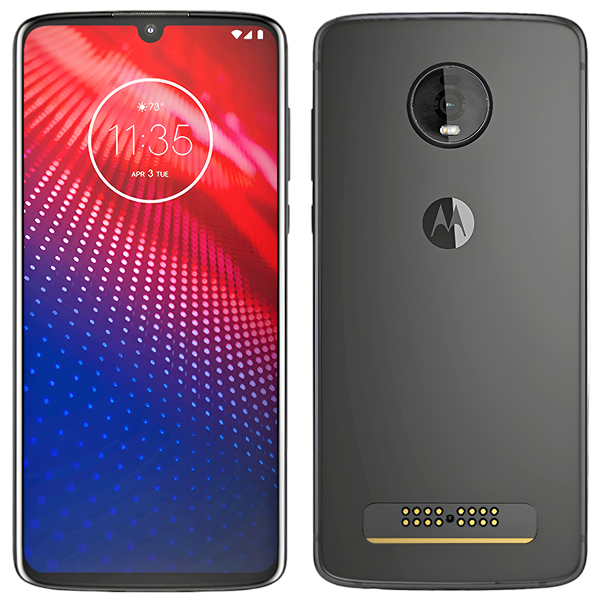
Get fast, reliable, and professional Motorola Moto Z4 repair services at The Fix — your trusted destination for expert device care.
Common Repairs We Handle Daily


Complete Troubleshooting: Motorola Moto Z4
Picture this: you're grabbing your Moto Z4 to snap a quick photo with that impressive 48MP camera, but the phone's dead—again. Or maybe you've got a Moto Mod attached and it's not connecting like it used to. The Z4 was Motorola's last hurrah for the Mods ecosystem back in 2019, and if you've held onto yours this long, you're probably pretty attached to it. Let's walk through the most common problems these devices develop and—more importantly—how to actually fix them.
Problem #1: Battery Dies Way Too Fast
What you're experiencing: Your Z4 barely makes it to lunch on a full charge. The battery percentage drops in huge chunks—like 50% to 20% in what feels like minutes. Sometimes it just shuts down completely even though the indicator showed 30% remaining. You're basically living next to a charger at this point.
Why this happens: Here's the reality—your battery's been through about 2,000 charge cycles over five years. Think of it like a coffee maker that's brewed thousands of pots. Eventually, it just doesn't heat the water as hot or brew as fast as it used to. Lithium-ion batteries work the same way. The chemicals inside degrade through normal use, and after five years, even well-maintained batteries show significant capacity loss. You're not imagining it—the battery physically can't hold as much charge as it could when new.
The 3,000mAh battery that originally got you through a full day now delivers maybe 60-70% of that capacity if you're lucky. Worse, aged batteries can't deliver the current spikes your processor needs during intensive tasks, causing shutdowns even when charge remains. That's not a software glitch—it's chemistry.
Step-by-step solutions:
- Check actual battery health. Download an app that shows real capacity versus design capacity. If you're below 75%, that explains everything you're experiencing. At this point, no amount of settings tweaking will fix the problem—you need a new battery.
- Try software optimization first. Navigate to Settings > Battery and check what's draining power. If you see apps using excessive battery in the background, clear their cache or uninstall them. Enable Battery Saver mode to see if that extends runtime enough for daily use while you plan repair.
- Reduce screen brightness. That gorgeous OLED display eats power. Drop brightness to 50-60% instead of running it maxed out. Enable adaptive brightness so it adjusts automatically. This won't fix a dying battery, but it'll squeeze out a bit more runtime.
- Accept that you need replacement. If you've tried everything and you're still charging twice daily, it's time. Battery replacement for the Z4 involves removing the back cover, disconnecting the old cell, and installing a fresh one. Professional service ensures proper installation without damaging the Moto Mod connector pins on the back.
What we've seen in our repair shop: Z4 batteries fail predictably after 4-5 years. We replace these regularly, and customers are always surprised how much runtime improves. One fresh battery brings back the all-day performance you remember. It's genuinely the best value repair for these devices.
Problem #2: Screen Issues and Display Problems
What you're experiencing: Maybe you've got a crack that's spreading. Or dead zones where taps don't register. The in-display fingerprint sensor might've stopped working reliably. You could be seeing image retention or uneven brightness across the OLED panel. Whatever it is, your screen's not right.
Why this happens: The Z4's 6.4-inch OLED display is beautiful but also delicate. Drops cause obvious cracks, but they can also damage the underlying OLED panel or digitizer without immediately visible external damage. OLED screens develop burn-in over time where static elements—like your keyboard or navigation buttons—ghost onto the display permanently. That's not fixable through settings.
The in-display fingerprint sensor adds complexity. It's actually part of the display assembly, so display damage often affects fingerprint recognition. The sensor uses light to scan your fingerprint through the screen, and cracks or panel damage interfere with this process.
Step-by-step solutions:
- Assess the damage honestly. Minor corner cracks that aren't spreading and don't affect touch functionality might not need immediate repair. But cracks near the fingerprint sensor or in the active display area will get worse and should be addressed before they spread further.
- Test touch responsiveness systematically. Open a drawing app and slowly drag your finger across the entire screen, especially edges and corners. Dead zones show up as areas where your line breaks or doesn't appear. This helps you document the exact problem before seeking repair.
- For burn-in without cracks: Sorry, but OLED burn-in is permanent. You can reduce how noticeable it is by avoiding max brightness and using dark mode, but you can't reverse it. If burn-in bothers you significantly, you'll need display replacement.
- Professional replacement when needed. OLED display assemblies for the Z4 include the panel, digitizer, and fingerprint sensor as one unit. Replacement restores clear display, reliable touch, and working fingerprint recognition. The key is ensuring the Moto Mod connector pins aren't damaged during display service—that's why professional service matters for this device.
Problem #3: Moto Mod Connection Issues
What you're experiencing: Your Moto Mods aren't connecting like they used to. The phone doesn't recognize when you attach a mod, or connection's intermittent. Maybe mods that worked fine before suddenly don't charge or function properly. This is frustrating because Mods are literally why you kept this phone.
Why this happens: Those 16 pin connectors on the back of your Z4 experience mechanical wear every time you attach and remove a mod. Think of it like a zipper—smooth at first, but after hundreds of cycles, the teeth don't align as precisely. Debris, pocket lint, and everyday gunk also accumulate on those pins, interfering with electrical contact.
The magnets that hold mods in place can also weaken slightly over time, affecting alignment. If mods don't seat perfectly flush, the pin connection suffers. Sometimes the issue's actually with the mod itself rather than the phone—those have wear points too.
Step-by-step solutions:
- Clean those pins carefully. Power off your phone completely. Use a soft, dry brush (like a clean toothbrush) to gently clean the connector pins on the back of your Z4. You can use isopropyl alcohol (90%+ purity) on a cotton swab for stubborn residue. Let it dry completely before powering back on.
- Test multiple mods if possible. If one mod connects fine but another doesn't, the problem's likely the problematic mod rather than your phone. If no mods connect reliably, the phone's connector needs attention.
- Check for physical damage. Inspect the pins closely with good lighting. They should all be straight and uniform. Bent or damaged pins prevent proper contact. If you see obvious physical damage, that requires professional repair.
- Professional connector service. When cleaning doesn't help and multiple mods fail to connect, the pin connector assembly may need professional cleaning or replacement. This isn't a DIY job—those pins are delicate and easy to damage further without proper tools.
Problem #4: Charging Port Acting Up
What you're experiencing: Your cable only charges if you hold it just right. Connection's intermittent, cutting in and out. Or maybe it charges super slowly even with a fast charger. You've started recognizing that specific angle where it actually works.
Why this happens: USB-C ports wear mechanically from thousands of cable insertions. The internal spring contacts that grip your cable lose tension over time, just like an electrical outlet that's been used for years. Pocket lint compounds the problem—it gets compressed into the port with every cable insertion, preventing full connection.
Step-by-step solutions:
- Inspect and clean first. Shine a light into that USB-C port. See the compressed lint and debris? Gently remove it with a wooden toothpick—never use metal that could damage contacts or cause shorts. You'll be shocked how much stuff comes out.
- Test multiple cables and chargers. Try cables that work perfectly with other devices. If your Z4 charges fine with some cables but not others, cable quality's part of the issue. But if all cables require specific positioning, the port hardware itself is the problem.
- Restart after cleaning. Once you've cleaned the port, restart your phone. The charging system sometimes needs a reboot to recognize clean contacts properly.
- Professional port replacement when needed. If cleaning provides zero improvement, the internal port contacts have worn out. USB-C port replacement for the Z4 is straightforward—the port sits on a small daughterboard that can be swapped out. New port hardware immediately restores reliable charging without the cable gymnastics.
When to Seek Professional Help
Some problems respond to troubleshooting, but others need expert diagnosis and repair. Here's when to stop troubleshooting and get professional help:
Battery life stays terrible after optimization. If you've cleared apps, adjusted settings, and enabled battery saver but still can't make it through half a day, the battery's done. Replacement's the only real fix.
Display cracks are spreading. Small cracks turn into big cracks. Once you see spider-webbing or cracks growing, they won't stop. Get it repaired before the entire display fails and you're locked out of your device.
Moto Mod pins look damaged. Bent or broken connector pins won't fix themselves. Professional repair can sometimes replace the connector assembly, but it requires expertise and proper tools.
Charging port problems persist after thorough cleaning. If you've removed all debris and you're still doing the cable angle dance, the port hardware needs replacement. It's not expensive, but it absolutely requires opening the device.
Prevention Tips Worth Following
You can't prevent every problem, but these habits help:
Protect that display. Use a case with raised edges so the screen doesn't contact surfaces when placed face-down. Screen protectors add minimal bulk but prevent scratches that could become cracks. The Z4's large OLED display is expensive to replace—prevention's worth the minor inconvenience.
Clean Moto Mod connectors regularly. Monthly quick cleaning with a dry brush keeps pins free of debris. This takes 30 seconds and prevents connection problems before they develop. Do the same with your mods—clean contacts on both sides maintain reliable connection.
Maintain that charging port. Gentle cleaning every few weeks prevents compressed debris buildup. Compressed air helps too, but be gentle—you're not trying to blast particles deeper into the mechanism.
Use quality cables. Cheap cables fit loosely and accelerate port wear through imprecise contact. Cables that plug in smoothly and stay connected without wiggling protect port hardware. Yeah, they cost more, but they're cheaper than port replacement.
Manage battery health proactively. Avoid leaving the phone plugged in overnight if possible. Charge to 80-90% for daily use rather than always hitting 100%. These habits slow capacity degradation—they won't prevent it entirely, but they help.
Conclusion: Keeping Your Z4 Running
Your Moto Z4 represents the end of an era—the last phone supporting Moto Mods. If you've invested in mods and you love the ecosystem, you've got good reasons to keep this device running. Most problems it develops are fixable without replacing the entire phone.
Having issues with your Moto Z4? The Fix specializes in Motorola repairs. Stop by our shop—we'll diagnose the problem for free, explain what's happening in plain English, and get your device working right again.
Battery replacement restores all-day runtime. Display repair fixes cracks and touch issues while preserving fingerprint functionality. Charging port service eliminates connection frustration. Mod connector cleaning or repair keeps your mods working. Each fix extends your device's useful life and protects your investment in the Mods ecosystem.
Professional diagnosis identifies exactly what's wrong so repairs address actual problems rather than guessing. We've worked on hundreds of Z4 devices and understand their specific quirks. Your Z4 can keep going—it just needs the right care. Contact The Fix and let's get your device back to reliable operation.


Trusted repair solution for mobile phones, tablets, gaming consoles, and computer systems. We provide fast, reliable, and affordable repair services to get your devices back in perfect working condition.
The Fix is an independent repair service provider and is not affiliated with, sponsored by, or endorsed by Apple Inc., Samsung Electronics, Google LLC, or any other device manufacturer. We use high-quality compatible replacement parts unless explicitly stated. All trademarks are property of their respective owners.


© Copyright The Fix Solutions All rights reserved 2026.
Design by Deepcoder