






Motorola Moto Z3 Repair Services
Get fast, reliable, and professional Motorola Moto Z3 repair services at The Fix — your trusted destination for expert device care.
Common Repairs We Handle Daily


Moto Z3 Repair: Technical Expertise
Remember when your Moto Z3 felt fast and responsive? When battery lasted the full day and your Moto Mods snapped on perfectly every time? That was six years ago. Now you're dealing with laggy performance, constant charging, and connection issues that make you wonder if it's time to give up. Here's the thing—most of what's slowing down your Z3 isn't unfixable. Understanding what's actually failing helps you decide between targeted repairs and replacement.
Device Architecture and Design Philosophy
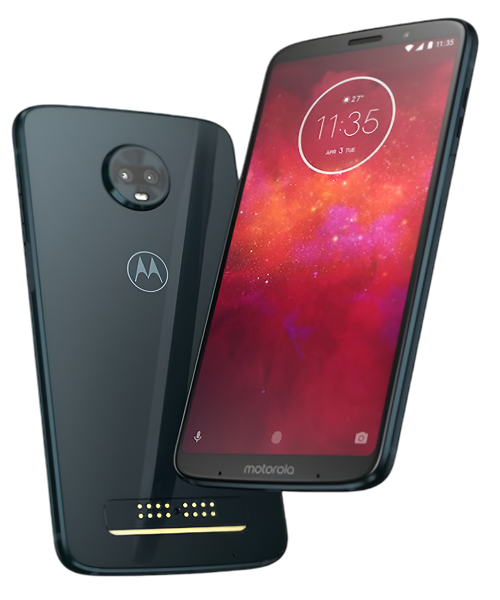
Motorola built the Z3 around the Moto Mods ecosystem, which shaped every design decision. The back of the device features 16 magnetic connector pins that provide power and data transfer to attached mods. This modular approach meant the Z3's internal layout had to accommodate both standard smartphone components and the infrastructure supporting external accessories.
The Snapdragon 835 processor that felt powerful in 2018 shows its age now. This chip was flagship-tier when new, but it's the same processor used in the 2017 Galaxy S8. After six years of app updates optimized for newer hardware, you'll notice the performance gap. That's not component failure—it's just aging specifications meeting modern software demands.
The 3,000mAh battery divides into cells positioned to maintain device balance when folded or when mods attach. This distributed configuration affects how the battery ages and how replacement procedures work. The cells connect to power management circuits that monitor health, temperature, and charging behavior across all sections.
The 6-inch OLED display uses Samsung-manufactured AMOLED technology rather than Motorola's own panels. This means it's got similar characteristics to Galaxy displays from the same era—vibrant colors, deep blacks, and susceptibility to burn-in after thousands of hours showing static elements like navigation buttons and keyboards.
Component Analysis: What Wears Out
Battery System Degradation
After six years and roughly 2,000 charge cycles, your Z3's battery shows significant capacity loss. Think of it like a car engine—new, it runs smoothly and efficiently. After 100,000 miles, it still works but doesn't perform like it used to. Lithium-ion cells lose capacity through chemical reactions that occur during every charge and discharge cycle.
The distributed battery design means individual cells can age at different rates depending on thermal exposure and stress. Cells positioned near the processor experience more heat during intensive use, potentially aging faster than cells in cooler areas. The battery management system reports aggregate health, so significant degradation in one cell affects overall performance even if other cells remain healthier.
Internal resistance increases as batteries age, reducing their ability to deliver current spikes during demanding tasks. This explains why your Z3 might shut down unexpectedly even when the indicator shows 20-30% remaining. The battery can't provide the instantaneous current the processor needs during intensive operations, causing protective shutdown.
OLED Display Characteristics
The AMOLED panel comprises organic compounds that emit light when electrical current passes through them. These compounds degrade naturally over time, reducing brightness and potentially shifting color accuracy. Unlike LCD displays where a backlight illuminates the entire panel uniformly, OLED pixels illuminate independently. This means burn-in can occur where static elements remain visible as permanent ghost images.
The display assembly includes multiple layers—the OLED panel itself, a digitizer for touch input, and protective glass. Impact damage can affect any layer. You might crack the glass without immediately damaging the OLED, but internal trauma from impacts can manifest as display problems days or weeks later as damaged areas expand through thermal cycling.
The in-display components include ambient light sensors and proximity sensors that control automatic brightness and screen timeout during calls. These sensors can fail independently from the display itself, causing issues like screen not turning off during calls or brightness behaving erratically.
Moto Mod Connector System
Those 16 pins on your Z3's back handle both power delivery and data transfer to mods. Each pin experiences mechanical wear from repeated mod attachment and removal. The spring-loaded contacts inside each pin compress thousands of times, gradually losing tension and contact precision.
The connector system includes magnets that align mods properly and hold them securely. These neodymium magnets can weaken slightly over time, though this typically requires years of use. More commonly, the alignment becomes compromised by impacts that slightly bend the frame or shift internal components.
Corrosion represents another failure mode for these connectors. Moisture exposure—sweat, humidity, or liquid contact—can cause oxidation on the connector pins. This creates resistance in the electrical path, causing intermittent connections or complete failure. The contact surfaces require clean metal-to-metal connection to work properly.
USB-C Charging Port
The charging port uses a reversible connector with spring contacts that grip the cable firmly. After thousands of insertion cycles, these springs lose tension. It's like an electrical outlet that's been used heavily for years—eventually it doesn't grip plugs as tightly and connections become loose.
The port connects to the motherboard through a flex cable and small daughterboard assembly. This modular design facilitates replacement but creates additional connection points that can fail. The flex cable experiences repeated flexing during device use and charging, potentially developing breaks in the thin conductors over time.
Port contamination accelerates mechanical wear. Pocket lint, dust, and debris get compressed into the port with every cable insertion. This prevents full connection and traps moisture that can cause corrosion. The combination of mechanical wear and contamination creates the intermittent charging problems users experience.
Recognizing Failure Patterns
Progressive Performance Degradation
The Z3's Snapdragon 835 processor and 4GB of RAM were adequate in 2018 but struggle with current apps. You'll notice app launches taking longer, interface animations stuttering, and multitasking becoming sluggish. This reflects the growing gap between device capabilities and software requirements rather than hardware failure.
However, sudden dramatic slowdowns suggest actual problems. If your Z3 suddenly becomes extremely slow or unresponsive, that indicates thermal throttling from cooling system problems, storage nearly full, or actual processor issues. The difference between gradual performance decline and sudden problems helps distinguish aging from failure.
Battery Behavior Changes
Normal battery aging produces specific patterns. Runtime gradually decreases over months and years. You notice the phone needs charging more frequently but behavior remains consistent—it just doesn't last as long. Abnormal battery behavior includes sudden shutdowns, rapid percentage drops, or refusal to charge beyond certain levels.
Physical battery swelling represents serious failure requiring immediate attention. You'll notice the back cover lifting or gaps appearing between the display and frame. Never continue using a device with visible battery swelling—it can damage other components and presents safety risks.
Display Issues Development
Burn-in develops gradually as organic compounds in specific pixels degrade faster than others. Navigation buttons, keyboards, and status bars show ghosting first because they display most frequently. Burn-in that appears suddenly or spreads rapidly suggests display damage rather than normal OLED aging.
Touch responsiveness problems typically affect specific zones consistently. Dead spots where taps don't register or areas requiring multiple taps indicate digitizer damage. Random touch issues that move around the screen more likely suggest software problems or loose connections rather than digitizer failure.
Professional Repair Methodology
Battery Replacement Procedures
After repairing these devices daily: Z3 battery replacement requires careful back cover removal without damaging the Moto Mod connector pins. The glass back adheres strongly, requiring controlled heating to soften adhesive without overheating internal components. Temperatures must stay below 80°C to avoid damaging the battery or other components during disassembly.
Once opened, the battery disconnects through a simple connector. The replacement installs with proper adhesive placement ensuring secure mounting without creating pressure points that could damage the new cell. Post-replacement testing verifies charging behavior, capacity reporting accuracy, and thermal management during use and charging.
The Moto Mod connectors require protection during battery service. Even slight damage to these pins affects mod functionality permanently. Professional repair includes careful shielding and positioning to prevent accidental contact with tools during battery work.
Display Assembly Service
OLED display replacement for the Z3 requires transferring several components from the old assembly to the new one. The earpiece speaker, proximity sensors, and ambient light sensor all integrate into the display assembly. Proper transfer ensures these components function correctly after display replacement.
The replacement display must match the peak touch sensitivity and color characteristics. Quality OLED panels maintain the vivid colors and deep blacks that made the Z3 display appealing. Lower-quality replacements show washed-out colors, reduced brightness, or touch sensitivity problems.
Frame alignment becomes critical during display installation. The display must seat completely flush without gaps, and pressure during adhesive curing must distribute evenly. Improper installation can cause touch sensitivity issues along edges or create gaps that compromise water resistance.
Moto Mod Connector Repair
Connector service ranges from cleaning to complete replacement depending on damage severity. Professional cleaning uses appropriate solvents and brushes that remove corrosion and debris without damaging pins. Stubborn corrosion may require ultrasonic cleaning to restore proper contact surfaces.
Pin straightening addresses bent connectors but requires precision tools and steady hands. Each pin must align perfectly for proper mod contact. Attempting this without proper tools risks breaking pins or pushing them deeper into the device, making replacement necessary.
Complete connector replacement becomes necessary when multiple pins show damage or corrosion has caused permanent degradation. The connector assembly integrates into the frame, making replacement complex. It requires substantial disassembly and careful installation to ensure proper alignment and secure mounting.
Charging Port Replacement
USB-C port replacement involves removing the old port assembly and installing a new daughterboard with fresh port hardware. The procedure requires disconnecting flex cables carefully to avoid damage, removing screws and adhesive securing the assembly, and routing the new assembly's flex cable properly during installation.
Post-replacement testing verifies charging at various current levels, data transfer functionality, and secure cable connection without excessive play. The new port should grip cables firmly and charge consistently without requiring specific cable positioning.
Longevity Considerations
The Z3's age creates practical considerations beyond technical repair capability. Software support ended years ago, leaving the device without security updates. This matters for users handling sensitive data but less for those using the device for basic communication and media consumption.
The Moto Mods ecosystem ended with the Z4, making mod availability increasingly limited. If you've invested in mods and they still function, maintaining the Z3 makes sense. But if you're not using mods, the modular design's benefits disappear while its compromises—thicker device, protruding camera—remain.
Performance limitations become increasingly noticeable as apps evolve. The Z3 handles basic tasks adequately but struggles with demanding apps and games. Realistic expectations about performance help determine whether repair makes sense for your usage patterns.
Conclusion: Technical Repair for Aging Devices
Your Moto Z3's age doesn't prevent repair—it just requires realistic assessment of whether fixes address your actual needs. Battery replacement restores runtime, display repair maintains usability, and charging port service ensures reliable connectivity. Each repair extends functional life, but the device's fundamental capabilities remain unchanged.
Ready to fix your Moto Z3? The Fix makes it easy. Walk in anytime for a free assessment—most repairs are same-day, and we'll keep you updated throughout the process. Your device deserves expert care, and that's exactly what we deliver.
We've worked on hundreds of Z3 devices and understand their specific architecture and common failure points. Professional diagnosis identifies what's actually failing so repairs address real problems rather than masking symptoms. Whether you need battery replacement, display service, or connector repair, we'll get your Z3 working properly again.
The decision to repair versus replace depends on your usage patterns and whether the Z3 still meets your needs. If it handles your daily tasks and you're comfortable with its capabilities, repairs provide cost-effective extension of useful life. Contact The Fix—we'll diagnose what's wrong and help you make informed decisions about keeping your device operational.


Trusted repair solution for mobile phones, tablets, gaming consoles, and computer systems. We provide fast, reliable, and affordable repair services to get your devices back in perfect working condition.
The Fix is an independent repair service provider and is not affiliated with, sponsored by, or endorsed by Apple Inc., Samsung Electronics, Google LLC, or any other device manufacturer. We use high-quality compatible replacement parts unless explicitly stated. All trademarks are property of their respective owners.


© Copyright The Fix Solutions All rights reserved 2026.
Design by Deepcoder