






Motorola Moto G9 Power Repair Services
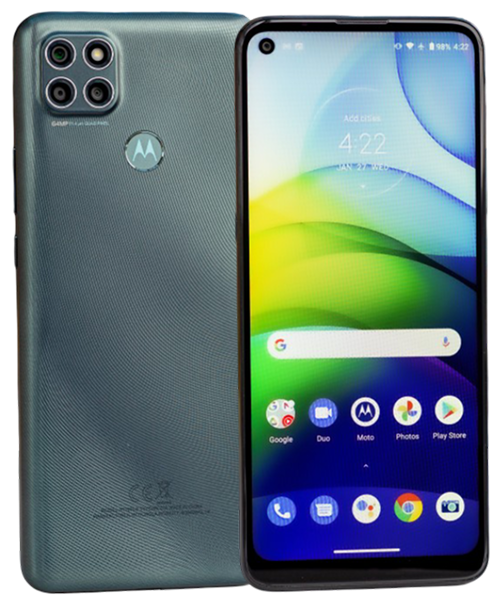
Get fast, reliable, and professional Motorola Moto G9 Power repair services at The Fix — your trusted destination for expert device care.
Common Repairs We Handle Daily


Complete Moto G9 Power Repair Guide
Here's a wild fact: the Moto G9 Power's 6,000mAh battery was bigger than most power banks when it launched in 2020. That massive cell made this budget device stand out—you could go two full days without charging. Fast forward four years, and that legendary battery life isn't so legendary anymore. If you're suddenly charging daily or dealing with other problems, let's figure out what's actually wrong and how to fix it without breaking the bank.
Quick Problem Checklist
Before we dive deep, let's identify what you're dealing with:
Battery Issues:
- [ ] Phone dies before end of day (used to last 2+ days)
- [ ] Percentage drops in huge chunks
- [ ] Shuts down unexpectedly even with charge remaining
- [ ] Back cover bulging or lifting
Display Problems:
- [ ] Cracked screen
- [ ] Dead zones where touch doesn't work
- [ ] Dark spots or uneven brightness
- [ ] Display flickering
Charging Issues:
- [ ] Cable only works at specific angles
- [ ] Charges extremely slowly
- [ ] Won't charge at all
- [ ] Port full of debris
Performance Problems:
- [ ] Apps crash constantly
- [ ] Interface lags during basic tasks
- [ ] Storage nearly full
- [ ] Overheating during normal use
If you checked multiple boxes, don't worry—most of these are fixable. Let's break down what's happening.
Understanding Your G9 Power
Motorola designed the G9 Power around that enormous 6,000mAh battery. Everything else about the device—the Snapdragon 662 processor, 4GB RAM, 6.8-inch LCD display—aimed for "good enough" to keep costs low while that battery stole the show. And honestly? For a lot of users, that trade-off worked perfectly.
The phone launched at an accessible price point, targeting users who valued battery life above cutting-edge specs. If you bought this phone, you probably cared more about making it through marathon days without charging than having the fastest processor or sharpest display. That's not a criticism—it's smart prioritization.
Four years later, the device shows its budget roots. The Snapdragon 662 wasn't powerful in 2020, and it really struggles with current apps. The LCD display works fine but doesn't match OLED quality. But here's the thing—if it handled your needs when new, repairs can restore that functionality at a fraction of replacement cost.
Understanding Why Phones Age
Let's talk about why your G9 Power isn't performing like it did in 2020. Every device faces the same fundamental challenges, regardless of price.
Battery cells degrade through chemical reactions that happen during every charge cycle. Think of bike tires—new, they've got great grip and smooth rolling. After thousands of miles, the rubber's worn down and performance drops. Your 6,000mAh battery's been through roughly 1,500 charge cycles. Even that massive capacity can't overcome basic chemistry—the cells can't store as much energy as they used to.
Charging ports wear mechanically from hundreds of cable insertions. It's like a door lock that's been used thousands of times—eventually the mechanism gets loose and doesn't work as smoothly. Those spring contacts inside the USB-C port lose tension, creating the intermittent connection problems you're experiencing.
LCD displays can develop backlight failures or impact damage affects the panel itself. Unlike OLED screens where individual pixels light up, LCDs use a backlight behind the entire screen. When that backlight or its driver circuits fail, you get dark spots or uneven illumination.
Software accumulation affects performance over time. Apps designed for 2024 hardware expect more processing power than the Snapdragon 662 provides. Add in cached data, background processes, and storage filling up, and you've got the slowdowns users notice.
Deep-Dive Solutions for Common Problems
The Battery Situation
Let's be honest—that 6,000mAh battery was the entire reason most people bought this phone. If it's not lasting like it used to, you're losing the device's core benefit. The reality from our repair experience: even massive batteries show significant degradation after four years of daily use.
Download a battery health app that shows actual capacity versus design capacity. If you're seeing 70% or less, that explains why your two-day battery now barely makes it through one day. At this degradation level, no amount of settings adjustment will restore the runtime you remember.
The solution? Battery replacement. For the G9 Power, this involves removing the back cover, disconnecting the massive battery pack, and installing a fresh cell. The large capacity means the physical battery takes up substantial internal space, but replacement follows standard procedures. A new 6,000mAh battery brings back that legendary runtime—you'll remember why you loved this phone.
If your back cover's bulging or lifting, stop using the device immediately. That's battery swelling, and it's serious. Swollen batteries can damage other components and present safety risks. Professional replacement's the only safe solution.
Display Repairs That Work
The 6.8-inch LCD display's size makes it vulnerable to crack damage. Even minor drops can shatter the glass. Cracks typically spread over time, so addressing them sooner prevents complete failure.
LCD backlight problems show up as dark spots or uneven brightness. The backlight sits behind the LCD panel, and when it or its driver circuits fail, illumination becomes inconsistent. This requires display assembly replacement—you can't replace just the backlight in most modern phones.
Touch responsiveness issues suggest digitizer damage. The digitizer layer sits above the LCD and senses your touches. Impact damage can break the digitizer without cracking the visible glass, creating dead zones where taps don't register. Full display assembly replacement fixes both visual and touch problems.
Quality replacement displays maintain adequate brightness and color for daily use. Budget device LCDs don't match flagship OLED quality, but they provide perfectly usable displays for the price point. After replacement, your screen should look and feel like it did when new.
Charging Port Solutions
USB-C port problems typically start with intermittent charging requiring specific cable positioning. This stems from spring contacts losing tension or debris preventing full insertion.
First step: inspect and clean the port. Shine a flashlight into that USB-C port and look for compressed lint. You'll probably find a surprising amount of debris. Gently remove it with a wooden toothpick—never use metal tools that could damage contacts or cause shorts.
After cleaning, test with multiple cables. If charging works normally, debris was your problem. If you still need specific angles or pressure, the port hardware's worn out. USB-C port replacement for the G9 Power is straightforward—the port sits on a small daughterboard that can be swapped. New port hardware restores reliable charging immediately.
Performance Optimization
The Snapdragon 662 processor wasn't powerful when new, and it really shows its age now. But you can improve performance without hardware changes.
Clear app cache regularly through Settings > Storage. This removes temporary files that accumulate and slow down your device. For apps you don't use, uninstall them completely—they consume storage and run background processes.
Keep at least 15-20% of storage free. When storage fills up, Android slows dramatically because it needs space for temporary files and system operations. Delete old photos, videos, and apps you don't use.
Factory reset serves as the nuclear option for software problems. Back up important data first, then navigate to Settings > System > Reset Options > Erase All Data. This gives you a clean software installation, eliminating accumulated bloat. If performance improves significantly after reset, software was your problem. If it's still slow, you're hitting the processor's fundamental limitations.
Realistic expectations matter here. The G9 Power will never be a speed demon. If you need snappy performance for demanding apps or games, no amount of optimization will deliver that. But for basic tasks—calls, messages, web browsing, social media—optimization can restore adequate responsiveness.
The Repair Process at The Fix
When you bring your G9 Power in, here's what actually happens. We start with comprehensive testing to identify all problems—not just the obvious ones. Sometimes what seems like a battery issue involves charging port problems too. Finding everything upfront prevents surprises.
We explain what we find in plain language. No jargon, no upselling. If your phone just needs port cleaning, we'll tell you that. If you need battery replacement, we'll explain why and what that involves. Transparent communication means you make informed decisions.
During repair, we use quality components that match specifications. For the G9 Power's massive battery, that means cells that actually deliver 6,000mAh capacity. For displays, it means LCD panels with proper brightness and touch sensitivity. Quality parts matter because they determine how long repairs last.
Testing after repair verifies everything works correctly. We don't just check the replaced component—we test the whole device. Battery replacement includes verifying charging behavior, runtime, and temperature management. Display replacement includes testing touch across the entire surface. Thorough testing catches problems before you leave.
Prevention Tips for Longevity
You can't prevent all problems, but smart habits help. Keep that charging port clean through monthly inspection. Compressed air and gentle cleaning with non-metal tools prevents debris buildup that causes connection problems.
Use quality cables that fit securely without requiring force. Loose cables accelerate port wear through imprecise contact. Cables that plug in smoothly and stay connected protect port hardware.
Protect that large display with a case providing raised edges. The 6.8-inch screen's size makes it vulnerable to damage. Even basic cases significantly reduce crack risk during drops.
Monitor battery health proactively. Apps that show capacity decline let you plan replacement before constant charging becomes unbearable. Catching degradation early means you replace the battery on your schedule, not when it fails completely.
Manage storage actively. Regular cleanup prevents performance problems from storage filling up. Delete photos and videos you don't need, uninstall unused apps, and clear cache periodically.
Conclusion: Keeping Your Battery Champion Running
Your Moto G9 Power's 6,000mAh battery made it special among budget devices. Four years later, that battery's not what it was, but replacing it brings back the legendary runtime you remember. Display repairs fix cracks and touch problems. Charging port service eliminates connection frustration. Each repair costs a fraction of replacement while restoring the functionality you depend on.
Don't trust your Moto G9 Power to just anyone. The Fix has the experience, tools, and expertise to handle budget device repairs correctly. We'll diagnose your device for free, explain your options honestly, and do the work right the first time.
We've worked on hundreds of G9 Power devices and understand their specific issues and repair requirements. Professional diagnosis identifies exactly what's wrong so repairs address real problems. Whether you need battery replacement, display service, or charging port repair, we'll restore reliable operation.
Budget devices deserve professional care just like flagships. Your G9 Power still handles daily tasks well when working properly. Contact The Fix—we'll get your battery champion back to reliable, all-day performance.


Trusted repair solution for mobile phones, tablets, gaming consoles, and computer systems. We provide fast, reliable, and affordable repair services to get your devices back in perfect working condition.
The Fix is an independent repair service provider and is not affiliated with, sponsored by, or endorsed by Apple Inc., Samsung Electronics, Google LLC, or any other device manufacturer. We use high-quality compatible replacement parts unless explicitly stated. All trademarks are property of their respective owners.


© Copyright The Fix Solutions All rights reserved 2026.
Design by Deepcoder