






Motorola Moto G9 Play Repair Services
Get fast, reliable, and professional Motorola Moto G9 Play repair services at The Fix — your trusted destination for expert device care.
Common Repairs We Handle Daily


Your Complete Moto G9 Play Repair Analysis: What Really Works
According to repair industry data, budget devices like the Moto G9 Play account for nearly 40% of all smartphone repairs—but they're also the phones people most often give up on prematurely. That's frustrating because most problems these devices develop are totally fixable without spending anywhere near replacement cost. If your G9 Play's acting up after four years of service, let's figure out what's actually wrong and what repairs make sense for your budget.
What's Actually Failing
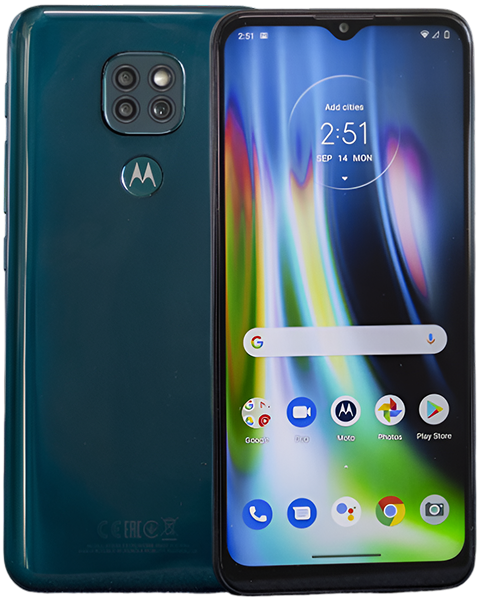
The Moto G9 Play hit shelves in 2020 as Motorola's entry-level offering, balancing essential features with aggressive pricing. You got a 6.5-inch display, triple camera system, and 5,000mAh battery without breaking the bank. The trade-offs showed up in processor speed, build materials, and camera quality—but for basic smartphone tasks, it worked fine.
Four years later, predictable wear patterns emerge. That 5,000mAh battery doesn't last nearly as long as it used to. The LCD display might've developed cracks or touch responsiveness issues. The charging port's getting finicky. Performance feels sluggish even for simple tasks. These aren't random failures—they're the natural result of daily use over years.
The Snapdragon 662 processor that powered your phone adequately in 2020 struggles with current apps optimized for newer, faster hardware. The 4GB of RAM that seemed sufficient now feels cramped when multitasking. But here's the thing—if the G9 Play met your needs when new, targeted repairs can restore that functionality at a fraction of what you'd spend on replacement.
Understanding Component Aging
Every phone faces the same fundamental challenges, regardless of price point. Understanding why components fail helps you make informed repair decisions.
Battery cells lose capacity through chemical reactions that occur during every charge and discharge cycle. Think of a watch battery—new, it powers your watch for years. Eventually, it weakens and needs replacement. Your G9 Play's 5,000mAh battery's been through roughly 1,500 charge cycles. The lithium-ion cells can't store as much energy as they originally did. That's basic chemistry, not a manufacturing defect.
After four years of daily charging, even well-maintained batteries show 20-30% capacity loss. The cells also develop higher internal resistance, reducing their ability to deliver current spikes during intensive tasks. This explains unexpected shutdowns even when the indicator shows remaining charge—the battery can't provide the instantaneous current the processor demands.
Charging ports wear mechanically through repeated cable insertions. The USB-C port contains spring contacts that grip cables firmly. After thousands of insertion cycles, those springs lose tension—just like a pen clip that's been used heavily and doesn't grip as tightly anymore. The contacts don't make secure connection, creating the intermittent charging problems users experience.
LCD displays can develop backlight failures or impact damage. Unlike OLED screens where pixels illuminate independently, LCDs use a backlight behind the panel. When backlight LEDs or driver circuits fail, you get dark spots or uneven brightness. Cracks from drops obviously affect the display, but internal damage from impacts can also manifest days or weeks later as problems develop.
Common Problems We Actually See
Based on the devices we see: G9 Play repairs cluster around a few consistent issues. Understanding these patterns helps identify what's wrong with your specific device.
Battery Performance Degradation
Your phone that used to last the full day now needs afternoon charging. Battery percentage drops in chunks—you'll see it go from 60% to 35% in what feels like minutes. Sometimes it shuts down completely even though the indicator showed 20-25% remaining. These symptoms all point to capacity loss and increased internal resistance in aged battery cells.
You might also notice the phone getting warm during normal use or charging. Degraded batteries generate more heat because internal resistance creates energy loss during charging and discharging. This heat accelerates further degradation, creating a feedback loop.
Physical battery swelling represents serious failure. If your back cover's lifting or you see gaps between the frame and display, stop using the device immediately. Swollen batteries can damage other components and present real safety risks. This requires immediate professional replacement.
Display and Touch Problems
Cracked screens obviously need replacement, but you might also experience touch responsiveness issues without visible damage. Dead zones where taps don't register consistently, areas requiring multiple taps, or phantom touches where the screen registers input without contact all suggest digitizer damage.
LCD backlight problems manifest as dark spots, uneven brightness, or complete backlight failure leaving you with a black screen you can barely see in bright light. The backlight sits behind the LCD panel, and when it or its driver fails, display illumination becomes inconsistent or stops entirely.
Some users report display flickering or brief black screens during use. This can indicate loose display connections, failing backlight drivers, or actual LCD panel degradation. Systematic testing determines whether the problem's the display assembly itself or connections between components.
Charging Port Issues
The classic symptom: your cable only charges if you hold it at a specific angle. Or charging stops randomly and you've got to reposition the cable. Maybe it charges extremely slowly even with the fast charger that came with the phone. These all stem from port wear and debris accumulation.
Inspect the USB-C port with a flashlight and you'll probably see compressed lint preventing full cable insertion. Even with debris removed, worn spring contacts don't grip cables firmly, creating intermittent connection. The combination of contamination and mechanical wear creates frustrating charging behavior.
Performance and Software Problems
Apps crash more frequently than they used to. The interface lags during basic tasks like scrolling or switching between apps. The device feels sluggish overall. These symptoms can indicate either software bloat or fundamental hardware limitations showing their age.
Storage filling near capacity dramatically impacts performance. Android needs available space for temporary files and system operations. When storage exceeds 85-90% full, the entire device slows noticeably. This isn't component failure—it's just how the operating system handles limited storage.
Repair Solutions That Actually Work
Let's talk about what repairs make practical and financial sense for budget devices like the G9 Play.
Battery Replacement Reality
Battery replacement transforms how the G9 Play performs daily. A fresh 5,000mAh cell brings back the all-day runtime you remember from when the phone was new. The procedure involves removing the back cover, disconnecting the depleted battery, and installing a quality replacement cell.
Post-replacement testing verifies proper charging behavior, accurate capacity reporting, and normal operating temperatures. For a four-year-old device that otherwise functions adequately, battery replacement provides the best value of any repair. You'll immediately notice runtime improvements—no more afternoon charging anxiety.
The key is using quality cells that actually deliver rated capacity. Lower-quality batteries might claim 5,000mAh but deliver significantly less. Professional repair services source reliable components that restore the performance you expect.
Display Assembly Replacement
Cracked screens need full assembly replacement—you can't replace just the glass on modern devices. The LCD panel, digitizer, and protective glass come as one integrated unit. Replacement assemblies restore clear display and reliable touch response.
For backlight problems without cracks, diagnosis determines whether the issue's the display assembly itself or connections between components. Loose connections can sometimes be reseated, but actual backlight failures require display replacement.
Quality replacement displays maintain adequate brightness and color for daily use. Budget device displays won't match flagship OLED quality, but they should provide perfectly usable screens for the price point. After replacement, your display should look and respond like it did when new.
Charging Port Service
USB-C port problems often resolve through thorough cleaning. Debris removal restores cable connection in many cases. When cleaning doesn't help, port replacement becomes necessary. The USB-C port sits on a small daughterboard that includes the microphone, making replacement straightforward compared to motherboard-level repairs.
New port hardware immediately restores reliable charging without cable positioning gymnastics. This repair makes sense even for budget devices because it extends useful life significantly for reasonable cost. Most users get another year or more from their device after port replacement.
Software Optimization
Performance problems sometimes respond to software-level fixes without hardware replacement. Factory reset eliminates accumulated bloat and gives you a clean software installation. Back up important data first, then navigate to Settings > System > Reset > Erase All Data.
If performance improves significantly after reset, software was your problem. If slowdowns persist with fresh software, you're hitting the processor's fundamental limitations. The Snapdragon 662 wasn't powerful when new, and it really struggles with current apps. Realistic expectations matter—optimization helps, but it won't make a budget processor perform like a flagship.
Storage cleanup provides immediate benefits. Delete photos and videos you don't need, uninstall unused apps, and clear cache regularly. Maintaining at least 15-20% free storage keeps the system running as smoothly as the hardware allows.
Prevention Strategies
Smart habits reduce how quickly problems develop. Keep the charging port clean through monthly inspection and gentle debris removal. This simple maintenance prevents most charging problems before they start.
Use quality cables that fit securely without requiring force. Loose cables accelerate port wear through imprecise contact and movement during charging. Cables that plug in smoothly and stay connected protect port hardware.
Protect the display with a case providing raised edges. The 6.5-inch screen's vulnerable to crack damage from face-down drops. Even minimal cases significantly reduce crack risk while adding little bulk.
Monitor battery health proactively through apps or system settings that report capacity. Watching capacity decline lets you plan replacement before you're dealing with constant charging frustration. Catching degradation early means replacing the battery on your schedule, not during an emergency.
Manage storage actively to prevent performance problems. Regular cleanup keeps the system running smoothly. Set a reminder to review storage monthly—delete unnecessary files, clear app caches, and uninstall apps you don't use.
Making Smart Repair Decisions
Budget devices require different cost-benefit analysis than flagships. Repair costs represent larger percentages of the device's current value, making each repair decision more significant.
Battery replacement typically makes excellent sense. It dramatically improves daily usability for reasonable cost. If your G9 Play works fine except for battery life, replacement's a no-brainer.
Display repairs require more careful consideration. Repair costs approach the device's current market value, so you need to honestly assess whether the phone meets your needs otherwise. Minor cracks that don't affect functionality might not warrant immediate repair, while extensive damage preventing normal use clearly does.
Charging port replacement provides good value when port problems prevent reliable charging. The repair's straightforward and costs relatively little, immediately restoring functionality.
Performance optimization through software cleanup and factory reset costs nothing but time. Always exhaust software solutions before assuming hardware replacement's necessary. But if optimization doesn't help and you need faster performance, repairs won't address fundamental processor limitations—that requires newer hardware.
Conclusion: Expert Care for Budget Devices
Your Moto G9 Play delivered solid performance at an accessible price when new. Four years later, it shows predictable age-related problems, but most issues are fixable. Battery replacement restores runtime, display repairs address cracks and touch problems, and charging port service ensures reliable connectivity. Each repair costs a fraction of device replacement while restoring the functionality you depend on.
Drop by The Fix for a free diagnostic. We'll run comprehensive tests on your G9 Play, identify exactly what's happening, and give you honest recommendations. No pressure, no upselling—just straightforward guidance from technicians who work on these devices every day.
We've repaired hundreds of G9 Play devices and understand their specific issues and repair requirements. Professional diagnosis identifies exactly what's wrong so repairs address real problems rather than symptoms. Whether you need battery replacement, display service, or charging port repair, we'll restore reliable operation at costs that make sense for budget devices. Your phone deserves expert care regardless of its price point—contact The Fix and let's get it working properly again.


Trusted repair solution for mobile phones, tablets, gaming consoles, and computer systems. We provide fast, reliable, and affordable repair services to get your devices back in perfect working condition.
The Fix is an independent repair service provider and is not affiliated with, sponsored by, or endorsed by Apple Inc., Samsung Electronics, Google LLC, or any other device manufacturer. We use high-quality compatible replacement parts unless explicitly stated. All trademarks are property of their respective owners.


© Copyright The Fix Solutions All rights reserved 2026.
Design by Deepcoder