






Motorola Moto G7 Power Repair Services
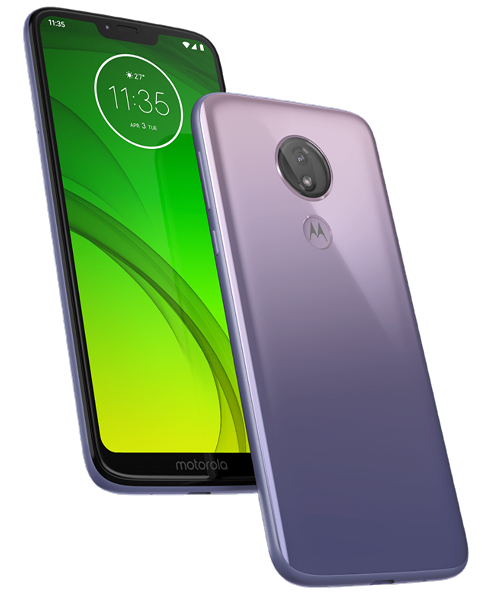
Get fast, reliable, and professional Motorola Moto G7 Power repair services at The Fix — your trusted destination for expert device care.
Common Repairs We Handle Daily


Moto G7 Power Problems: Complete Troubleshooting Guide
Why's your Moto G7 Power suddenly acting like it's on its last legs? You bought this phone specifically for that massive 5,000mAh battery—two-day runtime sounded amazing back in 2019. Now you're lucky if it makes it to dinner. The charging port's being difficult, the screen's not responding right, and you're wondering if it's finally time to give up. Here's the thing—most problems affecting six-year-old budget devices are actually fixable. Let's troubleshoot what's happening and figure out real solutions.
What You're Dealing With
The G7 Power launched as Motorola's budget battery champion. That 5,000mAh cell at this price point made it a practical choice for users who valued runtime over specs. Six years later, you've got a device that's served you well but now shows predictable wear patterns affecting daily usability.
The Snapdragon 632 processor was entry-level even in 2019. The 3GB of RAM felt adequate then but struggles now with current apps. The 6.2-inch LCD display's decent enough for basic tasks. But after six years of daily use, various components are failing or wearing out in ways that affect how the phone functions.
If your G7 Power still handles your needs—calls, messages, web browsing, basic apps—targeted repairs can extend its life at costs that make sense for a budget device. But if you're constantly frustrated by slow performance or need features the hardware can't support, repairs might just postpone inevitable replacement.
Why Components Fail Over Time
Every phone faces the same aging processes. Understanding what's happening helps you decide between fixing issues and moving on.
Battery cells lose capacity through chemical reactions during charge cycles. After six years and roughly 2,200 cycles, your 5,000mAh battery's capacity has dropped significantly. Think of a garden hose that's been left outside for years—the rubber degrades, it develops leaks, and water pressure drops. Your battery can't store energy like it used to, and internal resistance has increased, causing all the symptoms you're experiencing.
Even well-maintained batteries show 30-40% capacity loss after this much use. The cells also can't deliver current spikes effectively, explaining shutdowns when your phone demands power during intensive tasks. This isn't a defect—it's just electrochemistry running its course over thousands of cycles.
Charging ports wear mechanically from cable insertions. The USB-C port's spring contacts have flexed thousands of times, gradually losing tension. They don't grip cables as firmly anymore, creating intermittent connections. Debris accumulation makes this worse—pocket lint gets compressed into the port with every cable insertion.
LCD displays can fail through various mechanisms. Backlight LEDs behind the panel can burn out, creating dark spots. Impact damage doesn't just crack glass—it can damage internal layers that fail days or weeks later. Think of storefront windows under stress—even without visible cracks, internal damage develops and spreads over time.
Troubleshooting Battery Problems
Your legendary two-day battery life's completely gone. Now you're charging daily—sometimes twice. The percentage drops in chunks, or the phone shuts down even when the indicator shows charge remaining.
What to try first:
Check battery health through apps showing actual capacity versus design specs. If you're below 70% of original 5,000mAh, that's your problem. No settings changes will fix capacity loss—you need a new battery.
Optimize what you can while deciding about replacement. Navigate to Settings > Battery and identify apps draining excessive power. Clear their cache or uninstall them. Enable Battery Saver to squeeze out more runtime. Drop screen brightness to 50-60%. These won't fix a dying battery, but they help manage it temporarily.
Look for physical swelling. Lay the phone flat—if it rocks, the battery's swelling. Check for gaps between the screen and frame. Any visible separation requires immediate professional attention. Don't keep using a device with a swollen battery.
When to get professional help:
If battery health shows significant degradation and optimization doesn't help, replacement's the answer. After years of fixing these devices: G7 Power battery replacement provides dramatic improvement. A fresh 5,000mAh cell brings back the two-day runtime you remember. For a six-year-old device that otherwise works, this repair makes sense.
Fixing Display Issues
Maybe you've got cracks spreading. Or dead zones where taps don't register. The backlight might be failing, creating dark spots or uneven brightness. LCD problems typically involve backlight systems rather than burn-in like OLED screens.
Troubleshooting steps:
For touch issues without visible damage, restart your phone first. Simple reboots clear temporary glitches. If problems persist, boot into safe mode to rule out app interference. Hold the power button, then press and hold "Power off" until safe mode appears.
If touch works in safe mode, a third-party app's causing problems. Uninstall recent apps systematically to identify the culprit. If touch issues persist in safe mode, you're dealing with hardware digitizer damage.
Test systematically with a drawing app. Drag your finger slowly across the entire screen. Dead zones show up as areas where your line breaks or doesn't appear. This documents exact problems before seeking repair.
When repair makes sense:
Cracks that aren't spreading and don't affect touch might not need immediate attention. But cracks near the edges or spreading across the screen will get worse. Backlight failures creating dark spots require display assembly replacement—you can't fix just the backlight in modern phones.
LCD replacement for the G7 Power involves full assembly replacement. The panel, backlight, digitizer, and glass come as one unit. Replacement restores clear display and reliable touch. For a six-year-old budget device, weigh repair costs against current device value and your specific needs.
Solving Charging Port Problems
Your cable only works at specific angles. Charging stops randomly and you've got to reposition everything. Maybe it charges super slowly even with the fast charger that came with the phone.
DIY troubleshooting:
Inspect the port visually. Use your phone's flash or a flashlight. You'll probably see compressed lint preventing full cable insertion. Gently remove debris with a wooden toothpick—never metal tools that could damage contacts.
After thorough cleaning, test multiple cables and chargers. Try cables that work perfectly with other devices. If your G7 Power charges normally with some cables but not others, cable quality's part of the issue. If all cables require specific positioning, the port hardware's worn out.
Restart after cleaning. The charging system sometimes needs a reboot to recognize clean contacts properly. Monitor whether charging improves after these steps.
Professional port replacement:
If cleaning provides zero improvement and multiple cables fail, port hardware needs replacement. The USB-C port sits on a small daughterboard that's straightforward to replace. New port hardware immediately eliminates cable gymnastics.
This repair costs relatively little and extends device life significantly. Even for budget devices, port replacement makes sense because it immediately restores reliable charging. Most users get another year or more after this repair.
Addressing Performance Slowdowns
Apps crash constantly. The interface lags during basic tasks. Everything feels sluggish. After six years, you're seeing both software bloat and fundamental hardware limitations.
Optimization techniques:
Check storage first. Navigate to Settings > Storage. If you're above 85% full, delete unnecessary files and apps. Android needs free space for temporary files—when storage fills up, performance tanks.
Clear app caches through Settings > Storage > Cached data. This removes temporary files that accumulate. For specific apps causing problems, go to Settings > Apps > [App] > Storage > Clear Cache.
Disable or uninstall apps you don't use. They consume resources even when not actively running. Review your app list monthly and remove anything you haven't opened in weeks.
Factory reset serves as the ultimate software fix. Back up important data first, then navigate to Settings > System > Reset > Erase All Data. If performance improves dramatically with fresh software, you had software problems. If slowdowns persist, you're hitting the Snapdragon 632's limitations.
Realistic expectations:
The G7 Power wasn't fast when new. The Snapdragon 632 and 3GB RAM struggle with current apps designed for newer, more powerful hardware. Optimization helps, but it won't make a budget processor from 2019 feel like a 2024 flagship. If you need faster performance, repairs won't deliver that—you need newer hardware.
Preventive Maintenance
These habits reduce how quickly new problems develop:
Keep the charging port clean through monthly inspection. Gentle cleaning prevents debris buildup that accelerates wear. This takes 30 seconds but prevents most charging problems.
Use quality cables that fit securely. Loose cables accelerate port wear through imprecise contact. Cables that plug in smoothly and stay connected protect port hardware.
Protect the display with a basic case. Even minimal cases significantly reduce crack risk during drops. The 6.2-inch screen's vulnerable to damage—prevention's cheaper than replacement.
Monitor battery health proactively. Apps reporting capacity let you plan replacement before constant charging becomes unbearable. Catching degradation early means replacing on your schedule.
Manage storage actively. Monthly cleanup prevents performance problems. Delete unnecessary photos and videos, uninstall unused apps, clear caches regularly. Keep at least 15% free space.
Making Smart Decisions
Budget devices require different cost-benefit analysis than flagships. Repair costs represent larger percentages of current device value, making each decision more significant.
Battery replacement typically makes excellent sense. It dramatically improves daily usability for reasonable cost. If your G7 Power works fine except battery life, replacement's worthwhile.
Display repairs require careful consideration. Repair costs approach the device's current value. Minor cracks not affecting function might not warrant immediate repair. Extensive damage preventing normal use clearly does.
Charging port replacement provides good value. It's straightforward and relatively inexpensive, immediately restoring functionality. Even for older budget devices, this repair makes sense.
Performance optimization costs nothing but time. Always exhaust software solutions before assuming hardware replacement's necessary. But if optimization doesn't help and you need faster performance, the G7 Power's processor limitations won't change through repair.
Conclusion: Practical Repairs for Budget Devices
Your Moto G7 Power's six years old, but age doesn't automatically mean it's beyond help. Battery replacement restores legendary runtime. Display repairs address cracks and touch issues. Charging port service eliminates connection frustration. Each repair costs a fraction of replacement while restoring functionality you depend on.
Having issues with your Moto G7 Power? The Fix specializes in Motorola repairs. Stop by our shop—we'll diagnose the problem for free, explain what's happening in plain English, and get your device working right again.
We've repaired hundreds of G7 Power devices and understand their specific issues and repair requirements. Professional diagnosis identifies exactly what's wrong so repairs address real problems. Whether you need battery replacement, display service, or charging port repair, we'll restore reliable operation at costs that make sense for budget devices. Your phone deserves expert care regardless of age or price point—contact The Fix and let's get it working properly again.


Trusted repair solution for mobile phones, tablets, gaming consoles, and computer systems. We provide fast, reliable, and affordable repair services to get your devices back in perfect working condition.
The Fix is an independent repair service provider and is not affiliated with, sponsored by, or endorsed by Apple Inc., Samsung Electronics, Google LLC, or any other device manufacturer. We use high-quality compatible replacement parts unless explicitly stated. All trademarks are property of their respective owners.


© Copyright The Fix Solutions All rights reserved 2026.
Design by Deepcoder