






Motorola Moto G Stylus 5G Repair Services
Get fast, reliable, and professional Motorola Moto G Stylus 5G repair services at The Fix — your trusted destination for expert device care.
Common Repairs We Handle Daily


Moto G Stylus 5G Technical Guide: Repair Insights
Remember when you'd pull out that stylus to jot quick notes or sketch ideas, and everything just worked? When the phone lasted all day and that 5G connection stayed solid? Three years later, you're dealing with a stylus the phone doesn't always recognize, battery life that's tanked, and you're wondering if this unique device can be saved. Good news—the Moto G Stylus 5G's problems are more fixable than you'd think.
Understanding Your Stylus-Equipped Device
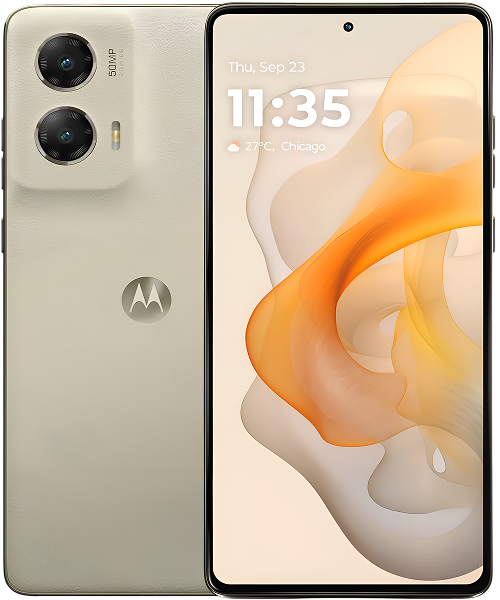
Motorola designed the G Stylus 5G around that built-in pen, bringing stylus functionality to a mid-range price point in 2021. That 6.8-inch display gives you room to write and draw, the Snapdragon 480+ handles basic tasks adequately, and the 5,000mAh battery originally provided solid runtime. The stylus itself stores in the phone's body with sensors detecting when you remove or insert it.
This stylus integration creates unique considerations for repairs. The digitizer layer in the display doesn't just register finger touches—it's also detecting the stylus's electromagnetic signal. The phone's body houses the stylus slot with sensors and spring mechanisms. These components can fail in ways that don't affect standard touchscreen phones.
Three years in, you're seeing predictable wear patterns affecting both standard smartphone components and stylus-specific systems. The battery doesn't last like it used to. The display might've developed cracks or responsiveness issues. That stylus slot's getting loose, or the phone doesn't recognize the pen anymore. Each problem has specific causes and solutions.
Component Aging and Failure Patterns
Every phone faces fundamental aging processes, but the G Stylus 5G's unique features introduce additional failure points.
Battery cells degrade through chemical reactions during charge cycles. After three years and roughly 1,100 cycles, your 5,000mAh battery's capacity has dropped. Think of a coffee maker that's brewed thousands of pots—eventually it doesn't heat water as quickly or brew as efficiently. Your battery can't store energy like it used to, and internal resistance has increased, causing rapid drain and unexpected shutdowns.
Even well-maintained batteries show 15-25% capacity loss after this much use. The cells also struggle to deliver current spikes effectively, explaining shutdowns when your phone demands power during intensive operations. This represents normal electrochemical aging, not defects.
The stylus digitizer operates differently than standard capacitive touch. It detects electromagnetic signals from the stylus rather than just finger capacitance. This system can develop calibration issues or sensor failures that specifically affect stylus input while finger touch works normally. Impact damage to the display can affect the electromagnetic sensing layer without necessarily damaging visible touch functionality.
The stylus slot mechanism uses spring-loaded components that detect pen insertion and removal. Like a seat belt buckle mechanism that's been used thousands of times, these springs and sensors can wear, lose tension, or develop connection problems. The stylus itself—the physical pen—can also wear. The tip can become damaged, the electromagnetic components can fail, or the pen can develop cracks affecting signal transmission.
Charging ports wear mechanically from cable insertions. After thousands of insertion cycles, spring contacts lose tension and don't grip cables firmly. Debris accumulation compounds this—pocket lint gets compressed into the port, preventing full connection and potentially affecting both charging and data transfer.
Stylus-Specific Problems
What actually happens with most units: stylus problems cluster around specific failure patterns that affect G Stylus devices uniquely.
Stylus Not Recognized
Your phone doesn't detect when you remove or insert the stylus. The screen doesn't respond to stylus input even though finger touch works fine. Or the stylus works intermittently—sometimes recognized, sometimes not.
These symptoms suggest either sensor problems in the stylus slot or electromagnetic detection issues in the display digitizer. The sensors detecting pen insertion can fail or lose connection. The digitizer layer can develop problems specifically affecting electromagnetic stylus sensing while capacitive touch remains functional.
Dirt or debris in the stylus slot can also prevent proper detection. The sensors need clean contact with the stylus to register insertion and removal. Compressed debris blocks this contact, causing intermittent or complete detection failure.
Stylus Input Accuracy Issues
The stylus registers input but accuracy's off. Lines don't appear where you're actually touching. There's lag between stylus movement and screen response. Or pressure sensitivity doesn't work correctly—light touches and firm presses feel the same.
These symptoms indicate digitizer calibration problems or degradation in the electromagnetic sensing system. The display's ability to precisely locate the stylus's position can drift over time or through impact damage. This affects stylus accuracy specifically while finger touch might work normally.
Physical Stylus Slot Problems
The stylus doesn't click into place like it used to. It falls out easily or rattles when inserted. The spring mechanism feels weak or non-existent. You can't remove the stylus smoothly—it sticks or requires extra force.
These mechanical issues stem from spring wear, housing damage, or debris buildup. The retention mechanism uses springs and precise tolerances that can degrade through repeated use. Physical damage from drops can also affect the slot housing, preventing proper stylus retention.
Standard Smartphone Issues
Beyond stylus-specific problems, the G Stylus 5G faces the same issues affecting all phones.
Battery Performance Degradation
Your phone that originally lasted all day now needs afternoon charging. Battery percentage drops in chunks. It shuts down unexpectedly even when the indicator shows remaining charge. These symptoms point to capacity loss in aged battery cells.
The 5,000mAh battery that gave you excellent runtime can't deliver the same performance after three years of daily charging. The cells physically can't hold as much energy, and increased internal resistance causes rapid discharge and shutdowns during power demands.
Display Problems
Cracks from drops obviously need attention, but you might also experience touch responsiveness issues, dead zones requiring multiple taps, or LCD backlight failures creating dark spots or uneven brightness. These problems affect the display assembly including the stylus digitizer layer.
Impact damage can affect stylus sensing specifically while standard touch works, or vice versa. The multiple sensing layers in the display assembly can fail independently, creating various symptom combinations.
Charging Port Issues
Your cable only works at specific angles. Charging's intermittent or extremely slow. The USB-C port feels loose. These symptoms stem from worn spring contacts, debris accumulation, or both.
After thousands of cable insertions, the port contacts don't grip firmly anymore. Debris prevents full insertion even with unworn contacts. The combination creates frustrating charging behavior requiring cable repositioning.
Professional Repair Solutions
Understanding what repairs actually involve helps you make informed decisions.
Battery Replacement
Battery replacement for the G Stylus 5G involves removing the back cover, disconnecting the depleted cell, and installing a quality 5,000mAh replacement. The procedure requires care around the stylus slot housing to avoid damaging that mechanism during battery access.
Post-replacement testing verifies proper charging behavior, accurate capacity reporting, and normal temperatures during use. A fresh battery restores the all-day runtime you remember. For a device that otherwise works well, this repair provides excellent value.
Display Assembly Service
Display replacement addresses both standard touch issues and stylus-specific problems. The assembly includes the LCD panel, backlight, capacitive touch digitizer, and electromagnetic stylus sensing layer. Replacement restores both finger touch and stylus input functionality.
Quality replacement displays maintain proper calibration for both input types. The electromagnetic sensing layer must function correctly for stylus accuracy. Professional installation ensures all sensing systems work as intended.
Stylus Slot Repair
Slot mechanism problems require accessing the internal housing, cleaning debris, and potentially replacing worn springs or damaged components. The sensors detecting stylus insertion need proper connection and alignment. Professional service restores reliable stylus retention and detection.
If the physical stylus itself has failed—damaged tip, broken electromagnetic components, or cracks—replacement styli are available. The new pen must match your device's specifications for proper electromagnetic sensing.
Charging Port Replacement
USB-C port replacement involves removing the worn assembly and installing a new daughterboard with fresh port hardware. The modular design makes replacement straightforward. New contacts immediately restore reliable charging without cable positioning requirements.
Maintenance for Longevity
Smart habits reduce repair frequency and extend device life.
Keep the stylus slot clean. Monthly inspection and gentle cleaning with compressed air prevents debris buildup that affects both retention and detection. Don't force the stylus in if it meets resistance—check for obstructions first.
Store the stylus properly in its slot when not in use. Carrying it loose in pockets or bags risks loss and damage. The slot protects the pen while keeping it instantly accessible.
Keep the charging port clean through regular inspection. Gentle debris removal with non-metal tools prevents most charging problems. This takes seconds but prevents frustrating connection issues.
Use quality cables that fit securely. Loose cables accelerate port wear through imprecise contact. Cables that plug in smoothly and stay connected protect port hardware.
Protect the large display with a case providing raised edges. The 6.8-inch screen's vulnerable to damage. Cases should allow stylus access without interfering with slot function.
Monitor battery health proactively. Apps reporting capacity decline let you plan replacement before constant charging becomes unbearable. Early detection means replacing on your schedule.
Making Repair Decisions
The G Stylus 5G's unique features affect repair economics. If you value stylus functionality and use it regularly, maintaining this device makes sense. Stylus-equipped phones remain relatively rare, especially at mid-range prices.
Battery replacement provides dramatic daily usability improvement. If stylus functionality works and you want to keep using this unique device, battery replacement's worthwhile.
Display repairs cost more but restore both touch and stylus input. If you depend on stylus features, display replacement maintains that capability. For users who rarely use the stylus, the repair economics shift.
Stylus slot repair maintains the device's defining feature. If you regularly use the pen, slot repairs justify their cost. Users who ignore the stylus might not find this repair valuable.
Charging port replacement provides good value regardless of stylus usage. It's straightforward and relatively inexpensive, immediately restoring reliable power delivery.
Conclusion: Maintaining Unique Functionality
Your Moto G Stylus 5G offers capabilities that standard touchscreen phones don't provide. When problems develop, professional repair can restore both standard smartphone functions and stylus-specific features. Battery replacement brings back all-day runtime. Display service fixes touch and stylus input. Slot repairs maintain pen functionality. Each repair extends this unique device's useful life.
Ready to fix your Moto G Stylus 5G? The Fix makes it easy. Walk in anytime for a free assessment—most repairs are same-day, and we'll keep you updated throughout the process. Your device deserves expert care, and that's exactly what we deliver.
We've worked on numerous G Stylus devices and understand their unique repair requirements. Professional diagnosis identifies both standard and stylus-specific problems. Whether you need battery replacement, display service, stylus slot repair, or charging port work, we'll restore the functionality that makes this device special. Contact The Fix—we'll get your stylus-equipped phone working properly again.


Trusted repair solution for mobile phones, tablets, gaming consoles, and computer systems. We provide fast, reliable, and affordable repair services to get your devices back in perfect working condition.
The Fix is an independent repair service provider and is not affiliated with, sponsored by, or endorsed by Apple Inc., Samsung Electronics, Google LLC, or any other device manufacturer. We use high-quality compatible replacement parts unless explicitly stated. All trademarks are property of their respective owners.


© Copyright The Fix Solutions All rights reserved 2026.
Design by Deepcoder