






Motorola Moto G Play Repair Services
Get fast, reliable, and professional Motorola Moto G Play repair services at The Fix — your trusted destination for expert device care.
Common Repairs We Handle Daily


Diagnosing Moto G Play Problems: Expert Repair Insights
Based on repair shop data across the industry, entry-level devices like the Moto G Play see higher replacement rates than any other category—not because they're unrepairable, but because owners assume fixing budget phones doesn't make sense. That's unfortunate because most problems these devices develop are totally fixable at costs well below replacement. If your G Play's showing problems after three years, let's diagnose what's actually wrong and figure out whether repair makes sense.
What You're Working With
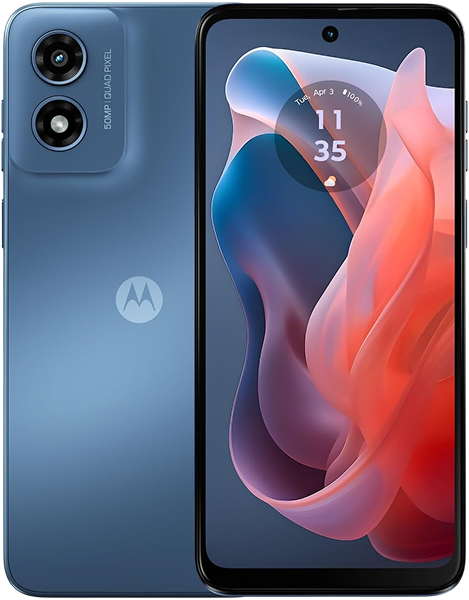
The Moto G Play launched in 2021 as Motorola's most affordable offering, delivering essential smartphone functions at an accessible price. You got a 6.5-inch display, adequate processor for basic tasks, and 5,000mAh battery providing solid runtime. The trade-offs were obvious—slower performance, basic cameras, limited storage—but for users needing fundamental smartphone capabilities, it worked.
Three years later, this budget device shows wear patterns we see consistently. That 5,000mAh battery doesn't last like it used to. The display might've developed cracks or touch issues. The charging port's acting up. Performance feels increasingly sluggish. These aren't defects—they're the predictable results of daily use combined with entry-level components aging.
The Snapdragon 460 processor was entry-level even in 2021. The 3GB of RAM barely sufficed then and really struggles now with current apps. But here's the thing—if the G Play met your needs when new and still handles basic tasks adequately, targeted repairs can restore functionality at costs that make sense for a budget device.
Identifying Specific Problems
Our technicians consistently find: proper diagnosis prevents wasting money on wrong fixes. Let's identify what you're actually dealing with.
Battery Performance Issues
Your phone that used to last all day now needs mid-afternoon charging. Battery percentage drops rapidly during basic use—you'll see it go from 60% to 30% in what feels like minutes. Sometimes it shuts down completely even when the indicator showed remaining charge.
After three years and roughly 1,100 charge cycles, your 5,000mAh battery's capacity has dropped significantly. Think of running shoes—new, they've got great cushioning. After 500 miles, they're noticeably worn. After 1,000 miles, the support's gone. Your battery faces similar degradation through repeated charge cycles.
You might notice the phone getting warm during normal use or charging. Degraded batteries generate more heat because internal resistance creates energy loss. This heat accelerates further degradation, worsening battery performance over time.
Physical battery swelling represents serious failure. If your back cover's lifting or gaps appear between the screen and frame, stop using the device immediately. Swollen batteries present safety risks requiring immediate professional attention.
Display and Touch Problems
Cracks from drops obviously need attention, but other display issues can be subtle. Dead zones where taps don't register consistently—usually along edges or specific corners. Areas requiring multiple taps to respond. Phantom touches where the screen registers input without you touching it.
LCD backlight problems show up as dark spots or uneven brightness. Unlike OLED screens where pixels illuminate independently, LCD displays use backlights behind the panel. When backlight LEDs or driver circuits fail, illumination becomes inconsistent.
Touch responsiveness that feels off across the screen suggests digitizer problems rather than just software glitches. The digitizer layer sensing your touches can fail independently from the visible display, creating various symptom combinations.
Charging Port Failures
The classic symptoms: your cable only works at specific angles. Charging stops randomly requiring cable repositioning. Extremely slow charging even with the charger that came with the phone. The USB-C port feels loose when cables plug in.
Inspect the port with good lighting and you'll probably see compressed lint and debris. That prevents full cable insertion and creates intermittent connection. But even after thorough cleaning, worn spring contacts don't grip cables firmly anymore after thousands of insertion cycles.
Performance and Storage Issues
Apps crash more frequently. The interface lags during basic tasks. Everything feels sluggish. After three years, you're seeing both software bloat accumulation and hardware limitations becoming increasingly apparent with current apps.
Storage filling near capacity dramatically impacts performance. The G Play's limited internal storage means this happens faster than on devices with more capacity. When storage exceeds 85% full, Android slows noticeably because it needs space for temporary files and system operations.
Diagnostic Testing That Works
Systematic testing identifies specific problems before attempting fixes.
Battery Health Assessment
Download a battery health app showing actual capacity versus design specification. If you're seeing 70% or less of original 5,000mAh capacity, that explains rapid drain and shutdowns. At this degradation level, settings changes won't restore the runtime you remember—you need a new battery.
Try this test: charge to 100%, then use normally for two hours. If battery drops more than 35-40%, that's abnormal drain indicating significant degradation. Compare to when the phone was new—if runtime's cut in half or worse, replacement makes sense.
Check for physical swelling. Lay the phone flat on a table—if it rocks or doesn't sit flush, the battery's swelling. Look for gaps between components. Any visible separation requires immediate professional attention.
Display Testing
Open solid color images—white, black, red, green, blue. Display problems become obvious against uniform backgrounds. LCD backlight failures show as dark spots on white. Dead pixels appear on solid colors.
Test touch systematically with a drawing app. Slowly drag your finger across the entire screen, especially edges and corners. Dead zones show up as areas where your line breaks or doesn't appear. This documents exact touch problems before seeking repair.
Boot into safe mode to rule out app interference. If touch works normally in safe mode, third-party apps might be causing problems. But if issues persist, you're dealing with hardware digitizer damage.
Charging System Diagnosis
Visual inspection first. Use your phone's flash or a flashlight to examine the USB-C port closely. You'll probably see compressed debris. Carefully remove it with a wooden toothpick—never use metal tools that could damage contacts.
After thorough cleaning, test multiple cables and chargers. Try cables that work perfectly with other devices. If your G Play charges normally with some cables but not others, cable quality's part of the issue. If all cables require specific positioning, port hardware needs replacement.
Monitor charging behavior. Does it charge slowly consistently, or does speed vary? Does it stop charging randomly? Does connection drop when you touch the cable? Each symptom helps pinpoint whether you're dealing with contamination, cable problems, or actual port hardware failure.
Performance Evaluation
Check storage first through Settings > Storage. If you're above 85% full, that explains significant performance problems. Delete unnecessary files and apps to free at least 20% capacity.
Review battery usage statistics to identify apps consuming excessive resources. Settings > Battery shows which apps drain power and work the processor hardest. Apps showing unusually high usage might be crashing, malfunctioning, or just poorly optimized for older hardware.
Try factory reset as diagnostic—back up data first. If performance improves dramatically with fresh software, you had software problems. If slowdowns persist, you're hitting the Snapdragon 460's fundamental limitations with current apps.
Repair Options
Once you've identified what's actually wrong, here's what fixes these issues.
Battery Replacement
A fresh 5,000mAh battery restores the all-day runtime you remember. The procedure involves removing the back cover, disconnecting the depleted battery, and installing a quality replacement. Post-replacement testing verifies proper charging, accurate capacity reporting, and normal temperatures.
For a three-year-old device that otherwise works adequately, battery replacement provides excellent value. You'll immediately notice runtime improvements—no more afternoon charging anxiety. The key is using quality cells that actually deliver rated capacity rather than cheap alternatives that fail quickly.
Display Assembly Replacement
Cracked screens need full assembly replacement—the LCD, digitizer, and glass come as one unit. Replacement restores clear display and reliable touch. Quality replacement displays maintain adequate brightness and color for daily use.
Display repair costs can approach the device's current value, so you need to weigh repair costs against how well the phone otherwise meets your needs and how much longer you plan to use it.
Charging Port Service
Many charging problems resolve through thorough cleaning alone. When cleaning doesn't help, port replacement becomes necessary. The USB-C port sits on a small daughterboard that's straightforward to replace.
New port hardware immediately eliminates cable positioning gymnastics. This repair costs relatively little and extends device life significantly—even for entry-level devices, port replacement makes sense.
Software Optimization
Performance issues sometimes respond to software fixes without hardware replacement. Factory reset eliminates accumulated bloat. Storage cleanup—deleting unnecessary photos, videos, and apps—provides immediate benefits.
These cost nothing but time. Always exhaust software solutions before assuming hardware replacement's necessary. But if optimization doesn't help, you're hitting processor limitations that repairs can't address.
Maintenance Strategies
Smart habits reduce how quickly problems develop.
Keep the charging port clean through monthly inspection. Gentle debris removal prevents most charging problems. Use quality cables that fit securely—loose cables accelerate port wear.
Protect the display with a case providing raised edges. Even minimal cases significantly reduce crack risk. Monitor battery health proactively—apps reporting capacity let you plan replacement before constant charging becomes unbearable.
Manage storage actively. Monthly cleanup prevents performance problems. Delete unnecessary files, clear caches, uninstall unused apps. Keep at least 20% free space.
Making Smart Decisions
Entry-level devices require different cost-benefit analysis. Repair costs represent larger percentages of current device value.
Battery replacement typically makes excellent sense—it dramatically improves daily usability for reasonable cost. Charging port replacement provides good value—it's straightforward and relatively inexpensive.
Display repairs require careful consideration—costs can approach device value. Software optimization costs nothing but time and should always come first.
If the G Play meets your basic needs—calls, messages, web browsing, simple apps—repairs can restore reliable performance. But if you need capabilities the hardware doesn't provide, repairs won't deliver them.
Conclusion: Diagnostic-Led Repair Decisions
Your Moto G Play delivered essential smartphone functionality at an accessible price. Three years later, it shows predictable problems, but most are fixable. Proper diagnosis identifies exactly what's failing so repairs address actual issues. Battery replacement restores runtime. Display repairs fix cracks and touch problems. Charging port service ensures reliable connectivity.
Bring your Moto G Play to The Fix and let our experienced techs take a look. We've seen every problem these devices develop, we know exactly how to fix them, and we'll treat your phone like it's our own. Free diagnostic, honest pricing, quality work.
Professional diagnosis prevents wasting money on wrong fixes. Whether you need battery replacement, display service, or charging port repair, we'll restore reliable operation at costs that make sense for budget devices. Contact The Fix—let's get your affordable smartphone working properly again.


Trusted repair solution for mobile phones, tablets, gaming consoles, and computer systems. We provide fast, reliable, and affordable repair services to get your devices back in perfect working condition.
The Fix is an independent repair service provider and is not affiliated with, sponsored by, or endorsed by Apple Inc., Samsung Electronics, Google LLC, or any other device manufacturer. We use high-quality compatible replacement parts unless explicitly stated. All trademarks are property of their respective owners.


© Copyright The Fix Solutions All rights reserved 2026.
Design by Deepcoder