






Microsoft Surface Pro 8 Repair Services
Get fast, reliable, and professional Microsoft Surface Pro 8 repair services at The Fix — your trusted destination for expert device care.
Common Repairs We Handle Daily


Why Won't Your Microsoft Surface Pro 8 Work Right? Microsoft Surface Pro 8 Repair Answers
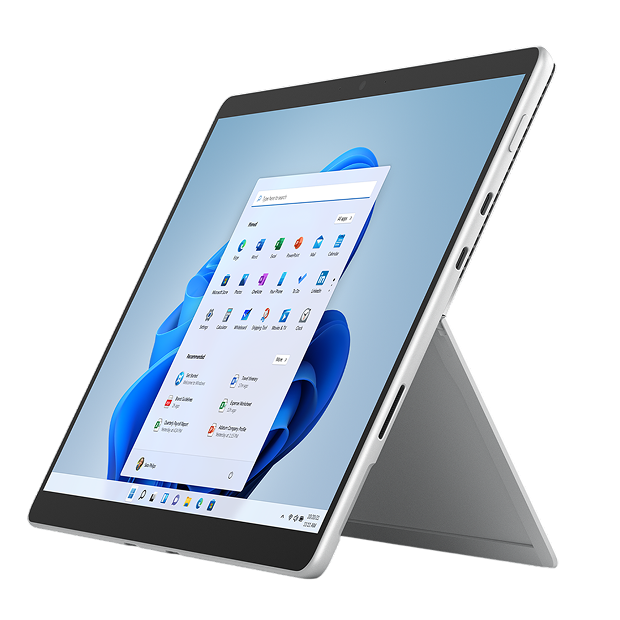
Here's what made the Surface Pro 8 different when Microsoft launched it in late 2021—they finally updated the design after years of incremental improvements. Thinner bezels around the 13-inch display created a more modern look while increasing screen size from previous 12.3-inch models. The PixelSense Flow display runs at 120Hz for smoother scrolling and pen input. Thunderbolt 4 ports replaced USB-A, fully embracing USB-C for connectivity. Intel 11th Gen Core processors provided solid performance for productivity workloads. Configurations ranged from 8GB to 32GB RAM and 128GB to 1TB storage. The removable SSD meant user upgrades were theoretically possible. For professionals wanting cutting-edge Windows tablet-laptop hybrid capability, the Surface Pro 8 represented Microsoft's most significant design evolution in years.
Three years into ownership, these premium devices face unique repair challenges. The Surface Pro 8's integrated construction makes repairs complex and risky. Cracked PixelSense displays are expensive because the screen includes sophisticated 120Hz and pen digitizer technology. Battery access requires complete display removal. USB-C ports wear from constant docking. The slim kickstand mechanism can fail. If you're dealing with a broken Surface Pro 8 and wondering whether Microsoft Surface Pro 8 repair makes sense given the repair complexity and costs, let's work through what actually goes wrong and what your realistic options look like.
Why People Love (and Hate) the Surface Pro 8
Microsoft positioned the Pro 8 as their answer to criticisms about outdated design. The thinner bezels and larger screen made it feel modern compared to the chunky borders on earlier models. The 120Hz refresh rate created noticeably smoother scrolling and pen input—once you experience 120Hz, going back to 60Hz feels sluggish.
The 13-inch PixelSense Flow display delivers 2880x1920 resolution with excellent color accuracy. It's genuinely gorgeous for creative work, productivity, and media consumption. The 120Hz refresh combined with the Surface Slim Pen 2 (which stores and charges in the Type Cover keyboard) creates an excellent digital writing and drawing experience.
Intel 11th Gen Core i5 or i7 processors with Iris Xe graphics handle demanding applications smoothly. The integrated graphics perform surprisingly well for a thin-and-light device—adequate for photo editing, video work, and even some light gaming.
The dual Thunderbolt 4 ports provide versatile connectivity. You can charge, connect to external displays, use high-speed storage, and dock through a single cable. But the elimination of USB-A and the headphone jack frustrated users who weren't ready for dongle life.
The kickstand adjusts from 0 to 165 degrees with smooth continuous adjustment. Combined with the detachable Type Cover keyboard, it enables true laptop positioning on surfaces where older kickstands felt awkward.
Battery capacity sits around 51Wh, delivering claimed 16 hours of typical use. Real-world battery life varies dramatically—light productivity might get 10-12 hours, while intensive work drains it much faster. Three years of use later, degradation has reduced those numbers significantly.
Understanding Why All Smartphones Age
Let's talk about why your three-year-old Surface Pro 8 develops issues even with careful use. Think about running shoes losing cushioning after many miles. When new, they provide excellent support and energy return. After hundreds of miles, the foam compresses permanently, the structure breaks down, and they don't protect your joints like they once did. You didn't abuse them—cumulative use created wear that eventually needs addressing.
Your Surface's battery chemistry degrades through every charge cycle. The lithium-polymer cells undergo chemical reactions that aren't perfectly reversible. After three years and maybe 800-1,200 charge cycles, you've lost 15-25% of design capacity, possibly more with heavy use or constant docked operation at 100% charge.
The PixelSense Flow display includes multiple sophisticated layers—protective glass, 120Hz LCD panel, capacitive touch digitizer, active pen digitizer with haptic feedback support. This complex stack experiences stress from temperature cycling, pressure when the Type Cover closes, and millions of touch and pen interactions over three years.
Thunderbolt 4 ports handle enormous bandwidth but experience significant mechanical wear on Surface devices. Professionals dock and undock multiple times daily. Each insertion cycle degrades the internal contacts. The port housing can loosen from repeated stress, especially with heavy docking stations pulling on the connection.
The slim kickstand mechanism operates thousands of times over three years of ownership. The continuous friction hinge that allows infinite angle adjustment experiences wear. Spring tension can decrease, lubrication can dry out, or components can develop looseness.
Software accumulation affects even powerful hardware. Three years of Windows updates, app installations, driver updates, and system changes create bloat that impacts performance. Background processes multiply. Startup programs accumulate. The fresh-install snappiness gradually diminishes.
Symptom Analysis: What's Actually Happening
Display Symptoms You're Seeing
After repairing these devices daily: screen issues present in multiple ways on Surface Pro 8 units. Physical cracks create spider-web patterns from drops or impacts. But we also see pressure cracks from objects in bags, cracks from closing the Type Cover with something between keyboard and screen, or spontaneous cracks from thermal stress.
Touch digitizer failures occur without visible damage. The screen displays perfectly but touch doesn't register in certain areas, or it registers incorrectly. The multitouch layer has failed independently of the glass and LCD.
Pen digitizer issues affect Surface Pen functionality. The pen doesn't track accurately, pressure sensitivity feels wrong, tilt detection doesn't work, or the haptic feedback feature (new in Pro 8 with Slim Pen 2) stops functioning. The sophisticated pen digitizer layer has developed problems.
The 120Hz refresh might fail, dropping back to 60Hz. You notice scrolling isn't as smooth anymore. This can indicate display controller issues or driver problems. Sometimes it's fixable through software, other times it indicates hardware failure.
Display connector issues from drops or pressure create flickering, lines across the screen, color distortion, or intermittent display function. The ribbon cables connecting the display to the main board have torn or worked loose.
Battery Problems You're Experiencing
Your battery degradation follows a predictable pattern. First year, battery life matched Microsoft's claims reasonably well—maybe 10-12 hours of productivity work. Second year, you noticed it wasn't lasting quite as long. Third year, you're charging mid-afternoon instead of making it through the workday.
The 51Wh capacity is modest for a productivity device with a power-hungry 120Hz display. After 800-1,200 cycles, you're probably at 75-85% of design capacity if you're lucky, possibly lower with heavy use patterns.
Professionals who keep their Surface Pro 8 docked and plugged in constantly face accelerated degradation. Staying at 100% charge stresses lithium-polymer cells more than cycling between 20-80%. This is a common usage pattern that creates premature battery wear.
Some batteries develop serious problems beyond gradual decline. Random shutdowns at non-zero percentages indicate the battery can't deliver peak current when the system demands it. You might see 35% remaining, then the Surface dies suddenly.
Charging might become dramatically slower. What took 2-3 hours when new now takes 5-6 hours or more. This can indicate battery degradation or charging circuit issues—diagnosis determines which.
Port Issues You're Facing
The dual Thunderbolt 4 ports handle charging, data transfer at 40Gbps, dual 4K display output, and docking station connections. When they fail, multiple functions disappear simultaneously.
Charging reliability suffers first. The device only charges when the cable's held at specific angles, or charging becomes completely intermittent. Sometimes one port works while the other doesn't, clearly indicating port-specific failure.
Docking becomes unreliable. Your docking station connection fails randomly—external monitors cut out, USB devices disconnect, network drops, or the dock isn't recognized at all. This creates productivity nightmares for professionals who depend on docked setups.
Data transfer problems appear. External storage disconnects randomly, file transfers fail midway, or the Surface doesn't recognize connected devices. This can be cable issues, device problems, or actual Surface port failure.
Thunderbolt 4 ports include 24 pins handling different signals. Partial pin damage affects specific functions while others work. You might charge fine but can't get display output, or data transfer works while charging doesn't.
Performance Degradation You're Noticing
The Intel 11th Gen Core processor should handle productivity tasks smoothly. If you're experiencing significant slowdowns, several causes are possible and diagnosable.
Thermal throttling from blocked vents dramatically reduces performance. The Surface Pro 8's slim chassis has minimal thermal headroom. Dust accumulation in the vents or degraded thermal paste causes temperature spikes that trigger aggressive throttling to prevent damage.
Storage performance degradation happens with heavy use. The removable SSD experiences wear from constant read-write cycles. Performance drops as the drive fills up and as NAND cells degrade. Severely degraded SSDs need replacement.
Software bloat from three years of accumulation affects the system. Background processes consume resources. Startup programs multiply. Windows update cache grows enormous. Driver conflicts create instability. A clean Windows installation often dramatically improves performance.
RAM issues are rare but possible. Failed or failing memory causes crashes, blue screens, or system instability. Diagnostic tools reveal memory errors if they're hardware-related.
Kickstand Problems You're Dealing With
The continuous friction hinge allows infinite angle adjustment but can develop issues over time and thousands of adjustment cycles.
Loosening is most common. The kickstand won't hold position reliably, especially at shallow angles needed for drawing or touch use. It slowly collapses under the device's weight instead of staying put. This happens from spring tension loss or worn friction surfaces.
Stiffness is the opposite problem. The kickstand becomes difficult to adjust, requiring excessive force. This indicates accumulated debris in the hinge mechanism or worn components creating unexpected friction.
Complete failure is less common but happens. The kickstand won't deploy at all, gets stuck partway, or deploys but won't support the device. This usually means broken internal components.
Strange noises during adjustment—clicking, grinding, or squeaking—indicate wear or debris in the mechanism. Sometimes cleaning helps, other times it signals approaching failure.
What You See and Experience at The Fix
When you bring your Surface Pro 8 to us, here's what happens from your perspective:
We greet you and take your device. You explain the issues you're experiencing—we listen carefully because symptoms guide our diagnostic approach. We're not rushing you or making assumptions.
We take the Surface to our diagnostic area. Testing takes 20-30 minutes. You can wait or come back—your choice. We're running comprehensive diagnostics, not just checking the reported problem. Sometimes issues you haven't noticed yet are developing.
We call you over and explain what we found. If it's display damage, we show you under magnification. If it's battery degradation, we show you the diagnostic readings. If it's port issues, we demonstrate the problem with known-good cables. We use plain language, not technical jargon.
We're honest about Surface repair complexity. These devices are difficult to repair. Display removal—required for most internal repairs—carries risk of screen damage. We explain this reality upfront, not as a sales tactic but as genuine information you need to make informed decisions.
We provide cost estimates in context. Surface Pro 8 repairs can be expensive because of parts costs and labor intensity. We discuss whether repair makes financial sense compared to Microsoft's own replacement options or buying current-generation devices.
You decide whether to proceed. We never pressure. If you approve repair, we give realistic timelines. Most Surface Pro 8 repairs take several days because of complexity—these aren't one-hour jobs. We keep you updated throughout the process.
When the repair's complete, we call immediately. When you pick up, we walk through what we did. We show you the repair. We let you test everything before you leave. Touch the screen, test the pen, verify charging, check ports, try the kickstand. We want you confident in the work.
You leave with your repaired Surface Pro 8 and our commitment to quality. If something goes wrong with our repair, we make it right. We stand behind our Microsoft Surface Pro 8 repair work because our reputation depends on customer satisfaction.
Root Causes and Solutions
Display damage typically requires complete screen assembly replacement. The PixelSense Flow display with 120Hz, touch, and pen digitizer is one integrated unit. Replacement is expensive and risky because it requires removing the old display without damaging internal components.
Battery replacement requires display removal, which carries screen damage risk. The battery is adhesive-secured inside and not easily accessible. We weigh repair costs and risks against device value and remaining useful life.
Port issues sometimes stem from debris or connector problems rather than actual port failure. We start with cleaning and testing. If ports need replacement, it requires display removal and micro-soldering work on the main board.
Kickstand repairs vary by failure mode. Loosening might be addressable through tension adjustment. Complete failure usually requires parts replacement. Both require internal access through display removal.
Performance issues often solve through software—Windows clean install, driver updates, removing bloatware. Hardware issues like failing storage or thermal problems require component-level diagnosis and repair.
Making the Call
Should you repair your Surface Pro 8? Three years old with premium specs and significant initial investment suggests repair might make sense for single-issue failures. Display damage creates difficult economics—replacement costs are substantial relative to device value.
Consider Microsoft's options. They offer repair services and trade-in programs. Sometimes their pricing is competitive with third-party repair, and you get factory-certified work.
Think about your specific configuration. A maxed-out Pro 8 with Core i7, 32GB RAM, and 1TB storage represents serious investment worth protecting. Base configurations have less repair justification.
The Pro 8 should receive Windows updates for years. It's current hardware with long remaining useful life, which favors repair investment over replacement.
Your Next Step
Bring your Microsoft Surface Pro 8 to The Fix and let our experienced techs take a look. We've seen every problem these devices develop, we know exactly how to fix them, and we'll treat your Surface like it's our own. Free diagnostic, honest pricing, quality work.
Surface devices require specialized knowledge and tools. Your Pro 8 deserves technicians who understand Microsoft's design philosophy and the specific challenges these hybrid devices present. That's what you get at The Fix—expertise earned from repairing hundreds of Surface devices, combined with honest guidance about repair value.


Trusted repair solution for mobile phones, tablets, gaming consoles, and computer systems. We provide fast, reliable, and affordable repair services to get your devices back in perfect working condition.
The Fix is an independent repair service provider and is not affiliated with, sponsored by, or endorsed by Apple Inc., Samsung Electronics, Google LLC, or any other device manufacturer. We use high-quality compatible replacement parts unless explicitly stated. All trademarks are property of their respective owners.


© Copyright The Fix Solutions All rights reserved 2026.
Design by Deepcoder