






Microsoft Surface Pro 4 Repair Services
Get fast, reliable, and professional Microsoft Surface Pro 4 repair services at The Fix — your trusted destination for expert device care.
Common Repairs We Handle Daily


Get Your Microsoft Surface Pro 4 Working Again: Complete Microsoft Surface Pro 4 Repair Guide
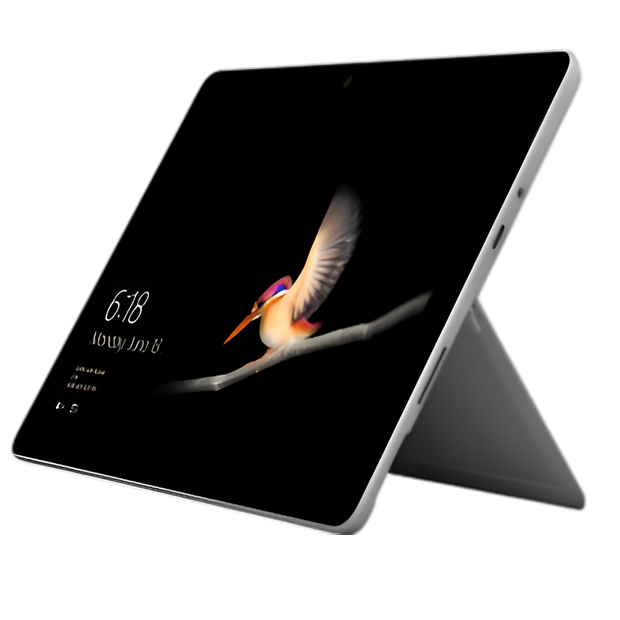
Back in October 2015, Microsoft launched the Surface Pro 4 as their most refined tablet-laptop hybrid yet. It featured a larger 12.3-inch PixelSense display (up from 12 inches), thinner bezels, Intel 6th Gen Skylake processors, and improved Type Cover keyboard with enhanced trackpad. Configurations ranged from Core m3 to Core i7 with 4GB to 16GB RAM and 128GB to 1TB storage. The adjustable kickstand, Surface Pen support, and Windows 10 made it a genuine laptop replacement for many professionals. For its time, the Surface Pro 4 represented Microsoft's vision of mobile computing's future—full Windows capability in tablet form when you need portability, laptop productivity when you need to work.
Nine years later, these devices are still around—many as backup machines, dedicated workstations, or simply well-maintained devices that refuse to die. But nine-year-old premium hardware develops serious problems. Screen flickering (the infamous "flickergate"), completely dead batteries, broken kickstands, worn ports, and severely outdated software plague devices this old. If you're dealing with a broken Surface Pro 4 and wondering whether Microsoft Surface Pro 4 repair makes sense for such an old device, let's honestly assess what goes wrong and when repair investment is justified versus when it's not.
Engineering Design: Premium 2015 Hardware
Microsoft designed the Surface Pro 4 to be a no-compromise device. The 12.3-inch PixelSense display delivered 2736x1824 resolution with excellent color accuracy and pen input support. The sixth-generation Intel Core processors (m3, i5, or i7) were cutting-edge in 2015 but struggle severely with current software nine years later.
The magnesium alloy chassis felt premium and provided good structural integrity. The continuously adjustable kickstand improved on previous generations with a wider range of angles. The Type Cover keyboard, while sold separately, transformed the tablet into a functional laptop.
Connectivity included USB 3.0, Mini DisplayPort, microSD card reader, headphone jack, and the Surface Connect port for charging and docking. This was pre-USB-C, which feels dated now but was standard for 2015.
The battery capacity varied by configuration but generally ranged from 38-48Wh. When new, this provided maybe 8-9 hours of light use. Nine years of degradation later, most Surface Pro 4 batteries are completely dead or barely hold any charge.
Cooling was always marginal. The slim chassis couldn't dissipate heat effectively under sustained load. Thermal throttling happened frequently, and long-term heat exposure contributed to various hardware failures over the device's life.
Component Systems: Understanding Failure Patterns
Think about a garden hose developing leaks over seasons of use. When new, water flows smoothly from end to end. After years of being coiled, stored, exposed to sun and cold, pressurized and depressurized thousands of times, small cracks appear. Eventually, those tiny issues become real leaks. Your Surface Pro 4 follows similar patterns with different components.
Display System: The Flickergate Problem
The reality from our repair experience: screen flickering is the most notorious Surface Pro 4 issue. This wasn't just a few units—it affected thousands of devices and became a class-action lawsuit. The problem stems from the display cable or controller failing from thermal stress and age.
The flickering typically starts subtly—occasional screen shimmer or brief flashes. Over time, it worsens to constant flickering that makes the device unusable. Sometimes it manifests as screen discoloration, lines, or complete display failure.
Microsoft acknowledged the issue and extended repair coverage for affected units, but that program has ended. Devices experiencing flickering now are out of luck for manufacturer support.
Physical screen damage—cracks, touch failures, dead zones—also affects aging devices. The PixelSense display is an integrated assembly that's extremely difficult and expensive to replace.
Battery System: Universal Failure
After nine years, Surface Pro 4 batteries are universally failed or severely degraded. We haven't seen a nine-year-old unit with functional battery capacity in years. Most won't hold any charge, work only when plugged in, or shut down randomly.
The battery sits inside the chassis, adhesive-bonded and requiring complete disassembly to access. The repair requires removing the fragile display—the most expensive component—to reach the battery. This creates a repair dilemma where battery replacement carries significant risk of display damage.
Even if battery replacement succeeds without damaging the display, you're investing significant money in a nine-year-old device with multiple other age-related issues and no software support.
Kickstand Mechanism: Wear and Failure
The kickstand's continuously adjustable hinge experiences thousands of cycles over nine years. The mechanism wears, spring tension decreases, and adjustment becomes problematic.
Common issues include loosening (won't hold position), stiffness (hard to adjust), or complete failure (won't deploy or won't support the device). Repair requires internal access and often parts replacement.
Port System: Mechanical Degradation
The USB 3.0 port, Mini DisplayPort, and Surface Connect port all experience wear from years of use. Spring contacts lose tension, housings loosen, and debris accumulates. Charging reliability through Surface Connect often fails first because it's used most frequently.
Processing System: Thermal Damage
The inadequate cooling in the Surface Pro 4 led to long-term reliability issues. Sustained heat exposure over years damaged various components. This contributed to the display flickering issue, storage failures, and other problems that emerged years after purchase.
Failure Mechanics: What Actually Breaks
The Flickering Display Crisis
"Flickergate" affected countless Surface Pro 4 units. The issue stems from the display controller or cables failing from thermal stress. The slim chassis couldn't dissipate heat effectively, and years of thermal cycling damaged components.
The flickering typically becomes worse over time and eventually renders the device unusable. Microsoft's extended repair program has ended, leaving owners with expensive out-of-pocket repairs or unusable devices.
Display replacement is the only solution, but it's expensive and risky. The display adhesive-bonds to the chassis and requires specialized equipment and expertise to remove without damage. Parts availability for nine-year-old devices is limited and quality questionable.
The Dead Battery Reality
Battery failure is universal on nine-year-old devices. The lithium-ion cells have degraded beyond usability after thousands of charge cycles and years of chemical aging. The battery won't hold charge, works only when plugged in, or causes random shutdowns.
Battery replacement requires display removal, carrying the same costs and risks as display replacement. You're investing significant money and accepting display damage risk for uncertain battery quality (replacement batteries are old stock or questionable third-party).
The Software Obsolescence Problem
Windows 10 support ends in October 2025. The Surface Pro 4 cannot officially run Windows 11 due to TPM and CPU requirements. This creates a security nightmare—running an unsupported OS exposes you to unpatched vulnerabilities.
Some users install Windows 11 through workarounds, but performance on nine-year-old hardware is poor. Many current applications won't run well on 6th Gen Intel processors with limited RAM.
Repair Procedures: The Difficult Reality
First 30 Minutes: Assessment
When a Surface Pro 4 comes in, we start with honest conversation about device age and repair economics. Nine-year-old hardware rarely justifies expensive repairs. We assess what's actually failing and provide realistic cost estimates.
We run diagnostics to confirm battery health, display issues, and general functionality. We document existing damage and discuss repair risks upfront. Surface Pro 4 repair, especially display-related work, carries inherent risk we explain clearly.
We discuss software limitations. Even with perfect hardware, the device has limited remaining useful life due to Windows 10 end-of-support in 2025. Repair investment needs consideration in that context.
Display-Related Repairs: High Risk
Display replacement or battery replacement both require removing the adhesive-bonded screen. This is the most technically challenging and risky repair. We use precision heating and specialized tools, but even with perfect technique, there's risk of display damage during separation.
The repair takes hours, not minutes. We work carefully and methodically because rushing guarantees damage. We test repeatedly during reassembly to catch issues before final adhesive application.
Parts Challenges
Finding quality replacement parts for nine-year-old devices is difficult. Microsoft stopped producing these components years ago. Available parts are salvaged from other broken units or questionable third-party alternatives. Quality and reliability are uncertain.
Batteries are particularly problematic. Replacement batteries are often old stock that's been degrading in warehouses, or they're third-party batteries that may not meet safety standards or deliver advertised capacity.
Economic Reality Discussion
We're honest about repair value. For most nine-year-old Surface Pro 4 units, repair costs approach or exceed what you could spend on significantly better current hardware with full support and modern capabilities.
Display replacement costs hundreds of dollars and carries risk. Battery replacement costs similar amounts for uncertain battery quality. Multiple repairs quickly exceed device value.
Long-Term Care: Extending What Life Remains
If you're keeping your Surface Pro 4 running as-is, here's realistic guidance:
Accept that it works only when plugged in if the battery's dead. Use it as a desktop device. Don't invest in battery replacement unless it has extraordinary sentimental or functional value.
If you're experiencing flickering, understand it will only worsen. Budget for replacement because the display will eventually become completely unusable. Display repair costs rarely justify investment in such old hardware.
Keep it cool. The thermal issues that plague Surface Pro 4 units worsen with heat. Use it on hard surfaces with good airflow. Don't use it on soft surfaces that block vents.
Plan for Windows 10 end-of-support. October 2025 isn't far away. After that, security vulnerabilities become serious concerns. Budget for replacement or accept the security risks of running unsupported software.
Back up your data religiously. Nine-year-old storage drives can fail without warning. Keep current backups of anything you can't afford to lose.
When Repair Doesn't Make Sense
We'll always be honest: repair rarely makes sense for nine-year-old Surface Pro 4 devices. Here's why:
Device age: Nine years old with no software support after October 2025. Limited remaining useful life regardless of hardware condition.
Repair costs: Display or battery replacement costs hundreds of dollars for uncertain parts quality on ancient hardware. That money buys significantly better current devices.
Multiple age-related issues: Even if you fix one problem, other age-related failures are likely. You're throwing money at a device approaching end-of-life.
Parts availability: Quality parts are scarce. You're gambling on salvaged or questionable third-party components.
Performance limitations: 6th Gen Intel processors struggle with current software. Even with perfect hardware, the device is slow by modern standards.
When Repair Might Make Sense
There are rare scenarios where Surface Pro 4 repair could be justified:
Sentimental value: If this device has personal significance you can't replace, emotional reasons might justify economic inefficiency.
Specific software: If you run specific applications that work on this hardware but won't run on newer devices, targeted repair might extend usability.
Already have parts: If you possess working parts from another broken Surface Pro 4, self-installation could extend life at minimal cost.
Learning project: If you want to learn Surface repair, the Pro 4 is low-risk practice. Parts are cheap if available, and if you break it further, you're not out much.
Your Next Step
Ready to fix your Microsoft Surface Pro 4? The Fix makes it easy. Walk in anytime for a free assessment—most repairs are same-day, and we'll keep you updated throughout the process. Your device deserves expert care, and that's exactly what we deliver.
We'll be completely honest about repair value on your nine-year-old Surface. If fixing it makes sense, we'll do quality work. If it doesn't—which is likely for most nine-year-old devices—we'll tell you straight and explain why. You deserve technicians who respect both your device and your budget, and that's what The Fix delivers every time.


Trusted repair solution for mobile phones, tablets, gaming consoles, and computer systems. We provide fast, reliable, and affordable repair services to get your devices back in perfect working condition.
The Fix is an independent repair service provider and is not affiliated with, sponsored by, or endorsed by Apple Inc., Samsung Electronics, Google LLC, or any other device manufacturer. We use high-quality compatible replacement parts unless explicitly stated. All trademarks are property of their respective owners.


© Copyright The Fix Solutions All rights reserved 2026.
Design by Deepcoder