






LG G Pad 3 (8.0) Repair Services
Get fast, reliable, and professional LG G Pad 3 (8.0) repair services at The Fix — your trusted destination for expert device care.
Common Repairs We Handle Daily


Protect Your LG G Pad 3 (8.0): Proactive LG G Pad 3 (8.0) Repair Tips
You've got a budget-friendly tablet that handles everything you need—streaming videos, reading, browsing the web, video calls with family. The LG G Pad 3 with its 8-inch screen hits that perfect size between too small and too bulky. Then reality sets in: maybe the screen cracked when you accidentally knocked it off the coffee table, or the battery that used to last all day now dies by mid-afternoon, or the charging port requires specific cable angles to actually charge. Suddenly you're facing a choice—deal with a broken tablet, pay for expensive repairs, or replace it entirely.
Here's the thing most people miss: the LG G Pad 3 (8.0) is incredibly repair-friendly, and professional LG G Pad 3 (8.0) repair costs way less than buying a replacement tablet with similar capabilities. This isn't a flagship device you paid premium prices for, but that doesn't mean it's disposable. With the right care and occasional maintenance, these tablets keep running for years. Let's talk about what goes wrong, how to prevent problems, and why repair makes excellent financial sense.
Your LG G Pad 3: The Quick Rundown
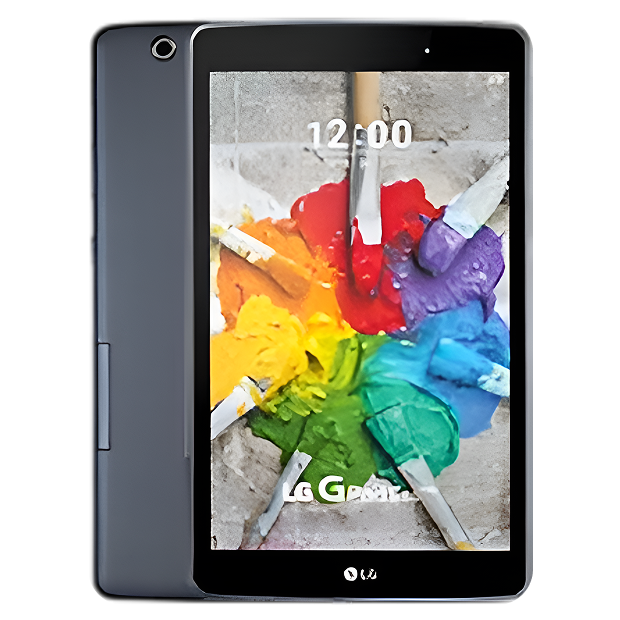
LG released the G Pad 3 8.0 in 2016 as an affordable Android tablet focused on value rather than cutting-edge specs. You're looking at an 8-inch 1920x1200 display that's sharp enough for reading and video, a Qualcomm Snapdragon 617 processor that handles everyday tasks without issues, 2GB of RAM, and 16GB or 32GB storage depending on your variant. The 4800mAh battery delivers solid all-day runtime under normal use. It's not flashy, but it works—and that's exactly why people still use these tablets years after purchase.
What's notable about the G Pad 3 from a repair standpoint? LG used pretty standard tablet construction here—nothing exotic or impossible to work on. The screen is held with adhesive like most tablets, but it's not aggressively bonded. The battery is accessible once you're inside. The charging port is soldered to the motherboard but replaceable with proper equipment. Components are modular enough that targeted repairs make sense rather than replacing entire assemblies. It's a tablet built to a price point, which ironically makes it more economical to repair than premium devices with specialized components.
Why Modern Phones Have These Issues (It's Not Just Yours)
Every LG G Pad 3 eventually shows wear, and that's not LG cutting corners—it's just physics meeting years of daily use. Here's what's actually happening inside your tablet over time.
Think about a rechargeable flashlight that dims over years of use. When it was new, it held a charge through multiple power outages. After several years and countless recharge cycles, it barely lasts an hour before dying. That's exactly what's happening to your tablet's battery. The lithium-ion cells inside degrade naturally with every charge cycle—it's chemistry, not a defect. After 500-800 full cycles (which might be 2-3 years if you charge daily), you'll notice the G Pad 3 dying faster during streaming or barely making it through a movie when it used to last all day.
The display is both impressive and vulnerable. Picture frame glass is a good analogy—it's designed to protect what's behind it, it looks great, but drop it corner-first and it shatters. Your G Pad 3's screen is similar: 8 inches of glass and digitizer technology that makes touch input feel natural and responsive. But slip it off the couch onto tile flooring? That glass cracks. Set something heavy on top of the tablet? You risk pressure damage to the LCD underneath the glass. The digitizer layer can fail from impact even when the glass looks fine, giving you display without touch response or erratic phantom touches.
Charging ports face relentless mechanical wear. You've plugged in that micro-USB cable hundreds or thousands of times over several years. Each connection creates microscopic wear on the internal metal contacts. Dust and lint accumulate inside the port. Cables yanked sideways stress the port's solder joints to the motherboard. Sometimes you've probably plugged in the cable in the dark or without looking, jamming it in at angles that bend the internal contacts. Eventually, charging becomes unreliable—you're wiggling cables, holding them at specific angles, or the connection fails entirely.
Software also ages in ways people overlook. The G Pad 3 shipped with Android 6.0 Marshmallow, and while some units received updates to Android 7.0 Nougat, LG stopped supporting these tablets years ago. As Android apps evolve and require newer system features, older tablets struggle. Apps crash more frequently. Performance slows down. Security vulnerabilities remain unpatched. The internal storage—budget-grade flash memory—can develop bad sectors after years of read/write cycles, causing freezing and crashes.
Worried About a Cracked Screen? Here's How We Handle It
Concern: Will screen replacement cost more than the tablet's worth?
Not even close. Screen replacement on an LG G Pad 3 (8.0) costs significantly less than buying a comparable replacement tablet. Yes, you paid maybe $150-$200 for this tablet originally, but finding a working used replacement in decent condition isn't easy years later, and buying new means spending $200+ on whatever current budget Android tablet is available. Professional LG G Pad 3 (8.0) repair for screens restores your familiar tablet that already has your apps, accounts, and settings configured exactly how you like them.
The screen replacement process involves carefully heating the edges to soften the adhesive bonding the glass to the frame, gently separating the damaged screen using proper pry tools, thoroughly cleaning all old adhesive residue without scratching the aluminum frame, installing the new display assembly with precise alignment, reconnecting the delicate ribbon cable to the motherboard, and sealing everything with appropriate adhesive. We test every inch of touch response, verify display quality, check brightness uniformity, and make sure there are no dead pixels or backlight bleed.
Concern: How do I know the replacement screen will work properly?
Quality control matters. We source high-quality display assemblies in the correct resolution, tested for touch response and brightness. . After installation, we run comprehensive tests: touch response across every zone, viewing angles, color accuracy, backlight uniformity, and durability of adhesive bonding. Your G Pad 3 doesn't leave our shop until the screen functions identically to the best. We've replaced hundreds of tablet screens—we know what proper installation looks and feels like.
Concern: What if there's other damage I don't know about?
That's exactly why we do thorough diagnostics before starting repairs. When you bring in a G Pad 3 with a cracked screen, we test everything else—we power it on and check if the LCD behind the glass is damaged, verify touch digitizer function in undamaged areas, test charging and battery, check speakers and buttons, and look for signs of liquid damage or internal component issues. If we find additional problems, we discuss them with you before proceeding. You make informed decisions, not surprised-after-the-fact decisions.
Concerned About Battery Replacement Costs? Here's the Reality
Concern: Is battery replacement worth it on an older tablet?
Absolutely, if you're still actively using the tablet. Think about it this way: you've already got a device that meets your needs. It streams Netflix, handles email, works for video calls, and runs the apps you use. The only problem is battery life. Spending a fraction of replacement cost to restore all-day battery life makes perfect sense. After battery replacement, we regularly see G Pad 3 owners using their tablets for another 2-3 years without issues.
Battery replacement on the LG G Pad 3 (8.0) involves opening the tablet case, disconnecting the old battery from the motherboard, carefully removing the battery (it's usually held with mild adhesive), installing a new battery that matches specifications, reconnecting securely, and running extensive charge/discharge tests to verify proper function. The process takes 60-90 minutes including testing. We charge to 100%, run power-intensive tasks while monitoring drain rate, and verify the tablet accurately reports remaining battery percentage.
Concern: Will a replacement battery last as long as the peak?
Quality batteries from reputable suppliers deliver performance comparable to the peak battery when it was new. We're not using cheap knockoffs—we source batteries that meet or exceed LG's peak specifications. After installation, you should see 6-8 hours of active use (streaming, browsing) or several days of standby time, which matches what the G Pad 3 delivered when new. Battery longevity depends on usage patterns and charging habits, but expect 2-3 years of solid performance from a quality replacement battery.
Concern: What happens if the battery fails shortly after replacement?
That's why warranty coverage matters. Professional LG G Pad 3 (8.0) repair comes with warranty protection on both parts and labor. If a replacement battery fails prematurely (which is rare with quality components), we replace it at no additional cost. You're protected against defective parts—something you don't get from DIY repairs or questionable repair shops.
Not Sure If It's the Charging Port? Here's How We Diagnose It
Concern: How do you tell if it's the port, the cable, or something else?
Systematic testing eliminates guesswork. When you bring charging problems to The Fix, we test with multiple known-good cables and adapters first—this rules out simple cable issues that account for about 30% of charging complaints. We inspect the port under magnification looking for physical damage like bent pins, cracks in the plastic housing, or corrosion on contacts. We measure actual charging current with USB power meters to see if the tablet's drawing proper power. We check if the port has loosened from the motherboard. We test battery health to ensure it's capable of accepting charge. This comprehensive approach identifies the actual problem rather than guessing.
Working with these daily teaches you: Charging problems on LG G Pad 3 tablets fall into predictable categories. Debris buildup in the micro-USB port causes maybe 25% of cases—thorough cleaning with proper tools resolves it. Damaged or worn charging cables and adapters account for another 30%. The remaining 45% are actual port damage requiring replacement. We've seen ports where internal contacts are bent, ports that have physically separated from the circuit board, and ports where corrosion has destroyed the metal contacts. Each requires different repair approaches.
Concern: Can you just clean the port instead of replacing it?
When cleaning solves the problem, absolutely. We're not in the business of recommending unnecessary repairs. If we can restore charging function by carefully cleaning debris from the port, that's what we do—and there's no charge for basic cleaning during diagnostic. We only recommend port replacement when the port is physically damaged beyond cleaning. You get honest assessment, not upselling.
Concern: How long does charging port repair take, and will it hold up?
Port replacement on the G Pad 3 typically takes 60-90 minutes. We desolder the damaged micro-USB port using proper temperature-controlled soldering equipment, clean the circuit board connection points, position the new port precisely (alignment is critical—even slight misalignment causes problems), solder all connection points cleanly, inspect solder joints for quality, and test charging functionality extensively before reassembling. We test with multiple cables, verify proper charging speed, check that the connection is solid without wiggling, and stress-test by plugging and unplugging repeatedly.
Worried the Tablet Might Have Multiple Problems? Here's Our Approach
Concern: What if it needs more than one repair?
We give you options. After comprehensive diagnostics, we explain everything we found and provide clear information about repair costs for each issue. Maybe your G Pad 3 has both a cracked screen and a dying battery. We discuss repairing both, repairing only the critical issue, or assessing whether multiple repairs make financial sense versus replacement. You make decisions based on complete information, not sales pressure. Sometimes we honestly tell customers that the repair costs don't make sense given the tablet's age and condition—we'd rather be honest than take your money for repairs that don't serve you well.
Concern: Will fixing one problem just reveal more problems?
Possibly, but our thorough pre-repair diagnostics minimize surprises. Before starting any LG G Pad 3 (8.0) repair, we test everything accessible without disassembly—display, touch, battery, charging, buttons, speakers, cameras, WiFi, Bluetooth. Once we open the tablet, we inspect internally for hidden issues like corrosion, previous repair damage, or failing components. If we discover additional problems during repair, we contact you immediately to discuss options before proceeding. No surprises, no unexpected bills.
Concern: How do I know if repair is worth it versus buying a new tablet?
Here's the honest math: If your LG G Pad 3 needs a screen replacement and battery replacement combined, you're still spending significantly less than buying a comparable new Android tablet. If it needs screen, battery, and charging port replacement, we're approaching the point where replacement might make more sense—and we'll tell you that honestly. Generally, if the tablet needs only one or two repairs and is otherwise functional, repair makes excellent financial sense. If it needs three or more significant repairs, replacement deserves consideration.
Tablet Won't Turn On or Keeps Freezing? Here's What We Check
Concern: What causes tablets to completely die?
Complete failure to power on usually stems from a few common causes. Completely drained batteries that fell below minimum voltage threshold won't respond until charged for several hours—many "dead" tablets just need patient charging. Damaged charging ports prevent charging entirely, which looks like a dead tablet but is actually just inability to charge. Failed power buttons mean you're pressing a button that's not sending signals to the motherboard. Corrupted system software can prevent booting. Rarely, it's actual motherboard failure, though this is uncommon in simple tablets like the G Pad 3.
For tablets that freeze or crash frequently, we're usually looking at failing internal storage (bad sectors in the flash memory), insufficient free storage space causing system instability, corrupted system files from bad updates or improper shutdowns, or occasionally overheating from blocked vents or failed thermal management. Software problems are often fixable without hardware replacement.
Concern: Can you recover my data if the tablet won't turn on?
Sometimes. If the motherboard is functional and we can get the tablet powered (by bypassing a failed battery or fixing charging issues), we can often access the internal storage and back up your data. If the motherboard or storage itself has failed catastrophically, data recovery becomes extremely difficult or impossible. This is exactly why regular backups matter—Google automatically backs up most Android data if you've got that enabled, but photos, documents, and app data might not be backed up depending on your settings.
Keep Your G Pad 3 Running Great Longer
Protect against screen damage. Use a quality case that has raised edges to protect the screen when face-down. Add a tempered glass screen protector for extra insurance. Never stack heavy objects on top of your tablet. When transporting in bags, ensure the screen isn't pressed against hard objects. Set it down gently rather than tossing it onto surfaces.
Battery care makes a difference. Avoid letting the battery drain to 0% regularly—charge when you hit 20-30%. Don't leave the tablet plugged in at 100% for days on end. Keep it away from extreme temperatures—don't leave it in hot cars or direct sunlight for extended periods. Charge with the tablet powered off occasionally for more complete charging cycles. Use a quality charger that delivers appropriate power.
Port maintenance prevents problems. Clean the charging port monthly with compressed air and a soft brush. Don't yank cables out sideways—pull straight. Use decent quality USB cables rather than the cheapest ones you can find. If you notice the connection becoming loose, address it quickly before it gets worse. Keep the port dry—avoid charging immediately after the tablet gets wet.
Software hygiene helps longevity. Uninstall apps you don't use anymore. Clear cache files occasionally through Settings > Storage. Don't fill internal storage to 100%—leave at least 1-2GB free for system operations. Restart the tablet weekly rather than always using sleep mode. Be cautious about installing apps from unknown sources that might contain malware.
Physical care basics. Clean the screen regularly with a microfiber cloth and screen-safe cleaner. Keep the tablet away from liquids. Avoid exposing it to humidity extremes. Don't use the tablet while it's charging if you can avoid it—this generates more heat. Handle with clean, dry hands.
Professional Repair Is the Smart Investment
Your LG G Pad 3 (8.0) might not be the newest tablet on the market, but it's functional, familiar, and meets your needs. Most problems—cracked screens, dying batteries, faulty charging ports, software issues—are totally repairable and cost a fraction of replacement. These tablets weren't designed to be disposable, and with professional care, they'll keep working for years.
Don't trust your LG G Pad 3 to just anyone. The Fix has the experience, tools, and expertise to handle tablet repairs correctly. We'll diagnose your device for free, explain your options honestly, and do the work right the first time. Your budget-friendly tablet deserves professional attention from people who understand both the repair process and the value of keeping capable devices running.


Trusted repair solution for mobile phones, tablets, gaming consoles, and computer systems. We provide fast, reliable, and affordable repair services to get your devices back in perfect working condition.
The Fix is an independent repair service provider and is not affiliated with, sponsored by, or endorsed by Apple Inc., Samsung Electronics, Google LLC, or any other device manufacturer. We use high-quality compatible replacement parts unless explicitly stated. All trademarks are property of their respective owners.


© Copyright The Fix Solutions All rights reserved 2026.
Design by Deepcoder