






LG G7 ThinQ Repair Services
Get fast, reliable, and professional LG G7 ThinQ repair services at The Fix — your trusted destination for expert device care.
Common Repairs We Handle Daily


Diagnosing LG G7 ThinQ Problems: Expert Repair Insights
Why's your LG G7 ThinQ's legendary Boombox Speaker suddenly sounding terrible? That super-bright display that was supposed to hit 1,000 nits can barely illuminate in sunlight anymore. The battery that got you through full days now dies by lunch. Six years after launch, with LG gone from smartphones entirely, you're dealing with a flagship that's aging in ways that make you wonder if it's salvageable. Let's diagnose what's actually failing and figure out realistic solutions.
The G7 ThinQ's Ambitious Features
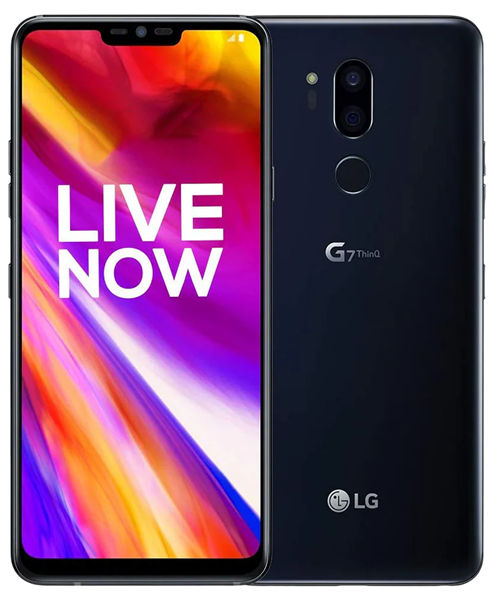
LG packed the G7 ThinQ with features designed to differentiate from competitors. The Boombox Speaker used the phone's internal space as a resonance chamber, delivering surprisingly loud audio for a device this size. The 6.1-inch LCD display could hit 1,000 nits brightness—exceptional for outdoor visibility. The Snapdragon 845 processor delivered strong performance. The 3,000mAh battery provided adequate runtime for 2018 usage patterns.
Six years later, those innovative features create specific repair challenges. The Boombox Speaker system's complexity means audio problems can stem from various failure points. The super-bright display mode stresses backlight components, potentially accelerating wear. The modest battery capacity that was acceptable in 2018 shows its limitations now that apps demand more power.
LG's market exit affects the G7 ThinQ like other discontinued devices. Parts availability declined after 2021. Software updates stopped. The device that was supposed to showcase LG's engineering became orphaned technology requiring creative solutions for ongoing maintenance.
Identifying Specific Problems
From working on these every day: G7 ThinQ issues follow predictable patterns that proper diagnosis can identify.
Battery Performance Degradation
Your phone dies rapidly during basic use. The percentage drops in huge chunks—60% to 20% in minutes. Sometimes it shuts down completely even when the indicator showed remaining charge. After six years and roughly 2,200 charge cycles, that 3,000mAh battery can't hold charge like it used to.
Think of a power cord that's been bent and flexed for years—the internal wiring degrades, creating resistance that generates heat and reduces efficiency. Your battery's internal chemistry has degraded similarly. The cells can't store energy effectively, and increased resistance causes rapid drain and unexpected shutdowns.
You might notice the phone getting warm during normal use. Degraded batteries generate excess heat through internal resistance, creating a feedback loop that accelerates further degradation.
Display and Brightness Problems
The LCD display might've developed cracks or backlight issues. The super-bright mode that could hit 1,000 nits no longer reaches those levels. You're seeing dark spots, uneven brightness, or complete backlight failure. These problems stem from backlight LED degradation or driver circuit failures.
Touch responsiveness issues manifest as dead zones, delayed response, or phantom touches. Like fine china that develops invisible stress fractures, the digitizer layer can fail from repeated impacts without visible external damage. The touch sensing becomes unreliable even when the screen looks intact.
The display that was exceptional at launch now struggles with basic visibility. Maximum brightness has decreased as backlight LEDs weakened. This happens gradually—you might not notice until using the phone outdoors and realizing it's barely readable in sunlight anymore.
Boombox Speaker Issues
That distinctive loud audio has become distorted, quiet, or completely silent. The Boombox Speaker system uses the phone's internal cavity as a resonance chamber. When components fail—the speaker itself, the seals creating the chamber, or the amplifier—audio quality suffers dramatically.
Sometimes only certain audio frequencies fail. You might hear voices but not bass, or music plays but calls sound terrible. These symptoms indicate specific component failures within the audio system rather than complete speaker death.
Water damage particularly affects the Boombox Speaker system because moisture can compromise the resonance chamber's effectiveness. Even minor liquid exposure years ago can cause delayed failures as corrosion develops.
Charging Port Failures
Your cable only works at specific angles. Charging stops randomly requiring repositioning. The USB-C port feels loose. After thousands of insertion cycles, spring contacts lose tension. Debris accumulation prevents full connection. The combination creates frustrating charging behavior.
The port also handles data transfer and audio output for USB-C headphones. Degradation affects all these functions simultaneously. Complete failure eliminates multiple connection options at once.
Performance Slowdowns
Apps crash frequently. The interface lags during basic tasks. Everything feels sluggish. The Snapdragon 845 was flagship-tier in 2018 but struggles with current apps optimized for newer processors. The 4GB RAM constrains multitasking with modern apps.
Storage filling near capacity worsens performance. When internal storage exceeds 85% full, Android slows noticeably. This affects all phones but becomes more problematic as devices age and accumulate data.
Diagnostic Testing
Systematic testing identifies specific problems before attempting fixes.
Battery Health Check
Download apps showing actual capacity versus design specification. If you're seeing 70% or less of original 3,000mAh, that explains rapid drain and shutdowns. At this degradation level, settings changes won't help—you need a new battery.
Check for physical swelling. Lay the phone flat—if it rocks, the battery's swelling. Look for gaps between the screen and frame. Any visible separation requires immediate professional attention.
Display Testing
Open solid color images—white, black, red, green, blue. Display problems become obvious against uniform backgrounds. Backlight failures show as dark spots on white. Test touch with a drawing app—drag your finger slowly across the entire screen. Dead zones show up as areas where your line breaks.
Compare maximum brightness to when the phone was new if possible. If it's significantly dimmer, backlight LEDs have weakened.
Speaker Testing
Play audio across different frequencies—music, spoken word, ringtones. Note which frequencies work and which don't. Complete silence suggests speaker failure. Distortion or reduced volume with certain sounds indicates partial component failure.
Test both regular speaker mode and calls. Sometimes one works while the other doesn't, indicating specific component problems within the audio system.
Charging Port Diagnosis
Visually inspect the port. You'll probably see compressed debris. Carefully remove it with a wooden toothpick. After cleaning, test multiple cables and chargers. If your G7 charges normally with some cables but not others, cable quality's part of the issue. If all cables require specific positioning, port hardware needs replacement.
Repair Solutions
Understanding what fixes these problems helps make informed decisions.
Battery Replacement
Battery replacement involves removing the back cover, disconnecting the old cell, and installing a quality 3,000mAh replacement. This restores adequate runtime for daily use, though the modest capacity means multi-day battery life isn't realistic.
Quality matters significantly. Reliable batteries provide advertised capacity while inferior alternatives fail quickly. For a six-year-old device where battery life has become problematic, replacement provides noticeable improvement.
Display Service
Display replacement follows standard LCD procedures. The assembly replaces as one unit. Quality replacement displays restore visual clarity and touch responsiveness, though aftermarket LCDs might not reach the 1,000 nits brightness the original panel achieved.
Speaker Repair
Speaker problems sometimes require component replacement. The Boombox Speaker system's complexity means repair can involve replacing the speaker itself, resealing the resonance chamber, or addressing amplifier issues. Professional diagnosis determines what's actually failed.
Charging Port Replacement
USB-C port replacement installs a new daughterboard with fresh port hardware. This immediately restores reliable charging, data connectivity, and audio output. The repair costs relatively little and eliminates connection frustrations.
Maintenance Strategies
Keep the charging port clean through monthly inspection. Gentle debris removal prevents most charging problems.
Use quality cables that fit securely. Loose cables accelerate port wear.
Protect the display with a case. Even minimal cases reduce crack risk.
Monitor battery health proactively. Apps reporting capacity help plan replacement before constant charging becomes unbearable.
Manage storage actively. Keep at least 20% free space.
Making Repair Decisions
The G7 ThinQ's discontinued status affects repair economics.
Battery replacement makes sense when everything else functions well. It provides noticeable improvement for reasonable cost.
Display repairs require careful cost-benefit analysis. Replacement displays can be expensive relative to current device value.
Charging port replacement provides good value—it's straightforward and relatively inexpensive.
Speaker repair depends on how much you valued the Boombox feature and repair costs.
Consider security implications. The G7 hasn't received updates in years. Vulnerabilities remain unpatched.
Conclusion: Flagship Repair Realities
Your LG G7 ThinQ delivered innovative features that distinguished it from competitors. Six years later, with LG gone, you're maintaining discontinued flagship technology. Battery replacement restores runtime. Display repairs address damage. Charging port service ensures connectivity.
Bring your G7 ThinQ to The Fix and let our experienced techs take a look. We've seen every problem these devices develop, we know exactly how to fix them, and we'll treat your phone like it's our own. Free diagnostic, honest pricing, quality work.
Professional diagnosis identifies what's actually failing so repairs address real problems. Whether you need battery replacement, display service, or charging port repair, we'll provide honest assessment. Contact The Fix—we'll help you make informed decisions about maintaining your discontinued flagship.


Trusted repair solution for mobile phones, tablets, gaming consoles, and computer systems. We provide fast, reliable, and affordable repair services to get your devices back in perfect working condition.
The Fix is an independent repair service provider and is not affiliated with, sponsored by, or endorsed by Apple Inc., Samsung Electronics, Google LLC, or any other device manufacturer. We use high-quality compatible replacement parts unless explicitly stated. All trademarks are property of their respective owners.


© Copyright The Fix Solutions All rights reserved 2026.
Design by Deepcoder