






LG G7 One Repair Services
Get fast, reliable, and professional LG G7 One repair services at The Fix — your trusted destination for expert device care.
Common Repairs We Handle Daily


Your Complete LG G7 One Repair Analysis: What Really Works
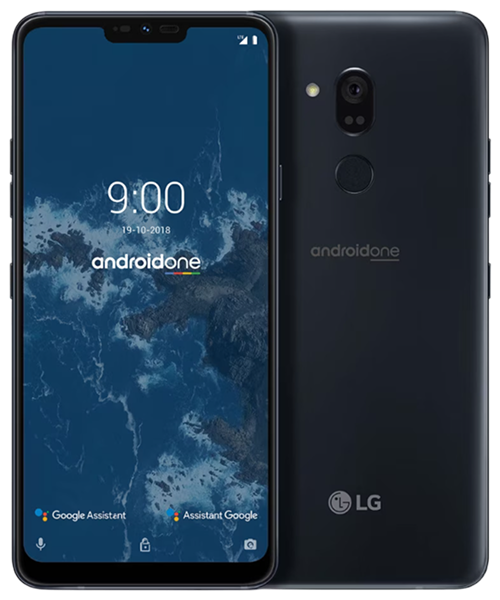
Here's something that made the LG G7 One unique: it was one of the few flagship-tier phones running stock Android through Google's Android One program. While other manufacturers loaded devices with custom interfaces and bloatware, the G7 One delivered pure Android with guaranteed updates. That clean software experience combined with solid hardware made it appealing to users who valued simplicity. Six years later, with LG gone from phones and Android One support long ended, you're maintaining a device that represented a brief moment when LG embraced Google's software vision.
The G7 One's Clean Software Approach
LG positioned the G7 One as a flagship alternative for users tired of manufacturer customizations. The Snapdragon 835 processor delivered strong performance. The 6.1-inch LCD display provided good brightness and color. The 3,000mAh battery offered adequate runtime. But the defining feature was stock Android One—no LG interface overlays, no duplicate apps, just clean Google software with promised updates.
The Android One program guaranteed two years of OS updates and three years of security patches. That support ended in 2021. Now you're running outdated software without security updates, using hardware that was flagship-tier six years ago but shows its age with current apps. The device still functions for basic tasks, but maintaining it requires understanding both hardware limitations and software realities.
LG's exit from smartphones in 2021 affects the G7 One particularly because it was already a niche device—an LG phone running Google's software rather than LG's interface. Parts availability follows the same challenges as other discontinued LG devices, but the G7 One's smaller market presence means even fewer components in circulation.
Common Hardware Issues
What we tell customers who come in: G7 One repairs cluster around predictable hardware failures common to phones this age.
Battery Capacity Loss
The 3,000mAh battery was modest even in 2018. After six years and roughly 2,200 charge cycles, capacity has dropped significantly. Think of an electric toothbrush battery—new, it holds charge for weeks. After years of daily recharging, it barely makes it a few days. Your phone's battery faces similar degradation.
The cells can't store energy like they used to. Internal resistance has increased, reducing their ability to deliver current spikes during demanding tasks. This explains unexpected shutdowns—the battery can't provide the instantaneous power the processor needs, causing protective shutdown even when charge indicators show remaining capacity.
You might notice the phone getting warm during normal use or charging. Degraded batteries generate more heat through internal resistance. This accelerates further degradation, worsening performance over time.
LCD Display Problems
The 6.1-inch LCD display can develop various issues. Cracks from drops obviously need attention. Backlight failures create dark spots or uneven brightness—think of aquarium glass under pressure, where internal stress creates weak points that fail over time. The backlight LEDs or driver circuits can fail, affecting illumination.
Touch responsiveness problems manifest as dead zones requiring multiple taps, delayed response, or phantom touches. The digitizer layer can fail independently from the visible display, creating various symptom combinations.
LCD displays don't suffer from OLED burn-in, but they can develop their own age-related issues. Color accuracy might shift as backlights age. Brightness can decrease as LEDs weaken. These changes happen gradually enough that users often don't notice until comparing to newer devices.
Charging Port Wear
The USB-C port experiences standard mechanical wear. After thousands of cable insertions, spring contacts lose tension and don't grip cables firmly. Debris accumulation compounds this—pocket lint gets compressed into the port, preventing full connection.
The G7 One's port handles charging, data transfer, and audio output for USB-C headphones. Port degradation affects all these functions. Complete failure eliminates multiple connection options simultaneously.
Performance and Software Limitations
The Snapdragon 835 processor was flagship-tier in 2018 but struggles with current apps optimized for newer hardware. The 4GB of RAM felt adequate then but constrains multitasking now. These aren't failures—they're fundamental hardware limitations becoming increasingly apparent.
Storage filling near capacity worsens performance. When internal storage exceeds 85% full, Android slows noticeably because it needs space for temporary files and system operations. This affects all phones but becomes more problematic as devices age and accumulate data.
Repair Options and Realities
Understanding what repairs accomplish helps make informed decisions about this discontinued device.
Battery Replacement
Battery replacement involves removing the back cover, disconnecting the old 3,000mAh cell, and installing a quality replacement. This restores the runtime you need for daily use, though the modest capacity means expectations should remain realistic—you're not getting multi-day battery life from this capacity.
Quality matters significantly. Reliable batteries provide advertised capacity while inferior alternatives fail quickly. For a six-year-old device where battery life has become problematic, replacement provides noticeable improvement if everything else functions adequately.
Display Assembly Service
Display replacement for the G7 One follows standard LCD screen procedures. The assembly replaces as one unit including the digitizer and protective glass. Quality replacement displays restore visual clarity and touch responsiveness.
Aftermarket LCD panels for discontinued devices vary in quality. Brightness, color accuracy, and touch sensitivity might not perfectly match original specifications. Setting realistic expectations prevents disappointment with repairs that restore function but don't match factory quality exactly.
Charging Port Replacement
USB-C port replacement follows standard procedures—installing a new daughterboard assembly with fresh port hardware. This immediately restores reliable charging, data connectivity, and audio output. The repair costs relatively little and eliminates connection frustrations.
Software Optimization
Performance issues sometimes respond to software fixes without hardware replacement. Factory reset eliminates accumulated bloat and gives you clean software. Back up important data first, then navigate to Settings > System > Reset > Erase All Data.
If performance improves significantly after reset, you had software problems. If slowdowns persist, you're hitting the Snapdragon 835's limitations with current apps. Optimization helps but won't make a six-year-old processor feel like current hardware.
Storage cleanup provides immediate benefits. Delete unnecessary photos and videos, uninstall unused apps, clear app caches regularly. Maintaining at least 15-20% free storage keeps the system running as smoothly as possible.
Maintenance Strategies
Smart habits reduce how quickly problems develop.
Keep the charging port clean through monthly inspection. Gentle debris removal with wooden toothpicks or compressed air prevents most charging problems.
Use quality cables that fit securely. Loose cables accelerate port wear through imprecise contact. Cables that plug in smoothly and stay connected protect port hardware.
Protect the display with a case providing raised edges. Even minimal cases significantly reduce crack risk during drops.
Monitor battery health proactively. Apps reporting capacity decline help plan replacement before constant charging becomes unbearable.
Manage storage actively. Monthly cleanup prevents performance problems. Delete unnecessary files, clear caches, uninstall unused apps. Keep at least 20% free space.
Making Practical Decisions
The G7 One's discontinued status and ended software support affect repair decisions.
Battery replacement makes sense when the device otherwise functions well and meets your needs. It provides noticeable daily usability improvement for reasonable cost. If you've grown accustomed to stock Android and the G7 One handles your basic tasks adequately, battery replacement extends useful life.
Display repairs require careful cost-benefit analysis. Replacement displays for discontinued devices can be expensive relative to current value. If you don't need cutting-edge performance and the G7 One's clean Android experience still appeals, display repair might justify costs. Otherwise, repair economics favor replacement.
Charging port replacement provides good value. It's straightforward, relatively inexpensive, and immediately restores multiple functions.
Software optimization costs nothing but time. Always exhaust software solutions before assuming hardware replacement's necessary.
Consider security implications. The G7 One hasn't received security updates in years. Vulnerabilities discovered since then remain unpatched. This matters more for users handling sensitive data than those using devices for basic communication and entertainment.
Understanding What You're Maintaining
Let's be realistic. The G7 One represented LG's brief embrace of Android One rather than developing their own software. That experiment ended, LG left phones entirely, and the guaranteed updates stopped years ago. You're maintaining a device that showcased a partnership that didn't last.
The stock Android experience that made the G7 One appealing is now outdated Android without updates. The clean interface remains, but security concerns and app compatibility issues grow over time. Hardware repair restores physical functionality but doesn't address software limitations.
But if the G7 One still handles your needs—calls, messages, web browsing, basic apps—and you accept the security trade-offs, repairs can extend useful life economically. The device's simplicity remains appealing even when the software's outdated.
Conclusion: Supporting Android One Legacy
Your LG G7 One delivered stock Android in flagship hardware—a combination that appealed to users who valued simplicity over customization. Six years later, with LG gone and Android One support ended, you're maintaining a device that represented a brief moment of software purity. Battery replacement restores runtime. Display repairs address damage. Charging port service ensures connectivity.
Drop by The Fix for a free diagnostic. We'll run comprehensive tests on your G7 One, identify exactly what's happening, and give you honest recommendations. No pressure, no upselling—just straightforward guidance from technicians who work on these devices every day.
We understand the considerations for discontinued LG devices including the G7 One's Android One heritage. Professional diagnosis identifies hardware problems and parts availability. Whether you need battery replacement, display service, or charging port repair, we'll provide honest assessment of what's realistic. Contact The Fix—we'll help you make informed decisions about maintaining your stock Android legacy device.


Trusted repair solution for mobile phones, tablets, gaming consoles, and computer systems. We provide fast, reliable, and affordable repair services to get your devices back in perfect working condition.
The Fix is an independent repair service provider and is not affiliated with, sponsored by, or endorsed by Apple Inc., Samsung Electronics, Google LLC, or any other device manufacturer. We use high-quality compatible replacement parts unless explicitly stated. All trademarks are property of their respective owners.


© Copyright The Fix Solutions All rights reserved 2026.
Design by Deepcoder