






Google Pixel 9 Pro Fold Repair Services
Get fast, reliable, and professional Google Pixel 9 Pro Fold repair services at The Fix — your trusted destination for expert device care.
Common Repairs We Handle Daily


The Truth About Google Pixel 9 Pro Fold Repair: Professional Guidance
Let's be honest—you spent a significant amount on the Pixel 9 Pro Fold because foldable technology is incredible, but now you're dealing with something that shouldn't be happening. Maybe the inner screen has a crease that's getting worse, the hinge feels different, or you're seeing issues that make you wonder if foldables are reliable enough. Here's what matters: foldable devices have unique characteristics and failure modes, and understanding the difference between normal foldable behavior and actual defects is crucial.
In this guide, we'll provide honest professional guidance about what actually happens with the Pixel 9 Pro Fold, which issues are normal for foldable technology versus genuine problems, and when Google Pixel 9 Pro Fold repair makes sense. You're about to get the straight truth about foldables from repair experts who work on these daily.
The Pixel 9 Pro Fold Story
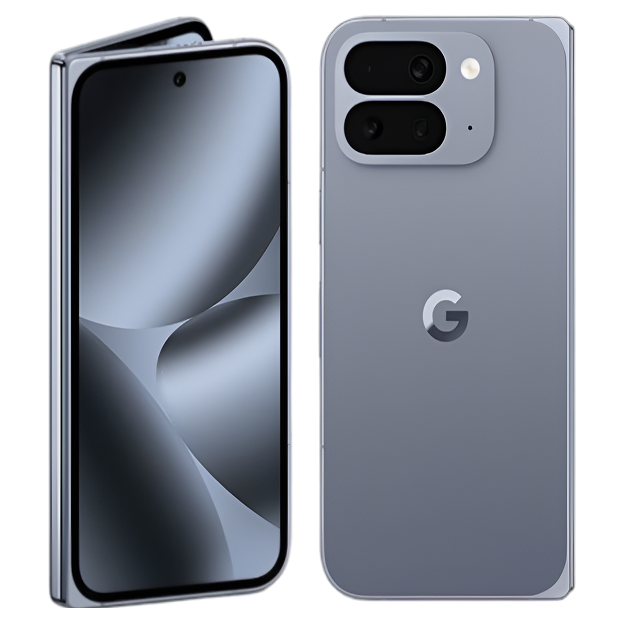
Google released the Pixel 9 Pro Fold in 2024 as their second-generation foldable, addressing many first-gen issues. You got the Tensor G4 chip, dual displays (6.3-inch outer OLED, 8-inch inner foldable OLED), triple camera system, 4,650mAh battery, and that transformative ability to unfold into a tablet-sized device. This represents cutting-edge engineering—folding glass, flexible OLED, sophisticated hinge mechanisms, software that adapts seamlessly between form factors.
Here's what makes the Pro Fold fascinating from a repair perspective: it's essentially two premium devices in one body, with all the complexity that implies. That inner foldable display uses ultra-thin glass (UTG) with a plastic protective layer, folding over 200,000 times through its rated lifetime. The hinge contains dozens of precision components working together. The device has two batteries, dual stereo speakers, three cameras, and software coordinating everything. When something goes wrong, diagnosis is more complex than candy-bar phones.
Why Devices Don't Age Gracefully
You know what's interesting about foldable phones? They experience everything traditional phones do—battery degradation, charging port wear, software accumulation—plus additional stresses unique to folding mechanisms. Understanding what's normal versus concerning helps you make informed decisions about your expensive device.
Think about a convertible car with a power-retractable hardtop. That roof has motors, sensors, latches, seals, and articulating panels that must coordinate perfectly. When new, it operates flawlessly—smooth, quiet, precise. After 50,000 open/close cycles over several years, you notice things: slight squeaks, the motor sounds different, seals don't sit quite as flush, and the mechanism occasionally hesitates. You haven't abused it—you've just used the defining feature thousands of times, and mechanical systems accumulate wear.
Your Pixel 9 Pro Fold experiences similar patterns, but with more sophisticated components. That foldable inner display undergoes substantial mechanical stress with every fold and unfold. The ultra-thin glass (UTG) is designed to flex repeatedly, but flexing creates internal stresses. The plastic protective layer on top of the UTG can develop micro-abrasions from touching, even with careful use. The OLED layers underneath the UTG experience localized stress at the fold radius. After thousands of folds, you might notice the crease becoming slightly more visible—this is characteristic wear, not necessarily a defect.
The hinge mechanism contains multiple cams, gears, springs, and dampers working together to provide controlled folding motion. These components experience friction with every movement. Lubricants break down over time and use. Tiny amounts of dust or debris that make their way into the hinge can affect smoothness. After thousands of fold cycles, hinge feel can change—maybe it's slightly stiffer, or there's a subtle click that wasn't there before. This doesn't necessarily mean failure is imminent—it means mechanical components are wearing.
The dual batteries (one on each side of the fold) degrade through normal lithium-ion chemistry. But on a foldable, the battery placement must accommodate the folding mechanism, so battery cells might be non-standard shapes or configurations. They still follow the same degradation curves—capacity dropping to 90-95% after 200 cycles, 85-90% after 500 cycles—but the unusual form factor can make battery replacement more complex than traditional phones.
The software has to manage display mode transitions hundreds of times daily, which creates opportunities for glitches that candy-bar phones never encounter. Apps that don't properly support foldable form factors can behave oddly. Display scaling, app continuity between screens, and orientation handling all add complexity that can manifest as weird behavior.
Understanding that foldables combine traditional phone aging with unique mechanical wear helps calibrate expectations. Your Pixel 9 Pro Fold isn't fragile, but it is more complex, and that complexity creates additional potential failure modes.
Inner Display Crease Evolution and Screen Protection
What you're experiencing: The crease down the center of the inner display has become more visible over time. Or you're noticing the protective layer starting to lift at edges or show ripples. Or there are tiny scratches or marks on the inner screen despite careful handling. Or you're seeing a faint line or discoloration along the fold.
Why this happens: Here's something foldable manufacturers don't emphasize—every foldable display develops a visible crease over time, and this is characteristic of current foldable technology, not a defect. The inner display bends at a tight radius thousands of times. The ultra-thin glass (UTG), adhesive layers, OLED panel, and plastic protective layer all flex together, but they have different flexibility characteristics.
The crease becomes more visible because repeated folding creates permanent deformation in these layers. The plastic protective layer on top of the UTG particularly shows this—it's designed to be replaceable (officially by authorized service, not user-replaceable), and developing visible wear is expected behavior. Google improved crease visibility on the Pixel 9 Pro Fold compared to earlier foldables, but physics still limits how invisible a crease can remain after thousands of folds.
The protective layer lifting at edges or developing bubbles happens because the adhesive bonding it to the UTG degrades with repeated flexing and environmental exposure. This layer isn't meant to last the device's lifetime—it's a consumable component that eventually needs replacement. If you peel this layer off yourself (don't do this), you expose the actual UTG to potential damage.
Tiny scratches or marks accumulate because the inner screen uses a soft plastic protective layer rather than hard glass like the outer display. This softness allows folding but means it scratches more easily than traditional phone screens. Even fingernails or the stylus can leave marks with enough pressure. This is a fundamental trade-off of current foldable technology.
Discoloration or faint lines along the fold can result from localized stress on OLED pixels at the fold radius. OLED organic compounds degrade faster in areas experiencing repeated mechanical stress. Minor discoloration along the fold after extended use is characteristic, not necessarily defective.
What we've seen in our repair shop: Most inner display concerns on foldables are actually normal characteristics of current technology. Visible crease after 6-12 months? Normal for foldables. Protective layer showing wear or lifting after heavy use? Expected behavior. Minor scratches despite careful handling? Characteristic of the soft protective material.
Actual defects look different—dead pixels, bright or dark lines away from the fold area, touch zones completely unresponsive, severe discoloration, or protective layer failing catastrophically (large areas lifted or torn).
When repair makes sense: Severe inner display damage (broken UTG, large dead zones, non-functional touch) warrants screen replacement, which is expensive on foldables. Protective layer replacement can address lifting or severe wear, though this service isn't widely available. Minor crease visibility, small scratches, or slight protective layer edge lifting are normal wear that don't necessarily justify expensive repair—they're characteristics of using a foldable.
Hinge Mechanism Feel and Function
What you're experiencing: The hinge doesn't feel as smooth as when the device was new. Maybe there's a slight grittiness or catching sensation when folding. Or the device doesn't stay open at certain angles like it used to. Or you hear creaking or clicking sounds during folding that weren't there before. Or dust/debris seems to accumulate in the hinge gap.
Why this happens: The Pixel 9 Pro Fold's hinge is a sophisticated mechanism containing cams, bearings, springs, and dampers that provide controlled motion throughout the 180-degree fold range. This mechanism experiences friction with every single fold and unfold cycle. The hinge is rated for 200,000+ folds, but feel can change before actual failure occurs.
Lubricants inside the hinge break down over time and use. Heat from the device, environmental dust, and repeated motion degrade lubricant properties. As lubrication degrades, friction increases slightly, which manifests as the hinge feeling less smooth or making sounds it didn't make when new.
Dust and debris accumulation in the hinge gap is inevitable despite sealing efforts. The gap must exist for folding to work, and tiny particles work their way in during normal use. These particles can create clicking sounds or increase friction. The hinge's brush seal (designed to sweep debris away) helps but can't eliminate intrusion entirely.
Hinge stiffness variation occurs because the mechanism provides resistance throughout the fold range to allow the device to stay open at various angles (laptop mode, tent mode, etc.). The springs and dampers providing this resistance can lose calibration over thousands of cycles. Maybe the device used to hold perfectly at 90 degrees but now slowly drifts closed—that's damper wear, not catastrophic failure.
Some creaking or clicking is normal for complex mechanical systems. The hinge contains multiple moving metal components that can produce sounds without indicating malfunction. However, loud grinding, severe catching, or difficulty folding indicates potential issues requiring attention.
From working on these every day: Most hinge concerns on foldables are actually normal mechanical wear rather than imminent failure. Hinge feel changing slightly after thousands of folds? Normal. Subtle sounds during folding? Usually characteristic. Slight stiffness variation? Expected behavior.
Actual hinge problems look different—severe binding that prevents folding, hinge completely loose with no resistance, loud grinding sounds, visible damage to hinge components, or the device not staying folded/unfolded properly.
When repair makes sense: Severe hinge dysfunction (won't fold properly, structural damage, complete loss of resistance) warrants repair, which is complex and expensive on foldables. Minor feel changes, subtle sounds, or slight stiffness variation are normal mechanical wear that don't necessarily justify expensive hinge service.
Outer Display Durability Compared to Inner
What you're experiencing: The outer 6.3-inch display might have developed scratches despite being Gorilla Glass Victus 2. Or you're noticing it doesn't feel as scratch-resistant as traditional phone displays. Or edge touch sensitivity seems different than the center.
Why this happens: The outer display uses Gorilla Glass Victus 2, which is among the toughest phone glass available. However, it's still glass, and glass still scratches from materials harder than it—sand, concrete, certain metals. The curved edges of the outer display are particularly vulnerable because they're thinner and experience more direct contact when the phone sits on surfaces.
Compared to the inner display, the outer screen is dramatically more durable—it's actual hard glass versus soft plastic protective layer. But compared to traditional flagship phones, it's similar durability. The difference is perception—foldable owners often baby the expensive device and notice scratches more than traditional phone owners who expect some wear.
Edge touch sensitivity differences can result from the outer display's slight curve. Touch digitizers near curved edges sometimes behave differently because of how the touch sensor grid wraps around curves. This is more noticeable on foldables because the outer screen is relatively narrow, so edge effects are proportionally more significant.
The pattern that emerges from repairs: Outer display damage on Pixel 9 Pro Fold typically results from the same causes as traditional phones—drops, impacts, pressure damage. The glass scratches similarly to other flagship phones despite being expensive foldable tech. Actual defects (spontaneous cracks, dead pixels, touch zones failing) are uncommon.
When repair makes sense: Severe outer display damage (cracks, shattered glass, large dead zones) warrants screen replacement. Normal scratches from use or minor edge touch characteristics don't indicate defects requiring repair.
Battery Performance in Dual-Battery Configuration
What you're experiencing: Battery life doesn't meet expectations for a device with two batteries totaling 4,650mAh. Or you're noticing uneven drain—maybe one side seems to drain faster than the other. Or charging doesn't feel as fast as specifications suggest.
Why this happens: The Pixel 9 Pro Fold uses dual batteries (one on each side of the fold) that the system manages as a single unit. The 4,650mAh total capacity sounds substantial, but consider what it's powering: two displays (one 6.3-inch, one 8-inch), Tensor G4 chip, triple camera system, and constant display mode transitions. Battery life per mAh is actually lower on foldables because of dual display power consumption.
The dual battery configuration adds complexity to battery management. The system must balance charge and discharge between two battery cells with potentially slight manufacturing variance. If one battery degrades slightly faster than the other (normal variation in manufacturing tolerances), you might notice uneven behavior, though the system usually masks this well.
Charging speed (up to 21W wired) sounds modest for a flagship, but charging two separate batteries simultaneously creates thermal challenges. The system limits charging speed to prevent excessive heat buildup in the device's center where the batteries meet. This thermal management is intentional protection, not a limitation indicating defects.
Battery degradation follows normal lithium-ion patterns, but on a foldable with two batteries, replacement complexity increases. After 500 charge cycles, expect 85-90% capacity remaining. On a power-hungry foldable with dual screens, that reduced capacity becomes noticeable in daily use.
What actually happens with most units: Battery complaints on foldables usually stem from users not accounting for dual display power consumption. Expectations based on battery capacity alone don't match reality when powering substantially more screen area than traditional phones. Actual battery defects (rapid degradation, charging failures, excessive heat, swelling) are uncommon but possible.
When repair makes sense: Actual battery defects warrant replacement, which is complex on foldables with dual batteries. Normal battery aging after 18-24 months of heavy use also justifies replacement if runtime no longer meets needs. Simply not meeting expectations based on mAh capacity alone doesn't indicate defects—it's the reality of foldable power consumption.
Software Quirks Specific to Foldables
What you're experiencing: Apps occasionally behave weirdly when transitioning between folded and unfolded states. Or specific apps don't scale properly on the inner display. Or the device sometimes doesn't recognize which screen you're trying to use. Or there are occasional stutters when switching displays.
Why this happens: Foldable software is genuinely complex. The system must seamlessly transition apps between a 6.3-inch outer display (20:9 aspect ratio) and an 8-inch inner display (tablet aspect ratio), maintaining app state and layout. Many apps weren't designed for this flexibility and handle transitions poorly.
Google's doing sophisticated display management—detecting fold angle, determining which screen is active, scaling UI appropriately, managing app continuity. This complexity creates opportunities for glitches that candy-bar phones never encounter. An app that works perfectly on traditional phones might have weird behavior on foldables simply because developers didn't test foldable scenarios.
The device sometimes "guesses wrong" about user intent—you unfold the phone expecting the app to continue on the inner screen, but it stays on the outer screen, or vice versa. This is Android's display management logic making decisions, not hardware failure. Google continuously refines this behavior through updates, but it's not perfect.
Performance stutters during display transitions can occur because the system is doing a lot simultaneously—detecting fold state, switching active display, rescaling UI, adjusting refresh rate, reconfiguring touch input. On complex apps or when system resources are constrained, this can manifest as brief lag.
Our technicians consistently find: Most software issues on foldables are actually software issues, not hardware problems. Weird app behavior? Usually app compatibility or Android display management, not defective hardware. Performance hiccups during transitions? Typically software optimization opportunities, not failing components. These issues often improve with Android updates or app updates as developers optimize for foldables.
When repair makes sense: Software quirks don't require hardware repair—they need software updates or app updates. If you're experiencing consistent, severe performance problems that persist across Android updates and factory resets, investigation might reveal actual hardware issues, but that's uncommon.
What to Expect When You Bring Your Pro Fold In
Let's walk through what happens when you bring a sophisticated device like the Pixel 9 Pro Fold to The Fix.
Comprehensive diagnostic testing comes first, but for foldables, this is more complex than traditional phones. We test both displays independently—outer screen uniformity, brightness, touch response, then inner screen characteristics including crease severity, protective layer condition, touch accuracy across the fold. We evaluate hinge mechanism feel through multiple fold cycles, listening for abnormal sounds and checking resistance curves. Battery health gets measured for both cells. Camera system gets validated across all three modules.
Then we have an honest conversation about findings, which is critical for foldables where many concerns are actually normal technology characteristics. If your inner display has a visible crease after 8 months of daily use, we'll explain this is expected foldable behavior, not a defect. If your hinge feels slightly different than when new after 10,000 folds, we'll contextualize that as normal mechanical wear. If your protective layer is showing edge lifting, we'll discuss whether it's within normal parameters or requires service.
For actual hardware issues, we discuss options transparently. Maybe your inner display has actual defects beyond normal crease—replacement is expensive but might be necessary. Maybe your hinge has severe dysfunction—repair is complex but available. Maybe your battery health is abnormally degraded—dual battery replacement is involved but feasible.
Google Pixel 9 Pro Fold repair requires specialized expertise because of device complexity. The fold mechanism, dual displays, dual batteries, and sophisticated sealing all require specific knowledge and tools. We're not just fixing problems—we're maintaining cutting-edge foldable engineering.
After repairs, extensive validation ensures everything works correctly. Inner display repairs get tested through hundreds of fold cycles. Hinge repairs get validated for proper feel and function. Battery repairs get tested across both charge and discharge patterns. We test foldable-specific features like app continuity, display transitions, and flex mode.
Most Google Pixel 9 Pro Fold repair jobs take longer than traditional phones because of complexity. Battery replacement or outer display repair might complete same-day. Inner display replacement or hinge service typically requires 2-3 days for proper repair and testing. We don't rush foldable repairs—proper quality work on this technology requires appropriate time.
Maintain Your Pixel 9 Pro Fold
Foldable-specific care:
- Never apply screen protectors to the inner display—the pre-installed protective layer is designed specifically for folding
- Clean inner display only with soft microfiber cloth—no pressure, no cleaners
- Avoid folding with objects between the displays (cards, papers, debris)
- Don't press hard on the inner display—it's more pressure-sensitive than traditional screens
Mechanical care:
- Fold and unfold deliberately—don't snap it closed or force it open
- Keep hinge gap clean—gently remove visible debris but don't insert objects into hinge
- Avoid using the device in dusty or sandy environments when possible
- Store the device folded to protect the inner display when not in use
General maintenance:
- Use high-quality USB-C charger and cable—foldables are expensive and deserve good accessories
- Keep both displays clean to prevent particles from getting trapped when folding
- Update Android regularly—Google continuously improves foldable software
- Avoid extreme temperatures—heat affects both batteries and mechanical lubricants
The Truth About Google Pixel 9 Pro Fold Repair: Professional Guidance
Your Pixel 9 Pro Fold represents cutting-edge mobile technology—folding displays, sophisticated hinges, dual batteries, seamless software. Many concerns users report are actually normal characteristics of current foldable technology (visible crease, protective layer wear, slight hinge feel changes) rather than defects requiring repair.
Actual hardware defects requiring repair do occur but are less common than traditional phones encountering issues. Bring your Pixel 9 Pro Fold to The Fix for expert diagnostic testing with proper understanding of foldable technology. We'll distinguish between normal foldable characteristics, software issues, and genuine hardware problems requiring repair.
Professional Google Pixel 9 Pro Fold repair addresses legitimate hardware failures—damaged displays, hinge dysfunction, degraded batteries. Your premium foldable deserves expert service with proper tools, quality components, and technicians who understand the unique requirements of folding device technology. We maintain foldables to factory standards with appropriate care for this sophisticated engineering.


Trusted repair solution for mobile phones, tablets, gaming consoles, and computer systems. We provide fast, reliable, and affordable repair services to get your devices back in perfect working condition.
The Fix is an independent repair service provider and is not affiliated with, sponsored by, or endorsed by Apple Inc., Samsung Electronics, Google LLC, or any other device manufacturer. We use high-quality compatible replacement parts unless explicitly stated. All trademarks are property of their respective owners.


© Copyright The Fix Solutions All rights reserved 2026.
Design by Deepcoder