






Google Pixel 9 Repair Services
Get fast, reliable, and professional Google Pixel 9 repair services at The Fix — your trusted destination for expert device care.
Common Repairs We Handle Daily


What's Happening to Your Google Pixel 9? Google Pixel 9 Repair Solutions
Remember when your Pixel 9 was lightning-fast, the cameras were flawless, and everything just worked perfectly? Yeah, those were the days. Now maybe you're dealing with battery drain that doesn't make sense, a screen that's acting weird, or charging issues that shouldn't happen on a phone this new. Here's the thing—even flagship devices from 2024 can develop problems, and knowing what's fixable versus what's actually serious makes all the difference.
In this guide, we'll break down exactly what goes wrong with the Pixel 9, why these issues happen even on premium devices, and how professional Google Pixel 9 repair addresses each problem. You're about to understand your phone's issues better than most people who work at carrier stores.
What Makes the Pixel 9 Tick
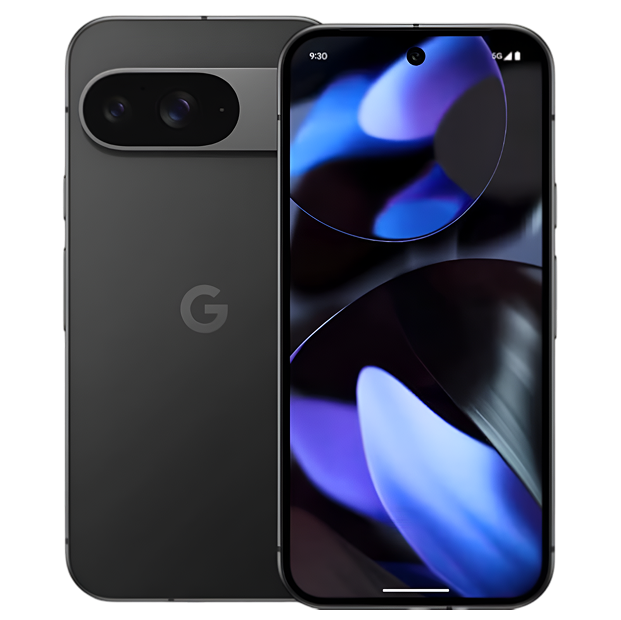
Google launched the Pixel 9 in late 2024 as their latest flagship, and it's genuinely impressive hardware. You got Google's Tensor G4 chip, a stunning 6.3-inch Actua display with 120Hz refresh, advanced camera system with AI processing, 4,700mAh battery, and seven years of software support. This isn't a budget phone—it's Google's premium offering designed to compete directly with iPhone 16 and Galaxy S24.
Here's what makes the Pixel 9 interesting from a repair perspective: it's cutting-edge tech with sophisticated integration between hardware and software. That Tensor G4 processor handles heavy AI workloads for photo processing, voice recognition, and real-time translation. The display uses OLED technology with variable refresh rates. The camera system coordinates multiple sensors with computational photography. When something goes wrong, it's often more complex than older, simpler devices—but it's also built to higher quality standards.
Let's Tackle the Urgent Stuff First
Battery Drain That Doesn't Add Up
What you're experiencing: Your Pixel 9's battery life suddenly got terrible, and you can't figure out why. Maybe it was fine yesterday but today it's draining crazy fast. Or you're seeing significant drain overnight when the phone should be idle. The battery percentage drops noticeably even when you're barely using it.
Why this happens on a new phone: With a device this new, actual battery degradation isn't the culprit—that takes years, not months. Instead, you're usually dealing with software issues or specific apps running amok in the background. Android 14 on Pixel 9 has aggressive battery optimization, but rogue apps can still bypass it. The Tensor G4 chip is powerful but also power-hungry when doing intensive AI processing.
Background app refresh, location services running constantly, poor cellular signal (forcing the phone to work harder searching for connection), and adaptive features learning your usage patterns all contribute. Sometimes a recent app update introduces a bug that causes battery drain. Other times, Android system processes get stuck in loops.
What you can try:
- Check Settings → Battery → Battery Usage to identify what's consuming power
- Look for apps with unusually high background activity and restrict them
- Toggle Airplane Mode on/off to reset cellular connection if signal is weak
- Restart your phone—sometimes system processes just need a reset
- Check for app updates that might fix known battery drain bugs
Here's what we've learned from the repair bench: On devices this new, battery drain complaints usually trace back to specific apps or software configuration rather than hardware failure. However, if you're experiencing rapid drain from day one despite normal usage patterns, there could be a manufacturing defect in the battery or power management circuit. That's rare but does happen occasionally with any mass-produced electronics.
Screen Issues on OLED Displays
What you're experiencing: You might see a green tint on the screen at low brightness, burn-in on the status bar or keyboard area, dead pixels appearing as black spots, or touch response issues in certain areas. Or maybe the display randomly goes dim or doesn't wake up properly when you tap it.
Why this happens: The Pixel 9's Actua display uses OLED technology, which means each pixel produces its own light. OLED offers incredible contrast and colors, but it's also susceptible to specific issues. The green tint at low brightness is actually a known characteristic of some OLED panels—not exactly a defect, but an artifact of how OLEDs work at very low brightness levels.
Burn-in occurs when static elements (status icons, keyboard, navigation buttons) remain in the same position for extended periods. OLED pixels physically degrade from use, and pixels displaying static content degrade unevenly compared to the rest of the screen. This shows up as ghost images of those static elements.
Dead pixels can result from manufacturing defects or physical stress on the display. The Pixel 9's display is thin and sophisticated, but that also makes it more vulnerable to pressure or impact damage. Touch issues might stem from the digitizer layer, software glitches in Android's touch handling, or interference from screen protectors.
What you can try:
- For green tint, try adjusting color settings or increasing minimum brightness slightly
- For burn-in, use apps that cycle colors to exercise all pixels evenly (limited effectiveness)
- For touch issues, remove screen protector temporarily and test
- Boot into Safe Mode to rule out third-party apps interfering with touch
- Update to the latest Android version—Google often addresses display issues in updates
Tech Myth Debunked: You might hear that OLED burn-in is preventable if you're just careful enough. That's only partially true. While you can minimize burn-in by avoiding static content and using dark modes, OLED pixels naturally degrade with use—it's physics, not user error. Modern OLEDs like the Pixel 9's display have significantly better burn-in resistance than older generations, but they're not immune.
Camera Problems on a Camera-Focused Phone
What you're experiencing: Camera app crashes or freezes when opening. Photos come out blurry or weirdly processed. The camera struggles to focus properly. Video recording stops unexpectedly. Or specific camera features (Night Sight, Portrait Mode) don't work correctly.
Why this happens: The Pixel 9's camera system is incredibly complex—it's not just lenses and sensors. There's a 50MP main camera, 48MP ultrawide, sophisticated autofocus system, and the Tensor G4 chip running intensive AI processing on every photo. When any part of this chain fails, you get weird results.
Software issues cause most camera problems on newer devices. The Camera app itself can have bugs. Android system services handling camera access can glitch. Third-party apps might interfere with camera operation. Google's computational photography depends on the AI processor working correctly—if Tensor G4 is thermal throttling or experiencing errors, photo processing fails.
Hardware issues can develop too, though. The camera modules contain tiny motors for autofocus (Voice Coil Motors or VCMs) that can fail. Optical image stabilization systems have physical components that can malfunction. The camera sensors themselves can develop defects. Physical impact can misalign camera modules or damage internal components.
What you can try:
- Clear Camera app cache: Settings → Apps → Camera → Storage → Clear Cache
- Restart your phone to clear temporary system glitches
- Check for Camera app updates in the Play Store
- Test the camera in Safe Mode to rule out third-party app interference
- Try taking photos with different camera apps to isolate whether it's Google's Camera app or the hardware
From working on these every day: Camera complaints on Pixel devices often stem from software rather than hardware—Google's aggressive computational photography sometimes produces unexpected results that users interpret as hardware failure. However, physical impact can definitely damage camera modules, and we do see autofocus failures or sensor issues that require component replacement. Professional Google Pixel 9 repair can diagnose whether you're dealing with software configuration or actual hardware failure.
Now the Annoying-But-Not-Critical Issues
Charging That's Slower Than Expected
What you're experiencing: Your Pixel 9 charges slower than you think it should, especially considering it supports fast charging. Or maybe wired charging works but wireless charging doesn't. Or charging is inconsistent—sometimes fast, sometimes slow, with no obvious pattern.
Why this happens: The Pixel 9 supports up to 27W wired fast charging and wireless charging, but achieving those speeds requires specific conditions. You need a compatible USB-C PD (Power Delivery) charger that can actually output the required wattage. Many cheap chargers claim fast charging but don't deliver. Cable quality matters too—a degraded or low-quality USB-C cable limits charging speed regardless of charger quality.
Thermal management also affects charging speed. The Pixel 9 deliberately slows charging when the battery gets warm to prevent damage. If you're using your phone while charging, if ambient temperature is high, or if the phone's in a case trapping heat, charging slows down significantly.
For wireless charging, alignment matters enormously. The Pixel 9's wireless charging coil must align with the charger's coil. Even slight misalignment dramatically reduces charging efficiency. Thick cases can also interfere with wireless charging. Some third-party wireless chargers don't properly implement the Qi standard and charge slowly as a result.
What you can try:
- Use Google's official charger or a high-quality USB-C PD charger (check specs carefully)
- Try a different USB-C cable—cheap cables limit charging speed
- Remove your case while charging to improve heat dissipation
- Don't use your phone heavily while charging
- For wireless charging, ensure perfect alignment and remove thick cases
What we tell customers who come in: Charging complaints on newer Pixels usually aren't hardware issues—they're configuration or accessory problems. Actual charging port failure is uncommon on devices this new. However, if you're using known-good chargers and cables, removing cases, and still getting terrible charging performance, there could be a hardware issue with the charging circuit or USB-C port assembly that needs professional diagnosis.
Performance Hiccups You Shouldn't Be Seeing
What you're experiencing: Your Pixel 9 occasionally stutters or lags even though it's a flagship device with powerful hardware. Apps take longer to open than they should. Animations aren't as smooth as you remember. The phone sometimes feels warm during normal use.
Why this happens: The Tensor G4 chip is powerful but also runs hot under load. Google implements aggressive thermal management—when the chip gets too warm, it throttles performance to prevent damage. This manifests as lag or stuttering during intensive tasks or when ambient temperature is high.
Background processes can also cause performance issues. Android constantly syncs data, updates apps, runs security scans, and performs maintenance tasks. If multiple intensive background tasks run simultaneously, you'll notice slowdowns even on powerful hardware.
Memory management plays a role too. The Pixel 9 has plenty of RAM, but if you run many apps simultaneously or use memory-intensive apps, the system has to shuffle apps in and out of memory. This causes loading delays when switching between apps.
Software bugs can cause performance issues too. Sometimes Android updates or specific app versions introduce performance regressions. Google usually fixes these in subsequent updates, but there's often a window where performance isn't optimal.
What you can try:
- Check which apps are running in background: Settings → Apps → See All Apps
- Restart your phone regularly to clear memory and reset system processes
- Check for Android updates—Google frequently releases performance improvements
- Limit background refresh for apps you don't need constant updates from
- Avoid using your phone in direct sunlight or hot environments when possible
A pattern we've noticed over the years: Performance complaints on flagship Pixels usually improve with software updates as Google optimizes thermal management and background processes. Actual hardware-related performance issues (faulty processor, RAM problems) are rare but not impossible. If your Pixel 9 shows consistent thermal throttling or performance issues despite normal usage, professional diagnostic testing can identify whether it's software tuning or actual hardware defects.
Connectivity Problems That Come and Go
What you're experiencing: WiFi keeps disconnecting randomly. Bluetooth audio cuts out or won't connect. Mobile data is slower than it should be or drops unexpectedly. Or maybe you're having issues with 5G connectivity specifically.
Why this happens: Modern smartphones juggle multiple wireless connections simultaneously—WiFi, Bluetooth, cellular (4G/5G), NFC, GPS. The Pixel 9's Tensor G4 chip handles all this coordination, but interference between signals, software bugs, or configuration issues can cause problems.
WiFi issues often trace to router compatibility, network congestion, or Android's adaptive WiFi features making poor decisions about which networks to use. Bluetooth problems can stem from interference with WiFi (they use overlapping frequencies), codec negotiation issues with audio devices, or Android's Bluetooth stack bugs.
5G connectivity is particularly finicky because 5G deployment is still incomplete. In areas with weak 5G signal, your phone constantly switches between 5G and 4G, which drains battery and causes connection interruptions. Some carriers' 5G networks have coverage gaps or implementation issues.
What you can try:
- For WiFi: Forget and rejoin networks, reset network settings, try different WiFi bands (2.4GHz vs 5GHz)
- For Bluetooth: Unpair and re-pair devices, clear Bluetooth cache, test with different devices
- For 5G: Toggle Airplane Mode on/off, switch to LTE/4G only if 5G is consistently problematic
- Update carrier settings and Android to latest versions
- Reset network settings (nuclear option): Settings → System → Reset Options → Reset WiFi, Mobile & Bluetooth
Based on the devices we see: Connectivity issues on newer Pixels usually resolve with software updates or network settings resets. Actual hardware failures of WiFi, Bluetooth, or cellular radios are uncommon but can happen. If you've tried all software troubleshooting and still have consistent connectivity problems, professional diagnostic testing can determine whether it's a hardware issue requiring antenna or radio component repair.
What Happens to Devices Over Time
You know what's fascinating about the Pixel 9? It's built with premium materials and sophisticated engineering, but it's still subject to the same physical laws as every other electronic device. Understanding what naturally happens helps you distinguish between normal aging and actual defects.
That 4,700mAh battery will eventually degrade—it's pure chemistry. Lithium-ion batteries naturally lose capacity with charge cycles. The Pixel 9's battery management is excellent and will slow degradation, but after 500-800 full charge cycles (roughly 18-24 months of daily charging), you'll notice reduced capacity. This is normal and expected, not a defect.
The OLED display will gradually develop minor burn-in on elements that remain static (status bar, keyboard). This is characteristic of OLED technology, not poor manufacturing. Google's display includes burn-in mitigation (pixel shifting, reduced brightness on static elements), but can't eliminate it entirely. Minimal burn-in after a year of heavy use is normal.
The USB-C charging port will experience wear from repeated cable insertions. Those tiny pins inside flex with each connection. Over hundreds or thousands of insertions, contacts can wear or lose spring tension. This affects any USB-C device, not just Pixels. Keeping the port clean and using quality cables minimizes wear but doesn't eliminate it.
Internal components like the Tensor G4 chip, RAM, and storage are solid-state with no moving parts, so they're remarkably reliable. However, they can still fail from manufacturing defects, electrical stress, or (rarely) physical damage from impact. These failures are uncommon but possible with any electronics.
Software complexity increases over time as you install apps, accumulate data, and receive Android updates. Each update adds features and security patches but also adds complexity. Performance can gradually degrade from software accumulation rather than hardware aging.
The camera system's mechanical components (autofocus motors, optical stabilization) will eventually wear from repeated use. These are tiny motors that move thousands of times during normal use. Quality is generally excellent on Pixel cameras, but mechanical components don't last forever.
Understanding these patterns helps you set realistic expectations. Your Pixel 9 isn't invincible, but it's also not fragile. Most issues that develop are either software-related (fixable) or normal component aging (addressable through professional Google Pixel 9 repair when the time comes).
What to Expect When You Bring Your Pixel 9 In
Let's walk through what actually happens at The Fix when you bring in your Pixel 9, because flagship devices need specialized diagnostic approaches.
We start with comprehensive testing using professional diagnostic equipment. Battery health gets measured precisely—actual capacity, charge cycles, voltage characteristics. Display gets tested for uniformity, brightness levels, touch accuracy across the entire surface. We test all cameras systematically (main, ultrawide, selfie) for focus accuracy, image quality, and feature functionality. Charging gets tested with calibrated equipment to measure actual charging speeds. We run stress tests on the processor to verify thermal management and performance consistency.
Then we explain findings in detail using language that makes sense. If your battery's at 94% health after six months of heavy use, we'll contextualize that as normal versus concerning. If your display shows minor edge brightness variance characteristic of OLED manufacturing tolerances, we'll explain that versus actual defects. If camera focus is microscopically off spec but still within acceptable range, we'll be honest about whether repair makes sense.
For actual hardware issues, we discuss repair options with honest recommendations. Maybe your charging port has debris affecting connection quality—simple cleaning solves it. Maybe your battery health is significantly degraded despite the device being relatively new—replacement makes sense. Maybe camera autofocus has failed—module replacement is necessary. We never push unnecessary services on flagship devices where diagnostics might solve problems.
Google Pixel 9 repair on flagship devices requires specialized tools, high quality parts, and expertise with Google's specific hardware integration. Our technicians understand the Pixel 9's internal layout, connector types, adhesive requirements, and testing procedures. We're not just swapping parts—we're maintaining a sophisticated device to factory standards.
After any repair, we run extensive validation testing. Full charge/discharge cycles verify battery performance. Display calibration ensures proper color and brightness. Camera testing validates focus accuracy and image processing. Charging tests confirm proper fast charging negotiation. We don't release devices until they pass comprehensive quality checks.
Most Google Pixel 9 repair jobs complete same-day for common issues. Battery replacement, charging port service, screen replacement—these are usually same-day turnaround. Camera module replacement or more complex repairs might require overnight for proper testing. We communicate timelines clearly so you can plan accordingly.
Keep Your Pixel 9 Running Great
Daily habits for flagship devices:
- Use Google's official charger or verified USB-C PD chargers—cheap chargers damage charging circuits
- High-quality screen protector and case are worth it on a premium device
- Keep charging port clean—inspect monthly and gently remove any debris
- Avoid extreme temperatures—Tensor G4 performs best at moderate temps
Software optimization:
- Keep Android updated—Google continuously improves Pixel 9 performance
- Restart weekly to clear memory and reset system processes
- Manage background app refresh for apps that don't need constant updates
- Use Battery Saver mode strategically when needed rather than always
Long-term protection:
- Don't use your Pixel 9 in extremely hot or cold environments when avoidable
- Remove case during intensive tasks if phone gets warm to improve heat dissipation
- Use dark mode to reduce OLED burn-in on static elements
- Consider display settings that shift elements slightly to prevent burn-in
What's Happening to Your Google Pixel 9? Google Pixel 9 Repair Solutions
Your Pixel 9 is Google's flagship for 2024—premium hardware, cutting-edge AI, sophisticated integration between hardware and software. Most issues that develop are either software-related (fixable through updates and configuration) or early hardware defects.
Bring your Pixel 9 to The Fix for expert diagnostic testing. We'll identify whether you're dealing with software configuration, normal device characteristics, or actual hardware issues requiring repair. No pressure, just honest assessment from technicians who specialize in premium devices and understand Google's hardware thoroughly.
Professional Google Pixel 9 repair addresses whatever's actually affecting your device—degraded batteries, damaged displays, camera failures, charging issues. Your flagship device deserves expert care with quality parts and proper procedures. We've got the tools, expertise, and commitment to maintaining your Pixel 9 to factory standards.


Trusted repair solution for mobile phones, tablets, gaming consoles, and computer systems. We provide fast, reliable, and affordable repair services to get your devices back in perfect working condition.
The Fix is an independent repair service provider and is not affiliated with, sponsored by, or endorsed by Apple Inc., Samsung Electronics, Google LLC, or any other device manufacturer. We use high-quality compatible replacement parts unless explicitly stated. All trademarks are property of their respective owners.


© Copyright The Fix Solutions All rights reserved 2026.
Design by Deepcoder