






Google Pixel 7a Repair Services
Get fast, reliable, and professional Google Pixel 7a repair services at The Fix — your trusted destination for expert device care.
Common Repairs We Handle Daily


Google Pixel 7a Repair: Professional Analysis and Solutions
You know what's wild? The Pixel 7a offers flagship-level features at mid-range pricing, but that doesn't make it immune to the issues that affect all smartphones. If your 7a is experiencing battery drain, display quirks, charging problems, or camera weirdness after months of solid performance, you're probably wondering whether this is normal wear, a software glitch, or something that actually needs fixing.
In this guide, we'll provide professional analysis of what happens with the Pixel 7a, which problems indicate hardware failures versus normal device behavior, and when Google Pixel 7a repair makes sense. You're about to understand exactly what's happening with your device.
Your Pixel 7a: The Quick Rundown
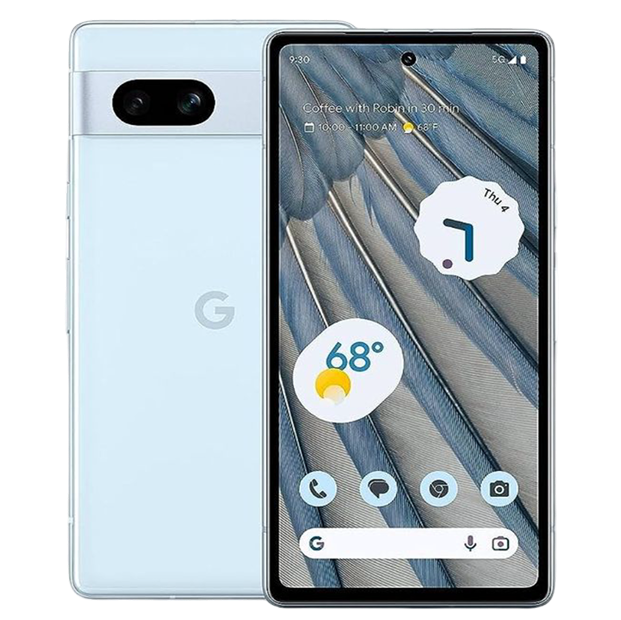
Google released the Pixel 7a in May 2023 as the value champion of their lineup. You got the same Tensor G2 chip as the flagship Pixel 7, a sharp 6.1-inch OLED display with 90Hz refresh, solid dual camera system with Google's computational photography, wireless charging (new for A-series), 4,385mAh battery, and IP67 water resistance. This wasn't a compromised budget phone—it was a flagship experience at mid-range pricing, which made it incredibly popular.
What's interesting about the 7a from a repair perspective is that it uses flagship-grade components (Tensor G2, quality OLED panel) in a more affordable package. When issues develop, they're often similar to problems seen on the flagship Pixel 7, not budget phone issues. That OLED display ages like flagship OLEDs. The Tensor G2 has the same thermal characteristics as the flagship. The battery follows identical lithium-ion degradation curves.
What Causes Tech to Break Down
Here's something nobody tells you when you buy a phone at this price point—getting premium features at mid-range pricing doesn't exempt you from the physics and chemistry that affect all electronics. Your Pixel 7a contains sophisticated components that degrade predictably with use, regardless of what you paid for the device.
Think about a quality power drill from a reputable brand that costs half what the professional-grade version costs. That consumer drill uses similar motor technology, lithium-ion battery chemistry, and electronic controls as the pro version—just with some features removed or slightly less durable materials. When you use it regularly for 18 months, you see the same patterns: battery holds less charge, the chuck develops slight play, the trigger feels different, and brushes in the motor wear down. You haven't abused it—you've just used it for normal tasks, and components designed to handle stress have accumulated wear.
Your Pixel 7a experiences identical patterns. That 4,385mAh battery undergoes electrochemical changes with every charge cycle. During charging, lithium ions migrate from the cathode to the anode through the electrolyte. During use, they move back. This process causes permanent microscopic changes—ions get trapped, electrode surfaces develop unwanted layers, the electrolyte slowly breaks down. Heat from the Tensor G2 during intensive tasks or from charging accelerates everything.
After 300-400 charge cycles (10-14 months of daily charging for most users), expect battery capacity around 92-95% of new. After 600-700 cycles (20-24 months), you're looking at 85-90%. This is normal lithium-ion chemistry that affects every battery-powered device from budget phones to flagship phones to electric vehicles. The 7a's battery management is good, but can't prevent fundamental electrochemistry.
The 6.1-inch OLED display uses organic compounds that physically degrade when emitting light. Static UI elements (status bar, keyboard, navigation) cause localized degradation because those pixels work harder. After 18-24 months of heavy use, minimal burn-in is characteristic, not defective. Modern OLEDs are dramatically better than earlier generations, but organic compound degradation is inherent to the technology.
The USB-C charging port experiences mechanical wear from repeated cable insertions. Those 24 pins must make reliable contact thousands of times. Pocket lint accumulates despite your best efforts. Using the phone while charging puts lateral stress on connections. After 18 months of daily use, port feel might change slightly or connections become finicky—this is mechanical wear, not poor quality.
The Tensor G2 chip is the same processor used in the flagship Pixel 7. It generates the same heat, has the same thermal management requirements, and ages identically. Software updates over time add complexity and features, making the system heavier even though hardware stays the same.
Understanding that mid-range pricing doesn't change physics helps set realistic expectations. Your 7a has quality components, but they're subject to the same natural degradation as components in phones costing twice as much.
Battery Life Degradation Patterns
What you're experiencing: Battery life has gotten noticeably worse over the past year. You used to comfortably make it through the day, but now you're hunting for chargers by evening. Or the battery percentage drops rapidly during use. Or overnight drain seems excessive even when the phone should be idle.
Why this happens: After 12-18 months of daily charging, your 7a's battery has been through 400-600 charge cycles. Each cycle causes permanent capacity reduction. Testing on 7a devices around this age typically shows battery health at 88-93% of original capacity. That 7-12% reduction translates to noticeably shorter runtime, especially if you're a heavy user.
The Tensor G2 is relatively power-hungry compared to competitors' chips, particularly during AI-heavy tasks and computational photography. Combined with the 90Hz OLED display (which consumes more power than 60Hz), the 7a uses more power than battery capacity alone would suggest. When capacity drops 10%, runtime might drop 15% because of how these components interact.
Software can also cause sudden battery drain that mimics hardware failure but isn't. A rogue app consuming excessive background power, Android system services stuck in loops, poor cellular signal forcing the radio to work harder—all these cause rapid drain without battery hardware being defective.
Actual battery defects have specific symptoms: battery swelling (back panel or screen lifting), phone getting extremely hot during charging, charging completely failing, or capacity dropping below 70% within the first year. These indicate manufacturing defects distinct from normal aging.
What we tell customers who come in: Most Pixel 7a battery complaints after a year of use show testing results around 88-92% health. Users experiencing reduced runtime are seeing normal capacity degradation, not defects. When health drops below 85% or runtime no longer meets needs, replacement makes sense and restores original performance. Customers consistently report the phone "feels new again" after battery replacement—because the fresh battery actually holds significantly more charge than the degraded one.
When repair makes sense: Battery health below 80-85% justifies replacement if runtime is insufficient for your usage. Actual defects (swelling, charging failure, excessive heat) require immediate replacement. Battery showing 90%+ health probably doesn't need hardware replacement—the issue is likely software or usage patterns rather than battery failure.
OLED Display Characteristics on Mid-Range Devices
What you're experiencing: You might notice a very subtle green tint at extremely low brightness. Or slight brightness variance across the screen. Or the faintest ghost image of the keyboard after heavy messaging use. Or occasional flickering at minimum brightness in dark rooms.
Why this happens: The Pixel 7a uses a quality OLED panel, but OLED technology has inherent characteristics regardless of device price. The green tint at 1-3% brightness is standard OLED behavior at extreme low brightness where organic compounds struggle to emit uniform color at minimal current. This affects OLEDs across price ranges—it's physics, not quality.
Slight brightness variance across a 6.1-inch panel results from manufacturing tolerances in depositing organic compounds. Even high-quality OLEDs have microscopic thickness variations that cause subtle brightness differences. Your eyes might notice this on uniform gray backgrounds, but it's within normal manufacturing specification.
Very slight burn-in after 12-18 months of heavy use (particularly on keyboard and status bar) is characteristic OLED aging. Static elements cause localized organic compound degradation. Google implements burn-in mitigation (pixel shifting, automatic brightness reduction on static elements), but can't prevent it entirely. Minimal burn-in after extended use is normal.
Flickering at very low brightness relates to PWM (pulse-width modulation) dimming. OLEDs control low brightness by rapidly turning pixels on and off rather than reducing voltage. Some users perceive this flickering, particularly in peripheral vision. It's characteristic of OLED dimming technology, not a defect.
Based on the devices we see: Most Pixel 7a display concerns are normal OLED characteristics that appear across all units. Minor tint at ultra-low brightness? Every OLED does this. Slight uniformity variance? Normal tolerance. Barely visible keyboard ghost after a year? Expected aging.
Actual defects look different—dead pixels, bright or dark lines, large discoloration areas, severe burn-in after minimal use, or touch zones completely unresponsive.
When repair makes sense: Severe display defects warrant screen replacement. Normal OLED characteristics that all units exhibit don't indicate problems requiring Google Pixel 7a repair. We distinguish between the two with proper testing—fixing actual problems, not "fixing" normal behavior.
Camera Performance and Computational Photography
What you're experiencing: Photos sometimes don't look as good as the reviews suggested. Autofocus occasionally struggles in low light or with close subjects. Or computational photography produces results that look "overprocessed" to you. Or video quality varies depending on conditions.
Why this happens: The Pixel 7a uses Google's computational photography approach—the camera hardware captures data, then Tensor G2 AI processing creates final images. This produces the distinctive "Pixel look" with enhanced colors, aggressive HDR, and heavy processing. Some users love it, others find it artificial compared to more natural rendering.
What users often interpret as camera hardware problems are actually processing characteristics. The Camera app can have bugs. Computational photography can produce artifacts in edge cases (extreme dynamic range, mixed lighting). Third-party camera apps might not properly access hardware. Thermal throttling during extended shooting reduces processing quality.
Actual hardware failures have specific symptoms. Voice Coil Motor failure causes consistent autofocus hunting across all conditions. Optical image stabilization failure causes consistently shaky video. Sensor defects appear in every photo regardless of settings. Physical impact can misalign camera modules.
The key difference: hardware failures manifest consistently regardless of app, lighting, or conditions. Software issues or processing artifacts vary by scenario.
From working on these every day: Most Pixel camera complaints stem from software/processing characteristics rather than hardware failures. Users comparing real-world photos to carefully staged review samples are often disappointed. Actual hardware failures are less common and have consistent, specific symptoms.
When repair makes sense: Actual hardware failures (autofocus motor failure, OIS malfunction, sensor defects) require camera module replacement. Processing characteristics, artifacts, or simply preferring different processing styles don't indicate hardware problems—they're software or preference issues that repair can't address.
Charging Port Contamination vs. Failure
What you're experiencing: Charging has become inconsistent—sometimes fast, sometimes slow. Or the cable doesn't feel as secure. Or you need to position the cable carefully. Or fast charging stopped working despite using the same accessories.
Why this happens: The Pixel 7a's USB-C port handles charging, data transfer, and USB host functionality. After 12-18 months of daily use, the port experiences two main issues: contamination and wear.
Port contamination is extremely common. Every time your phone's in your pocket, lint and dust enter the port. This debris compresses into a dense layer at the bottom of the port cavity, preventing proper cable insertion. When the cable can't fully insert, the 24 pins don't make complete contact, causing intermittent charging or reduced speed.
Actual port wear happens after hundreds of cable insertions. The pins inside experience microscopic wear. Solder connections experience stress from lateral forces when using the phone while charging. After extended use, connections that were rock-solid can become finicky.
Thermal management also affects charging. The 7a monitors battery temperature during charging. If temperature exceeds safe levels (from ambient heat, using the phone while charging, or charging in a case), charging speed reduces. This is protective behavior, not port failure.
What we've seen in our repair shop: About 65% of Pixel 7a charging complaints are port contamination, not hardware failure. Professional cleaning solves it immediately. Testing with known-good cables and chargers identifies accessory problems. When those causes are eliminated, actual port hardware issues become apparent.
When repair makes sense: Actual port hardware failure requires replacement. Port contamination needs professional cleaning but not part replacement. Accessory issues need better cables/chargers, not phone repair. We diagnose the actual cause rather than automatically replacing parts.
Performance and Thermal Behavior
What you're experiencing: The Pixel 7a occasionally stutters during intensive tasks. Or it gets warm during gaming, camera use, or charging. Or performance seems to slow when the device is warm.
Why this happens: The Tensor G2 chip generates heat during intensive processing. Google implements thermal management that throttles performance when temperature exceeds thresholds. This prevents damage but manifests as reduced performance during sustained intensive use.
This isn't a defect—it's physics. The Tensor G2 prioritizes AI capabilities over pure efficiency, which means more heat generation than some competitors. When that heat exceeds safe levels, performance reduction is intentional protection.
Background processes can cause performance issues. Android constantly syncs data, updates apps, runs maintenance. Multiple intensive background tasks cause slowdowns even on capable hardware. Memory management also matters—running many apps requires shuffling them in and out of RAM, causing delays.
The reality from our repair experience: Performance issues on Pixel 7a usually improve with software updates as Google optimizes thermal tuning and background processes. Actual hardware-related performance problems (failing processor, RAM errors) are rare. Thermal throttling during intensive use is normal, not defective.
When repair makes sense: Hardware failures affecting performance require professional diagnosis. Thermal throttling during intensive use is normal. Performance issues that resolve with updates or resets indicate software problems, not hardware needing repair.
What to Expect When You Bring Your 7a In
Here's what happens when you bring your Pixel 7a to The Fix.
Comprehensive diagnostic testing starts with professional equipment. Battery health gets precisely measured—capacity, voltage, internal resistance. Display gets tested—uniformity, brightness, touch response. Camera system gets validated—both modules tested for focus, stabilization, image quality. Charging gets tested with known-good accessories and power measurement.
Then we explain findings clearly. If your battery's at 89% health after 16 months, we'll contextualize that as normal aging. If your display shows minor tint at 2% brightness, we'll explain this is characteristic OLED behavior. If charging issues stem from port contamination, we'll demonstrate that rather than recommending unnecessary replacement.
For actual hardware issues, we discuss options transparently. Battery health significantly degraded? Replacement makes sense. Display has actual defects? Screen replacement appropriate. Charging port hardware failed? Replacement necessary. Camera module has autofocus failure? Module replacement required.
Pixel 7a repair requires proper technique and tools. Water-resistant sealing, adhesive requirements, precise reassembly all need proper knowledge. We maintain build quality during repair.
After repairs, comprehensive validation ensures proper function. Battery repairs get charge/discharge testing. Display repairs get calibration and touch validation. Camera repairs get tested across features. Charging repairs get validated with multiple accessories.
Most Google Pixel 7a repair jobs complete same-day for common issues. Battery replacement, charging port service, screen replacement typically finish same-day.
Keep Your Pixel 7a Healthy
Daily care:
- Use quality USB-C charger and cable—cheap accessories damage charging systems
- Screen protector and case worthwhile on a device you're keeping long-term
- Clean USB-C port monthly with wooden toothpick
- Avoid extreme temperatures
Battery optimization:
- Use Battery Saver mode strategically
- Avoid regular full discharges
- Remove case if phone gets warm during charging
- Lower display brightness when possible
Software maintenance:
- Keep Android updated
- Restart weekly
- Monitor battery usage for problem apps
- Manage background refresh
Google Pixel 7a Repair: Professional Analysis and Solutions
Your Pixel 7a offers flagship features at mid-range pricing—Tensor G2, quality OLED, good cameras, long software support. Most issues that develop are either normal aging (battery degradation, OLED characteristics), software-related (addressable through updates), or component wear all devices experience.
Actual hardware defects requiring repair occur but are less common than software issues or normal characteristics. Bring your Pixel 7a to The Fix for expert diagnostic testing. We'll distinguish between normal device behavior, software optimization opportunities, and genuine hardware problems requiring repair.
Professional Google Pixel 7a repair addresses real hardware failures—degraded batteries, damaged displays, camera malfunctions, charging port issues. Your device deserves expert service with quality components and proper procedures. We fix actual problems, not normal device characteristics.


Trusted repair solution for mobile phones, tablets, gaming consoles, and computer systems. We provide fast, reliable, and affordable repair services to get your devices back in perfect working condition.
The Fix is an independent repair service provider and is not affiliated with, sponsored by, or endorsed by Apple Inc., Samsung Electronics, Google LLC, or any other device manufacturer. We use high-quality compatible replacement parts unless explicitly stated. All trademarks are property of their respective owners.


© Copyright The Fix Solutions All rights reserved 2026.
Design by Deepcoder