






Google Pixel 7 Pro Repair Services
Get fast, reliable, and professional Google Pixel 7 Pro repair services at The Fix — your trusted destination for expert device care.
Common Repairs We Handle Daily


Google Pixel 7 Pro Repair Done Right: Professional Solutions
Look, we get it—handing over your Pixel 7 Pro can feel stressful, especially when you're not sure whether what you're experiencing is a real problem or just normal device behavior after two years of use. Maybe the battery isn't lasting like it used to, the display has developed some quirks, or charging has become inconsistent. You're wondering whether these issues justify professional repair or if you should just live with them.
In this guide, we'll walk you through exactly what happens when you bring your Pixel 7 Pro to The Fix, which problems actually need repair versus simple maintenance, and what you can expect from the process. Let's get your device working right again.
Living With the Pixel 7 Pro
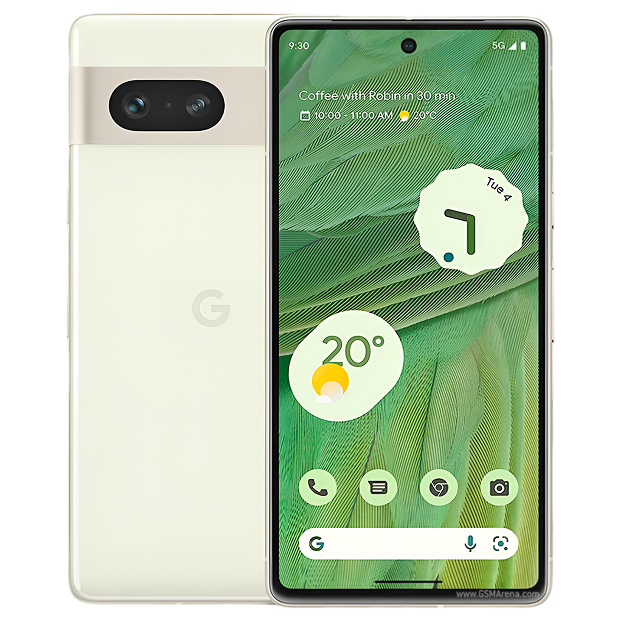
Google launched the Pixel 7 Pro in October 2022 as their flagship—no compromises, maximum capability. You got the Tensor G2 chip, massive 6.7-inch QHD+ LTPO OLED display with 120Hz refresh, triple camera system with 5x telephoto, 5,000mAh battery, wireless charging, IP68 water resistance, and five years of security updates. This was Google's premium offering competing directly with iPhone 14 Pro Max and Galaxy S22 Ultra.
Now we're over two years in, and we've got solid real-world data on how these devices age. That LTPO OLED display is showing predictable wear patterns. The large 5,000mAh battery has been through 700-900 charge cycles for heavy users. Charging ports have experienced thousands of insertions. Camera systems have captured hundreds of thousands of photos. This real-world aging data helps us diagnose issues accurately and distinguish between normal wear and actual defects.
Why Devices Don't Age Gracefully
Here's something nobody tells you when you spend flagship money on a phone—premium pricing doesn't exempt you from the physics and chemistry that cause all electronics to degrade with use. Your Pixel 7 Pro contains sophisticated components operating at the edge of current technology, and that sophistication comes with complexity that creates additional potential wear points.
Think about a high-end camera that costs thousands of dollars. When new, the autofocus is lightning-fast, the image stabilization is flawless, the shutter operates with precision, and every component works perfectly. After two years of professional use—thousands of actuations, hours of continuous operation, exposure to various conditions—you notice changes. The autofocus might be slightly slower in challenging conditions. The stabilization system sounds different. The shutter has developed a characteristic sound. These aren't defects—they're the natural result of mechanical and electronic components doing exactly what they were designed to do thousands of times.
Your Pixel 7 Pro follows identical patterns. That 5,000mAh battery is among the largest in flagships, but size doesn't prevent electrochemical degradation. Every charge cycle causes permanent changes at the molecular level. Lithium ions migrate between electrodes, but some get trapped. Electrode surfaces develop layers that impede subsequent ion flow. The electrolyte decomposes into compounds that reduce performance. Heat from the Tensor G2 during intensive tasks and from fast charging accelerates everything exponentially.
After 700-900 charge cycles (typical for heavy users after 24+ months), expect battery capacity around 82-88% of original. This isn't defective—it's predictable lithium-ion chemistry affecting every rechargeable device from phones to electric vehicles. The Pixel 7 Pro's excellent battery management slows degradation but can't prevent it.
The 6.7-inch LTPO OLED display uses organic compounds that emit light when electricity passes through them. These organic molecules physically break down from the energy required to produce photons—it's unavoidable chemistry. LTPO technology (enabling variable refresh from 10Hz to 120Hz) adds complexity with more control circuitry and layers. Static UI elements (status bar, keyboard, navigation) cause faster localized degradation. After two years of heavy use, minimal burn-in is characteristic OLED aging, not poor quality.
The triple camera system contains mechanical components subject to wear. Voice Coil Motors (VCMs) for autofocus and optical image stabilization use electromagnetic actuators that have moved thousands of times. The telephoto camera with 5x optical zoom has additional moving parts for zoom control. These mechanisms experience friction and wear over extended use.
The USB-C port has handled over a thousand cable insertions by this point, possibly more. Those 24 pins must make reliable contact every time. Mechanical wear accumulates. Pocket lint compresses into the port cavity. Solder connections experience stress from lateral forces. After this much use, even well-made ports can develop issues.
Software has grown substantially heavier over two years. The Pixel 7 Pro shipped with Android 13. You've received Android 14 and 15, each adding features and complexity. Apps update constantly, often adding functionality that consumes more resources. After two years, you're running significantly heavier software on identical hardware.
Understanding these patterns helps evaluate whether your Pixel 7 Pro needs repair or if you're experiencing normal aging that all devices encounter.
Battery Performance After Extended Use
What you're experiencing: Battery life has declined noticeably over the past year. You used to easily make it through a day, now you're hunting for chargers by evening. Or the battery percentage drops unpredictably—showing 50%, then suddenly 20%. Or charging takes longer than it used to, especially fast charging.
Why this happens: After two years of daily charging, your Pixel 7 Pro's battery has been through 700-900+ cycles for heavy users. Testing on devices this age consistently shows battery health at 82-88% of original 5,000mAh capacity. That means your battery now holds 4,100-4,400mAh instead of 5,000mAh—a loss of 600-900mAh.
That capacity loss translates to dramatically shorter runtime because the large, high-refresh LTPO display and Tensor G2 chip consume substantial power. A battery at 85% health doesn't give you 85% runtime—it often feels like 70% because power-hungry components have less available energy and the battery management system becomes less accurate as cells degrade.
Battery percentage jumping erratically indicates calibration issues. As batteries age and internal resistance increases unevenly across cells, accurate state-of-charge estimation becomes nearly impossible. The system makes educated guesses that become increasingly inaccurate.
Charging slowing over time relates to both battery degradation and thermal management. Degraded batteries can't accept charge as quickly. The charging system also becomes more conservative as batteries age, further limiting charge speed to protect degraded cells.
Here's what happens when you come to The Fix: We measure actual battery capacity with professional equipment and compare it to expected degradation curves for devices this age. Testing typically shows 82-88% health on two-year-old Pixel 7 Pro devices. When health drops below 85% and runtime no longer meets user needs, replacement makes sense. Battery replacement restores full 5,000mAh capacity and original runtime. Customers consistently report their phone "feels completely new" after battery replacement.
When repair makes sense: Battery health below 80-85% justifies replacement if runtime is insufficient. Actual defects (swelling, excessive heat, charging failure) require immediate replacement. Battery showing 90%+ health probably doesn't need hardware replacement—the issue is likely software or usage patterns.
Display Characteristics After Two Years
What you're experiencing: You might notice the display showing its age—subtle burn-in on the status bar or keyboard, slight green tint at low brightness that's more noticeable than you remember, or brightness variance across the large screen. Or you're seeing "image retention" where recently displayed content temporarily ghosts when showing solid colors.
Why this happens: The Pixel 7 Pro's 6.7-inch LTPO OLED has produced billions of images over two years. OLED organic compounds degrade from use—it's not "if" but "how much." After 18-24 months of typical use, visible aging is common and generally normal.
Burn-in on status bar and keyboard after this much use is extremely common on OLEDs. These elements remain static for hours daily, causing localized organic compound degradation that's faster than surrounding pixels. Google's burn-in mitigation helps, but can't prevent it entirely after extended heavy use. Minimal burn-in after two years is characteristic, not defective.
The green tint at low brightness can become more pronounced as LTPO panels age and organic compounds degrade unevenly. What was barely noticeable when new can become slightly more visible after two years of use.
Image retention (temporary ghosting) differs from permanent burn-in. It's a temporary effect where recently displayed content leaves brief afterimages. This becomes more common as OLEDs age but usually isn't permanent—the ghost image fades after displaying different content.
What we tell customers who come in: Most Pixel 7 Pro display concerns after two years are normal OLED aging rather than defects. Minimal status bar burn-in? Expected after this use. Slight tint more noticeable? Normal aging. Brief image retention? Common on aged OLEDs.
Actual defects look different—dead pixels, bright or dark lines, large permanent discoloration, severe burn-in, or touch failure. We distinguish between normal aging and defects with calibrated testing.
When repair makes sense: Severe display defects warrant screen replacement. Normal OLED aging characteristics don't necessarily require Google Pixel 7 Pro repair unless degradation significantly impacts usability. We're honest about what's normal two-year aging versus actual defects.
Camera System After Thousands of Photos
What you're experiencing: The camera still takes excellent photos but maybe not as consistently as you remember. Autofocus occasionally hesitates, especially in low light. The telephoto camera seems slightly slower to focus. Or you're noticing more variation in image quality than when the phone was new.
Why this happens: The Pixel 7 Pro's triple camera system has captured hundreds of thousands of photos and videos over two years. The hardware (sensors, lenses, VCMs, OIS systems) and software (computational photography algorithms) have both changed.
Voice Coil Motors controlling autofocus on all three cameras have moved thousands of times. These tiny electromagnetic actuators contain physical components—coils, magnets, springs—that experience wear. While designed for longevity, slight performance degradation after extensive use is normal. This manifests as occasionally slower autofocus or slight hunting in challenging conditions.
The telephoto camera with 5x optical zoom has additional complexity—the zoom mechanism itself contains moving parts subject to wear. After thousands of zoom operations, slight performance changes aren't unusual.
Optical image stabilization systems on main and telephoto cameras use electromagnetic actuators that have made thousands of tiny corrective movements. Slight OIS degradation after this much use can affect video stabilization quality.
Software has also evolved. Google continuously updates computational photography algorithms. Photos from your Pixel 7 Pro today process differently than photos from October 2022 even with identical hardware. Some users prefer current processing, others preferred earlier versions.
From working on these every day: Most Pixel 7 Pro camera issues after two years are either minor mechanical wear (slightly slower autofocus occasionally, minor OIS changes) or software evolution. Complete hardware failures (total autofocus failure, severe OIS malfunction, sensor defects) are less common and have consistent, severe symptoms.
When repair makes sense: Complete autofocus failure, severe OIS problems, or sensor defects warrant camera module replacement. Minor performance variations, slightly slower autofocus occasionally, or disliking current processing don't indicate hardware failures needing repair.
Charging Port After Extensive Use
What you're experiencing: Charging has become less reliable—the cable doesn't seat as firmly as it used to, connection drops when the phone moves, fast charging is inconsistent, or you need to position the cable carefully for charging to work.
Why this happens: After two years, your Pixel 7 Pro's USB-C port has experienced 1,000-1,500+ cable insertions. Two primary issues affect ports this age: severe contamination and mechanical wear.
Port contamination is nearly universal on two-year-old devices. Lint and dust accumulate over months and years, compressing into dense layers that prevent proper cable insertion. Even meticulous users develop this—it's inevitable with daily pocket carry.
Mechanical wear is also common after this many insertions. The 24 pins inside experience microscopic wear from friction. Solder connections experience stress from lateral forces when using the phone while charging. After 1,000+ insertions, even well-made ports can become finicky.
Your charging cable and adapter have also aged. Two years of daily use degrades cable conductors, loosens connectors, and reduces charging performance. Often the "port problem" is actually cable degradation.
What really happens in most cases: About 70% of two-year-old Pixel 7 Pro charging complaints involve port contamination or degraded cables rather than port hardware failure. Professional cleaning and testing with new accessories solves most issues. When those don't help, actual port hardware failure becomes apparent and requires replacement.
When repair makes sense: Actual port hardware failure (damaged pins, loose housing that cleaning can't fix, complete failure) requires replacement. Contamination needs professional cleaning but not part replacement. Cable issues need new cables, not phone repair.
What Actually Happens During Repair
Let's walk through The Fix's actual process for Pixel 7 Pro repair, so you know exactly what to expect.
Initial diagnostic (always free): We start with comprehensive testing using professional equipment. Battery capacity gets precisely measured with instruments that show actual remaining capacity, not just percentage estimates. We compare results to expected degradation for devices this age. Display gets tested with calibrated instruments for uniformity, brightness levels, touch accuracy. Camera system gets validated—all three modules tested for focus speed, accuracy, stabilization, image quality. Charging gets tested with professional power measurement equipment and known-good cables and chargers.
Honest discussion about findings: This is crucial for two-year-old devices where aging and defects can overlap. If your battery tests at 84% health, we'll explain this is normal aging for 24 months of daily charging, and we'll discuss whether replacement makes sense based on your usage needs. If your display shows minimal burn-in characteristic of aged OLEDs, we'll clarify this is normal aging, not a defect. If charging issues stem from contamination, we'll show you the debris under magnification rather than immediately recommending port replacement.
Transparent repair options: For actual hardware issues, we discuss options without pressure. Battery significantly degraded and runtime insufficient? Replacement restores full capacity. Display has actual defects beyond normal aging? Screen replacement appropriate. Charging port hardware has failed after cleaning attempt? Replacement necessary. Camera module has mechanical failure? Module replacement required. We explain exactly what we'd do, why, and let you decide.
Professional repair work: Pixel 7 Pro repair requires specific expertise. The device uses sophisticated adhesive sealing for water resistance. Internal layout is complex with precise cable routing. Reassembly requires proper adhesive application and component alignment to maintain water resistance ratings. Our technicians understand these requirements and have appropriate tools and parts.
Comprehensive post-repair testing: After any repair, we validate everything thoroughly. Battery repairs get multiple charge/discharge cycles at various power levels. Display repairs get calibration, uniformity verification, and touch validation across the entire surface. Camera repairs get tested across all three modules and all features. Charging repairs get validated with multiple cables and chargers at various power levels. We don't release devices until they pass our quality standards.
Timeline expectations: Most Google Pixel 7 Pro repair jobs complete same-day for common issues. Battery replacement, charging port cleaning/service, screen replacement typically finish same-day. Camera module replacement might need overnight for thorough testing. Complex repairs need adequate time—we don't rush work on expensive devices.
Maintain Your Pixel 7 Pro Going Forward
Age-appropriate care:
- Replace degraded charging cables—two-year-old cables often cause "phone problems"
- Keep USB-C port clean with monthly inspection and gentle debris removal
- Consider professional battery replacement when health drops below 85%
- Use quality charger (30W USB-C PD minimum) for proper fast charging
Display care for aged OLEDs:
- Use dark mode to minimize further burn-in on static elements
- Vary usage patterns when possible—don't spend hours only in apps with static UI
- Accept that minimal burn-in after two years is normal, not defective
- Lower brightness when possible to slow additional organic compound degradation
Battery longevity:
- Avoid extreme temperatures—heat dramatically accelerates degradation on already-aged batteries
- Use Battery Saver during intensive tasks
- Consider replacement when health drops below 80-85% rather than limping along
Software optimization:
- Keep Android updated for performance improvements
- Restart weekly to clear accumulated processes
- Monitor battery usage statistics for problem apps
- Clear app cache periodically
Google Pixel 7 Pro Repair Done Right: Professional Solutions
Your Pixel 7 Pro has been in service for over two years—substantial time for constant-use electronics. Most issues at this age are either normal component aging (battery degradation, OLED wear, port contamination, minor camera wear) or software-related.
Actual hardware defects requiring repair do occur, but understanding what's normal aging versus failure is crucial. Bring your Pixel 7 Pro to The Fix for expert diagnostic testing that accounts for device age and usage. We'll distinguish between normal two-year wear, maintenance needs, and genuine hardware failures requiring repair. No pressure, no upselling—just honest assessment from technicians who work on these devices daily.
Professional Google Pixel 7 Pro repair addresses real hardware failures—significantly degraded batteries, damaged displays, camera malfunctions, charging port failures. Your flagship device deserves expert service with quality components, proper procedures, and technicians who understand premium device engineering. We fix actual problems while being honest about what's normal aging.


Trusted repair solution for mobile phones, tablets, gaming consoles, and computer systems. We provide fast, reliable, and affordable repair services to get your devices back in perfect working condition.
The Fix is an independent repair service provider and is not affiliated with, sponsored by, or endorsed by Apple Inc., Samsung Electronics, Google LLC, or any other device manufacturer. We use high-quality compatible replacement parts unless explicitly stated. All trademarks are property of their respective owners.


© Copyright The Fix Solutions All rights reserved 2026.
Design by Deepcoder