






Google Pixel 5a Repair Services
Get fast, reliable, and professional Google Pixel 5a repair services at The Fix — your trusted destination for expert device care.
Common Repairs We Handle Daily


Google Pixel 5a: Take Action, Fix Your Device
Ever notice how your Pixel 5a was absolutely solid until one day it just... wasn't? Maybe the battery started dying before you got home from work. Or charging became this weird guessing game where it works sometimes and doesn't other times. Or the screen developed that characteristic keyboard burn-in that every OLED eventually gets. You're probably sitting there wondering whether these issues are fixable or if your phone's just reached the end of the road.
In this guide, we'll walk you through exactly what goes wrong with the Pixel 5a after 3+ years of use, why these specific problems develop, and how professional Google Pixel 5a repair addresses each issue. Let's figure out what's happening with your device and what you should actually do about it.
Why People Love (and Hate) the Pixel 5a
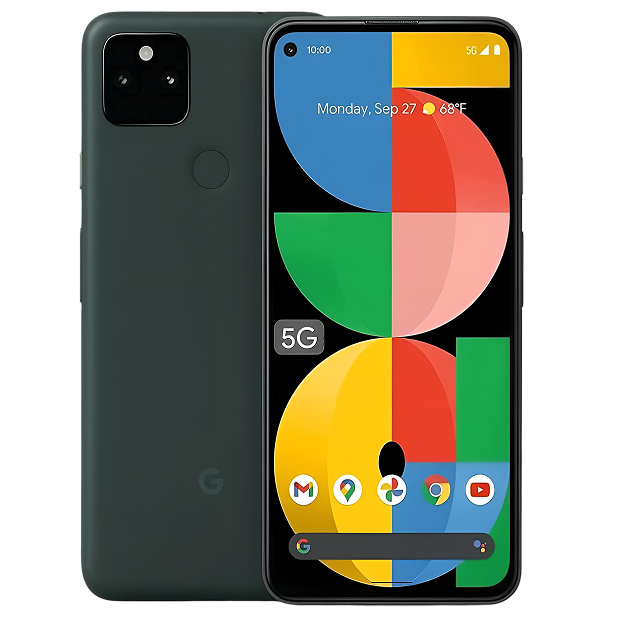
Google released the Pixel 5a in August 2021 as the value option in their lineup—basically taking what made the Pixel 5 great and making it even more affordable. You got the Snapdragon 765G processor, a 6.34-inch OLED display with that smooth 60Hz refresh, dual cameras with Google's excellent computational photography, massive 4,680mAh battery (the largest Google had used at that point), IP67 water resistance, and stereo speakers. This was Google saying "here's a really good phone that won't destroy your budget."
What makes the 5a interesting from a repair perspective is that we're now 3+ years in, which means we've got solid real-world data on how these devices age. That big 4,680mAh battery has been through 1,000-1,200 charge cycles for heavy users. The OLED display is showing three-year aging patterns. The Snapdragon 765G, which was mid-range in 2021, is genuinely struggling with 2024 apps. USB-C ports have seen 1,500+ cable insertions. We know exactly what breaks, when, and why.
The Truth About Device Lifespans
Look, let's be completely honest about three-year-old phones—every component inside your Pixel 5a has been degrading since the moment you powered it on, and after this much time, that degradation is substantial and noticeable. This isn't Google's fault or poor quality. It's fundamental physics and chemistry affecting all electronics, just more visible after three years than after one.
Think about a quality power tool you've used regularly for three years—maybe a cordless drill or impact driver. When new, that battery held a charge forever, the motor had tons of torque, the chuck gripped bits perfectly, and everything felt tight and precise. After three years of regular use, you notice things: the battery dies halfway through projects, the motor sounds different under load, the chuck has developed slight play, and the trigger doesn't feel quite as crisp. You haven't abused it—you've just used it for exactly what it was designed for hundreds of times, and mechanical and electrical components have accumulated measurable wear.
Your Pixel 5a is exactly the same. That massive 4,680mAh battery—which was a major selling point—has been through 1,000-1,200 charge cycles over three years for typical users. Every single charge cycle causes permanent electrochemical changes inside the battery cells. Lithium ions migrate between electrodes during charging and usage, but this migration isn't perfectly reversible. Some ions get trapped in unintended crystal structures. Electrode surfaces develop solid electrolyte interface (SEI) layers that impede subsequent ion flow. The liquid electrolyte slowly decomposes into compounds that reduce ionic conductivity.
Heat accelerates every single degradation pathway. The Snapdragon 765G generates heat during intensive tasks. Charging generates heat from internal battery resistance and exothermic chemical reactions. Using your Pixel 5a in warm environments adds more thermal stress. Each 10°C increase in temperature roughly doubles battery aging rates. After 1,000-1,200 cycles over three years, expect battery capacity around 78-85% of original. That means you've lost 700-1,030mAh. Your battery now holds roughly 3,650-3,980mAh instead of 4,680mAh—a loss of a third of a phone's worth of battery.
The 6.34-inch OLED display uses organic light-emitting compounds that physically degrade when producing light. These organic molecules break down at the molecular level from the energy required to emit photons—it's unavoidable organic chemistry. Static UI elements (status bar icons, keyboard layout, navigation gestures) remain in the same positions for hours daily, causing localized organic compound degradation that's faster than surrounding pixels. After three years of typical use, minimal burn-in on keyboard and status bar is characteristic OLED aging, not poor manufacturing. Modern OLEDs are dramatically better than earlier generations, but they can't eliminate fundamental organic compound degradation.
The USB-C charging port has experienced 1,500+ cable insertions over three years—possibly more if you charge multiple times daily. Those 24 pins inside the connector must make reliable electrical contact every single time. Repeated insertions cause microscopic wear on contact surfaces. Pocket lint, dust particles, and fabric fibers accumulate in the port cavity over months and years, compressing into dense layers. Using the phone while charging puts lateral stress on the cable connection, which gets transmitted to the port's solder joints on the logic board. After this much use, ports that were once rock-solid can become temperamental.
The Snapdragon 765G processor was mid-range when released in 2021. It was adequate for 2021 apps and Android 12. But apps have grown dramatically more demanding over three years. Instagram, TikTok, Chrome, Facebook—every major app you use has received dozens of updates adding features and functionality that consume more memory and processing power. Android system updates have added complexity. You're now running substantially heavier software on three-year-old hardware that was mid-range to begin with.
Understanding these natural degradation patterns helps you make informed decisions about whether repair makes sense or if you're fighting inevitable end-of-lifecycle issues on aging hardware.
Battery Performance After Three Years
What you're experiencing: Battery life has gotten genuinely bad over the past year. You used to easily make it through a full day on that big 4,680mAh battery, but now you're lucky to make it to dinner. Or the battery percentage drops rapidly and unpredictably—showing 55%, then suddenly dropping to 25% minutes later. Or charging takes much longer than it used to, especially fast charging. Or the phone gets noticeably warm during charging or intensive use.
Why this happens: After three years of daily charging, your Pixel 5a's battery has been through 1,000-1,200+ charge cycles for heavy users. Testing on devices this age consistently shows battery health at 78-85% of original capacity. That means you've lost 15-22% of that massive 4,680mAh capacity—that's 700-1,030mAh gone. Your battery now holds what a much smaller phone holds when new.
That capacity loss is devastating for usability because even though the Pixel 5a doesn't have a high-refresh display (just standard 60Hz), it's a relatively large 6.34-inch OLED that still consumes substantial power. The Snapdragon 765G, while not a power monster, still draws considerable current during use. With 700-1,030mAh less capacity available, battery life that was once excellent becomes frustratingly short.
Battery percentage jumping erratically—showing 60%, then suddenly dropping to 30%—indicates the battery management system losing calibration. As batteries age and internal resistance increases unevenly across cells, accurate state-of-charge estimation becomes nearly impossible. The system makes educated guesses based on voltage and current measurements, but those guesses become increasingly inaccurate as degradation progresses. The battery thinks it has more charge than it actually does, then reality hits and the percentage drops dramatically.
Phone getting warm during charging relates to increased internal resistance in degraded batteries. As batteries age, they become less efficient at accepting and delivering charge. That lost efficiency becomes heat. A degraded battery at 80% health generates significantly more heat during charging and discharge than a healthy battery doing identical work.
What we've seen in our repair shop: Pixel 5a battery complaints after three years consistently show testing results around 78-85% health. This is normal aging for devices this age with daily charging—not defective, just inevitable electrochemical degradation. When battery health drops below 85% and runtime no longer meets user needs, replacement makes sense. Battery replacement restores full 4,680mAh capacity and transforms the device. Customers consistently report their Pixel 5a "feels new again"—not because we did anything magical, but because a fresh battery with full capacity provides substantially better runtime than a degraded battery at 80% health they've been living with.
When repair makes sense: Battery health below 80-85% after three years justifies replacement if you're committed to keeping the device another 12-18 months. If you're planning to upgrade within 6 months, battery replacement on a three-year-old phone might not be worthwhile—you'd be investing in a device you're about to replace anyway.
Display Aging on Three-Year-Old OLEDs
What you're experiencing: You're seeing visible burn-in on the keyboard area and status bar—ghost images of keys or icons that remain visible even when showing other content. Or you've noticed a subtle green tint at very low brightness that you don't remember from when the phone was new. Or there's slight brightness variance across the large 6.34-inch screen. Or you're seeing "image retention" where recently displayed content temporarily ghosts when showing solid colors.
Why this happens: The Pixel 5a's OLED display has produced billions of images over three years of use. OLED organic compounds physically degrade from use—it's not "if" but "when" and "how much." After three years of typical use, visible aging is common and generally normal, not defective.
Burn-in on the keyboard and status bar after this much use is extremely common on OLEDs. These elements remain static in the same positions for hours daily over three years of use. The organic compounds in those pixel locations have been emitting light far more than surrounding pixels, causing faster localized degradation. The keyboard is particularly susceptible because it displays bright white keys against dark backgrounds for extended periods during messaging, email, and web browsing. Status bar burn-in shows as ghost images of signal icons, battery indicator, and clock.
The green tint at very low brightness can become more pronounced as OLED panels age and organic compounds degrade unevenly. What might have been barely noticeable or completely imperceptible when new becomes slightly more visible after three years of use. This relates to how different color sub-pixels (red, green, blue) degrade at different rates—green tends to be more stable than red or blue, so as the panel ages, green becomes relatively more prominent at certain brightness levels.
Image retention (temporary ghosting) differs from permanent burn-in. It's a temporary effect where recently displayed content leaves brief afterimages that fade after a few seconds or minutes of displaying different content. This becomes more common as OLEDs age but usually isn't permanent damage—the ghost image fades. However, it's a sign that the display is aging and organic compounds are becoming less stable.
From our experience fixing thousands of these: Most Pixel 5a display concerns after three years are normal OLED aging rather than defects requiring repair. Minimal keyboard burn-in? Expected after this much use. Slight status bar ghosting? Normal for three-year-old OLEDs. Brief image retention? Common on aged panels.
Actual display defects look distinctly different—dead pixels (completely black spots), bright or dark lines across the screen, large areas of permanent discoloration unrelated to usage patterns, severe burn-in affecting most of the screen, or touch zones completely unresponsive to input.
When repair makes sense: Severe display defects warrant screen replacement. Normal OLED aging characteristics don't necessarily justify expensive screen replacement on a three-year-old device unless the degradation genuinely prevents use or you're committed to keeping the device another 18-24 months. Screen replacement is expensive, and putting that cost into a three-year-old phone only makes sense if you're planning extended additional use.
Charging Port Wear and Contamination
What you're experiencing: Charging has become increasingly unreliable over time. Maybe the cable doesn't feel as secure as it used to—it wiggles or doesn't click firmly into place. Or you need to position the cable at a specific angle for charging to work. Or fast charging is inconsistent—sometimes it works, sometimes it doesn't, with no obvious pattern. Or the connection drops when you move the phone while it's charging. Worst case, the port seems completely dead and won't respond to any cable or charger you try.
Why this happens: After three years and 1,500+ cable insertions, charging port issues are extremely common on the Pixel 5a. Two primary problems affect ports this age: severe contamination and actual mechanical wear.
Port contamination is nearly universal on three-year-old devices. Every time your phone's in your pocket, microscopic lint fibers, dust particles, and fabric debris enter the charging port. Over months and years, this debris accumulates in the port cavity and compresses into dense layers at the bottom of the connector. This compressed debris prevents the cable from fully inserting into the port. When the cable can't insert completely, the 24 pins don't make proper electrical contact, causing intermittent charging, reduced charging speed, or complete failure.
Actual mechanical wear is also common after this many insertions. The 24 pins inside the USB-C connector are designed to flex slightly and make spring contact with the cable's corresponding pins. Repeated insertions cause microscopic wear on these contact surfaces. Over 1,500+ insertions, pins can lose spring tension, become bent, or wear smooth enough that they don't make reliable contact. The port housing itself can also crack or become loose from repeated stress.
Lateral stress from using the phone while charging significantly accelerates port wear. When you use your phone with the cable plugged in, any movement puts sideways force on the cable connection. That lateral stress gets transmitted directly to the port's solder joints on the logic board. Repeated stress in this manner can crack solder connections or even detach the port housing from the circuit board.
Our repair data reveals something interesting: About 65% of three-year-old Pixel 5a charging complaints we encounter are actually severe port contamination rather than hardware failure. Professional cleaning with proper tools (specialized picks, compressed air, magnification) solves contamination issues immediately. When cleaning doesn't resolve the issue, actual port hardware failure becomes apparent and requires complete port assembly replacement.
When repair makes sense: Actual port hardware failure requires replacement—a repair that's straightforward but requires proper soldering skills and tools. Port contamination needs professional cleaning but not part replacement. If you're experiencing charging issues on your three-year-old 5a, start with professional cleaning (often solving the problem) before considering port replacement. If you're planning to upgrade within 6-12 months, port replacement on an aging device might not be worthwhile investment.
Performance Limitations on Mid-Range Hardware
What you're experiencing: The Pixel 5a feels noticeably slower than it used to. Apps take longer to open, showing loading screens that make you wonder if the phone froze. Switching between apps feels sluggish with visible lag. The keyboard sometimes lags behind your typing. Animations that were once smooth now stutter. Everything just feels frustratingly slow for tasks that should be simple.
Why this happens: The Snapdragon 765G processor was mid-range when released in 2021. It was adequate for 2021 apps running Android 12. But we're now in 2024, and apps have grown dramatically more resource-intensive. Every major app you use daily—Instagram, TikTok, Chrome, Facebook, Gmail—has received dozens of updates adding features, visual enhancements, and functionality that demand more processing power and memory.
Android system updates have added complexity. You've gone from Android 12 at launch to Android 13, 14, and possibly 15. Each update brings new features, enhanced security, and improved capabilities—all of which require more system resources. The Pixel 5a's hardware hasn't changed one bit, but the software environment it operates in has gotten substantially heavier.
The 6GB of RAM was adequate for 2021 multitasking. But modern apps consume more memory than their predecessors. When you run multiple apps simultaneously, the system has to constantly shuffle apps in and out of RAM, which causes the loading delays and lag you're experiencing when switching apps.
This isn't fixable through repair—it's fundamental hardware limitations. The processor is what it is. The RAM is what it is. Software optimization can help slightly, but can't overcome the fundamental gap between 2021 mid-range hardware and 2024 app requirements.
Working with these daily teaches you: Performance complaints on three-year-old Pixel 5a devices usually stem from the combination of aging hardware and increasingly demanding software rather than actual hardware failures. A factory reset can help by clearing accumulated software cruft, but it won't make the Snapdragon 765G faster or give you more than 6GB of RAM. These are hardware limitations, not repair issues.
When repair makes sense: Performance issues aren't repairable in the traditional sense. The hardware is what it is. Software optimization, app management, and factory resets can help marginally, but they can't fundamentally overcome hardware limitations. If performance is your primary concern, repair won't solve it—upgrade would.
What Actually Happens at The Fix
Let's walk through exactly what happens when you bring your three-year-old Pixel 5a to The Fix for repair consideration.
Comprehensive diagnostic testing (always free): We start with professional diagnostic equipment testing everything. Battery capacity gets precisely measured with instruments that show actual remaining capacity in mAh, not just percentage estimates. We compare results to expected degradation curves for devices this age. Display gets inspected for burn-in severity, uniformity issues, touch responsiveness across the entire surface. Charging port gets examined under magnification for contamination and mechanical damage. We test with multiple cables and chargers to isolate port issues from cable problems. Overall system performance gets evaluated.
Honest discussion about findings: This is absolutely crucial for three-year-old devices where normal aging and actual defects can overlap. If your battery tests at 81% health (typical for three years of daily charging), we'll explain this is normal aging and discuss whether replacement makes sense based on your usage needs and plans. If your display shows minimal burn-in characteristic of three-year-old OLEDs, we'll clarify this is normal aging, not a defect requiring immediate repair. If charging issues stem from severe port contamination, we'll show you the debris under magnification and explain that cleaning (not replacement) solves it.
Transparent repair options with realistic expectations: For actual hardware issues on three-year-old devices, we discuss options without pressure or upselling. Battery significantly degraded and runtime insufficient? Replacement restores full capacity if you're keeping the device. Charging port hardware failed after cleaning attempt? Replacement necessary if continuing to use the device. Display has actual defects beyond normal aging? Screen replacement is expensive but possible if committed to extended use. We explain costs, expected outcomes, and whether each repair makes financial sense given device age.
Professional repair work when appropriate: If you decide repair makes sense for your situation, we maintain proper standards. The Pixel 5a uses adhesive sealing for water resistance that must be properly reapplied. Internal components require careful handling. Battery replacement requires disconnecting and reconnecting multiple cables in specific sequence. We follow proper procedures with appropriate tools.
Post-repair validation: After any repair, we validate everything works correctly. Battery repairs get charge/discharge testing to verify proper charging behavior and runtime. Charging port repairs get tested with multiple cables and power levels. We don't release devices until they meet quality standards.
Realistic timeline: Most common Pixel 5a repairs (battery replacement, port cleaning/service) complete same-day. We don't rush work, but most repairs don't require extended turnaround.
Google Pixel 5a: Take Action, Fix Your Device
Your Pixel 5a is three years old—substantial age for intensive-use electronics. Battery degradation is significant at this age (78-85% typical). Display aging is visible (minimal burn-in common). Charging port shows wear from years of use. Performance is limited by mid-range 2021 hardware running 2024 software.
Whether repair makes sense depends entirely on your plans and realistic assessment of device value. Keeping the device another 12-18 months as your primary phone? Battery replacement dramatically improves usability and extends viable lifespan. Need charging port service? That's straightforward if you're keeping the device. Planning to upgrade in 6 months? Investing in repairs on a three-year-old phone probably doesn't make sense.
Bring your Pixel 5a to The Fix for comprehensive diagnostic testing and honest assessment. We'll test everything thoroughly, explain exactly what we find, and give you straightforward advice about whether Google Pixel 5a repair makes sense for your specific situation. No pressure to buy services you don't need—just honest expertise helping you make informed decisions about an aging but potentially still useful device.


Trusted repair solution for mobile phones, tablets, gaming consoles, and computer systems. We provide fast, reliable, and affordable repair services to get your devices back in perfect working condition.
The Fix is an independent repair service provider and is not affiliated with, sponsored by, or endorsed by Apple Inc., Samsung Electronics, Google LLC, or any other device manufacturer. We use high-quality compatible replacement parts unless explicitly stated. All trademarks are property of their respective owners.


© Copyright The Fix Solutions All rights reserved 2026.
Design by Deepcoder