






Google Pixel 3 XL Repair Services
Get fast, reliable, and professional Google Pixel 3 XL repair services at The Fix — your trusted destination for expert device care.
Common Repairs We Handle Daily


Complete Google Pixel 3 XL Repair Guide
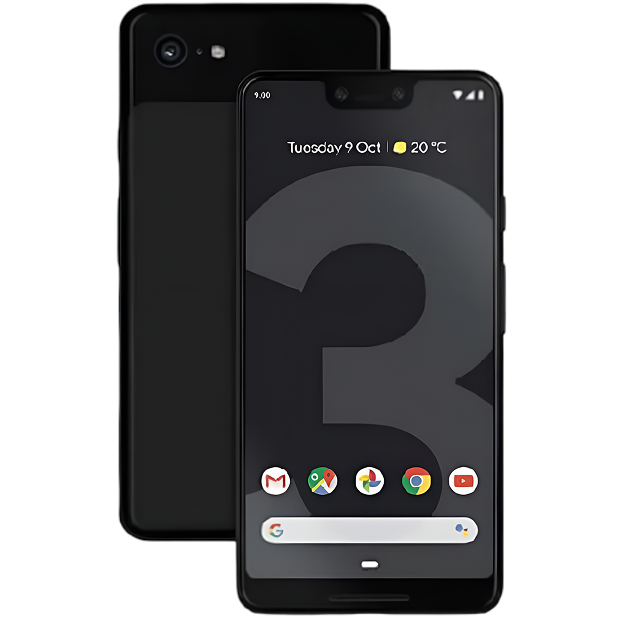
When Google released the Pixel 3 XL in 2018, it pushed boundaries with features that would become smartphone standards. Wireless charging arrived in the Pixel lineup for the first time. Night Sight transformed low-light photography through computational brilliance. The 6.3-inch OLED display with its distinctive notch maximized screen real estate. Six years later, many Pixel 3 XL devices continue serving their owners, though age-related issues increasingly surface. Understanding common problems and available solutions helps maintain these capable devices.
The Pixel 3 XL: Premium Features That Endure
Google positioned the Pixel 3 XL as its flagship statement, combining hardware refinements with software innovations that leveraged machine learning in unprecedented ways. The device introduced features like Call Screen, which used Google Assistant to handle spam calls automatically. Top Shot captured burst photos around your shutter press, using AI to recommend the best frame. Super Res Zoom enhanced digital zoom quality through computational photography rather than optical hardware.
The 6.3-inch OLED display delivered vibrant colors and deep blacks that made content consumption immersive. The controversial notch housed dual front-facing cameras enabling wide-angle selfies and portrait mode effects. While the design choice sparked debate, the display itself offered excellent brightness, color accuracy, and outdoor visibility that remains impressive by current standards.
Wireless charging represented a significant addition to the Pixel lineup. The Qi-compatible charging supported both standard charging pads and Google's Pixel Stand, which transformed the phone into a smart display while charging. This convenience feature changed how users approached daily charging routines, making counter and nightstand charging more elegant.
The camera system built on Pixel 2's foundation while introducing Night Sight—a computational photography breakthrough that captured usable images in near-darkness without flash. The single 12.2MP rear camera continued proving that sensor count matters less than processing intelligence. Six years later, the Pixel 3 XL camera still produces impressive results that many current mid-range devices struggle to match.
Common Problems Affecting the Pixel 3 XL
Battery Capacity Degradation
The 3,430mAh battery that once provided all-day endurance now struggles to reach evening. This represents the most frequent complaint from long-term Pixel 3 XL owners. Battery chemistry naturally degrades through charge cycles, and after six years of use, even carefully maintained cells show significant capacity loss. Users notice rapid discharge during basic tasks, unexpected shutdowns above 20% charge, and extended charging times suggesting the battery can no longer accept current efficiently.
Battery swelling occasionally occurs in aged cells, creating visible separation between the display and frame. Any physical deformation requires immediate attention, as swollen batteries present safety risks. The pressure can damage other internal components and potentially compromise the structural integrity of the device.
OLED Display Issues
The beautiful OLED panel that made the Pixel 3 XL display so appealing also proves susceptible to burn-in. Navigation buttons, status bar icons, and keyboard outlines may ghost onto the screen after thousands of hours of use. While this doesn't affect touch functionality, it becomes increasingly noticeable on light backgrounds and diminishes the visual experience.
The notch area can develop specific problems where sensors housed within malfunction. The front-facing cameras may fail to focus properly, or the ambient light sensor can lose calibration, causing brightness adjustments that seem random. These issues stem from the complex integration required to pack multiple sensors into the limited notch space.
Touch responsiveness may degrade in specific zones, particularly along edges where the display curves slightly toward the frame. Users report needing multiple taps to register input or experiencing phantom touches where the screen registers input without physical contact. These problems suggest digitizer layer issues rather than the OLED panel itself.
Charging Port Connectivity Problems
The USB-C port experiences mechanical stress with every cable insertion and removal. After years of daily charging cycles, internal contacts can bend or wear, creating intermittent charging behavior. Users often report needing to position cables at specific angles or experiencing slow charging that has nothing to do with the battery itself.
Wireless charging functionality can also degrade. The charging coil embedded in the back of the device may develop connection problems, causing intermittent wireless charging or complete failure. This less common issue typically stems from the coil's flex cable connection to the motherboard becoming unseated through repeated thermal expansion and contraction.
Camera Performance Issues
The camera module may develop autofocus problems where it struggles to lock onto subjects or produces consistently blurry images. This can stem from either software glitches that a factory reset might address or actual hardware failure in the focus mechanism. The dual front-facing cameras in the notch can fail independently, with one camera working while the other produces black images or error messages.
Night Sight and other computational photography features depend heavily on processing power and software optimization. As the device ages and accumulates software updates not optimized for its specific hardware, these features may slow down or produce less impressive results than they originally delivered.
Power Button and Physical Controls
The physical power button may become less responsive over time, requiring harder presses to register input. In some cases, buttons stick in the depressed position or fail to click properly. This stems from worn internal switch mechanisms rather than software problems. The Active Edge squeeze feature may also lose sensitivity or stop working entirely as the pressure sensors age or lose calibration.
Wireless Charging Inconsistency
Devices may charge wirelessly intermittently or fail to charge on certain pads while working on others. This suggests either coil misalignment issues, worn charging coil connections, or debris interfering with the magnetic coupling between the device and charging pad. Temperature management during wireless charging can also degrade, causing the device to overheat and throttle charging speed.
Comprehensive Repair Solutions
Battery Replacement Process
Professional battery replacement begins with careful removal of the back glass panel, which adheres to the frame through strong adhesive. Technicians apply controlled heat to soften this adhesive without damaging the glass or internal components. Once opened, the wireless charging coil must be carefully removed to access the battery beneath. The old battery disconnects through a simple connector, and the new cell installs with proper adhesive placement ensuring secure mounting without creating pressure points.
Post-replacement testing verifies the new battery charges correctly through both wired and wireless methods, delivers expected runtime, and reports accurate charge levels to the system. Proper reassembly includes replacing the back glass adhesive to maintain the device's weather resistance and structural integrity.
Display Assembly Replacement
Display replacement requires removing the back glass first to access internal components, then carefully heating the display perimeter to soften adhesive. The OLED panel and digitizer arrive as a pre-assembled unit that includes the notch housing and front-facing cameras. Technicians must transfer these components carefully to avoid damaging delicate camera modules or sensor arrays.
Proper installation ensures the notch area sensors align correctly with their openings in the frame and all flex cable connections seat securely. Testing verifies touch responsiveness across the entire display surface, proper function of both front cameras, accurate ambient light sensor operation, and correct display calibration.
Charging Port Repair
Charging port replacement involves accessing the port assembly through the device interior after removing the back glass. The USB-C port typically resides on a small daughterboard that includes the primary microphone and related circuitry. Replacing this entire assembly proves more reliable than attempting to replace just the port connector.
Post-repair testing confirms proper wired charging at various current levels, USB data transfer functionality, and microphone operation for calls and recordings. The repair should restore secure cable connections without requiring unusual positioning or pressure.
Wireless Charging Coil Service
Wireless charging problems may require replacing the charging coil assembly or reseating its connection to the motherboard. The coil adheres to the back glass and connects to the main board through a flex cable. Service involves carefully removing the old coil, cleaning adhesive residue, and installing a quality replacement with proper alignment to ensure efficient coupling with charging pads.
Testing verifies charging functionality across different pad types and confirms proper temperature management during wireless charging sessions.
Camera Module Replacement
Both rear and front camera modules can be replaced when they fail. The rear camera replacement requires careful handling to avoid damaging the optical image stabilization mechanism. Front cameras in the notch demand precise alignment during installation to ensure they sit correctly within their limited space.
Post-installation calibration ensures proper autofocus operation and optimal image quality. Professional services have the equipment to properly calibrate camera modules rather than simply installing hardware without verification.
Preventive Maintenance for Extended Longevity
Implementing deliberate maintenance habits extends the time between necessary repairs. Avoid exposing the device to temperature extremes, particularly sustained heat above 95°F that accelerates battery degradation and can affect adhesive holding internal components. Remove cases during wireless charging if the device becomes notably warm, as trapped heat accelerates component aging.
Keep both the USB-C port and wireless charging surface clean. Gently remove accumulated lint from the port every few weeks using non-conductive tools. Wipe the back glass regularly to remove debris that might interfere with wireless charging efficiency. Quality charging accessories matter—use cables that fit securely without requiring force and charging pads that properly support Qi charging specifications.
Enable battery optimization features in settings to reduce background app activity. The Pixel 3 XL includes adaptive battery features that learn your usage patterns and limit power to apps you rarely use. Taking advantage of these software optimizations extends battery life between charges and reduces overall stress on aging battery cells.
Install protective cases that guard against drops while allowing access to wireless charging functionality. Many modern cases support wireless charging without requiring removal. Screen protectors prevent scratches that could evolve into cracks, though ensure they don't interfere with the notch area sensors.
Regular software maintenance helps distinguish hardware from software problems. Periodically clear cached data to free storage space and potentially improve performance. When issues arise, attempt factory resets before assuming hardware failure—many problems that seem hardware-related actually stem from software corruption accumulated over years of updates.
Making Informed Repair Decisions
The Pixel 3 XL occupies an interesting position in the repair landscape. Software support ended in 2021, creating security considerations for continued use as a primary device. However, the hardware capabilities remain solid for many common smartphone tasks. The exceptional camera continues producing impressive images. The large OLED display provides excellent media consumption experiences. Wireless charging convenience doesn't diminish with age.
Consider your actual usage patterns when evaluating repair value. If you primarily use the device for communication, media consumption, and photography—areas where the Pixel 3 XL still excels—affordable repairs extend utility economically. Battery replacement eliminates constant charging anxiety. Display repair restores visual quality. Charging port fixes ensure reliable power delivery through both wired and wireless methods.
The calculation shifts if you require the latest apps demanding cutting-edge performance, need robust security updates for sensitive data, or depend on features that require current software support. Software limitations become increasingly relevant as the device ages further beyond its support window.
Budget considerations factor significantly. Repair costs represent fractions of replacement device prices. For users who appreciated the Pixel 3 XL's feature set and still find it meets their needs, maintenance provides a cost-effective path to continued use. The device introduced features that remain relevant—wireless charging, excellent computational photography, and premium display quality.
The Fix Approach to Premium Device Repair
At The Fix, we recognize that your Pixel 3 XL represented a significant investment in Google's flagship vision. We approach repair with the professionalism these premium devices deserve, using quality components that restore the functionality you remember. Our technicians understand the Pixel 3 XL's architecture, common failure points, and optimal repair procedures.
Every repair begins with comprehensive diagnostics identifying all existing and potential problems. We explain findings clearly, discuss available options honestly, and complete work efficiently. Whether you need battery replacement, display repair, charging system service, or camera work, we apply expertise developed through repairing hundreds of these devices.
We stand behind our repairs because we believe capable hardware deserves proper maintenance. The Pixel 3 XL's premium features—wireless charging, flagship camera, beautiful display—remain appealing years after release. Professional repair restores these capabilities for continued enjoyment.
Our goal involves keeping your device operational for as long as it serves your needs. We don't push unnecessary services or recommend premature replacement. Instead, we provide honest assessment and quality service that extends your device's functional life economically.
Conclusion: Maintaining Premium Flagship Experience
The Google Pixel 3 XL introduced features that shaped smartphone development—computational photography breakthroughs, wireless charging convenience, and software intelligence that distinguished it from specification-focused competitors. Six years later, properly maintained examples still deliver satisfying experiences for appropriate use cases.
When problems arise, professional diagnosis identifies specific issues and implements targeted solutions. Battery replacements restore all-day endurance, display repairs maintain visual excellence, and charging system work ensures reliable power delivery through both wired and wireless methods. Camera service preserves the computational photography capabilities that made Pixel phones famous.
If your Pixel 3 XL has served you well and continues meeting your daily needs, professional repair represents a practical path forward. Contact The Fix to discuss how we can restore your device's functionality and extend its useful service life. Your premium flagship still has value to offer with proper professional care.


Trusted repair solution for mobile phones, tablets, gaming consoles, and computer systems. We provide fast, reliable, and affordable repair services to get your devices back in perfect working condition.
The Fix is an independent repair service provider and is not affiliated with, sponsored by, or endorsed by Apple Inc., Samsung Electronics, Google LLC, or any other device manufacturer. We use high-quality compatible replacement parts unless explicitly stated. All trademarks are property of their respective owners.


© Copyright The Fix Solutions All rights reserved 2026.
Design by Deepcoder