






Google Pixel 2 XL Repair Services
Get fast, reliable, and professional Google Pixel 2 XL repair services at The Fix — your trusted destination for expert device care.
Common Repairs We Handle Daily


Expert Analysis: Google Pixel 2 XL Repair Considerations
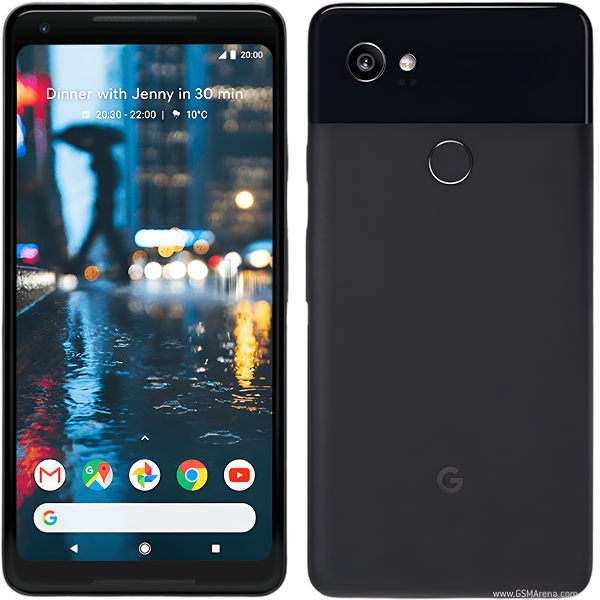
The Pixel 2 XL holds a unique place in smartphone history—a device that sparked intense display controversy at launch yet delivered exceptional camera performance that influenced years of mobile photography development. Released in 2017 alongside the standard Pixel 2, the XL variant featured a larger 6-inch P-OLED display that generated significant discussion regarding blue tint at angles and screen grain. Despite these initial concerns, many Pixel 2 XL devices continue serving users seven years later. Understanding this device's specific characteristics helps inform intelligent repair decisions.
Expert Context: The Pixel 2 XL's Complex Legacy
Google partnered with LG for the Pixel 2 XL's display manufacturing, resulting in a P-OLED panel that exhibited different characteristics than the Samsung-manufactured AMOLED in the standard Pixel 2. Early units showed pronounced blue color shifting when viewed off-axis and visible grain patterns that some users found distracting. Google addressed many concerns through software updates that adjusted color profiles and improved calibration, demonstrating how software optimization can mitigate hardware limitations.
Beyond display discussions, the Pixel 2 XL represented significant achievements. The 12.2MP camera, identical in hardware to the standard Pixel 2, produced exceptional images through computational photography. Features like portrait mode worked remarkably well with a single lens—a testament to Google's machine learning expertise. HDR+ processing set standards that competitors struggled to match for years afterward.
The device introduced squeezable sides through Active Edge technology, enabling quick Google Assistant activation or camera launching through physical gestures. This capacitive pressure sensing represented thoughtful interaction design that didn't require additional buttons or complex gestures. The feature gained devoted users who appreciated its intuitive convenience.
Build quality emphasized premium materials—an aluminum frame with glass front panel and soft-touch coated back. The 6-inch display with 18:9 aspect ratio maximized screen real estate while maintaining reasonable device width. The 3,520mAh battery provided solid endurance, particularly when combined with Android's battery optimization features and the efficiency advantages of OLED technology.
Comprehensive Issue Analysis from Professional Perspective
Display Characteristics and Failure Patterns
The P-OLED display's inherent characteristics create unique repair considerations. Beyond the blue tint and grain that affected early units, these panels age differently than standard AMOLED displays. Burn-in can appear more pronounced, with navigation elements and status icons ghosting onto the screen after extended use. The soft-touch coating on the back panel may show wear or discoloration, though this affects aesthetics rather than functionality.
Color accuracy can shift as the organic compounds in P-OLED panels degrade over time. Users may notice the display appearing warmer or cooler than when new, or reduced maximum brightness as the panel ages. These gradual changes often go unnoticed until comparing directly with newer devices, but they represent normal aging for OLED technology.
Touch responsiveness issues typically affect edge areas where the display curves slightly toward the frame. The digitizer layer can develop dead zones requiring multiple taps to register input. In some cases, phantom touches occur where the screen registers input without physical contact—suggesting digitizer degradation rather than software problems.
Battery Degradation Patterns
The 3,520mAh battery that once enabled all-day use now shows capacity loss after seven years of charging cycles. Even careful users who avoided overnight charging and extreme temperatures experience significant degradation. The battery's ability to deliver current spikes diminishes alongside capacity loss, explaining why aged units may shut down unexpectedly even when charge indicators show remaining capacity.
Battery swelling occasionally occurs in aged cells, creating visible gaps between display and frame or causing the back panel to lift. Any physical deformation requires immediate attention regardless of remaining functionality. Swollen batteries present safety risks and can damage other internal components through sustained pressure.
Charging and Connectivity Considerations
USB-C port reliability decreases through mechanical wear. After thousands of insertion cycles, internal contacts can loosen or bend, creating intermittent charging that requires specific cable positioning. Debris accumulation exacerbates mechanical issues—compressed pocket lint prevents cables from seating fully while trapping moisture that accelerates corrosion.
The USB-C port also handles data transfer and audio output through adapters. Port degradation can manifest as charging problems, data transfer failures, or audio issues that initially seem unrelated. Comprehensive port testing distinguishes mechanical failures from deeper electrical problems affecting charging circuitry on the motherboard.
Camera System Longevity
The camera module itself typically remains reliable, as optical components and image sensors don't degrade significantly under normal use. However, the autofocus mechanism using voice coil motors can develop mechanical resistance or calibration drift. This manifests as focus hunting—the camera visibly searching for focus without locking—or consistently soft images suggesting focus offset.
The camera app's computational features depend on processing power and software optimization. As the device ages beyond its support window and accumulates apps designed for newer hardware, camera app performance may degrade. Launching delays or processing slowdowns don't necessarily indicate hardware failure but rather the device's aged specifications struggling with current software demands.
Active Edge Sensor Reliability
The capacitive pressure sensors enabling squeeze gestures can lose calibration or sensitivity over time. Frame materials work-harden through thermal cycling, changing their flex characteristics enough to affect sensor readings. Software updates sometimes alter squeeze detection thresholds, creating situations where previously reliable functionality suddenly seems unresponsive despite no hardware changes.
Complete Active Edge failure typically stems from sensor disconnection or damage rather than gradual degradation. The sensors connect through flex cables that can become unseated through impacts or internal component movement during repairs. Testing in safe mode helps distinguish software calibration issues from hardware failures.
Professional Perspective on Repair Viability
Battery Replacement Economics
Battery replacement represents the most common and cost-effective Pixel 2 XL repair. The procedure requires removing the back panel through controlled heating, disconnecting the depleted battery, and installing a quality replacement. Post-replacement testing verifies proper charging behavior, accurate capacity reporting, and normal operating temperatures.
For users whose Pixel 2 XL otherwise functions adequately, battery replacement dramatically improves daily usability. A fresh battery eliminates constant charging anxiety and unexpected shutdowns. However, the repair makes most sense when other components function reliably—replacing the battery on a device with a failing display or compromised charging port may prove shortsighted.
Display Replacement Considerations
Display assembly replacement involves significant complexity and cost relative to the device's current market position. Replacement panels must match the P-OLED specifications, and quality varies considerably among aftermarket options. Some replacement displays exhibit the same blue tint and grain issues that affected original panels, while others show different color characteristics that may or may not align with user preferences.
The decision to replace displays depends largely on damage severity and device condition otherwise. A cracked display on an otherwise well-functioning device with recently replaced battery justifies repair. However, displays showing burn-in or age-related color shifts typically don't warrant replacement on seven-year-old hardware unless the device serves critical functions or holds significant personal value.
Charging Port Service
USB-C port replacement provides excellent value when mechanical wear causes charging problems. The port resides on a small daughterboard assembly that includes the primary microphone, making complete assembly replacement straightforward. This repair immediately restores reliable wired charging and data connectivity.
The relatively low cost of charging port repair compared to battery or display work makes it practical even for older devices. Users can reasonably expect several more years of charging port functionality after replacement, assuming the device doesn't suffer other critical failures.
Component-Level Repair Reality
Some issues exceed practical repair scope for legacy devices. Motherboard-level failures affecting core functionality—boot loops, random restarts, or complete power failure—often prove uneconomical to repair. While technically possible, the diagnostic time and component-level soldering required typically costs more than the device's functional value.
Camera module replacement makes sense only when the device otherwise functions well and photography remains the primary use case. The Pixel 2 XL camera continues producing impressive results that justify camera-specific repairs for users who value computational photography excellence.
Realistic Recommendations Based on Usage Patterns
Primary Device Users
Using a seven-year-old device without security updates as your primary phone introduces significant security considerations. The Pixel 2 XL's official support ended in 2020, leaving it vulnerable to discovered exploits. This matters less for users primarily making calls and using established apps, but significantly impacts those handling sensitive data or banking information.
For primary device users, battery replacement makes sense only if you plan continued use despite security limitations and accept that app compatibility may increasingly pose problems. The device handles communication, media consumption, and photography adequately, but demanding apps and modern games exceed its specifications.
Secondary Device and Specific Use Cases
The Pixel 2 XL excels as a secondary device, backup phone, or dedicated-purpose device. Battery replacement proves particularly worthwhile for users maintaining it as emergency backup or dedicating it to specific tasks like music playback, podcast listening, or home automation control. These use cases don't require cutting-edge performance or latest security updates.
The camera alone justifies keeping functional Pixel 2 XL devices operational. The computational photography remains impressive, and dedicated camera devices don't face the same security concerns as daily-use phones. Users might repair a Pixel 2 XL specifically for its camera while using newer devices for other functions.
Collectors and Enthusiasts
Some users maintain devices for historical or sentimental reasons. The Pixel 2 XL represents an important moment in smartphone photography development and sparked discussions about display technology that influenced subsequent designs. For collectors, maintaining functionality through battery replacement and other repairs preserves an important device regardless of practical utility.
Reality Check: When Repair Doesn't Make Sense
Honesty matters when discussing legacy device repair. Multiple simultaneous failures—dead battery, cracked display, failing charging port—typically indicate it's time to move on rather than investing in comprehensive repairs. The cumulative repair costs approach or exceed the device's functional value for most users.
Devices showing motherboard-level problems like boot loops or random restarts often hide additional failing components. Repairing one issue frequently reveals others, creating escalating costs that quickly surpass practical limits. Professional diagnostics can identify these situations before investing in repairs that prove insufficient.
Users requiring current apps, robust security, or maximum performance need newer devices. The Pixel 2 XL's Snapdragon 835 processor and 4GB RAM show their age when running demanding modern applications. Software limitations become increasingly relevant as the device ages further beyond its support window.
The Fix Approach: Honest Assessment and Quality Service
At The Fix, we provide realistic assessments for legacy devices like the Pixel 2 XL. We understand that repair decisions involve balancing functional needs, budget considerations, and practical utility. Our diagnostics identify all existing and potential problems, allowing informed decisions rather than discovering additional issues mid-repair.
When repair makes sense, we use quality components and apply professional expertise developed through servicing hundreds of Pixel devices. Battery replacements restore practical usability, charging port repairs ensure reliable connectivity, and we approach each repair with the care your device deserves regardless of age.
We also honestly communicate when repair doesn't serve your best interests. If diagnostic testing reveals multiple failing components or motherboard-level problems, we explain the situation clearly rather than pursuing repairs that provide poor value. Our goal involves helping you make informed decisions, not simply performing requested services.
For Pixel 2 XL owners whose devices still meet their needs, we provide the expertise to extend functional life through targeted repairs. We respect that these devices continue offering value in appropriate use cases and stand behind our work.
Conclusion: Informed Decisions for Legacy Flagship
The Google Pixel 2 XL combined premium ambitions with controversial display technology while delivering exceptional camera performance. Seven years after release, the device occupies a unique position—too old for primary use with current security expectations but still capable for specific purposes when properly maintained.
Battery replacement makes sense for users who accept the device's limitations and appreciate its remaining strengths. Charging port repair provides excellent value for restoring reliability. Display replacement depends heavily on damage type and device condition otherwise. Each repair decision requires weighing costs against realistic expectations for continued utility.
If your Pixel 2 XL serves specific needs or holds personal significance, professional service can extend its functional life. Contact The Fix for honest diagnostic assessment and discussion of realistic options. We'll help you determine whether repair makes sense for your specific situation or whether transitioning to newer devices better serves your needs.


Trusted repair solution for mobile phones, tablets, gaming consoles, and computer systems. We provide fast, reliable, and affordable repair services to get your devices back in perfect working condition.
The Fix is an independent repair service provider and is not affiliated with, sponsored by, or endorsed by Apple Inc., Samsung Electronics, Google LLC, or any other device manufacturer. We use high-quality compatible replacement parts unless explicitly stated. All trademarks are property of their respective owners.


© Copyright The Fix Solutions All rights reserved 2026.
Design by Deepcoder