






Google Pixel 2 Repair Services
Get fast, reliable, and professional Google Pixel 2 repair services at The Fix — your trusted destination for expert device care.
Common Repairs We Handle Daily


Google Pixel 2 Repair: Technical Analysis and Solutions
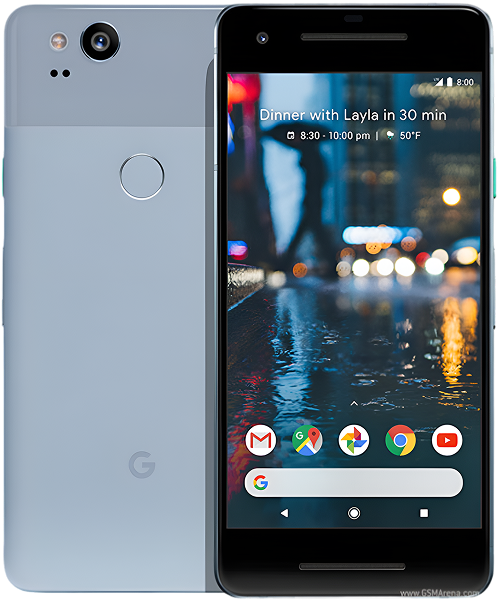
The Pixel 2 represented Google's refinement of its smartphone vision—pure Android without manufacturer overlays, computational photography that redefined mobile imaging, and hardware designed around software optimization rather than specification sheets. Released in 2017, these devices introduced features like Active Edge squeeze detection and portrait mode through single-lens computational processing. Seven years later, many Pixel 2 units remain in service, though the realities of component aging increasingly require technical intervention to maintain functionality.
Device Architecture and Design Philosophy
Google engineered the Pixel 2 around specific priorities that differentiated it from contemporaries. The aluminum unibody construction provided structural rigidity while enabling efficient heat dissipation from the Snapdragon 835 processor. The 5-inch AMOLED display delivered vibrant colors and deep blacks while consuming less power than equivalent LCD panels. The 2,700mAh battery seemed modest by specifications alone but achieved impressive endurance through aggressive software optimization and the efficiency advantages of OLED technology.
The device's modular internal architecture facilitated component replacement when designed. Engineers positioned major elements—battery, display assembly, charging port, and camera module—as discrete units connected through flex cables and standardized connectors. This modularity wasn't accident but deliberate design consideration that acknowledged eventual repair necessity. Components could be accessed without complete device disassembly, reducing repair complexity and time requirements.
Active Edge technology introduced capacitive sensors embedded in the frame rails that detected squeeze pressure. This system required precise calibration between hardware sensors and software interpretation, creating unique diagnostic considerations when troubleshooting non-responsive squeeze functionality. The integration demonstrated Google's software-first approach—using algorithms to interpret analog sensor input rather than relying purely on mechanical buttons.
The camera system exemplified computational photography's potential. A single 12.2MP sensor combined with sophisticated image processing produced results that competed with dual-camera systems from competitors. The dedicated Pixel Visual Core chip handled image processing tasks, reducing main processor load while enabling features like HDR+ processing. This architecture meant camera problems could stem from hardware failures, software glitches, or processing chip issues—requiring systematic diagnosis to identify root causes.
Component-Level Analysis of Common Failures
Battery degradation follows predictable patterns in lithium-ion cells. The 2,700mAh battery endures chemical changes through charge-discharge cycles that progressively reduce capacity. After several years of daily use, cells typically retain 70-80% of design capacity, manifesting as noticeably shorter runtime. Beyond capacity loss, internal resistance increases, reducing the battery's ability to deliver current spikes that intensive tasks demand. This explains why aged batteries cause unexpected shutdowns even when charge indicators show remaining capacity—the cell can't provide the instantaneous current peaks the processor requires.
The AMOLED display assembly comprises multiple layers including the OLED panel itself, digitizer for touch input, and protective glass. Each layer introduces potential failure points. OLED panels suffer from burn-in where static interface elements permanently ghost onto the screen through uneven pixel degradation. The organic compounds in OLED technology degrade naturally over time, explaining why older panels show reduced brightness and color accuracy even without obvious burn-in patterns. Digitizer layers can develop dead zones through impact damage that doesn't crack the glass but damages the underlying capacitive mesh.
Charging port failures typically originate from mechanical stress rather than electrical component degradation. The USB-C connector endures hundreds of insertion cycles that gradually loosen internal spring contacts. Manufacturers design ports for specific insertion cycle ratings—typically 10,000 cycles—but real-world usage often exceeds these specifications. Port housing can also develop microscopic cracks in solder joints connecting it to the motherboard, creating intermittent charging behavior that seems random but actually corresponds to slight movements stressing compromised connections.
The camera module represents sophisticated optical and electronic integration. The lens assembly focuses light onto the image sensor through mechanical actuators that enable autofocus. These actuators use voice coil motors—tiny electromagnetic systems that move lens elements with precision measured in micrometers. Over time, these mechanisms can develop mechanical resistance or calibration drift, causing autofocus hunting or consistently soft images. The image sensor itself rarely fails outright but can develop hot pixels—permanently bright pixels that appear in every image—through radiation damage or manufacturing defects that manifest after extended use.
Active Edge pressure sensors can lose calibration through frame deformation or sensor degradation. The capacitive sensors detect minuscule frame flexing when you squeeze the device. Frame materials can work-harden through thermal cycling and mechanical stress, changing their flex characteristics enough to affect sensor readings. Software updates sometimes alter squeeze detection thresholds, creating situations where previously reliable squeeze functionality suddenly seems unresponsive despite no hardware changes.
Systematic Failure Pattern Recognition
Battery issues announce themselves through specific symptom progressions. Initial signs include slightly reduced endurance—a device that previously lasted until evening now requires late-afternoon charging. As degradation accelerates, rapid discharge becomes apparent even during light tasks. Eventually, unexpected shutdowns occur, initially at low percentages but progressively affecting higher charge levels. The battery may also swell slightly, creating visible separation between the display and frame or causing the back glass to lift. Any physical deformation represents serious safety concerns requiring immediate professional attention.
Display problems manifest differently depending on underlying causes. Burn-in develops gradually, initially appearing as faint ghosting visible only against solid backgrounds. Over time, these ghost images become permanent and visible during normal use. Dead zones in touch responsiveness typically affect specific screen regions consistently—a particular corner or edge that requires multiple taps. Display flickering or color shifts suggest connection problems between the panel and motherboard rather than panel failure itself. These symptoms often correlate with physical impacts that may have seemed minor at occurrence but damaged internal cable connections.
Charging port issues follow recognizable progressions. Initial symptoms include intermittent charging requiring cable repositioning to establish connection. Users often report needing to "find the sweet spot" where cables charge reliably. As port contacts further degrade, charging becomes increasingly unreliable until specific cables cease working entirely. Visual inspection may reveal bent or recessed pins within the port opening. Debris accumulation exacerbates mechanical wear—pocket lint compresses into the port, preventing cables from seating fully while also trapping moisture that accelerates corrosion.
Camera problems present through various symptoms depending on failure type. Autofocus issues cause consistent blurriness or visible hunting where the camera continuously searches for focus without locking. Image processing failures produce error messages when launching the camera app or during image capture. Lens contamination—internal moisture or debris—creates hazy images or visible spots that don't clean away externally. Physical damage to the camera module causes completely black viewfinders or failure to launch the camera app at all.
Performance degradation can stem from either aging hardware or accumulated software bloat. Distinguishing between these causes requires systematic testing. Hardware-related slowdowns affect all operations consistently, including basic interface navigation and app launching. Software-induced slowdowns often affect specific apps or functions while leaving others responsive. Factory resets that restore full performance confirm software causes, while persistent sluggishness after fresh system installation suggests hardware limitations or thermal throttling from degraded thermal interface materials.
Professional Repair Methodology and Considerations
Battery replacement on the Pixel 2 requires careful heat application to soften adhesive securing the display assembly. Technicians use controlled heating to reach adhesive softening temperatures without damaging the OLED panel—typically 80-90°C applied evenly across the display perimeter. Specialized tools separate the display from the frame without applying excessive pressure that could crack the glass or damage the panel. Once opened, the battery disconnects through a simple flex cable connector, and the new cell adheres using proper double-sided adhesive that ensures secure mounting without creating pressure points that could damage the battery.
Display assembly replacement demands precision to avoid damaging delicate components. The OLED panel and digitizer arrive as a pre-assembled unit, simplifying replacement compared to separating individual layers. However, several flex cables connect the display to the motherboard, each requiring careful disconnection and reconnection. The display assembly also houses the proximity sensors and front-facing camera, necessitating their transfer to the new assembly. Proper reassembly ensures these sensors function correctly and the display seats flush with the frame without gaps that compromise water resistance.
Charging port repair involves replacing the entire daughterboard assembly that houses the USB-C connector, microphone, and related circuitry. This modular approach proves more reliable than attempting to replace just the port connector, which requires microsoldering expertise and risks damaging the PCB. The daughterboard connects to the main motherboard through flex cables, making replacement straightforward for experienced technicians. Post-repair testing verifies charging functionality, data transfer capability, and microphone operation since all share the replaced assembly.
Camera module replacement requires optical calibration to ensure proper autofocus function. Simply installing a new camera doesn't guarantee optimal performance—the focus mechanism needs calibration to the specific device. Professional repair services have calibration equipment that programs focus ranges and ensures the camera achieves accurate focus across its entire range. Without proper calibration, a replaced camera may focus inconsistently or fail to achieve sharp focus at certain distances.
Diagnostic procedures follow systematic elimination of potential causes. For intermittent problems, technicians attempt to reproduce issues under controlled conditions. Battery testing uses specialized equipment measuring actual capacity against design specifications. Display testing involves applying test patterns that reveal dead pixels, color accuracy problems, and touch responsiveness across all zones. Charging system diagnosis tests both port hardware and charging circuitry to distinguish mechanical failures from electronic component problems.
Longevity Considerations for Legacy Devices
The Pixel 2's official software support ended in 2020, creating security and compatibility considerations for continued use. While the hardware remains functional, the lack of security updates introduces vulnerability to discovered exploits. Users must weigh these risks against their specific use cases. Devices used primarily for calling, messaging, and media consumption face different risk profiles than those handling sensitive financial or business data.
Hardware capabilities limit software performance as applications evolve. Modern apps designed for current processors and memory configurations may run sluggishly on the Snapdragon 835 and 4GB RAM configuration. This doesn't render the device useless but affects user experience with demanding applications. For basic smartphone functions, web browsing, and established apps, the Pixel 2's hardware remains adequate.
Component availability affects long-term repairability. As devices age, replacement parts transition from manufacturer stock to third-party alternatives. Quality varies significantly among aftermarket components. Reputable repair services source quality parts that meet or exceed specifications, but the general parts availability gradually declines. Planning repairs proactively rather than waiting for complete failure increases likelihood of securing quality components.
The decision to repair versus replace balances multiple factors. Repair costs represent fractions of replacement device prices, making battery and charging port repairs economically sensible. Display replacements cost more but still significantly undercut new device purchases. The calculation becomes personal—if the Pixel 2 meets your daily needs and you appreciate its interface simplicity, repair extends useful life economically. If you require current apps, maximum security, or latest features, replacement may better serve your needs.
Environmental and Practical Value Propositions
Electronic waste represents significant environmental challenges. Every device kept functional through repair reduces demand for new manufacturing and associated resource extraction. The Pixel 2 required rare earth elements, precious metals, energy-intensive manufacturing, and global logistics networks to produce. Maximizing its functional lifespan through maintenance justifies that initial resource investment and defers the environmental cost of replacement device production.
The repairability of older devices like the Pixel 2 offers educational value. Understanding how smartphones work, what components they contain, and how repairs proceed demystifies technology many users treat as black boxes. This knowledge enables informed decisions about device maintenance, helps users identify when professional repair becomes necessary, and supports realistic expectations about device longevity.
From practical perspectives, maintaining functional backup devices provides contingency planning. A repaired Pixel 2 serves excellently as emergency backup when primary devices fail or need service. It can function as dedicated devices for specific purposes—music player, car navigation unit, or home automation controller. These use cases don't require cutting-edge specifications but benefit from functional hardware.
Conclusion: Engineering Meets Maintenance
The Google Pixel 2 demonstrated Google's hardware and software integration capabilities, delivering flagship experiences through engineering optimization rather than specification excess. Seven years after release, the fundamental hardware remains functional, though component aging inevitably requires attention. Battery replacements restore runtime, display repairs maintain visual quality, and charging port fixes ensure reliable power delivery.
Professional repair services provide the technical expertise to diagnose specific problems and implement appropriate solutions. Understanding the device's architecture, recognizing common failure patterns, and applying proper repair methodology ensures repairs restore intended functionality. The Pixel 2's modular design facilitates component replacement when approached with appropriate tools and knowledge.
At The Fix, we appreciate the engineering excellence the Pixel 2 represented and provide services that maintain these devices for continued use. Whether you need battery replacement, display repair, charging port service, or comprehensive diagnostics, our technicians apply professional expertise to restore functionality. We use quality components and stand behind our work because we believe capable hardware deserves proper maintenance.
If your Pixel 2 experiences problems affecting daily usability, contact The Fix. We'll diagnose the specific issues affecting your device and discuss solutions that restore reliable operation. Your technically excellent legacy device still has functional life to offer with appropriate professional care.


Trusted repair solution for mobile phones, tablets, gaming consoles, and computer systems. We provide fast, reliable, and affordable repair services to get your devices back in perfect working condition.
The Fix is an independent repair service provider and is not affiliated with, sponsored by, or endorsed by Apple Inc., Samsung Electronics, Google LLC, or any other device manufacturer. We use high-quality compatible replacement parts unless explicitly stated. All trademarks are property of their respective owners.


© Copyright The Fix Solutions All rights reserved 2026.
Design by Deepcoder