






iPhone XS Max Repair Services
Get fast, reliable, and professional iPhone XS Max repair services at The Fix — your trusted destination for expert device care.
Common Repairs We Handle Daily


Your iPhone XS Max Acting Up? Let's Fix That: A Guide to iPhone XS Max Repair
Introduction
Remember when your iPhone XS Max was the phone everyone wanted? That massive 6.5-inch display was perfect for watching videos, the battery lasted all day without even trying, and Face ID worked so smoothly you forgot passwords existed. Fast forward to 2025, and your XS Max probably doesn't feel quite as magical anymore. Maybe the battery dies by mid-afternoon, or that gorgeous screen has a crack you've been ignoring for months.
Here's the thing though—your XS Max isn't "too old" to keep using. It's just showing normal signs of aging after six years of daily use. The good news? Most issues are totally fixable, and iPhone XS Max repair costs a fraction of what you'd spend on a new device. Even better, keeping your current phone running is way more sustainable than adding another device to the e-waste pile.
In this guide, we'll walk you through the most common problems XS Max owners face, what you can try fixing yourself, and when professional iPhone XS Max repair makes the most sense. Let's figure out what's going on and get your phone back to feeling solid again.
Let's Talk About Your iPhone XS Max for a Second
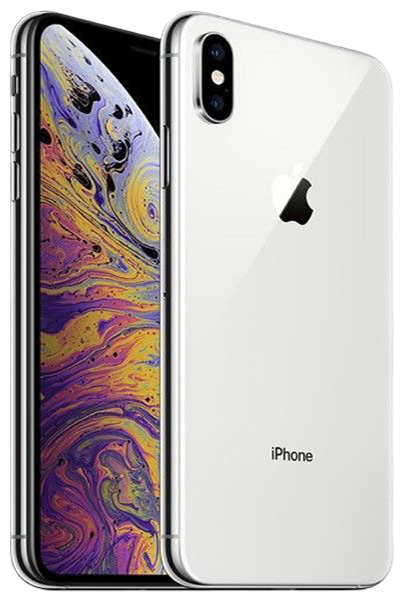
The iPhone XS Max launched in September 2018 as Apple's biggest phone yet (at the time). That 6.5-inch Super Retina OLED display was a game-changer for people who wanted a phone that could actually replace their tablet. The A12 Bionic chip delivered serious performance, the dual-camera system took beautiful photos, and the 3,174 mAh battery—largest in any iPhone up to that point—meant you could actually make it through a full day.
What's interesting is how well this device has aged. Six years later, the A12 still handles iOS 17 without breaking a sweat. That OLED display still looks gorgeous (unless you've got burn-in, which we'll get to). The size that felt huge in 2018 is pretty standard now, and honestly, if you're used to that big screen, going back to something smaller feels cramped.
The XS Max represents a sweet spot in iPhone history—it was built really well, it's got enough power for modern apps, and it came out before things got super expensive. When it starts having issues, iPhone XS Max repair almost always makes more sense than upgrading, especially when you look at the sustainability and financial side of things.
Why Devices Age (And Why That's Totally Normal)
Look, every phone gets old. It's not that your XS Max is falling apart—it's just been through six years of daily use, thousands of charge cycles, temperature swings, and life in general. Understanding what's happening helps you figure out what's actually broken versus what's just normal aging.
The Battery Chemistry Reality
Here's what happens with your battery over time: every single charge creates tiny chemical changes inside. The lithium ions that move between the positive and negative sides gradually lose efficiency. Think of it like a rechargeable flashlight—works perfectly when it's new, but after a few years, it doesn't hold charge like it used to.
Your XS Max battery was designed for roughly 500 full charge cycles before dropping to 80% capacity. If you've charged daily since 2018, you're sitting at over 2,000 cycles right now. That battery's probably running at 60-70% of what it could do when new. This isn't failure—it's chemistry. But here's the cool part: battery replacement completely resets this, giving you another few years of all-day battery life.
OLED Screens Have a Lifespan Too
That beautiful OLED display uses organic compounds that light up individually for each pixel. "Organic" sounds great, but it also means those compounds degrade over time. After 40,000+ hours of use, you might notice the screen isn't quite as bright as it used to be, or you're seeing burn-in where static elements (like the status bar or keyboard) leave faint ghost images.
This is normal for six-year-old OLED technology. It's not some manufacturing defect—it's just what happens to organic materials after years of use. Screen replacement fixes this completely, giving you a fresh panel that looks like new.
Physical Wear Is Inevitable
Your charging port's been plugged in thousands of times. Your buttons have been pressed tens of thousands of times. The seals around your screen have expanded and contracted through countless temperature changes. None of this means your phone is junk—it just means components wear out with use.
The good news is that worn components are replaceable. That's the whole point of repair—swapping out the parts that age fastest while keeping everything else that still works great.
Water Resistance Fades With Time
When your XS Max was new, it had IP68 water resistance—good for up to 2 meters for 30 minutes. But those seals and adhesives don't last forever. After six years of thermal cycling (hot car in summer, cold pocket in winter, repeat a thousand times), those materials have definitely degraded.
By now, you should assume your water resistance is compromised even if the phone's never been opened for repair. This doesn't mean panic if you get caught in the rain, but don't go dunking it in water like you might have when it was new.
The Battery Dilemma
What you're experiencing: Your phone dies way before the day's over, even though you used to make it to bedtime easily. Maybe it's showing 40% and suddenly shuts off. Or it takes three hours to fully charge. You're constantly hunting for outlets, carrying charging cables everywhere, or you've basically given up and just accept that your phone's always dying.
Why this is happening: After six years and 2,000+ charge cycles, your battery's internal resistance has increased dramatically. It can't deliver the power your phone needs for intensive tasks, which causes those sudden shutdowns even when the percentage looks fine. The Battery Management System also loses calibration accuracy over time, so the percentage you see isn't even reliable anymore.
Plus, iOS 17 is more demanding than the iOS 12 your phone shipped with. Even though Apple optimizes for older devices, modern iOS on an old battery is like trying to run a marathon on two hours of sleep—it's just not gonna work well.
What you can try:
- Check Battery Health right now. Go to Settings > Battery > Battery Health & Charging. Look at Maximum Capacity. If it's below 80%, that's why you're having problems. Below 75%? Yeah, you need a new battery.
- See what's draining power. Settings > Battery shows which apps are using the most juice. If something you barely use is at the top of that list, delete it or turn off Background App Refresh for it (Settings > General > Background App Refresh).
- Try a full restart. Press Volume Up, then Volume Down, then hold the Side button until the Apple logo appears. Sometimes processes get stuck in loops, and this clears them.
- Test Low Power Mode. Turn it on (Settings > Battery) and see if you can actually make it through the day. If this helps a lot, your battery's probably okay—you just need to adjust some settings. If it barely makes a difference, your battery's genuinely worn out.
💡 Pro Tip: Before you commit to battery replacement, try recalibrating the Battery Management System. Let your phone die completely until it shuts off on its own. Then charge it uninterrupted to 100% and leave it charging for another 2 hours. This won't restore lost capacity, but it can make the percentage reading more accurate, which helps you understand what's actually happening.
What we've learned: We see XS Max devices with 60% battery health where owners thought they just needed to "manage it better." You can't manage chemistry. When the battery's genuinely worn out, no amount of settings tweaking will fix it. But battery replacement gives you another 2-3 years of reliable use, and it's way more affordable and sustainable than upgrading to a new device. Professional iPhone XS Max repair for batteries is straightforward and makes a massive difference in daily usability.
The Screen Saga
What you're experiencing: Maybe you've got a crack you've been living with for months. Or maybe the crack just happened and you're trying to figure out if you can wait. Touch might be getting weird in certain spots. You're seeing lines, dead pixels, or strange discoloration. Or the screen just looks dimmer than it used to, even at full brightness.
Why this is happening: Your XS Max screen isn't just one piece of glass—it's a complex assembly with the OLED panel, digitizer for touch, and 3D Touch layer all sandwiched together. Cracks in the top glass can propagate into the digitizer over time, especially with the phone flexing slightly in your pocket or from temperature changes. The OLED panel itself can develop defects after six years—pixels die, organic compounds degrade unevenly, connections weaken.
That big 6.5-inch screen is also more vulnerable to damage than smaller phones simply because there's more surface area to hit when you drop it. The larger the screen, the more likely something hard hits it during a fall.
What you can try:
- Assess the damage honestly. Small corner cracks that aren't spreading are one thing. Cracks across the middle of the screen or near the edges spread faster because that's where flex stress is highest during normal use.
- Test touch everywhere. Open Notes and scribble all over the screen. Can you draw in every area? If touch works perfectly despite cracks, you've got some time before repair becomes urgent. But if dead zones are appearing or growing, don't wait—it'll only get worse.
- Look for OLED issues. Burn-in shows up as ghost images where static elements (status bar, keyboard, navigation buttons) leave permanent marks. Uneven brightness or color shifts mean the OLED panel itself is failing. These won't improve—they only get worse over time.
- Apply a screen protector temporarily. If you've got cracks, a tempered glass protector can prevent them from spreading and keeps glass shards contained while you're saving up for repair.
What we've learned: People often say "it's just a small crack" and then three months later the whole screen's shattered because thermal expansion propagated the damage. Even small cracks compromise structural integrity. The XS Max screen is expensive to replace compared to smaller models because of the size and OLED technology, but waiting usually doesn't save you money—it just makes the phone harder to use in the meantime. When you're ready for professional iPhone XS Max repair, address the screen sooner rather than later. It doesn't cost more to fix a completely shattered screen versus a small crack, but a dead screen can create data access issues if you can't unlock the device.
The Face ID Frustration
What you're experiencing: Face ID worked perfectly for years, and now it's spotty. Sometimes it recognizes you, sometimes it doesn't. You're getting "Face ID is not available" errors. Or maybe it stopped working completely after you had the screen replaced somewhere else. You're stuck typing your passcode constantly, which defeats the whole point of having Face ID.
Why this is happening: The TrueDepth camera system is sophisticated—it projects 30,000 infrared dots onto your face and reads the pattern back to create a 3D map. All those components (dot projector, flood illuminator, IR camera) are paired specifically to your phone's logic board. Drops can misalign these tiny sensors. Dust buildup on the dot projector reduces accuracy. And low-quality screen replacements often damage the delicate flex cable that connects everything.
After six years, it's also possible the dot projector itself is wearing out—those infrared LEDs have a lifespan, and heavy use can degrade them.
What you can try:
- Clean the notch area thoroughly. Use a microfiber cloth to wipe the sensor area. You'd be surprised how much dust accumulates there. Screen protectors that cover the sensors can also interfere—make sure yours has proper cutouts.
- Delete and re-enroll your face. Go to Settings > Face ID & Passcode, delete your existing face data, and set it up fresh. Try doing this in different lighting conditions—bright room, dim room, near a window. Sometimes the system just needs to relearn your face, especially after iOS updates.
- Test in controlled lighting. Face ID uses infrared, so it works in complete darkness, but extreme backlighting (like sun directly behind you) can still cause issues. Test it in a normally-lit room to figure out if it's a hardware problem or environmental.
- Check after any previous repairs. If Face ID stopped working right after a screen replacement you had done elsewhere, that repair probably damaged something. The TrueDepth flex cable is incredibly fragile, and inexperienced techs tear it all the time.
What we've learned: Face ID problems spike after screen replacements because that flex cable is so delicate. We test Face ID before and after every screen repair to make sure everything's working. If your Face ID failed right after someone else worked on your phone, that's on them—bring it to us for proper iPhone XS Max repair and we'll assess whether it's fixable. Often it's a damaged cable, which is repairable. Sometimes it's the dot projector itself, which is trickier but still fixable with micro-soldering work. Face ID isn't "unfixable" like people assume—it just requires proper expertise.
The Speaker Situation
What you're experiencing: Your speakers sound muffled or distorted, especially at higher volumes. Maybe the earpiece speaker (the one you hold to your ear during calls) is crackling. Or the bottom speakers don't seem as loud as they used to be. People can't hear you clearly on calls, or you can barely hear them.
Why this is happening: Your XS Max has stereo speakers—one in the earpiece at the top, one at the bottom. After six years, those speaker grilles have accumulated dust, pocket lint, and general gunk that dampens sound quality. The speaker membranes themselves can also degrade from thousands of hours of vibration. If you've exposed your phone to moisture, even humidity, the speakers can develop corrosion that affects performance.
The microphones (there are three of them—bottom, front, and back) can have similar issues. Dust buildup or moisture exposure reduces clarity, making you sound muffled to people on the other end of calls.
What you can try:
- Clean the speaker grilles carefully. Use a soft-bristled toothbrush to gently brush the speaker openings. You can also try compressed air, but be gentle—you don't want to damage the membranes. You'd be shocked how much accumulated gunk comes out.
- Test each speaker independently. Play audio and check both the earpiece and bottom speakers. Adjust balance in Settings > Accessibility > Audio/Visual > Balance to test each side. This helps you figure out if one speaker's worse than the other.
- Check for water damage. Look at the Liquid Contact Indicator in the SIM tray—if it's red instead of white or silver, liquid got inside at some point. Moisture can corrode speaker connections even if the phone still works otherwise.
- Test call quality. Make a call and use both the earpiece and speakerphone. Ask the other person how you sound. This isolates whether it's a speaker issue or microphone issue.
What we've learned: Speaker issues are one of those problems where people assume they just need to live with it, but they're often fixable. Deep cleaning can restore most of the clarity if it's just dust buildup. If the speakers themselves are damaged, replacement is straightforward—they're modular components that swap out easily. Don't ignore muffled sound or distortion—it usually gets worse over time as more debris accumulates or corrosion spreads. Professional iPhone XS Max repair can address speaker and microphone problems and get your audio quality back to normal.
The Back Glass Problem
What you're experiencing: You dropped your phone and the back glass shattered. It still works fine, but it looks terrible and you're worried about further damage. Maybe glass pieces are falling out, or you're getting cuts on your hand from sharp edges. You've heard back glass repair is expensive and complicated.
Why this is happening: The XS Max has a glass back to enable wireless charging, but it's bonded to the frame with strong adhesive and sandwiched against the wireless charging coil and other internal components. Unlike the front screen, which is designed to be removed for repairs, the back glass was never meant to come off easily. This makes repair more labor-intensive.
The glass itself is tough, but it's still glass. Drops onto hard surfaces—especially if your phone lands on a corner—can shatter it. Tempered glass can handle impact better than scratches, which is why keys in your pocket rarely damage it but a drop onto concrete does.
What you can try:
- Assess the damage. If the crack is minor and no glass is missing, you can technically keep using the phone. But if pieces are falling out or you're exposing internal components, that's a problem—dust and moisture can get inside.
- Apply a skin or case temporarily. A dbrand skin or a thick case can cover the damage and prevent further glass loss while you're figuring out repair. It's not pretty, but it protects the internals.
- Check wireless charging. Make sure it still works. If the charging coil got damaged in the drop, you'll notice wireless charging doesn't work anymore or is very inconsistent.
What we've learned: Back glass repair on the XS Max is legitimately more involved than front screen replacement because of how it's constructed. Some shops won't even attempt it. We can do it, but we're upfront that it takes time and precision to remove the old glass, clean up the adhesive, and install new glass without damaging the wireless charging coil or frame. The good news is that it's doable, and once it's fixed, the phone looks and works like new. If you're keeping your XS Max for another couple years, iPhone XS Max repair for the back glass is worth it for both protection and appearance.
What to Expect When You Come to The Fix
Bringing your phone in for repair can feel stressful—we get it. Your XS Max has all your photos, messages, apps, and basically your whole digital life on it. Let's walk through exactly what happens so you know what to expect.
Free Diagnostic (No Pressure)
First thing we do is run a comprehensive diagnostic. We've got tools that read your battery cycle count, check Face ID functionality, analyze logic board health, and look for liquid damage indicators. We also visually inspect everything under magnification for issues you might not see with the naked eye.
This diagnostic is completely free. If you decide not to proceed with repairs, no worries—you've just learned what's actually going on with your phone.
Honest Explanation (Plain English)
Once we know what's wrong, we'll explain it in terms that actually make sense. No technical jargon unless you want it. We'll tell you what needs fixing, why it happened, and realistically what your options are. If it's something simple you can fix yourself, we'll tell you that too—even if it means we don't make money on the repair.
You'll get a clear explanation of what the repair involves and about how long it'll take. Most common iPhone XS Max repair work (battery, screen, charging port) is same-day service.
Quality Work With Tested Parts
When we do the actual repair, we use high-quality tested components. Battery replacements use reliable cells with proper management systems. Screen replacements maintain full functionality including True Tone. We're not the cheapest shop in town, but we're the one where the repair actually lasts.
We take our time with the work. Proper heat control when dealing with adhesives, careful cable management, anti-static procedures—all the stuff that separates a solid repair from a rushed one that causes problems three months later.
Testing Before You Leave
We don't just fix the issue and hand your phone back. Every repair includes thorough testing of all systems—not just the part we replaced. Battery replacements get charge cycle testing. Screen replacements get full touch and display testing plus Face ID verification. We check cameras, speakers, buttons, ports—everything.
If something isn't working right, we address it before you walk out. You shouldn't have to come back because we missed something.
Your Data Stays Yours
We never need to wipe your phone for repairs. What's on your device stays on your device. We don't look at your data, we don't back it up to our systems, we don't touch your apps or settings. The only exception is if you're doing a logic board repair for water damage—then we might need to disconnect the battery for safety, but your data stays intact.
Keep Your XS Max Running Great
Prevention's easier than repair. Here's what actually makes a difference:
Get a case that actually protects. Look for one with raised edges around the screen and camera bump—those are your most vulnerable spots. The XS Max is a big, heavy phone (208 grams), so grippy cases prevent drops better than smooth ones. We see too many naked XS Max devices come in with shattered screens that a decent case would've prevented.
Clean your charging port every few months. Power down the phone and use a wooden toothpick to gently scrape out any lint. After six years of daily use, there's definitely stuff in there. This prevents charging issues before they become actual problems.
Manage your battery health. Keep your phone between 20-80% when possible—extreme charge levels accelerate aging. Don't leave it charging overnight after it hits 100%. iOS does have Optimized Battery Charging that helps with this, but it's not perfect.
Keep storage from getting full. Leave at least 10-15% free space (that's about 8-12GB on a 64GB model). When storage fills up completely, your phone constantly has to shuffle data around, which wears the flash memory and slows everything down. Use iCloud Photos with "Optimize Storage" if you're running low.
Update iOS regularly. New updates include battery optimization fixes and security patches. Just maybe wait a week or two after a major release to let Apple work out any initial bugs.
Avoid temperature extremes. Don't leave your XS Max in a hot car—heat dramatically accelerates battery aging. Below freezing temporarily reduces battery capacity (it comes back when warmed), but your phone's fine. It's the heat that really damages things long-term.
Accept that water resistance is gone. After six years, those seals aren't what they used to be. Be more careful around water than you were in 2018. If you do get it wet, dry it immediately.
Your XS Max Has More Life Left
Your iPhone XS Max isn't outdated—it's just getting older, and that's totally normal. The A12 chip still handles modern apps without breaking a sweat. That 6.5-inch OLED display still looks gorgeous for watching videos and scrolling. The cameras still take solid photos for everyday use. With the right care and repairs when needed, your XS Max has another 2-3 years of reliable life in it easily.
Most issues you're dealing with—battery drain, cracked screens, charging problems—are totally fixable. iPhone XS Max repair costs a fraction of what you'd spend on a new device, and keeping your current phone running is way more sustainable than constantly upgrading. Every year you keep using your XS Max prevents hundreds of dollars in unnecessary spending and keeps a perfectly functional device out of the landfill.
If you've tried the DIY solutions in this guide and you're still having issues, bring your phone by The Fix. We handle iPhone XS Max repair every day, and we've seen basically every problem these devices develop. We'll give you an honest assessment of what's wrong and whether repair makes sense for your situation. Most of the time, it absolutely does. Let's get your phone back to feeling solid again.


Trusted repair solution for mobile phones, tablets, gaming consoles, and computer systems. We provide fast, reliable, and affordable repair services to get your devices back in perfect working condition.
The Fix is an independent repair service provider and is not affiliated with, sponsored by, or endorsed by Apple Inc., Samsung Electronics, Google LLC, or any other device manufacturer. We use high-quality compatible replacement parts unless explicitly stated. All trademarks are property of their respective owners.


© Copyright The Fix Solutions All rights reserved 2026.
Design by Deepcoder