





iPhone Duo Repair Services
At The Fix, we help with common phone repair needs, including screen, battery, charging, camera and back glass concerns. Tell us what your iPhone Duo is doing and we can discuss the repair needed and provide a quote.
Common Repairs We Handle Daily


iPhone Duo Repair at The Fix
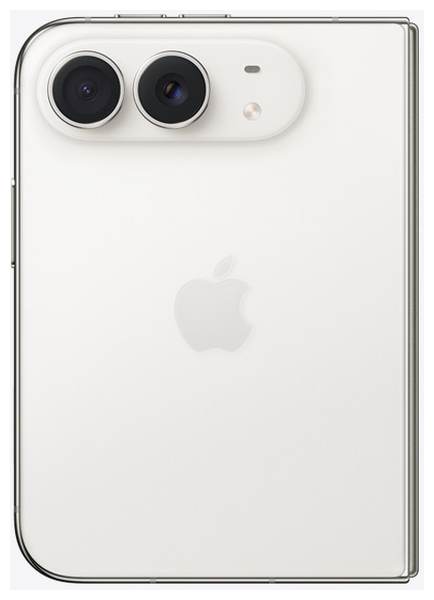
iPhone Duo brings a foldable design to the iPhone range. Apple lists a 7.6-inch inner OLED display and a 5.4-inch outer OLED display, both with ProMotion technology. Its announced features also include an A20 Pro chip, a titanium frame, Ceramic Shield surfaces, a dual-battery design, USB-C connectivity and a multi-camera system. These features make the device distinctive, but they do not mean every fault has a single or predictable repair.
At The Fix, we help customers with common phone repair needs, including screen repair, battery replacement, charging and port repair, camera repair, and back glass replacement. This guide explains common symptoms and practical considerations for a foldable phone like iPhone Duo. The right repair depends on the symptoms and the fault found in the individual device, so a quote should follow a conversation about the problem.
What should you do if your iPhone Duo screen is damaged?
A damaged screen can show cracks, dark areas, lines, flickering, touch problems or no image at all. With a foldable phone, the inner and outer displays are separate viewing surfaces, so it is useful to describe which screen is affected and what you can still see or control. Do not assume that a visible crack explains every display or touch symptom.
If glass is cracked or pieces are loose, avoid touching the damaged area and stop using the device if it is unsafe to handle. Do not press hard on the inner display, force the hinge or try to flatten the phone. Avoid opening the device yourself. A qualified technician can help identify whether the issue is limited to the visible surface or involves other display functions.
Screen repair is a common phone service at The Fix. When discussing an iPhone Duo screen problem, explain whether the inner display, outer display or both are affected, whether touch still responds, and whether the problem began after a drop or pressure. This information helps narrow down the concern without treating a symptom as a confirmed diagnosis.
When might your iPhone Duo need a battery replacement?
Battery problems can appear as shorter time between charges, unexpected shutdowns or difficulty keeping the device powered through normal use. Apple describes iPhone Duo as having a dual-battery architecture, but that description alone does not establish the cause of a particular power problem. Battery behavior can also be affected by software, charging accessories, temperature and other hardware faults.
If the phone becomes unusually hot, the body or screen begins to lift, or you suspect the battery is swollen, stop using and charging it. Do not press the case closed or attempt to remove the battery. Keep the device away from heat and arrange professional help. A damaged lithium-ion battery can be hazardous if handled incorrectly.
The Fix offers battery replacement as a repair category. The appropriate next step is to describe the battery symptoms and get a quote for the work required. The repair needed and its timing depend on the individual fault.
Why might your iPhone Duo stop charging properly?
A phone that charges intermittently, charges slowly or does not respond when connected may have a problem with its cable, power adapter, connector or internal hardware. iPhone Duo uses USB-C for wired charging, according to Apple's published specifications. That confirms the connector type, but it does not prove that a charging complaint is caused by the port itself.
For a safe first step, check for visible damage to the cable and adapter and try a compatible, known-working charging accessory if it is safe to do so. Do not insert metal objects into the connector, force the cable, or attempt to open the phone. If the device has been exposed to liquid, do not connect a charging cable while moisture may remain in the connector. If the phone is hot, damaged or behaving unusually, disconnect it when safe and seek assistance.
The Fix provides charging and port repair services for phones. If you request help with iPhone Duo charging, describe whether wired charging fails completely, works only intermittently or is accompanied by another symptom. The cause should be identified before deciding whether port repair or another solution is appropriate.
What can you do about camera or back glass damage?
Apple lists a 48-megapixel Fusion Main camera, a 48-megapixel Fusion Ultra Wide camera, a 12-megapixel Center Stage front camera on the outer display and an under-display FaceTime camera. If photos are blurry, a camera view is black, focus behaves unexpectedly or a camera surface is cracked, note which camera or function is affected. A symptom alone does not confirm that a camera module needs replacement.
Check that the camera surface is clean and that the problem is not limited to one app or setting. If the camera area or rear glass is cracked, avoid pressing on the damaged area. Sharp fragments can cause injury, and a damaged enclosure should not be treated as protective against dust or moisture. Do not rely on the phone's published water-resistance specification after damage.
The Fix offers camera repair and back glass replacement among its phone repair services. Describe the visible damage and the camera behavior when requesting a quote. The repair selected should match the actual fault rather than an assumption based only on the symptom.
How can The Fix help with your iPhone Duo repair?
A useful repair conversation starts with the problem you can observe: what stopped working, when it began, whether the phone was dropped or exposed to liquid, and whether the issue happens consistently. These details help explain the concern and establish the next step. The symptoms do not always identify the failed component, and the final quote depends on the repair required.
The Fix's phone repair services include screen repair, battery replacement, charging and port repair, camera repair and back glass replacement. The repair approach should be based on the device's actual condition and the service required.
Before bringing in a device, back up important data if it is working safely and you can do so. A hardware repair should not be treated as a promise that data will remain intact. If the device is swollen, unusually hot, severely damaged or possibly wet, do not keep using it just to make a backup. Visit your nearest The Fix location to discuss the problem and get a quote for the repair your phone needs.
Frequently Asked Questions About iPhone Duo Repair
Can a cracked iPhone Duo screen be repaired?
Screen repair is a common phone repair service, but the appropriate work depends on the affected display and the damage. Describe whether the inner screen, outer screen or touch function is affected so the problem can be discussed before a quote is provided.
Does a charging problem always mean the USB-C port is damaged?
No. A cable, adapter, software issue or internal fault can also cause charging problems. Avoid forcing the connector or inserting objects into it, and get help if the cause is not clear.
What should I do if my iPhone Duo battery looks swollen?
Stop using and charging the device and do not press on the screen or case. A swollen battery can be hazardous, so arrange professional assistance rather than trying to open the phone yourself.
Will repairing my iPhone Duo preserve my data?
Data preservation cannot be promised for every hardware repair. Back up important information beforehand when the device is safe to use, and do not continue using a phone that appears physically unsafe just to complete a backup.
For help with a screen, battery, charging, camera or back glass concern, contact or visit your nearest The Fix location to discuss the symptoms and get a quote for the repair your iPhone Duo needs.


Trusted repair solution for mobile phones, tablets, gaming consoles, and computer systems. We provide fast, reliable, and affordable repair services to get your devices back in perfect working condition.
The Fix is an independent repair service provider and is not affiliated with, sponsored by, or endorsed by Apple Inc., Samsung Electronics, Google LLC, or any other device manufacturer. We use high-quality compatible replacement parts unless explicitly stated. All trademarks are property of their respective owners.


© Copyright The Fix Solutions All rights reserved 2026.
Design by Deepcoder