






iPhone 8 Repair Services
Get fast, reliable, and professional iPhone 8 repair services at The Fix — your trusted destination for expert device care.
Common Repairs We Handle Daily


Is Your iPhone 8 Driving You Crazy? Here's Your iPhone 8 Repair Guide
Introduction
Why does your iPhone 8 feel like it's giving up on you? Maybe the battery barely makes it to lunch, or that screen crack you've been ignoring is finally making touch unresponsive. Perhaps the home button's acting weird, or wireless charging stopped working after you dropped it. You're probably wondering—is it even worth fixing a phone from 2017?
Here's the honest answer: if your iPhone 8 still does what you need it to do, iPhone 8 repair is almost always the smarter financial move than upgrading. We're talking about fixing issues for a fraction of what you'd spend on even a budget replacement phone. Plus, you already know how everything works, your apps are set up, and there's something satisfying about keeping a perfectly capable device running instead of tossing it.
In this guide, we'll walk through the most common iPhone 8 problems, what you can prevent with simple maintenance, and when professional iPhone 8 repair makes sense. Let's figure out what's going on and keep your phone working as long as possible.
Let's Talk About Your iPhone 8 for a Second
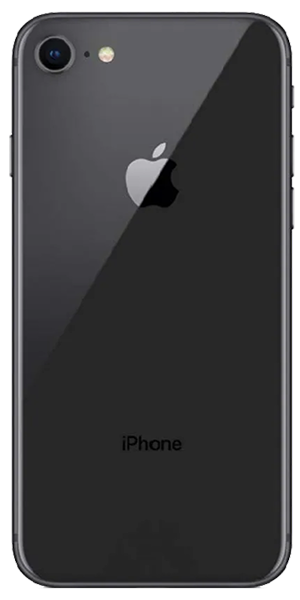
The iPhone 8 launched in September 2017—seven years ago now. It was the last iPhone with a home button, which honestly, some people still prefer over Face ID and gestures. You got wireless charging for the first time (thanks to that glass back), a solid A11 Bionic chip, and a camera that still takes decent photos for everyday use.
What makes the iPhone 8 special in 2025? It's probably paid off, it's reliable for basic tasks, and replacement parts are affordable since so many were made. That 4.7-inch screen is compact compared to modern phones—some people love that it actually fits in their pocket and can be used one-handed.
Here's the reality though: the iPhone 8 is genuinely old by tech standards. The 1,821 mAh battery was already small when it launched, so at seven years old, it's definitely struggling. iOS 17 runs on it, but you'll notice some lag. Still, for calls, texts, email, social media, and basic photos, it works fine. When something breaks, iPhone 8 repair costs way less than upgrading, which is why keeping it running makes financial sense.
How to Keep Your iPhone 8 Running Great
Prevention's your best friend when you're trying to squeeze more life out of an older device. Here's what actually helps:
Battery Care (This Is Critical)
Your iPhone 8 battery was already small to begin with, so every bit of care matters:
Charge before it hits 20%. Deep discharges (letting it die completely) put extra stress on aging batteries. Keep it topped up throughout the day instead of waiting for the low battery warning.
Avoid extreme temperatures. Heat kills batteries fast. Don't leave your iPhone 8 in a hot car, in direct sunlight, or charge it under your pillow. If it feels hot, unplug it and let it cool down.
Use Low Power Mode proactively. Don't wait until you hit 20% to turn it on. If you know you've got a long day ahead, turn it on in the morning (Settings > Battery > Low Power Mode). It reduces background activity and extends battery life significantly.
Consider replacing the battery preemptively. If your Battery Health shows below 80% (Settings > Battery > Battery Health & Charging), you're already experiencing significant capacity loss. Battery replacement is affordable and makes a huge difference in daily usability.
Physical Protection (Prevent Expensive Repairs)
The iPhone 8's glass back and front make it vulnerable to drops:
Get a case with raised edges. Look for one where the edges around the screen and camera sit higher than the glass. When you drop it face-down, the case hits first instead of the screen. This alone prevents tons of screen damage.
Use a screen protector. Tempered glass protectors won't prevent your screen from cracking in major drops, but they absorb minor impacts and prevent scratches. They're cheap insurance.
Be extra careful with the back glass. Unlike the screen, back glass repair is complicated and expensive because it's fused to the frame. A dbrand skin or thick case can prevent back glass damage while keeping wireless charging functional.
Port Maintenance (Save Your Charging Port)
After seven years, your Lightning port's probably packed with lint:
Clean it every couple months. Power down the phone and use a wooden toothpick to gently scrape the bottom of the port. You'll be amazed how much compressed lint comes out. This prevents "cable only works at angles" problems before they start.
Don't wiggle cables aggressively. If the cable isn't charging, don't force it or wiggle it hard—that damages the internal connector pins. Clean the port first, then try a different cable.
Software Optimization (Make iOS Run Smoother)
iOS 17 on an A11 chip is pushing the limits, so optimize what you can:
Keep storage from filling up. Leave at least 2-3GB free. When storage maxes out, the phone slows down dramatically. Delete unused apps, clear Safari cache (Settings > Safari > Clear History and Website Data), and use iCloud Photos with "Optimize iPhone Storage" (Settings > Photos).
Disable Background App Refresh for apps you rarely use. Go to Settings > General > Background App Refresh and turn it off for anything that doesn't need to update constantly. This saves battery and reduces system load.
Restart weekly. A simple restart (hold Side + Volume Down until you see the slider, then slide to power off) clears memory and stops processes that might be slowing things down.
Limit widgets and animations. Reduce Motion (Settings > Accessibility > Motion > Reduce Motion) makes the interface feel snappier on older hardware.
Why Older Devices Have Issues (It's Just Physics)
Look, your iPhone 8 is seven years old. Some wear and tear is inevitable. Understanding what's happening helps you figure out what's fixable and what's just normal aging.
The Battery Reality
Here's what happens: every charge cycle creates tiny chemical changes in your battery. After 500 cycles, batteries typically drop to 80% capacity. If you've charged daily since 2017, you're sitting at 2,500+ cycles. Your battery's probably at 50-60% of its original capacity—basically half the battery you started with.
The iPhone 8's 1,821 mAh battery was already small. At 60% health, you're running on about 1,100 mAh, which explains why it dies so fast. This isn't fixable with settings—it's chemistry. Battery replacement completely resets this and gives you another couple years of reliable use.
LCD Screen Aging
Unlike newer iPhones with OLED, the iPhone 8 uses an LCD display. The good news? LCDs don't suffer from burn-in like OLED. The bad news? The backlight gradually dims over time, and touch sensors can develop dead zones after years of use. If your screen feels less responsive or looks dimmer even at max brightness, that's age.
Cracks obviously make things worse—they can propagate into the digitizer layer, causing touch issues even if the display still shows an image.
Home Button Wear
That Touch ID home button is one moving part that gets pressed thousands of times. The click mechanism can wear out, and the fingerprint sensor can get scratched or accumulate oils that reduce accuracy. If your home button feels mushy or Touch ID fails constantly, it's probably just worn out.
Here's the catch: the home button is paired to your logic board for security. Replacing it means you lose Touch ID functionality permanently—it'll still work as a button, but fingerprint unlock won't work anymore. This is by design to prevent fraud, but it's worth knowing before you commit to repair.
Water Resistance Is Long Gone
The iPhone 8 had IP67 rating when new—good for 1 meter for 30 minutes. But those seals and adhesives don't last forever. After seven years and potentially previous repairs, assume your water resistance is zero. Be careful around water, and if it does get wet, dry it immediately.
Let's Tackle the Urgent Stuff First
Your Battery Dies Ridiculously Fast
What's happening: You charge to 100% in the morning and you're at 20% by lunch. Or worse, the phone shuts off suddenly at 40% remaining. You're constantly hunting for outlets, and your phone's basically unusable unless it's plugged in.
Why this happens: After seven years and 2,500+ charge cycles, your battery's capacity is severely degraded. The Battery Management System also loses calibration, so the percentage you see isn't even accurate. When you do intensive tasks (video, games, GPS), the worn battery can't deliver enough power and the phone shuts down to protect itself.
What you can try:
- Check Battery Health immediately. Settings > Battery > Battery Health & Charging. If Maximum Capacity is below 80%, your battery's worn out. Below 70%? It's critical—that's why you're seeing these problems.
- Recalibrate the battery meter. Let your phone die completely until it shuts off. Then charge uninterrupted to 100% and leave it charging 2 more hours. This won't restore capacity, but it can make the percentage reading more accurate.
- Enable Low Power Mode all day. If you're barely making it through the day, turn on Low Power Mode in the morning (Settings > Battery). It reduces background activity dramatically.
- Identify battery hogs. Settings > Battery shows which apps drain the most. Delete or restrict anything using excessive power.
Here's what we've learned: The iPhone 8's small battery means even minor degradation has huge impact. We see devices with 65% battery health where owners think they just need to "manage it better"—you can't manage chemistry. When Battery Health drops below 75%, daily usability suffers significantly. Battery replacement for the iPhone 8 is one of the most cost-effective repairs you can do—it transforms the phone back to all-day reliability. Professional iPhone 8 repair for batteries is straightforward and makes a massive difference.
Your Screen Is Cracked or Touch Isn't Working
What's happening: Maybe you've got a crack you've been living with, and now touch is getting unresponsive in certain areas. Or the crack just happened and you're trying to figure out if you can wait. Ghost touches might be registering, or specific parts of the screen just won't respond.
Why this happens: The iPhone 8 screen has multiple layers—glass, LCD panel, and digitizer for touch. Cracks in the glass can propagate into the digitizer over time, especially from pocket pressure or temperature changes. The digitizer itself can fail independently after years of use, creating dead zones even without visible damage.
What you can try:
- Test touch everywhere. Open Notes and scribble all over the screen. Mark where touch doesn't work. If dead zones are small and stable, you've got time. If they're growing, don't wait—it'll only get worse.
- Apply a screen protector temporarily. Tempered glass can prevent crack propagation while you're saving for repair. It also keeps glass shards contained if the crack's bad.
- Restart the phone. Sometimes touch glitches are software-related. Force restart (press Volume Up, then Volume Down, then hold Side button until Apple logo appears) and see if touch improves.
📊 Repair Value Comparison:
Option 1: Keep Using Damaged Screen
- Frustration: High (touch issues get worse over time)
- Risk: Glass shards, complete touch failure, difficulty accessing data
- Long-term viability: Low
Option 2: Screen Repair
- Investment: Moderate (but way less than new device)
- Result: Fully functional screen, restored usability
- Extended device life: 1-2+ years
- Best for: Anyone planning to keep their iPhone 8 running
Option 3: Buy Replacement Phone
- Investment: High (even budget phones cost significantly more)
- Learning curve: New interface, transferring data, setting up apps
- Best for: If your iPhone 8 has multiple major issues beyond just the screen
What we've learned: Small cracks turn into big cracks fast, especially with temperature swings. We've seen hairline cracks spread across the entire screen after a phone was left in a cold car overnight—thermal contraction propagated the damage. Address cracks within 4-6 weeks if possible. Screen replacement is one of the most common iPhone 8 repair services we do, and it's affordable because LCD replacement parts are widely available. Don't wait until the screen's completely unresponsive—it doesn't cost more to fix, but it makes data backup harder if you can't unlock the phone.
Home Button Stopped Working or Touch ID Fails
What's happening: The home button doesn't click right, or it's stopped working entirely. Touch ID fails constantly or doesn't recognize your finger at all. You're stuck using AssistiveTouch or typing your passcode every time, which is annoying.
Why this happens: After seven years, the mechanical click mechanism inside the home button can wear out. The Touch ID sensor surface gets scratched or accumulates oils that reduce accuracy. Sometimes it's not the button itself—it's the cable connecting it to the logic board that's damaged.
What you can try:
- Clean the home button surface. Use isopropyl alcohol on a microfiber cloth to clean the Touch ID sensor. Oils and gunk can prevent it from reading your fingerprint accurately.
- Re-register your fingerprints. Delete existing fingerprints (Settings > Touch ID & Passcode) and add them fresh. Make sure your finger and the sensor are completely dry and clean when you do this.
- Enable AssistiveTouch as backup. Settings > Accessibility > Touch > AssistiveTouch. This creates a virtual home button on screen. Not ideal, but it works if your physical button dies.
Here's the important part about home button repair: The Touch ID sensor is paired to your specific logic board at the factory for security. If we replace the home button, it'll work as a button (you can still click it to go home), but Touch ID functionality is permanently lost. Apple designed it this way to prevent fraud, but it means you'll be typing your passcode forever after replacement.
If the button's just dirty or the cable's loose, we can fix that and keep Touch ID working. But if the actual sensor is damaged, you're choosing between a working button without Touch ID or a broken button with non-functional Touch ID. Most people choose the working button.
What we've learned: Home button issues are frustrating because of that Touch ID limitation. We're always upfront about what's fixable and what isn't. If your home button still clicks but Touch ID fails, often it's just dirt or calibration—that's fixable with Touch ID intact. If the button's physically broken, we'll explain your options clearly before any work happens. iPhone 8 repair for home buttons is tricky, but we'll give you honest advice about whether it makes sense for your situation.
The Annoying-But-Not-Critical Issues
Charging Port Only Works at Weird Angles
What's happening: Your charging cable only works when held at specific angles. You've tried multiple cables and they all do the same thing. Wireless charging works fine, but wired charging is basically broken.
Why this happens: After seven years of daily plugging and unplugging, your Lightning port has accumulated compressed pocket lint deep inside. It prevents the cable from fully inserting, which makes it feel "loose." Beyond that, the connector pins can wear down or corrode from exposure to moisture.
What you can try:
- Clean the port carefully. Power off your phone. Use a wooden toothpick (never metal) and gently scrape the bottom and sides of the Lightning port. You'll probably be shocked by how much lint comes out. This fixes about 80% of "broken port" complaints.
- Try certified cables. Some cheap third-party cables have thicker housings that don't fully seat in worn ports. Use an Apple-certified cable to test.
- Check for corrosion. Shine a flashlight into the port. Green or white crusty stuff on the pins? That's corrosion from liquid exposure. Light corrosion can be cleaned with isopropyl alcohol on a soft brush.
What we've learned: We spend a lot of time just cleaning Lightning ports. People think their port's broken when it's actually just packed with years of lint. For genuinely worn or damaged ports, replacement is straightforward—the port, microphone, and speaker are on one flex cable that swaps out easily. This is affordable iPhone 8 repair that dramatically improves usability if wireless charging isn't an option for you.
Back Glass Is Shattered
What's happening: You dropped your phone and the back glass shattered. It still works perfectly, but it looks terrible and you're worried glass pieces might fall out or cut your hand.
Why this happens: The glass back enables wireless charging, but glass breaks when you drop it. The iPhone 8's back glass is fused to the frame with strong adhesive, making it much harder to replace than the front screen.
What you can try:
- Apply a skin or thick case. A dbrand skin or protective case can cover the damage and prevent glass pieces from falling out. It's not pretty, but it protects your hand and keeps debris from getting inside.
- Test wireless charging. Make sure it still works. If the charging coil got damaged in the drop, wireless charging might be inconsistent or dead.
- Evaluate if repair makes sense. Back glass replacement is labor-intensive because of how it's attached. Some shops won't do it. We can, but it takes time. If you're keeping the phone for another year+, it's worth fixing. If you're upgrading soon anyway, a case might be enough.
What we've learned: Back glass repair on the iPhone 8 isn't impossible, but it's definitely more involved than screen replacement. We have to carefully remove the old glass, clean all the adhesive, and install new glass without damaging the wireless charging coil. It's doable, and once fixed, the phone looks great again. But we're honest about the time and effort involved. If your iPhone 8 is otherwise solid and you're keeping it for a while, professional iPhone 8 repair for back glass makes sense.
Camera Glass Cracked (But Camera Still Works)
What's happening: The glass covering your rear camera cracked, but the camera itself still takes photos. You're seeing flares or haziness in bright light though, and you're worried about further damage.
Why this happens: The camera lens protector sits slightly raised on the back of the phone, making it vulnerable in drops. Even minor drops onto the camera corner can crack it. The actual camera lens underneath is usually fine—it's just the protective glass that broke.
What you can try:
- Test your photos. Take pictures in different lighting. If they look normal except for slight haziness or flares in bright light, it's just the protective glass—the actual lens is fine.
- Apply clear tape temporarily. A small piece of clear packing tape over the broken camera glass can reduce flares and prevent debris from getting to the actual lens underneath.
- Consider repair priority. If photos are still usable, this isn't urgent. But if dust or moisture gets under the broken glass to the real lens, that's when you'll have serious problems.
What we've learned: Camera glass replacement is relatively quick and affordable. The protective glass is just a cover—replacing it doesn't involve touching the actual camera module. If you use your camera regularly and want clear photos, getting this fixed improves image quality noticeably. It's one of those repairs that's not urgent but makes a difference in day-to-day use. Professional iPhone 8 repair can swap the camera glass easily and prevent dust from damaging the real lens over time.
What to Expect When You Bring Your iPhone 8 In
We know it can feel weird handing over your phone, especially if it's got all your stuff on it. Here's exactly what happens at The Fix so there are no surprises.
Free Diagnostic
First, we run a complete diagnostic using tools that read battery health, check for liquid damage, test all buttons and ports, and analyze system logs. This tells us exactly what's wrong—not just guessing based on symptoms.
This diagnostic is completely free. If you decide repair doesn't make sense for your situation, you've lost nothing but 15 minutes.
Honest Assessment
We'll explain what's wrong in plain English, why it happened, and what your realistic options are. If it's something you can fix yourself, we'll tell you. If it's not worth repairing given the phone's age and condition, we'll be upfront about that too.
You'll get a clear explanation of what repair involves, how long it takes, and what to expect afterward. No pressure, no upselling—just honest information so you can make the best decision.
Quality Parts and Careful Work
When we do iPhone 8 repair work, we use tested components from reliable suppliers. We're not the cheapest shop, but we're the one where parts don't fail three months later. Battery replacements use quality cells. Screen replacements maintain full touch functionality.
We take our time with repairs. Proper technique, anti-static procedures, careful cable handling—all the stuff that makes repairs last.
Testing Before You Leave
We don't just fix the issue and hand your phone back. Every repair includes thorough testing:
- Battery replacements get charge cycle testing
- Screen replacements get full touch testing
- Port replacements get charging and data transfer testing
- All repairs get button, speaker, and microphone testing
If something's not working right, we address it before you walk out. You shouldn't have to come back because we missed something.
Your Data Stays Untouched
We never need to erase your phone for repairs. What's on your device stays on your device. We don't access your data, don't back it up to our systems, don't look at your photos or messages. Your stuff is your stuff.
Your iPhone 8 Still Has Value
Look, your iPhone 8 is genuinely old by tech standards—seven years is a long time for a phone. But if it still does what you need (calls, texts, email, social media, photos), keeping it running makes way more financial sense than upgrading.
Most issues you're dealing with—dead battery, cracked screen, charging problems—are fixable at a fraction of what even a budget replacement phone costs. iPhone 8 repair extends your device's life by 1-2+ years, saving you hundreds while preventing a functional phone from becoming e-waste.
The A11 chip still handles basic tasks fine. The camera's decent for everyday photos. The compact size is actually nice compared to today's giant phones. With smart repairs and basic maintenance, your iPhone 8 can keep serving you reliably.
If you've tried the prevention tips in this guide and you're still having issues, bring your phone by The Fix. We handle iPhone 8 repair daily, and we'll give you an honest assessment of what makes sense. Sometimes repair's the obvious choice. Sometimes it's not. Either way, you'll know exactly what you're dealing with. Let's see what we can do to keep your phone running.


Trusted repair solution for mobile phones, tablets, gaming consoles, and computer systems. We provide fast, reliable, and affordable repair services to get your devices back in perfect working condition.
The Fix is an independent repair service provider and is not affiliated with, sponsored by, or endorsed by Apple Inc., Samsung Electronics, Google LLC, or any other device manufacturer. We use high-quality compatible replacement parts unless explicitly stated. All trademarks are property of their respective owners.


© Copyright The Fix Solutions All rights reserved 2026.
Design by Deepcoder