






iPhone 5 Repair Services
Get fast, reliable, and professional iPhone 5 repair services at The Fix — your trusted destination for expert device care.
Common Repairs We Handle Daily


Extend Your iPhone 5 Lifespan: Essential iPhone 5 Repair Strategies
Introduction
Why are you still using an iPhone 5 in 2025? Maybe it's paid off and you can't justify phone payments. Maybe you need a backup device that makes calls. Or maybe you're just not ready to let go of that perfect 4-inch size that fits in your hand and pocket so nicely. Whatever the reason, you're dealing with a phone that's over twelve years old (launched September 2012), and it's showing its age in ways you can't ignore anymore.
Here's the honest reality: your iPhone 5 is ancient by smartphone standards. It maxed out at iOS 10.3.4 and won't run any newer versions. Most apps have dropped support. The 1,440 mAh battery was tiny even when new—at twelve years old, it's barely functional. The power button failure issue is legendary. And yet, you're asking about iPhone 5 repair because you're not ready to upgrade.
We need to have a realistic conversation about whether iPhone 5 repair makes sense in 2025. Sometimes it does—if you just need a basic communication device and repairs are minimal. Sometimes it doesn't—if you're fighting multiple failures and the phone can't do what you need anyway. In this guide, we'll help you diagnose what's actually wrong and figure out if keeping your iPhone 5 alive is the smart move or if it's time to accept that this device has reached the end of its viable life. Let's be honest about what we're working with.
"Is This You?" Reality Check Quiz
Answer honestly—this determines if repair makes any sense:
Critical Functionality:
- Can you make and receive phone calls reliably?
- Can you send and receive text messages?
- Can you check email (even if slowly)?
- Does the phone hold a charge for at least 2-3 hours of use?
- Can you use it as an emergency backup device?
Current Problems: 6. Power button (sleep/wake) completely dead or stuck? 7. Battery dies within an hour of unplugging? 8. Charging port only works if cable held at specific angle? 9. Screen cracked badly with touch not working? 10. Apps you need won't install because iOS too old?
Your Realistic Needs: 11. Do you only need calls/texts/basic communication? 12. Is this your primary phone or a backup? 13. Are you avoiding upgrade costs specifically? 14. Do you understand most modern apps won't work? 15. Are you comfortable with a device that's genuinely obsolete?
Assessment:
If you answered YES to questions 1-5 and mostly NO to 6-10:
- Your iPhone 5 still functions for basics
- Minimal repairs might extend its life 6-12 months
- Could be worth it if needs are truly basic
If you answered NO to 2+ questions in 1-5 OR YES to 3+ in 6-10:
- Your iPhone 5 has significant functionality problems
- Multiple repairs needed likely don't make economic sense
- Seriously consider if this device still serves you
If you answered NO to questions 11-13:
- You're trying to use an iPhone 5 beyond its capabilities
- No amount of repair fixes software obsolescence
- You need a newer device for your actual requirements
The iPhone 5: A Twelve-Year-Old Device
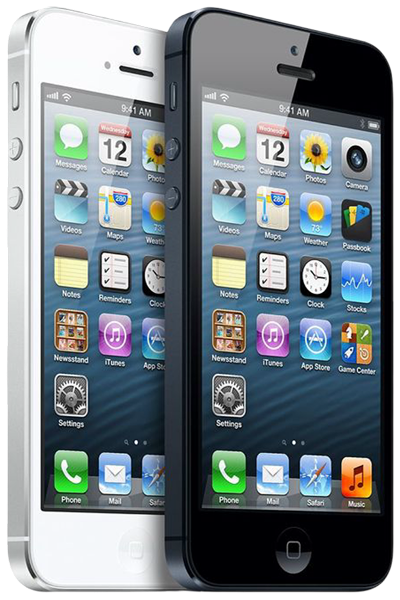
The iPhone 5 launched in September 2012—over twelve years ago. It was revolutionary at the time: first iPhone with a 4-inch screen (up from 3.5"), first with Lightning connector (replacing 30-pin), thinner and lighter than predecessors, LTE connectivity, improved cameras. It was genuinely impressive in 2012.
Twelve years later, the iPhone 5 is obsolete in every technical sense. iOS 10.3.4 is the absolute final version it'll ever run—no security updates, no app compatibility improvements, nothing. The A6 chip struggles with even basic modern websites. The 1GB of RAM can barely keep one app running. That 1,440 mAh battery? Even brand new, it's half the capacity of budget phones today.
But here's why people still use them: the 4-inch size is genuinely nice for one-handed use and fits in any pocket. The build quality was solid—aluminum and glass construction that's held up physically. And for the absolute basics—voice calls, SMS texts, alarm clock, music player—it technically still works.
The question isn't whether the iPhone 5 can be repaired. The question is whether it should be. If you need a phone that does literally nothing except make calls and send texts, and you're comfortable with zero app functionality, then maybe minimal repairs make sense. If you need anything beyond that, you're trying to use twelve-year-old technology for tasks it can't handle.
Diagnostic Troubleshooting: Start Here
Let's diagnose what's actually broken and whether fixing it makes any sense.
Path 1: The Infamous Power Button Problem
Starting point: Your power button (sleep/wake) doesn't work or is stuck.
Why this is THE iPhone 5 issue: The iPhone 5 has a notorious design flaw where the power button cable breaks or the button mechanism fails. Apple even ran a free repair program for this (expired years ago). If your power button's dead, you can't wake the phone, lock it, or power it off normally.
Step 1: Test the button
- Press the power button firmly. Does it click? Does the screen respond?
- Completely dead: The button cable has failed or the mechanism is broken
- Stuck/won't click: The button's physically jammed
Step 2: Workarounds while deciding
- Enable AssistiveTouch: Settings > General > Accessibility > AssistiveTouch (ON). This puts a virtual power button on screen.
- Use "Raise to Wake" equivalent: Can't—iOS 10 doesn't have this feature. You'll need AssistiveTouch.
Step 3: Evaluate repair value Power button repair requires replacing the power button cable assembly. It's doable, but ask yourself:
- Is this your only issue?
- How much longer will you realistically use this phone?
- Does investing in iPhone 5 repair make sense for a twelve-year-old device?
Honest assessment: If the power button's your only problem and everything else works, repair might extend the phone's life another 6-12 months for basic use. If you're also dealing with battery death, charging port issues, and cracked screen, combined repairs don't make sense. The phone's already on borrowed time with zero software support.
Path 2: Battery Dies in Under Two Hours
Starting point: Your battery can't hold a charge worth anything.
Step 1: Check Battery Health (if feature exists) iOS 10 doesn't have the Battery Health feature—that came in iOS 11.3. You can't check capacity percentage directly. But you can observe real-world performance.
Step 2: Reality test
- Charge to 100%
- Use the phone normally (calls, texts, light browsing)
- How long until it dies?
Results interpretation:
- 4+ hours: Battery's worn but functional for basic use
- 2-4 hours: Battery's severely degraded
- Under 2 hours: Battery's essentially dead
Step 3: Understand what you're working with The iPhone 5 battery is 1,440 mAh—tiny even when brand new. After twelve years, it's probably at 40-50% capacity. That's roughly 600-700 mAh of usable capacity. For comparison, a cheap emergency power bank has 2,000+ mAh.
Step 4: Evaluate replacement value Battery replacement for the iPhone 5 is straightforward and affordable—parts are cheap because the phone's so old. But here's the question: even with a fresh 1,440 mAh battery, you're working with less capacity than most modern phones have when worn to 60%.
Did You Know? Apple offered a battery replacement program for certain iPhone 5 units manufactured between September 2012 and January 2013 that experienced battery issues. If your phone was in that batch and you never got the replacement, that might explain why your battery's been problematic for years—it had a manufacturing defect from day one. The program ended in 2014, but it's interesting context for why some iPhone 5 batteries aged worse than others.
The honest calculation: Battery replacement makes sense if:
- It's your only issue
- You only need 3-4 hours of basic use daily
- You're keeping the phone as an emergency backup, not daily driver
- You understand you're getting 2012-era battery capacity
Battery replacement doesn't make sense if:
- You're also fighting power button, charging port, and screen issues
- You need the phone to last a full work day
- You're using it as your primary phone
- Modern app functionality matters to you
Path 3: Charging Cable Only Works at Weird Angles
Starting point: You have to position the Lightning cable just right or it won't charge.
Step 1: Inspect the port Shine a flashlight into the Lightning port. Do you see:
- Dark debris/lint at the bottom?
- Bent pins?
- Corrosion (green/white crusty material)?
Step 2: Cleaning attempt Power off the phone completely. Use a wooden toothpick (NEVER metal) and gently scrape the bottom and sides of the Lightning port. Go slowly and be thorough.
Results:
- Lint comes out and charging improves: Problem solved with cleaning
- No debris and still doesn't work: Port is genuinely damaged
Step 3: Test with multiple cables Try an Apple-certified cable if you've been using third-party cables. Some cheap cables have thicker housings that don't seat properly in worn ports.
Step 4: Repair evaluation If cleaning doesn't fix it, the Lightning port needs replacement. The port, speakers, and microphone are on one flex cable that replaces as a unit.
The practical reality: Lightning port replacement on the iPhone 5 is affordable since parts are cheap. But if you're also dealing with power button failure and battery death, you're looking at multiple repairs on a twelve-year-old phone. At what point does the combined investment stop making sense?
The Problems Nobody Wants to Discuss
Software Obsolescence Is Unfixable
The reality you can't repair: Your iPhone 5 runs iOS 10.3.4—the final version released in 2019. That's six years without security updates. Most apps require iOS 12 minimum now, many need iOS 14+. Banking apps? Social media? Navigation? Most don't work anymore.
What this means practically:
- Can't install most apps from App Store
- Apps you have installed might stop working as services update
- No security patches—vulnerable to known exploits
- Websites render poorly in old Safari
- No Apple Pay, no Face ID, no modern features
There's no repair for this. It's not hardware failure—it's that the world moved on from iOS 10 and won't support it anymore.
The honest question: If you can't use modern apps, can't access modern services securely, and can't update anything, what's the iPhone 5 actually good for? Calls and texts? A $50 flip phone does that. Music player? Your old iPod did that. Seriously evaluate whether keeping this phone makes sense for your actual needs.
The Screen Situation
What you're dealing with: Maybe your screen's cracked. Maybe touch is spotty. The display's probably dimmer than you remember even at max brightness.
The repair math: Screen replacement for the iPhone 5 is cheap—parts cost almost nothing because the phone's ancient. Labor's straightforward. But you need to think about total investment, not just screen cost.
If screen replacement is your only repair: probably worth it if you're committed to using this phone.
If screen replacement plus battery plus power button plus charging port: you're investing significantly in a phone that can't run modern software and has zero remaining support.
The psychological trap: People fall into the "sunk cost" mindset. "I've already fixed X and Y, so I might as well fix Z." But each repair doesn't make the phone younger or restore iOS support. You're just maintaining a device that's fundamentally obsolete.
Home Button and Touch ID
What might be broken: Home button doesn't click, Touch ID doesn't work, or both.
The Touch ID reality: Even if we replace the home button, Touch ID won't work. The sensor's paired to the logic board—replacing it means you lose fingerprint unlock permanently. You'll have to type your passcode every time.
Given that the iPhone 5 doesn't have Touch ID (that came with the 5s), if you have an iPhone 5, you're just dealing with a mechanical home button that might need replacement.
The repair question: Home button replacement is affordable. But again—is this the only issue, or are you fighting multiple problems on a twelve-year-old phone?
What to Expect When You Bring Your iPhone 5 In
We approach the iPhone 5 differently than any other device because it's genuinely obsolete.
Free Diagnostic Plus Brutally Honest Assessment
We'll test everything—battery performance, button functionality, port condition, screen integrity. Then we have the conversation nobody wants: does repairing a twelve-year-old phone with zero software support actually make sense?
Sometimes the answer's yes—if it's a single affordable repair and you need the phone for truly basic tasks only. More often, the answer's no—multiple repairs on a device this old rarely make economic or practical sense.
The Reality Check We Give Every iPhone 5 Owner
We'll ask you directly:
- What do you actually need this phone to do?
- How long do you realistically plan to use it?
- Are you avoiding upgrade costs or do you genuinely not need modern features?
- Do you understand that most apps and services won't work?
Your answers determine whether iPhone 5 repair makes sense or if you're throwing money at a device that can't serve your actual needs.
Quality Work Even on Ancient Hardware
If you decide repair makes sense after our honest conversation, we use quality parts and do careful work. Age doesn't mean we cut corners. Battery replacements get reliable cells. Screen replacements are done properly.
But we won't let you invest heavily in repairs without understanding what you're actually getting: a twelve-year-old phone with 2012 capabilities and zero software support going forward.
The Upgrade Conversation
We'll also discuss alternatives openly. Sometimes keeping the iPhone 5 alive is the right move. Sometimes getting a used iPhone 7 or 8 for minimal cost makes more sense—you get modern iOS support, app compatibility, and years of remaining life.
We're not trying to upsell you. We're trying to help you make the smart decision for your situation and budget.
If You're Committed to Keeping It Alive
If you've decided the iPhone 5 still serves your minimal needs, here's how to maximize what's left:
Battery management is critical. Keep Low Power Mode enabled always (Settings > Battery). This extends runtime significantly by reducing background activity.
Keep storage under 80%. The 16GB, 32GB, or 64GB you have isn't much. Delete everything unnecessary. When storage fills, the phone crawls.
Clean the Lightning port monthly. Wooden toothpick, gentle scraping. Prevents charging issues before they become critical.
Use AssistiveTouch permanently if your power button's failing (Settings > General > Accessibility > AssistiveTouch). It's ugly but functional.
Accept extreme limitations. You can't install most apps. You can't update iOS. Security vulnerabilities exist that'll never be patched. You're using this phone for calls, texts, and maybe music—that's it.
Have a backup plan. The iPhone 5 could die permanently at any moment—it's twelve years old. Know what you'll do when it finally gives up entirely.
Don't rely on it for anything critical. Don't use it for banking, important work communications, or emergency-only communications. It's too old and unreliable.
Your iPhone 5: The Honest Verdict
Let's be completely real: your iPhone 5 is twelve years old with zero remaining software support, app compatibility that's basically dead, and hardware that's ancient by modern standards.
iPhone 5 repair can technically extend its physical life—we can replace batteries, fix power buttons, swap screens. But we can't give you iOS updates, modern app support, or security patches. We can't make it less obsolete.
If you need a phone that literally only makes voice calls and sends SMS texts, and you're comfortable with zero additional functionality, then minimal repairs might make sense. We're talking truly minimal needs here—emergency backup phone, dedicated music player, give-it-to-a-kid-to-learn-responsibility device.
If you need anything beyond that—apps, internet browsing, navigation, social media, mobile banking, anything modern—you need a newer device. No amount of iPhone 5 repair fixes software obsolescence.
Stop by The Fix for a free diagnostic and honest conversation. We'll assess what's broken, explain what we can fix, and more importantly, have a real discussion about whether fixing it actually makes sense for your situation. We handle iPhone 5 devices occasionally, and we're always upfront about the limitations. Sometimes repair's the right move. More often, it's time to accept this device has served its purpose and move on. Either way, you'll get straight talk about what makes sense—no pressure, just honesty.


Trusted repair solution for mobile phones, tablets, gaming consoles, and computer systems. We provide fast, reliable, and affordable repair services to get your devices back in perfect working condition.
The Fix is an independent repair service provider and is not affiliated with, sponsored by, or endorsed by Apple Inc., Samsung Electronics, Google LLC, or any other device manufacturer. We use high-quality compatible replacement parts unless explicitly stated. All trademarks are property of their respective owners.


© Copyright The Fix Solutions All rights reserved 2026.
Design by Deepcoder