






iPhone 17 Air Repair Services
Get fast, reliable, and professional iPhone 17 Air repair services at The Fix — your trusted destination for expert device care.
Common Repairs We Handle Daily


iPhone 17 Air Repair: Ultra-Thin Design Meets Expert Care
Introduction
So you went for the iPhone 17 Air—the sleekest, thinnest iPhone Apple's ever made at just 5.6mm. That 6.6-inch ProMotion display is gorgeous, the design is stunning, and holding it feels like holding the future. Then reality hits: you drop it, the battery's not lasting like it should, or something else goes wrong with this ultra-thin marvel.
Here's the thing about the iPhone 17 Air—its revolutionary thinness comes with repair challenges that don't exist on thicker iPhones. That impossibly slim profile means tightly packed components, specialized adhesives, and assembly techniques that require genuine expertise. You can't just hand this device to any repair shop and expect good results.
Whether it's a cracked display, battery replacement, or any other issue, your iPhone 17 Air needs technicians who understand what makes this device unique and how to repair it without compromising its structural integrity or functionality.
Device Overview
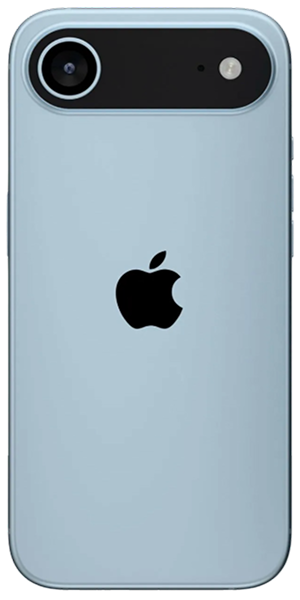
The iPhone 17 Air represents Apple's boldest design departure in years. At 5.6mm thick, it's about 30% thinner than the standard iPhone 17 and significantly slimmer than any previous iPhone. That ultra-thin profile is impressive, but it fundamentally changes how the device is constructed and how repairs must be approached.
That 6.6-inch display is the largest on any non-Max iPhone, and it features ProMotion's 120Hz refresh rate plus always-on functionality. The screen-to-body ratio is incredible, but it also means there's more glass surface area vulnerable to damage. The display assembly in the Air is specially designed for thinness, using different bonding techniques than standard iPhones.
Inside, the iPhone 17 Air uses a custom battery design—it has to be thin enough to fit in that 5.6mm chassis while still providing all-day battery life. The A19 Pro chip manages power incredibly efficiently, but when battery issues develop, replacement is more complex than on thicker iPhones.
The Air replaced the iPhone Plus in Apple's lineup, positioning it as a premium alternative for people who want a larger display without going full Pro Max. It starts at $999 for 256GB, making it a significant investment that deserves professional care when problems arise.
Here's what matters for repairs: every component in the iPhone 17 Air is miniaturized and precisely fitted. There's no wasted space, no easy access panels. Repairing this device requires specialized tools, genuine understanding of its construction, and experience that only comes from working on these ultra-thin devices.
Universal Challenges That Affect All Smartphones
Let's talk about reality for a moment. Your iPhone 17 Air goes everywhere with you—that's the point of a smartphone. But portability means exposure to risks that stationary devices never face.
Consider the physical stresses. That ultra-thin body is engineering perfection, but it's also less rigid than thicker phones. Slight flexing from pocket pressure, impact from drops, or even temperature-induced expansion and contraction all stress the internal components more than they would in a thicker, more rigid chassis.
Environmental factors affect the Air just like any phone. Temperature swings from air conditioning to summer heat, humidity in bathrooms, dust infiltration through port openings—all of this impacts electronics over time. The tight internal spacing in the Air means there's less buffer for these environmental stresses.
Battery chemistry doesn't care how thin or advanced your phone is. Lithium-ion batteries degrade from the moment they're manufactured. Every charge cycle reduces capacity slightly. Heat accelerates degradation. The iPhone 17 Air's battery is excellent, but it won't last forever—and its custom thin design means replacement is more involved than standard iPhones.
User accidents happen to everyone eventually. You're careful, sure—everyone is until they're not. One distracted moment, one slippery surface, one unexpected bump. The iPhone 17 Air's thin design makes it easier to hold, but it doesn't make it indestructible. When accidents happen, professional repair is your path back to full functionality.
Common iPhone 17 Air Problems
Screen Damage on the Large Display
The iPhone 17 Air's 6.6-inch display is breathtaking—until it cracks. That large screen means more glass surface area exposed to potential damage, and the ultra-thin design means less structural protection for the display assembly.
Cracked screens on the Air present unique challenges. The display is bonded using specialized adhesives designed for the thin chassis. Improper removal can damage the OLED panel, crack the frame, or compromise the structural integrity of the device. This isn't a repair for amateurs or quick-fix shops.
The OLED panel itself is incredibly thin to fit the Air's profile. Even when the outer glass survives impact, the OLED underneath can fail, creating dead zones, color distortion, or complete blackout in portions of the display. Sometimes you'll see the crack; other times, the panel fails without visible external damage.
Touch sensitivity issues develop from display damage. The Air's touchscreen uses capacitive sensing layers integrated into the display assembly. Cracks or impact can damage these layers, creating unresponsive zones or erratic touch behavior where the screen registers touches you didn't make.
Face ID sensors are integrated into the display assembly area. Damage near the top of the screen can affect Face ID functionality. Professional repair preserves these sensors—amateur repairs often permanently disable Face ID, which significantly reduces the phone's value and functionality.
At The Fix, we have the specialized tools and adhesives required for iPhone 17 Air screen replacement. We understand the precise disassembly procedures that protect the thin frame and preserve Face ID. Your repaired Air will look and function exactly as it did before damage occurred.
Battery Challenges in Ultra-Thin Design
The iPhone 17 Air's battery is a marvel of engineering—thin enough to fit in a 5.6mm chassis while delivering all-day battery life. But when that battery starts failing, replacement is significantly more complex than standard iPhones.
Battery degradation shows familiar symptoms: reduced runtime, unexpected shutdowns at higher charge percentages, slow charging, or iOS displaying battery health warnings. The Air's battery capacity is smaller than thicker iPhones due to size constraints, so degradation becomes noticeable sooner.
The custom battery design in the Air uses specialized adhesive that's stronger than standard iPhone batteries. This adhesive is necessary for the thin design—it prevents battery movement and maintains structural rigidity. But it also makes removal more challenging without damaging the battery or surrounding components.
Battery swelling is particularly serious in the Air. The tight internal spacing means even slight swelling can press against the display from behind, causing screen lifting or damage. If your Air's screen is raising, the back feels bulged, or the phone won't sit flat, stop using it immediately and seek professional service.
Charging issues might be battery-related or indicate charging circuit problems. The Air's miniaturized charging circuitry is precisely engineered, but it can fail from power surges, liquid damage, or component defects. Proper diagnostics determine whether you need battery replacement, charging port service, or logic board repair.
The Fix has experience replacing iPhone 17 Air batteries. We use the correct adhesives, follow proper removal procedures, and ensure the replacement battery is precisely fitted without stressing the thin chassis. Your Air will deliver the battery life Apple intended.
Structural Integrity and Bending
The iPhone 17 Air's ultra-thin profile creates a unique concern: structural integrity. While Apple engineered this device carefully, the physics of a 5.6mm thick device mean it's more susceptible to bending stress than thicker phones.
Pocket bending can occur when the Air is in tight pockets or under pressure from sitting. You might not notice slight bending immediately, but it stresses internal components, can crack the logic board, or damage the battery. Even minor bends can affect display fit and cause screen issues.
Drop damage manifests differently on the Air than thicker iPhones. The thin frame absorbs less impact energy, meaning more force transfers to internal components. You might drop the Air and see no external damage, but internal components—cameras, logic board, battery connections—can suffer from the impact.
Frame damage from impacts affects device functionality beyond cosmetics. The Air's thin aluminum frame is part of its structural system. Bent or cracked frame sections compromise the entire device's integrity, affect component alignment, and can prevent proper reassembly after repairs.
Apple designed the Air with structural reinforcement in key areas, but it's still a thin device. Treat it carefully—use it with both hands, don't put excessive items on top of it, and consider a protective case that adds rigidity without significantly increasing thickness.
If your iPhone 17 Air has sustained bending or frame damage, The Fix can assess the extent of the problem and determine if repair is viable. Some structural damage is fixable; severe bending might compromise the device beyond reasonable repair.
Charging Port Vulnerabilities
The iPhone 17 Air uses USB-C charging—a significant change from the Lightning connector on most iPhones. While USB-C is superior in many ways, it has its own repair considerations in the ultra-thin Air chassis.
USB-C port damage happens from repeated cable insertion at angles, yanking cables without supporting the port, or using cables that don't fit precisely. The port's internal pins are delicate, and the connector's thinner profile (necessary for the Air's slim design) means less mechanical strength.
Debris accumulation in USB-C ports is common. Pocket lint, dust, and microscopic particles work their way into the port opening over time. In the Air's tightly engineered chassis, debris has nowhere to go—it compresses against port contacts, preventing proper cable insertion and electrical connection.
Charging problems show various symptoms: no charging at all, intermittent charging that stops with slight movement, extremely slow charging, or the phone not recognizing certain cables. These symptoms might indicate port damage, debris accumulation, or charging circuit issues on the logic board.
Liquid intrusion affects USB-C ports severely. The iPhone 17 Air has water resistance, but it's not waterproof. Liquid entering the USB-C port can corrode contacts, short electrical connections, or damage charging circuits. If you've exposed your Air to water and now have charging issues, professional inspection is critical.
The Fix can clean or replace USB-C ports on the iPhone 17 Air. Port replacement in this ultra-thin device requires specialized skills—the port is integrated with the device's frame, and improper replacement can damage the thin chassis or compromise water resistance.
Camera System Failures
The iPhone 17 Air features Apple's advanced camera system—48MP Fusion Main camera, 48MP Ultra Wide, and 18MP Center Stage front camera. When these sophisticated systems fail in the ultra-thin chassis, repair requires precision.
Autofocus problems create blurry photos that won't lock focus. The Air's camera modules use Voice Coil Motors in an ultra-compact form factor. These motors can fail from drops, impacts, or age, leaving the camera unable to focus properly.
Optical image stabilization (OIS) failures cause shaky, blurry photos and videos. The OIS system in the Air is miniaturized to fit the thin design, but it's still sophisticated. When it fails, software stabilization can't fully compensate for the loss of hardware-based stabilization.
Camera lens scratches affect image quality dramatically. The Air's cameras protrude slightly despite the thin body—they have to, given lens optics requirements. This makes them vulnerable to scratches when you set the phone down. Even minor lens scratches create flare, reduce contrast, or cause soft focus.
Black screen in Camera app has multiple possible causes in the Air. The camera module itself might have failed, connections might be loose (particularly relevant in a device that experiences more flexing), or software glitches might be responsible. Proper diagnostics distinguish between these scenarios.
Front camera issues affect both selfies and Face ID. The Center Stage feature is fantastic for video calls, but if the front camera fails, you lose this functionality. Face ID depends on the TrueDepth camera system, so front camera problems might also affect biometric authentication.
At The Fix, we stock camera modules compatible with the iPhone 17 Air's ultra-thin design. Camera replacement requires careful disassembly of the tightly packed chassis, but we have the experience and tools to perform this work while preserving all device functionality.
Overheating in Compact Design
The iPhone 17 Air's A19 Pro chip is incredibly efficient, but generating heat in a 5.6mm thick chassis presents thermal challenges. The thin design means less thermal mass to absorb heat and less space for heat dissipation.
Normal warmth during intensive use is expected—the Air's thin body means you feel heat more directly than on thicker phones. But overheating that causes discomfort, performance throttling, or unexpected shutdowns indicates problems.
Thermal throttling reduces performance to manage heat. If your Air suddenly becomes sluggish during gaming, video recording, or intensive apps, the system might be throttling to prevent overheating. This is normal protective behavior, but excessive throttling suggests cooling system problems.
The Air uses a sophisticated vapor chamber cooling system optimized for its thin profile. If this system fails or becomes contaminated, heat management suffers dramatically. Professional repair can address vapor chamber issues, though they're fortunately rare.
Software issues can cause unexpected heat generation. Rogue apps, background processes, or iOS bugs sometimes cause excessive CPU usage, generating heat even during light use. Before assuming hardware problems, software troubleshooting makes sense.
If your iPhone 17 Air is overheating, The Fix can diagnose the cause. We'll determine if it's normal behavior for intensive use, a software issue, or actual hardware failure requiring repair.
Wi-Fi and Connectivity Issues
The iPhone 17 Air uses Apple's new N1 networking chip, supporting Wi-Fi 7, Bluetooth 6.0, and Thread. These advanced connectivity features are fantastic when working, but failures require specialized diagnosis.
Wi-Fi dropouts or weak signal strength indicate antenna or chip problems. The Air's antennas are integrated into the ultra-thin frame, and physical damage or flexing can affect antenna performance. You might notice poor Wi-Fi performance in locations where other devices work fine.
Bluetooth connectivity issues affect wireless headphones, smartwatches, and other accessories. The N1 chip handles Bluetooth, so failures might affect multiple wireless technologies simultaneously rather than just one.
The C1X modem in the iPhone 17 Air handles cellular connectivity. Modem failures create inability to connect to cellular networks, frequent disconnections, or poor signal strength. These problems require specialized diagnostics to distinguish between carrier issues, SIM problems, and hardware failure.
Antenna damage from drops or bending affects all wireless connectivity. The Air's thin frame houses antennas in specific locations, and frame damage can break antenna connections or damage antenna elements.
Software issues sometimes mimic hardware failures. Corrupted network settings, iOS bugs, or carrier profile problems can create connectivity issues that seem like hardware failures but are actually software-related.
The Fix has the diagnostic tools to determine if your iPhone 17 Air's connectivity problems are hardware or software-related. We can repair or replace failed components while preserving the device's ultra-thin profile.
The iPhone 17 Air Repair Process
Repairing the iPhone 17 Air requires specialized approaches due to its ultra-thin design. Here's what happens when you bring your Air to The Fix.
Specialized Diagnostic Process: We start with detailed questions about your Air's symptoms. When did problems start? Any drops, impacts, or bending? Exposure to liquids? This background is crucial for diagnosing ultra-thin devices where multiple symptoms might indicate structural issues.
Our diagnostic equipment includes specialized fixtures for the iPhone 17 Air. We test battery health, charging system function, display quality, camera operation, Face ID status, structural integrity, and logic board function. We're looking not just at the obvious problem but at whether the thin design has been compromised in ways that affect multiple systems.
Careful Disassembly Procedures: The iPhone 17 Air requires specialized opening procedures. The adhesives are stronger, the components more tightly packed, and the tolerances tighter than standard iPhones. We use precision tools and controlled heating to safely separate components without damaging the thin frame or internal parts.
Every step is carefully documented. We photograph the device before, during, and after repair, ensuring we can precisely reassemble everything in its correct position. Misalignment of even half a millimeter can cause problems in a device this thin.
Component Replacement with Precision: Whether we're replacing the display, battery, cameras, or other components, precision is critical. The replacement parts must fit exactly within the ultra-thin chassis. Adhesives must be precisely applied—too much and components won't fit properly; too little and structural integrity suffers.
We use manufacturer-specified adhesives designed for the iPhone 17 Air's thin profile. Generic adhesives don't provide the same bonding strength or thin application profiles required for this device.
Structural Integrity Verification: After repair, we verify structural integrity. The Air should be flat (no bending), display should sit flush, back panel should be properly sealed, and all components should be precisely aligned. We check for any flex or give that might indicate improper assembly.
Comprehensive Functional Testing: Every system gets tested: display touch response across the entire surface, Face ID recognition, camera focus and stabilization, audio quality, wireless connectivity, charging speed, and button functionality. Your iPhone 17 Air needs to work perfectly, not just "good enough."
Post-Repair Support: The ultra-thin design means we're particularly attentive to post-repair support. If you notice anything not quite right—even minor things like slight gaps or inconsistent button feel—bring it back immediately. These details matter in a precision device like the Air.
Prevention Tips
Protect your iPhone 17 Air with these strategies designed specifically for ultra-thin devices:
Case Selection is Critical: Not all cases are appropriate for the Air. Get a case specifically designed for the iPhone 17 Air that adds structural rigidity without significantly increasing thickness. Cases that grip the sides firmly help resist bending stress.
Screen Protection: Use a quality tempered glass screen protector. The Air's large display is expensive to replace, and a screen protector absorbs impact energy during drops. Edge-to-edge protectors work best with the Air's minimal bezels.
Avoid Pocket Stress: Don't sit on your Air in back pockets. Don't overstuff front pockets with keys, coins, and your phone together. The thin profile means less resistance to bending forces from pocket pressure.
Two-Handed Use: The Air's size and thinness make one-handed use tempting, but two-handed use is safer. You're less likely to drop it, and you're not putting bending stress on the thin body while holding and tapping with one hand.
Charging Port Care: The USB-C port is robust but still needs care. Support the port when inserting cables—push straight in, don't angle the connector. Use quality cables that fit precisely without excessive play.
Temperature Management: Don't leave your Air in hot cars or direct sunlight. The thin body heats up quickly, and extreme temperatures accelerate battery degradation. Don't use it in extreme cold either—cold affects battery performance and can make the thin body more brittle.
Regular Backups: iCloud or computer backups mean your data survives hardware failures. The Air's larger base storage (256GB minimum) means you have more data at risk. Set up automatic backups and verify they're working periodically.
Professional Inspection After Drops: Even if your Air seems fine after a drop, consider professional inspection. Internal damage might not be immediately obvious, and catching problems early prevents progressive failures.
Conclusion
Don't trust your iPhone 17 Air to just anyone. The Fix has the experience, tools, and expertise to handle iPhone 17 Air repairs correctly. We'll diagnose your device for free, explain your options honestly, and do the work right the first time.
Your iPhone 17 Air represents Apple's most ambitious design in years—ultra-thin, beautifully engineered, and packed with advanced technology. When something goes wrong, it deserves repair that respects that engineering and maintains the precision Apple built into it.
Most problems are totally fixable. Display damage, battery degradation, charging issues, camera failures—these are challenges we handle with proven techniques specifically adapted for ultra-thin devices. Your Air can be restored to perfect functionality.
Bring your iPhone 17 Air to The Fix and let our experienced techs take a look. We've seen every problem these devices develop, we know exactly how to fix them, and we'll treat your phone like it's our own. Free diagnostic, honest pricing, quality work.
Expert repair extends your Air's life and protects your investment. Don't let small problems become expensive replacements. Professional care brings your ultra-thin iPhone back to life and keeps it running the way Apple designed it to.


Trusted repair solution for mobile phones, tablets, gaming consoles, and computer systems. We provide fast, reliable, and affordable repair services to get your devices back in perfect working condition.
The Fix is an independent repair service provider and is not affiliated with, sponsored by, or endorsed by Apple Inc., Samsung Electronics, Google LLC, or any other device manufacturer. We use high-quality compatible replacement parts unless explicitly stated. All trademarks are property of their respective owners.


© Copyright The Fix Solutions All rights reserved 2026.
Design by Deepcoder