






iPhone 17 Repair Services
Get fast, reliable, and professional iPhone 17 repair services at The Fix — your trusted destination for expert device care.
Common Repairs We Handle Daily


iPhone 17 Repair: Expert Service for Apple's Latest Innovation
Introduction
Picture this: you just got your hands on the stunning new iPhone 17 with its gorgeous 6.3-inch ProMotion display and that beautiful Lavender or Sage finish. Life's great until—crack—you drop it getting out of your car. Or maybe the battery's draining faster than it should, or the camera's acting weird. Suddenly, your $799+ investment needs professional attention.
Here's what you need to know about the iPhone 17: it's an incredible device with some serious upgrades over the iPhone 16, but when something goes wrong, you can't just wing it with DIY repairs or trust it to anyone. The new Ceramic Shield 2, Center Stage front camera, and A19 chip mean this phone requires expertise that only comes from technicians who actually understand Apple's latest technology.
Whether you're dealing with a cracked screen, battery issues, or charging problems, professional repair gets your iPhone 17 back to perfect condition without voiding protections or compromising functionality. Let's dive into what actually goes wrong with these new devices and how proper repair works.
Device Overview
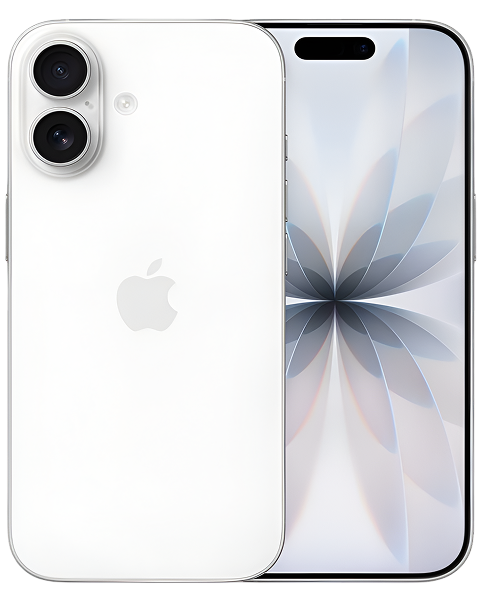
The iPhone 17 represents Apple's latest refinement of their smartphone design. Released in September 2025, it brings some significant improvements that change the repair landscape compared to previous models.
First, that display. The 6.3-inch screen is larger than the iPhone 16's 6.1-inch display, and it's the first time ProMotion's 120Hz refresh rate has come to a non-Pro iPhone. That silky-smooth scrolling and gaming experience is amazing—until the screen cracks. The always-on display functionality is fantastic for glancing at notifications, but it also means the display assembly is more complex than previous generations.
The new Ceramic Shield 2 on the front is supposedly three times more scratch-resistant than previous versions. That's great for everyday protection, but here's the thing: scratch-resistant doesn't mean shatter-proof. Drop your iPhone 17 on concrete from the wrong angle, and you'll still crack that beautiful display.
Apple ditched the 128GB base storage option—the iPhone 17 starts at 256GB for $799. That's actually good news from a repair perspective because you're less likely to fill up storage and need data recovery services, but it doesn't change the fact that when hardware fails, you need professional help.
The A19 chip powering this device is incredibly efficient, but it also means the iPhone 17 has sophisticated power management that can create confusing symptoms when something goes wrong. Battery draining fast? Is it the battery itself, or is something else causing excessive power draw? Proper diagnostics matter.
Universal Challenges That Affect All Smartphones
Think about how you actually use your iPhone 17. It's in your pocket with keys and coins. It's in your bag with who-knows-what pressing against the screen. It's in your hand constantly—texting, scrolling, gaming, filming. That's thousands of touches daily, dozens of charge cycles monthly, and countless opportunities for something to go wrong.
Smartphones face unique environmental challenges. Your iPhone 17 goes from air-conditioned spaces to summer heat, from dry offices to humid bathrooms. Temperature and humidity fluctuations stress internal components in ways desktop devices never experience. That's why even careful users eventually face hardware issues.
Physical stress is constant and cumulative. Every time you press the volume buttons or power button, you're wearing down mechanical components. Every charging cable insertion stresses the Lightning port. Every time you set your phone down—even gently—the internal components experience tiny impacts. Over months and years, this adds up.
Battery chemistry works against you from day one. Lithium-ion batteries start degrading the moment they're manufactured. Every charge cycle reduces capacity slightly. Heat accelerates this degradation. The iPhone 17's battery is excellent, but it won't last forever. After a couple years of daily use, replacement becomes necessary.
Then there's the reality of accidents. You're careful, sure—but so is everyone else who's ever cracked a phone screen. It takes one moment of distraction, one slippery surface, one unexpected bump. The question isn't if something might go wrong—it's what you'll do when it does.
Common iPhone 17 Problems
Screen Cracks and Display Damage
Let's address the elephant in the room: cracked screens are still the most common iPhone repair, and the iPhone 17 is no exception. Despite Ceramic Shield 2's improved scratch resistance, drop your phone wrong and that display will crack.
What makes iPhone 17 screen damage unique? The larger 6.3-inch display means more glass surface area exposed to potential impact. The ProMotion technology and always-on functionality mean the display assembly is more sophisticated than previous generations. This isn't just glass and an LCD—it's a complex OLED panel with 120Hz refresh rate circuitry, always-on display components, and precise touch sensing layers.
Cracks range from minor corner chips to spiderwebbing across the entire display. Sometimes the touch functionality continues working despite visible cracks—other times, touch becomes unresponsive or erratic. The OLED panel underneath the glass can fail independently, creating dead zones, color distortion, or complete blackout even when the glass looks intact.
Here's something important: the iPhone 17's Face ID sensors are integrated with the display assembly. Improper screen replacement can damage these sensors, permanently disabling Face ID. That's why professional repair matters—technicians at The Fix know how to preserve Face ID functionality during screen replacement.
Display issues aren't always from impacts. We've seen iPhone 17s with green tint issues, flickering at certain brightness levels, or touch sensitivity problems that develop without any physical damage. These indicate manufacturing defects or component failures that require professional diagnosis and repair.
Battery Draining Fast
Battery life on the iPhone 17 is impressive out of the box—Apple claims all-day battery life, and the A19 chip's efficiency delivers on that promise. But what happens when your iPhone 17 suddenly won't make it through a full day anymore?
Battery degradation happens to all lithium-ion batteries over time. The iPhone 17 launched in September 2025, so early adopters might already notice reduced capacity by now if they're heavy users. iOS shows battery health percentage in Settings, and when that drops below 80%, you're definitely noticing shorter battery life.
But rapid battery drain isn't always about battery health. The A19 chip manages power incredibly well, but rogue apps, background processes, or iOS bugs can cause excessive battery consumption. Sometimes what seems like a failing battery is actually a software issue that's fixable without hardware replacement.
Real battery problems show specific symptoms: the phone dies at 20% or 30% remaining, battery percentage jumps erratically, charging is extremely slow, or the battery health percentage shows "Service" warnings. These indicate actual battery degradation or charging circuit issues.
Swollen batteries are serious safety concerns. If your iPhone 17's screen is lifting, the back feels bulged, or the phone won't sit flat on a table, stop using it immediately. Swollen lithium batteries can rupture or catch fire. This isn't common, but it requires immediate professional attention when it happens.
The Fix can replace iPhone 17 batteries with high-quality components that restore your phone to full-day battery life. We'll also run diagnostics to ensure charging circuits are functioning properly and recalibrate the battery management system so iOS accurately reports capacity.
Charging Port Issues
The iPhone 17 still uses Lightning connector—USB-C didn't make it to this model. That charging port takes constant abuse from daily plugging and unplugging, and it's surprisingly vulnerable to damage and debris accumulation.
Port not charging at all is the nightmare scenario. You plug in your cable and nothing happens—no charging indicator, no battery percentage increase. This could be port damage, but it might also be cable failure, power adapter problems, or charging circuit issues on the logic board. Proper diagnosis determines the actual problem.
Intermittent charging drives people crazy. You plug in the cable and it charges—until you move the phone slightly and charging stops. Position the cable just right and it works again. This typically indicates a damaged Lightning port where internal pins are bent or the connection is loose.
Debris accumulation causes more charging problems than people realize. Lint from pockets, dust, and microscopic particles accumulate inside the Lightning port over time. Eventually, this prevents the cable from fully inserting, creating poor electrical contact. Professional cleaning often solves charging issues without requiring port replacement.
Slow charging can indicate port damage, but it might also mean you're using a low-wattage charger. The iPhone 17 supports fast charging with appropriate adapters, but damaged port pins can limit charging speed even with the right equipment.
Water damage affects charging ports severely. The iPhone 17 has water resistance, but it's not waterproof. Liquid intrusion can corrode internal port contacts, creating charging problems that progressively worsen. If you've exposed your iPhone 17 to water and now have charging issues, professional inspection is critical.
Camera Problems and Image Quality Issues
The iPhone 17's camera system is a significant upgrade—48MP Fusion Main camera, 48MP Fusion Ultra Wide, and that new 18MP Center Stage front camera. When these sophisticated systems fail, photography and video capture suffer dramatically.
Blurry photos that won't focus indicate autofocus system problems. The camera uses Voice Coil Motors (VCM) to move lens elements for focusing. These motors can fail from drops, impacts, or age, leaving the camera stuck at one focus distance or hunting constantly without locking focus.
Camera shake or jittery video suggests optical image stabilization (OIS) failure. OIS uses tiny motors and gyroscopes to counteract hand movement. When OIS fails, photos and videos show excessive blur and shakiness that software stabilization can't fully compensate for.
Black screen in Camera app seems like a major failure, but it has multiple possible causes. The camera module itself might have failed, the connection to the logic board could be loose, or iOS might have camera software glitches. Diagnostics distinguish hardware from software issues.
Front camera problems affect Face ID and video calls. The Center Stage feature on the iPhone 17's front camera is fantastic for video calls, but if the camera fails, you lose both selfies and this intelligent framing capability. Face ID might also be affected since it uses infrared cameras near the front camera.
Lens scratches or cracks affect image quality dramatically. The iPhone 17's camera lenses protrude slightly, making them vulnerable to scratches when you set the phone down. Even minor scratches create lens flare, reduced contrast, or soft focus that ruins photos.
At The Fix, we stock camera modules for the iPhone 17 and can replace failed cameras while preserving all functionality including Center Stage and Face ID. Camera replacement is delicate work requiring proper tools and expertise.
Back Glass Damage
The iPhone 17 has a glass back that enables wireless charging and gives the phone its premium feel. It's durable, but drop it wrong and that back glass shatters just like the front screen.
Back glass cracks create multiple problems beyond aesthetics. Shattered back glass feels terrible in your hand—sharp edges and rough texture where smooth glass should be. Wireless charging might stop working if cracks damage the charging coil underneath. Water resistance is compromised when back glass integrity fails.
Replacing iPhone back glass is significantly more complex than screen replacement. Apple designed these phones so the back glass is fused to the frame, requiring complete disassembly to replace properly. This includes removing the battery, logic board, cameras—everything—to access the back glass.
Some repair shops use shortcuts like grinding away the broken glass and gluing on new glass. This looks okay initially but creates problems: improper adhesive application compromises water resistance, wireless charging alignment suffers, and structural integrity is questionable. Proper back glass replacement follows manufacturer procedures.
Color matching matters for back glass replacement. The iPhone 17 comes in Lavender, Sage, Mist Blue, White, and Black—and your replacement back glass needs to match your phone's color exactly. Quality repair shops stock the right colors and ensure perfect matches.
Face ID and Biometric Failures
Face ID is remarkably reliable on the iPhone 17, but when it fails, it's frustrating. "Face ID is not available" or "A problem was detected with Face ID" messages mean something's wrong with the sophisticated sensor array that makes facial recognition possible.
Physical damage to the TrueDepth camera system disables Face ID. Drop your iPhone 17 and crack the screen near the top notch area, and you might damage the infrared cameras, dot projector, or flood illuminator that Face ID requires. Sometimes these components fail even when the screen looks fine.
Water damage affects Face ID sensors severely. Despite the iPhone 17's water resistance, liquid intrusion can corrode delicate Face ID components. Once corrosion sets in, Face ID becomes unreliable or stops working entirely.
Software issues occasionally cause Face ID problems. iOS updates can introduce Face ID bugs, or data corruption might affect the secure enclave storing facial data. Before assuming hardware failure, trying software troubleshooting makes sense—but when software fixes don't work, hardware repair is necessary.
Face ID repair is complex because components are paired to your specific phone's logic board during manufacturing. Not all Face ID problems are fixable through component replacement. Sometimes the issue requires logic board repair or, in worst cases, isn't repairable without replacing major assemblies.
The Fix has experience diagnosing Face ID issues on iPhone 17 devices. We'll determine if your problem is fixable through repair or if it's a more complex logic board issue requiring different approaches.
Logic Board Issues and Performance Problems
The iPhone 17's A19 chip is incredibly powerful and reliable, but logic board problems can still develop. These manifest as various symptoms that seem unrelated until you realize they all point to motherboard issues.
Random reboots and crashes indicate instability that might be logic board-related. If your iPhone 17 restarts unexpectedly, freezes regularly, or crashes during specific tasks, something's causing system instability. This could be failing RAM chips, voltage regulation problems, or damaged circuits on the logic board.
Performance degradation beyond normal battery throttling suggests component failures. If your iPhone 17 suddenly runs sluggish, apps take forever to open, or animations stutter despite good battery health, logic board component failure might be responsible.
Connectivity issues across multiple systems point to logic board problems. Wi-Fi, Bluetooth, and cellular connectivity all failing simultaneously usually indicates the logic board's communication circuits have problems rather than individual component failures.
Water damage causes catastrophic logic board problems if liquid reaches internal electronics. The iPhone 17's water resistance provides good protection, but it's not perfect. Submersion, high-pressure water exposure, or liquid intrusion through damaged seals can corrode logic board traces and components.
Logic board repair requires specialized equipment and expertise. Component-level repair involves microscopic soldering, specialized diagnostic equipment, and deep knowledge of iPhone architecture. Not every repair shop can perform this work—but The Fix has the tools and experience for logic board diagnostics and repair.
Audio Issues: Speakers and Microphones
Audio problems frustrate daily iPhone use. The iPhone 17 has stereo speakers and multiple microphones that enable great audio quality—when they're working properly.
Speaker distortion or crackling indicates failing speaker components. The tiny speakers in smartphones can fail from age, debris accumulation, or water damage. You might notice distortion at high volumes first, progressing to constant crackling or complete speaker failure.
One speaker working while the other doesn't affects the stereo experience significantly. The iPhone 17 has speakers at the top (in the earpiece) and bottom. If only one works, you lose stereo separation and overall volume decreases.
Microphone failures make phone calls difficult or impossible. The iPhone 17 has multiple microphones for noise cancellation and better audio capture. If callers can't hear you, or if voice recordings sound muffled or distorted, microphone problems are likely.
Water damage affects audio components severely. Liquid can damage speaker membranes, corrode microphone contacts, or short audio circuits. If you've exposed your iPhone 17 to water and now have audio issues, professional cleaning and component replacement might be necessary.
Audio IC failures on the logic board cause various audio problems. These sophisticated chips control audio routing, processing, and amplification. When they fail, you might experience no sound, distorted audio, or microphones that don't work despite speaker functionality.
The iPhone 17 Repair Process
When you bring your iPhone 17 to The Fix, here's exactly what happens—and why our approach delivers better results than quick-fix shops or mail-in services.
Thorough Diagnostic Assessment: We start by understanding your specific issues. What symptoms are you experiencing? When did they start? Any drops, water exposure, or other incidents? This information guides our diagnostic approach.
We then run comprehensive diagnostics using professional-grade tools. We're not just testing the obvious problem—we're checking battery health, screen functionality, charging system integrity, camera operation, Face ID status, and logic board function. Comprehensive diagnostics reveal related issues you might not have noticed yet.
Transparent Explanation: After diagnostics, we sit down with you and explain exactly what we found. No confusing technical jargon, no pressure tactics. If your iPhone 17 needs a simple screen replacement, we say so. If there are multiple issues, we prioritize them and let you decide how to proceed.
Cost estimates are clear and complete. We explain what repairs cost, why they're necessary, and what alternatives exist. You get complete information to make informed decisions about your device.
Professional Repair Execution: iPhone 17 repairs happen in our facility using proper tools, high-quality parts, and experienced technicians. We follow best practices for iPhone repair—proper ESD protection, careful handling of delicate components, and attention to detail throughout.
Screen replacements preserve Face ID functionality—this requires special care because Face ID components are paired to your phone. Battery replacements include proper adhesive application and battery health recalibration. Charging port repairs ensure proper fit and function. Every repair is done right, not just done fast.
Most repairs complete same-day. Screen replacement, battery swap, charging port repair—these typically finish within hours. More complex work like logic board repair or extensive water damage restoration might take longer, but we communicate timing clearly.
Complete Testing and Quality Assurance: Every repaired iPhone 17 goes through extensive testing before we return it. We verify the specific repair worked correctly, but we also test everything else. Display quality and touch response, Face ID recognition, camera functionality, charging speed, audio quality, button operation—everything gets checked.
We make sure your iPhone 17 works perfectly, not just "good enough." If testing reveals any issues, we address them before returning your device.
Post-Repair Support: After you pick up your iPhone 17, our support continues. Questions about your repair? Something not functioning quite right? Bring it back—we stand behind our work. No runaround, no excuses, just solutions.
Prevention Tips
Keep your iPhone 17 in excellent condition with these practical strategies:
Protect That Screen: The Ceramic Shield 2 is tough, but it's not indestructible. Get a quality tempered glass screen protector and a protective case. This simple investment prevents the majority of screen damage. Cases with raised bezels protect both front and back glass when you set your phone down.
Mind the Cameras: Those beautiful camera lenses protrude slightly from the back. Cases with camera bump protection prevent lens scratches. Never set your iPhone 17 directly on rough surfaces without a case—concrete, gravel, and even some tables can scratch camera lenses.
Charging Port Care: Keep your Lightning port clean. Every few weeks, use a wooden toothpick or soft brush to carefully remove lint and debris. Don't use metal objects that might damage port pins. Clean ports prevent most charging issues.
Battery Health Management: iOS has optimized battery charging that learns your routine and delays charging past 80% until you need it. Enable this feature. Avoid extreme temperatures—don't leave your iPhone 17 in hot cars or cold environments. Heat especially accelerates battery degradation.
Water Resistance Isn't Waterproof: The iPhone 17 has good water resistance, but it's not meant for swimming or showering. Water resistance degrades over time as seals age. If your phone gets wet, dry the Lightning port before charging—water and electricity don't mix.
Software Updates: Keep iOS current. Updates include bug fixes, security patches, and performance improvements. Sometimes issues that seem like hardware problems are actually software bugs that updates fix.
Regular Backups: Use iCloud or iTunes to back up your iPhone 17 regularly. When hardware failures happen, having current backups means your data survives. Set up automatic backups so you don't have to remember.
Handle With Care: Use two hands when taking your phone out of your pocket. Don't use your phone while walking on stairs. Pay attention when setting it down. Most drops happen during routine activities when you're not paying full attention.
Conclusion
Your iPhone 17 is worth professional care. Display damage, battery degradation, charging problems, camera issues—these challenges are totally fixable when addressed by experienced technicians who actually understand Apple's latest technology.
Don't let problems worsen. That small screen crack will spread. The battery that's losing capacity will eventually swell. The intermittent charging issue will become complete failure. Small problems today become expensive repairs tomorrow when left unaddressed.
Expert repair costs less than you'd expect, especially compared to replacing your iPhone 17 entirely. Most issues are fixable in hours, not days or weeks. You get your phone back working perfectly, with all your data intact and Face ID functionality preserved.
Ready to fix your iPhone 17? The Fix makes it easy. Walk in anytime for a free assessment—most repairs are same-day, and we'll keep you updated throughout the process. Your device deserves expert care, and that's exactly what we deliver.
Bring your iPhone 17 to The Fix and let our experienced technicians diagnose what's actually wrong. We've got the tools, expertise, and high-quality parts to fix it right. Free diagnostic, honest pricing, quality work that actually lasts.
Professional repair brings your iPhone 17 back to life. Your device still has years of great performance ahead—let's make sure it keeps delivering the experience Apple designed.


Trusted repair solution for mobile phones, tablets, gaming consoles, and computer systems. We provide fast, reliable, and affordable repair services to get your devices back in perfect working condition.
The Fix is an independent repair service provider and is not affiliated with, sponsored by, or endorsed by Apple Inc., Samsung Electronics, Google LLC, or any other device manufacturer. We use high-quality compatible replacement parts unless explicitly stated. All trademarks are property of their respective owners.


© Copyright The Fix Solutions All rights reserved 2026.
Design by Deepcoder