






iPhone 16 Pro Max Repair Services
Get fast, reliable, and professional iPhone 16 Pro Max repair services at The Fix — your trusted destination for expert device care.
Common Repairs We Handle Daily


The Definitive Guide to iPhone 16 Pro Max repair: Common Problems & Solutions
Your day is packed. You’re bouncing between meetings, coordinating plans, and relying on your iPhone 16 Pro Max to be the command center for it all. Then, it happens. The screen freezes, the battery dies unexpectedly, or the camera fails right when you need it. Suddenly, your streamlined day hits a brick wall. There’s nothing more disruptive than a broken device, and you don’t have time to waste on a complicated solution.
We get it. Your time is valuable, and you need a fix that’s as fast and efficient as your phone is supposed to be. This guide is built for exactly that. Let me walk you through the most common issues we see and show you how a professional iPhone 16 Pro Max repair can be a quick, hassle-free process that gets you back up to speed in no time.
Getting to Know Your iPhone 16 Pro Max
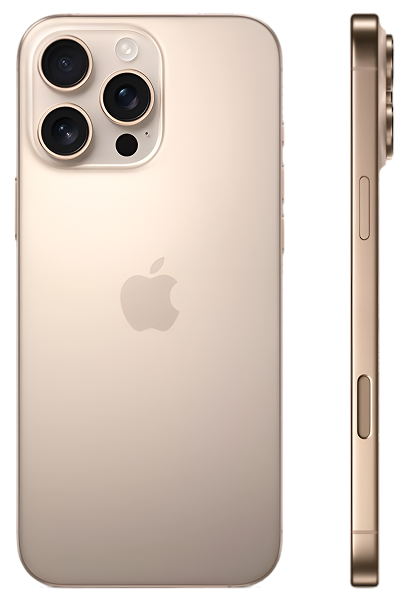
Released in the fall of 2024, the iPhone 16 Pro Max is an absolute powerhouse, designed for professionals and creators who can’t afford to slow down. It’s a serious tool, powered by the blazing-fast A18 Pro chip and featuring a pro-grade camera system that’s second to none. Its massive, fluid ProMotion display is your window to productivity and entertainment. When you’ve invested in a device built for peak performance, you expect it to keep up with your demanding schedule.
The Universal Challenges of Modern Electronic Devices
Ever wonder why even the most advanced phones can suddenly fail? It’s because at their core, they’re all dealing with the same physical limitations.
- Screen & Display Fragility: That beautiful display is your main point of interaction, but it’s also the most exposed. A single unlucky drop can bring your entire workflow to a halt, which is incredibly frustrating.
- Battery Degradation: Think of your battery like the gas tank in a high-performance car; over time, it just can't hold as much fuel. It’s a slow chemical process, and when it happens, you suddenly find yourself hunting for an outlet instead of getting things done.
- Port and Connection Wear: Your USB-C port is a high-traffic area. After hundreds of plug-ins, it's not surprising that wear and tear can lead to a connection failure, leaving you with no way to quickly power up for your next task.
- Software Complexity: iOS is designed for speed, but a small software glitch can act like a traffic jam in your phone’s system, causing slowdowns and crashes that kill your momentum.
So, how do these issues show up on your iPhone 16 Pro Max and, more importantly, how can we fix them fast?
An In-Depth Look at Common iPhone 16 Pro Max Problems
Here are the top issues that can disrupt your day and the quickest ways to get them resolved.
1. The Battery is Draining Way Too Fast
- Symptoms: It's a feeling of pure panic. It's only 2 PM, and your phone is already in the red zone. You bought the Pro Max for its incredible battery life, but now you’re tethered to a charger, unable to move freely. The device might even feel a bit warm, a sign that something is working overtime in the background.
- Potential Causes: In my experience, this is often a software issue. A recently updated app might have a bug, or a background process could be stuck in a loop, draining power. It's like having an app running in the background of your computer that's maxing out the CPU. Of course, after a year or two, simple battery aging is also a factor.
- In-Depth Fixes to Try: Before you panic, let's try a few quick things.
- The 60-Second Reboot: The first thing we always check is a simple hard reset. Press and quickly release the volume up, then volume down, then press and hold the side button until the Apple logo appears. This can solve a surprising number of software glitches in under a minute.
- Find the Power Hog: Go to Settings > Battery. This screen is your dashboard. It will show you exactly which app is eating up your battery. If you see an app you don't recognize or rarely use at the top, disabling or deleting it can be an instant fix.
- A common misconception our technicians often address is that a draining battery always means you need a new one. While that can be true, we often find it’s a software issue that can be resolved quickly. If these fixes don't work, however, a professional iPhone 16 Pro Max repair to replace the battery is an incredibly fast service that can restore your phone's all-day power in about an hour.
2. The Phone is Overheating and Slowing Down
- Symptoms: You’re in the middle of an important video call or navigating with GPS, and your phone gets hot and starts to lag. The screen dims, and every tap feels like it’s happening in slow motion. It’s a complete productivity killer.
- Potential Causes: Heat is the enemy of performance. The A18 Pro chip is powerful, but if an app forces it to run at 100% for too long, it generates a lot of heat. Your phone's built-in protection system then throttles the processor's speed to cool it down, which is what causes the lag. This is almost always caused by a buggy app or a demanding game.
- In-Depth Fixes to Try:
- Give It a Break: The fastest fix is to stop what you're doing. Close the demanding app, take the case off for a minute, and let the phone cool down.
- Update Your Apps: App developers frequently release updates to fix performance bugs that cause overheating. A quick trip to the App Store can often solve the problem for good.
- What I find interesting is that many users think overheating is a sign their phone is broken. Most of the time, it's just the phone protecting itself. However, if your device gets hot during basic tasks like browsing the web, it could signal a deeper issue. A quick diagnostic can determine if you need a simple software fix or a more involved hardware solution.
3. The Camera Fails or Won't Focus
- Symptoms: You’re trying to capture a quick, important moment—a child's first steps, a whiteboard in a meeting—and the camera app is just a black screen. Or, it opens, but the focus just hunts back and forth, turning a perfect shot into a blurry mess. There’s nothing more frustrating than your pro-grade camera failing you.
- Potential Causes: The camera system in the Pro Max is a mechanical marvel, with tiny motors for focus and stabilization. An unlucky drop, even a small one, can knock these delicate parts out of alignment. It can also be a simple software glitch that a reboot can fix.
- In-Depth Fixes to Try:
- The Quick App Relaunch: Double-press the home gesture and swipe up on the Camera app to close it completely. Relaunching it often clears the glitch.
- Check for Updates: A bug in an iOS update can sometimes affect the camera. Check for a new software update under Settings > General.
- A common misconception is that a camera problem means a long, complicated fix. In reality, a camera module replacement is one of the more straightforward hardware fixes. If a reboot doesn’t solve it, a fast and professional iPhone 16 Pro Max repair is the best way to ensure you don’t miss another important moment.
4. The Screen is Cracked or Damaged
- Symptoms: This one is impossible to ignore. A cracked screen makes your premium device look and feel terrible, and it can be a real hazard with sharp edges. It's the ultimate show-stopper, making your phone difficult and unpleasant to use.
- Potential Causes: A drop. That's it. It only takes one moment of distraction for your device to take a tumble.
- In-Depth Fixes to Try: Unfortunately, there's no software fix for broken glass.
- In my experience, many people live with a cracked screen for weeks because they think the repair process will take too long. They worry about being without their phone for a day or more. The truth is, a screen replacement is our most common and streamlined service. A professional iPhone 16 Pro Max repair for the screen can often be completed while you wait.
Our iPhone 16 Pro Max repair Process: Fast, Simple, and Hassle-Free
We know your time is money. Our entire process is built around speed and convenience to minimize your downtime.
- The Express Diagnosis: As soon as you bring in your device, we get to work. Our technicians can typically identify the problem in just a few minutes, right there at the counter. It's a quick, free, and no-pressure first step.
- The Instant Quote: Once we know the issue, we'll give you a clear, upfront quote and an accurate time estimate immediately. No waiting, no surprises.
- The Same-Day Repair: For most common issues like screens, batteries, and charging ports, our skilled technicians can complete the repair the very same day, often in about an hour. You can run an errand and come back to a phone that's as good as new.
- The Final Check: We quickly test all the phone's functions after the repair to make sure everything is working perfectly, so you can walk out the door with confidence and get back to your busy day.
A Proactive Guide to Keeping Your iPhone 16 Pro Max in Peak Condition
Want to avoid the hassle of a repair altogether? A few quick habits can make all the difference. Using a quality case and a screen protector is the fastest and cheapest way to protect your phone from its biggest threat—gravity. To keep your battery healthy, try to avoid letting your phone overheat while charging. Taking 30 seconds to remove the case during a fast charge can genuinely prolong its life and save you a trip for a replacement.
Conclusion
Your iPhone 16 Pro Max is a high-performance tool, and you don't have time for it to be out of commission. When a problem happens, you need a solution that is fast, clear, and convenient. While some issues can be solved with a quick reboot, for everything else, a professional repair is the most efficient way to get back on track.
If you're dealing with a frustrating issue and need a quick solution, we're here to help. Contact The Fix today for a fast and hassle-free iPhone 16 Pro Max repair that respects your time and gets your device working perfectly again.


Trusted repair solution for mobile phones, tablets, gaming consoles, and computer systems. We provide fast, reliable, and affordable repair services to get your devices back in perfect working condition.
The Fix is an independent repair service provider and is not affiliated with, sponsored by, or endorsed by Apple Inc., Samsung Electronics, Google LLC, or any other device manufacturer. We use high-quality compatible replacement parts unless explicitly stated. All trademarks are property of their respective owners.


© Copyright The Fix Solutions All rights reserved 2026.
Design by Deepcoder