






iPhone 16 Pro Repair Services
Get fast, reliable, and professional iPhone 16 Pro repair services at The Fix — your trusted destination for expert device care.
Common Repairs We Handle Daily


The Definitive Guide to iPhone 16 Pro repair: Common Problems & Solutions
You made a significant investment when you purchased your iPhone 16 Pro. It's more than just a phone; it's a powerful tool for your work, your creativity, and your daily life. So when something goes wrong—a cracked screen staring back at you, or a battery that no longer holds its value—the immediate worry is often about the high cost of a solution. The thought of paying for a pricey replacement can be daunting.
But what if the smartest financial decision isn't replacing your device, but restoring it? This guide is designed to be a practical, cost-conscious resource for protecting your investment. We’ll break down the most common issues, explain the value proposition of a professional iPhone 16 Pro repair, and show you how fixing your current device is often the most cost-effective way to maintain the performance you paid for.
Getting to Know Your iPhone 16 Pro
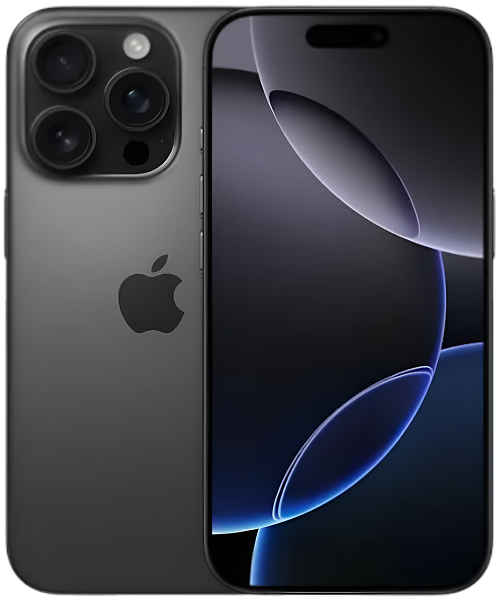
Released in the fall of 2024, the iPhone 16 Pro represents the pinnacle of Apple's mobile technology for the year, making it a substantial financial investment for its owners. Aimed at creative professionals, tech enthusiasts, and users who demand the absolute best, the device was celebrated for its advanced A18 Pro chip, which delivered desktop-class performance, and its revolutionary new camera system with enhanced optical zoom capabilities. Its titanium frame and ProMotion display underscore its status as a premium device built to perform and last.
The Universal Challenges of Modern Electronic Devices
Even the most premium devices are subject to wear and tear. Understanding these universal truths is the first step in making a smart financial decision about your technology.
- Screen & Display Fragility: The ProMotion display on your iPhone 16 Pro is one of its most expensive components. While its Ceramic Shield front is incredibly durable, a drop at the wrong angle can still lead to a costly crack. Protecting this component is key to preserving your device's resale value.
- Battery Degradation: Think of your battery as a consumable part with a finite number of charge cycles. As it ages, its ability to hold a charge diminishes. A phone with a weak battery is not only frustrating to use but also has a significantly lower trade-in or resale value.
- Port and Connection Wear: The USB-C port is essential for charging and data transfer. Damage to this single component can render an otherwise perfectly functional, high-value device useless, making a targeted repair an incredibly high-value proposition.
- Software Complexity: A complex software bug can slow down your device, making you think it's time for an expensive upgrade. Often, however, the underlying hardware is perfectly fine, and a professional diagnostic can save you from an unnecessary purchase.
So, knowing that every device has its vulnerabilities, let's look at the most cost-effective solutions for your iPhone 16 Pro.
An In-Depth Look at Common iPhone 16 Pro Problems
Here are the issues that can impact your device's value and performance, and the smart financial reasons to consider a professional repair.
1. Cracked Screen and Display Damage
- Symptoms: You have visible cracks, "spiderwebs," or chips on the front glass. You might also see unresponsive touch areas, colored lines, or black spots on the OLED display underneath, which can make the device difficult or impossible to use.
- Potential Causes: The number one cause is an accidental drop. Even with a case, an impact directly on the screen or on a corner can transfer enough force to fracture the Ceramic Shield.
- In-Depth Fixes to Try: For a physically broken screen, there are no DIY software fixes. Your only options are to live with the damage (which can get worse over time), attempt a risky DIY replacement, or get a professional repair. A high-quality screen protector is the best preventative measure to avoid this costly situation.
2. Premature Battery Degradation and Performance
- Symptoms: Your iPhone 16 Pro no longer lasts a full day on a single charge. It may shut down unexpectedly, or you might notice that the interface feels sluggish and apps take longer to open, as iOS automatically throttles performance to manage a weak battery.
- Potential Causes: All batteries age chemically, but this process can be accelerated by heat, frequent fast charging, and consistently draining the battery to zero. For a device as powerful as the iPhone 16 Pro, a healthy battery is essential for peak performance.
- In-Depth Fixes to Try:
- Check Battery Health: Go to Settings > Battery > Battery Health & Charging. If the Maximum Capacity is below 85%, you will likely feel a significant impact on your daily use.
- Enable Optimized Charging: This setting reduces the time your battery spends at a full 100% charge, which helps slow down the aging process.
- Audit Your Apps: Use the battery menu to see if a specific app is consuming a disproportionate amount of power.
- One key detail our experts have noted is that a battery replacement is the single most cost-effective way to make an old phone feel new again. For a small fraction of the price of a new iPhone, you can restore your device's performance and all-day battery life, extending the life of your initial investment for another year or two. When faced with this issue, a professional iPhone 16 Pro repair is the smartest financial move.
3. Overheating and Its Impact on Long-Term Value
- Symptoms: The phone's titanium frame becomes uncomfortably hot, especially during gaming, 4K video recording, or while using GPS in the car. The screen may dim, and performance can become choppy.
- Potential Causes: Overheating is often a software issue where an app causes the A18 Pro chip to run at maximum capacity for too long. However, persistent heat can also indicate a more serious hardware issue, like a problem with the logic board.
- In-Depth Fixes to Try:
- Update Your Software: Ensure both iOS and your apps are fully updated, as these updates often contain important thermal management improvements.
- Remove the Case: If the phone gets hot during charging or heavy use, temporarily removing the case can help it dissipate heat more effectively.
- Reset All Settings: This can resolve underlying software conflicts that may be causing the processor to overwork itself.
- A common misconception is that overheating is just a temporary annoyance. Our technicians know that chronic overheating is the number one killer of battery health. By addressing the root cause of the heat, whether through a software fix or a professional diagnostic, you are actively protecting the long-term value of your battery and other internal components.
4. Camera System Malfunctions
- Symptoms: The camera app freezes, the viewfinder is black, or the advanced optical zoom mechanism fails to focus correctly, resulting in blurry photos. You might also notice dust or spots inside the lens.
- Potential Causes: The sophisticated multi-lens camera system is delicate. A drop can damage the sensitive optical image stabilization (OIS) motors or misalign the lenses, even if there's no visible external damage.
- In-Depth Fixes to Try: First, try a simple hard reset of the phone. Then, make sure the camera lens is completely clean. If the problem persists across different apps (like Instagram and the native Camera app), it is a hardware failure. If a simple fix doesn't work, a full iPhone 16 Pro repair for the camera is a far more economical choice than replacing a device that costs well over a thousand dollars.
- One key detail our experts have noted is the importance of a properly functioning camera for a Pro-level device's resale value. A phone with a faulty camera is extremely difficult to sell. A professional camera repair not only restores your ability to take amazing photos but also preserves a huge portion of your device's value on the secondary market.
Our iPhone 16 Pro repair Process: What to Expect at The Fix
We believe that a smart repair should be a transparent and affordable process. We focus on providing value and clarity at every step.
- The Free, No-Pressure Diagnosis: Bring your device in for a comprehensive diagnostic at no cost. We'll identify the precise issue and determine the most cost-effective solution.
- Clear Options and Upfront Pricing: We’ll explain the problem and provide a clear, upfront quote for the repair. We'll often compare this cost to the price of a new device, so you can see the significant savings for yourself. There are no surprises.
- The Expert Repair: Our skilled technicians will perform the repair using high-quality parts, focusing on restoring your device to its full potential and extending the life of your investment.
- Post-Repair Testing: We rigorously test every function of your iPhone 16 Pro after the repair to ensure it's working perfectly, so you can leave confident that you've made a smart financial decision.
A Proactive Guide to Keeping Your iPhone 16 Pro in Peak Condition
The cheapest repair is the one you never have to make. Protecting your investment from day one is the smartest financial strategy. A durable case and a high-quality screen protector are not expenses; they are insurance policies against the most common and costly repairs. Similarly, practicing good battery habits—like avoiding extreme heat—costs nothing but can add years to your device's lifespan, pushing back the need for a replacement and saving you hundreds, if not thousands, of dollars in the long run. Thinking about preventative care can help you avoid a costly iPhone 16 Pro repair.
Conclusion
Your iPhone 16 Pro is a significant investment, and when it's not working correctly, it's natural to worry about the cost. However, a brand-new device isn't your only option. In many cases, a professional repair is a far more cost-effective and intelligent solution that restores the performance you paid for and extends the life of your device.
If you're facing an issue and want to explore the most valuable solution, we're here to help. Contact the experts at The Fix today for a transparent and affordable iPhone 16 Pro repair that protects your wallet and your investment.


Trusted repair solution for mobile phones, tablets, gaming consoles, and computer systems. We provide fast, reliable, and affordable repair services to get your devices back in perfect working condition.
The Fix is an independent repair service provider and is not affiliated with, sponsored by, or endorsed by Apple Inc., Samsung Electronics, Google LLC, or any other device manufacturer. We use high-quality compatible replacement parts unless explicitly stated. All trademarks are property of their respective owners.


© Copyright The Fix Solutions All rights reserved 2026.
Design by Deepcoder